To Do List
What is this form?
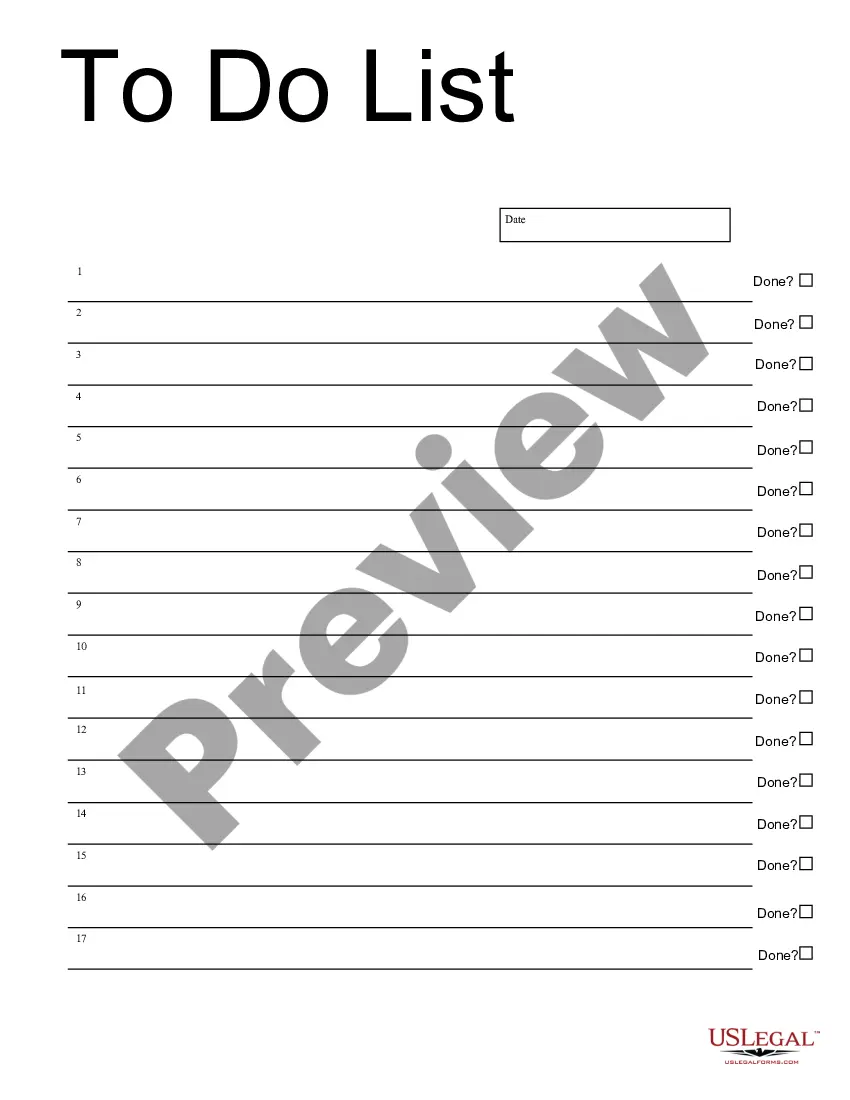
The To Do List form is a practical business document designed to help you organize tasks efficiently. Unlike other organizational tools, this form is specifically formatted to be completed easily in Adobe Acrobat or Word, making it accessible for users of all skill levels. Its structured layout allows individuals and teams to track what has been accomplished, ensuring better time management and productivity.
What’s included in this form
- Sections for listing tasks and activities.
- Designated fields for marking completed tasks.
- Space for deadlines and priority levels.
- Organizational tools for easy reference and updates.

When to use this document
This To Do List can be used in various situations, including managing daily tasks at the office, planning personal projects, or organizing events. Whether you need to keep track of ongoing responsibilities or set priorities for a team, this form serves as a helpful guide for ensuring that nothing is overlooked.
Who can use this document
- Business professionals seeking to enhance their productivity.
- Team leaders coordinating projects and deadlines.
- Individuals managing personal tasks or goals.
- Students organizing academic assignments and activities.
How to prepare this document
- Open the form in Adobe Acrobat or Word.
- Enter each task you need to complete in the designated sections.
- Mark tasks as completed in the provided fields.
- Add deadlines next to each task if applicable.
- Review your list regularly to update and manage priorities.
Is notarization required?
In most cases, this form does not require notarization. However, some jurisdictions or signing circumstances might. US Legal Forms offers online notarization powered by Notarize, accessible 24/7 for a quick, remote process.
Get your form ready online
Our built-in tools help you complete, sign, share, and store your documents in one place.
Make edits, fill in missing information, and update formatting in US Legal Forms—just like you would in MS Word.
Download a copy, print it, send it by email, or mail it via USPS—whatever works best for your next step.
Sign and collect signatures with our SignNow integration. Send to multiple recipients, set reminders, and more. Go Premium to unlock E-Sign.
If this form requires notarization, complete it online through a secure video call—no need to meet a notary in person or wait for an appointment.
We protect your documents and personal data by following strict security and privacy standards.

Make edits, fill in missing information, and update formatting in US Legal Forms—just like you would in MS Word.

Download a copy, print it, send it by email, or mail it via USPS—whatever works best for your next step.

Sign and collect signatures with our SignNow integration. Send to multiple recipients, set reminders, and more. Go Premium to unlock E-Sign.

If this form requires notarization, complete it online through a secure video call—no need to meet a notary in person or wait for an appointment.

We protect your documents and personal data by following strict security and privacy standards.
Common mistakes
- Failing to update the list regularly.
- Listing tasks that are too vague or unclear.
- Not prioritizing tasks, leading to overwhelmed feelings.
- Neglecting to check off completed items, which can cause confusion.
Why complete this form online
- Easy to download and access from any device.
- Editable fields allow for quick updates and modifications.
- Structured format helps maintain clarity and organization.
- Save time with a digital format compared to handwritten notes.
Legal use & context
- This form is a non-legal document intended for personal use.
- It does not require formal execution or witness verification.
- Maintain this document for personal and professional organization, with no legal enforceability attached.
Summary of main points
- The To Do List form is a valuable tool for organizing tasks effectively.
- It is suitable for a variety of users, from professionals to students.
- Regular updates to the list enhance productivity and clarity.
- This form can be utilized without state-specific modifications.
Looking for another form?
Form popularity
FAQ
Step 1: open Excel and add column headers. Open a new Excel spreadsheet and enter new column headers. Step 2: fill in task details. Step 3: apply a filter to your list. Step 4: sort your tasks using the filter. Step 5: done!
The few dictionaries that recognize the "task" meaning generally consider both to-do and todo as proper. Though as others have noted here, to-do is vastly preferred by formal publications; only in the programming world and some informal contexts does todo seem to be more common.
Pick a medium. To-do lists come in all shapes and sizes, so it's all about what works for the individual. Make multiples. Why have one list when you can have2026 Keep it simple. Meet the MITs. Start easy. Break it down. Stay specific. Include it all.
No, todo is not in the scrabble dictionary.
If your list item is a complete sentence, capitalize the first letter. If your list item isn't a complete sentence, you can choose whether or not to capitalize the first letterit's a style choice. The only thing that is important is to be consistent.
Choose the Right App (or Paper) Make More Than One List. Jot Down Tasks as Quickly as Possible. Assign Due Dates. Revise Your To-Do Lists Daily. Limit Yourself to 3-5 Tasks Daily. Put Tasks on Your To-Do List, Not Goals. Keep Goals and Objectives Separate.
Wiktionary. to-do list(Noun) A list of errands and other tasks often written on a piece of paper as a memory aid that one needs or intends to accomplish.
A Task is.. a task. It's an Outlook item that is stored in a Tasks Folder. A To-Do is any Outlook item that is flagged for follow-up, usually flagged email, as well as all of the tasks in the Task folders in the profile.
Choose the Right App (or Paper) Make More Than One List. Jot Down Tasks as Quickly as Possible. Assign Due Dates. Revise Your To-Do Lists Daily. Limit Yourself to 3-5 Tasks Daily. Put Tasks on Your To-Do List, Not Goals. Keep Goals and Objectives Separate.