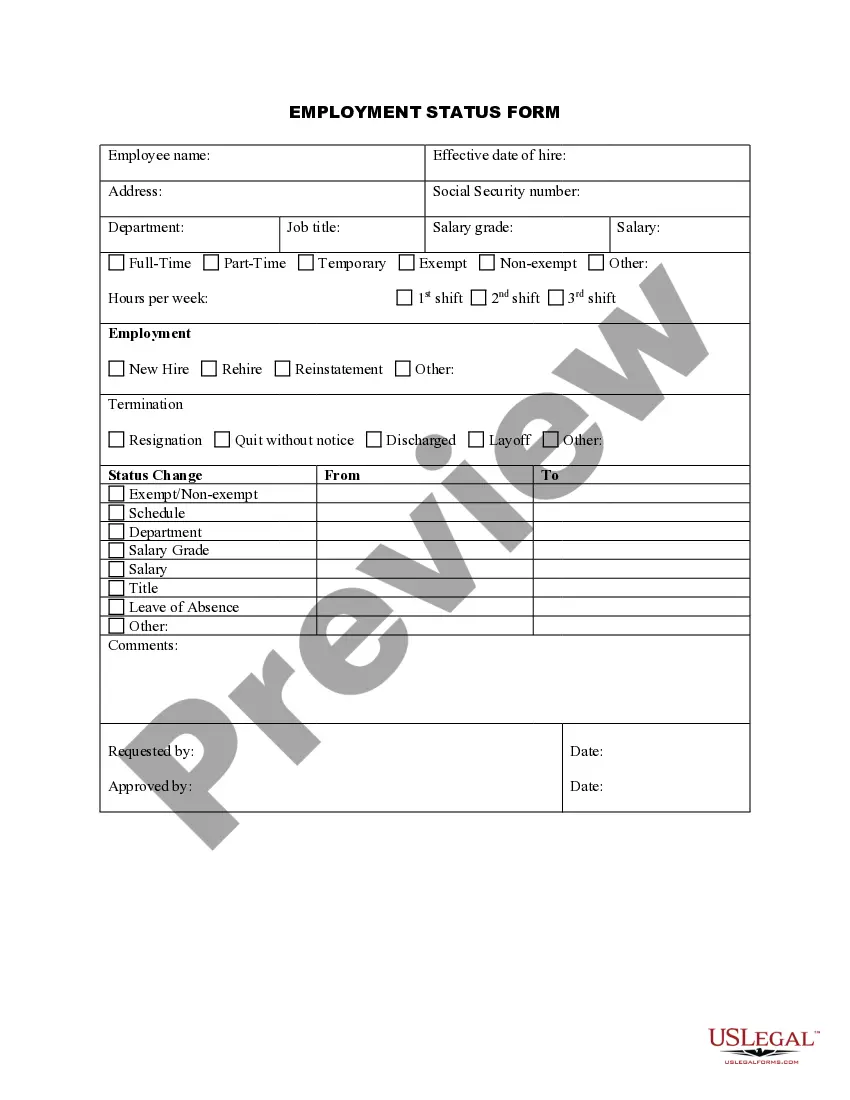
Employment Status Form
About this form
The Employment Status Form is a crucial document used to record and document an employee's employment status, along with any changes to that status. It is designed for employers to maintain accurate records and ensure compliance with employment regulations. This form differs from other employment forms as it specifically tracks the status of an employee rather than performance or personal information.
What’s included in this form
- Employee name: A field to input the name of the employee.
- Effective date of hire: When the employee officially started employment.
- Address: The employee's mailing address.
- Social Security number: A mandatory field for identification purposes.
- Job title: The official title of the employee's position.
- Employment type: Options to select such as Full-Time, Part-Time, Temporary, or Exempt/Non-exempt.
- Hours per week: The expected work hours for the employee.
- Termination reason: Explanation for any changes to the employee's status, including resignation or discharge.



When this form is needed
This form should be used whenever there is a change in an employee's status, whether they are being hired, re-hired, or if changes occur in employment such as a layoff or termination. It is essential for businesses managing a workforce to utilize this form to ensure proper record-keeping and compliance with employment laws.
Intended users of this form
- Employers looking to document and track employee statuses in compliance with labor regulations.
- HR professionals responsible for maintaining accurate employment records.
- Business owners managing a small team or workforce.
- Payroll departments needing to update employment statuses for payroll processes.
How to prepare this document
- Identify the employee's name and contact information.
- Specify the effective date of hire.
- Enter the employee's Social Security number for identification.
- Select the job title and employment type from the provided options.
- Document hours per week expected of the employee.
- Provide any relevant details regarding termination or changes in employment status.
Notarization requirements for this form
This form does not typically require notarization to be legally valid. However, some jurisdictions or document types may still require it. US Legal Forms provides secure online notarization powered by Notarize, available 24/7 for added convenience.
Get your form ready online
Our built-in tools help you complete, sign, share, and store your documents in one place.
Make edits, fill in missing information, and update formatting in US Legal Forms—just like you would in MS Word.
Download a copy, print it, send it by email, or mail it via USPS—whatever works best for your next step.
Sign and collect signatures with our SignNow integration. Send to multiple recipients, set reminders, and more. Go Premium to unlock E-Sign.
If this form requires notarization, complete it online through a secure video call—no need to meet a notary in person or wait for an appointment.
We protect your documents and personal data by following strict security and privacy standards.

Make edits, fill in missing information, and update formatting in US Legal Forms—just like you would in MS Word.

Download a copy, print it, send it by email, or mail it via USPS—whatever works best for your next step.

Sign and collect signatures with our SignNow integration. Send to multiple recipients, set reminders, and more. Go Premium to unlock E-Sign.

If this form requires notarization, complete it online through a secure video call—no need to meet a notary in person or wait for an appointment.

We protect your documents and personal data by following strict security and privacy standards.
Common mistakes to avoid
- Failing to update the form promptly when an employee's status changes.
- Leaving out critical information such as Social Security number or effective date of hire.
- Using outdated versions of the form that do not comply with current regulations.
Benefits of using this form online
- Convenient access anytime and anywhere to keep employee records updated.
- Editability allows for quick modifications when employee statuses change.
- Reliability with forms drafted by licensed attorneys to ensure legal compliance.
Legal use & context
- This form is legally recognized for maintaining clear employment records.
- Utilizing this form aids businesses in demonstrating compliance with labor laws.
- Employers can use this documentation to defend against potential employment disputes.
Summary of main points
- The Employment Status Form is essential for documenting changes in employee status.
- Employers must ensure the form is accurately completed and kept up to date.
- Using this form online provides convenience and legal reliability.
Looking for another form?
Form popularity
FAQ
It takes about two months to get approved in the program. Employers who are approved receive a guarantee that the IRS will not audit their past payroll activities. And they only have to pay 10% of the payroll taxes they would have paid for the previous year, without any penalties.
Use Form 8919 to figure and report your share of the uncollected social security and Medicare taxes due on your compensation if you were an employee but were treated as an independent contractor by your employer. By filing this form, your social security earnings will be credited to your social security record.
The general rule is that an individual is an independent contractor if the payer has the right to control or direct only the result of the work, not what will be done and how it will be done.Whether a worker is an independent contractor or employee depends on the facts in each situation.
In general, U.S. organizations use employment status to refer to the type of implied or written contract between the employer and employee, e.g., full-time employment, part-time employment, temporary or contract employment, or an internship or apprenticeship.
Firms and workers file Form SS-8 to request a determination of the status of a worker for purposes of federal employment taxes and income tax withholding.
SF-8 Unemployment Compensation_0.pdf. This form has been given to you because (1) you have been separated from your job, or (2) you were placed in a nonpay status, or (3) your records have been transferred to a different payroll office.
Your 'employment status' is your legal status at work. It can be determined by: the type of employment contract you have. the way you get paid.
Level of control How much say does the employer have over the individual? Mutuality of obligations Is there a duty to offer work and for the individual to carry it out? Personal service Can someone else step in if they can't do the work?
There are three types of employment status: employee, worker and self-employed.