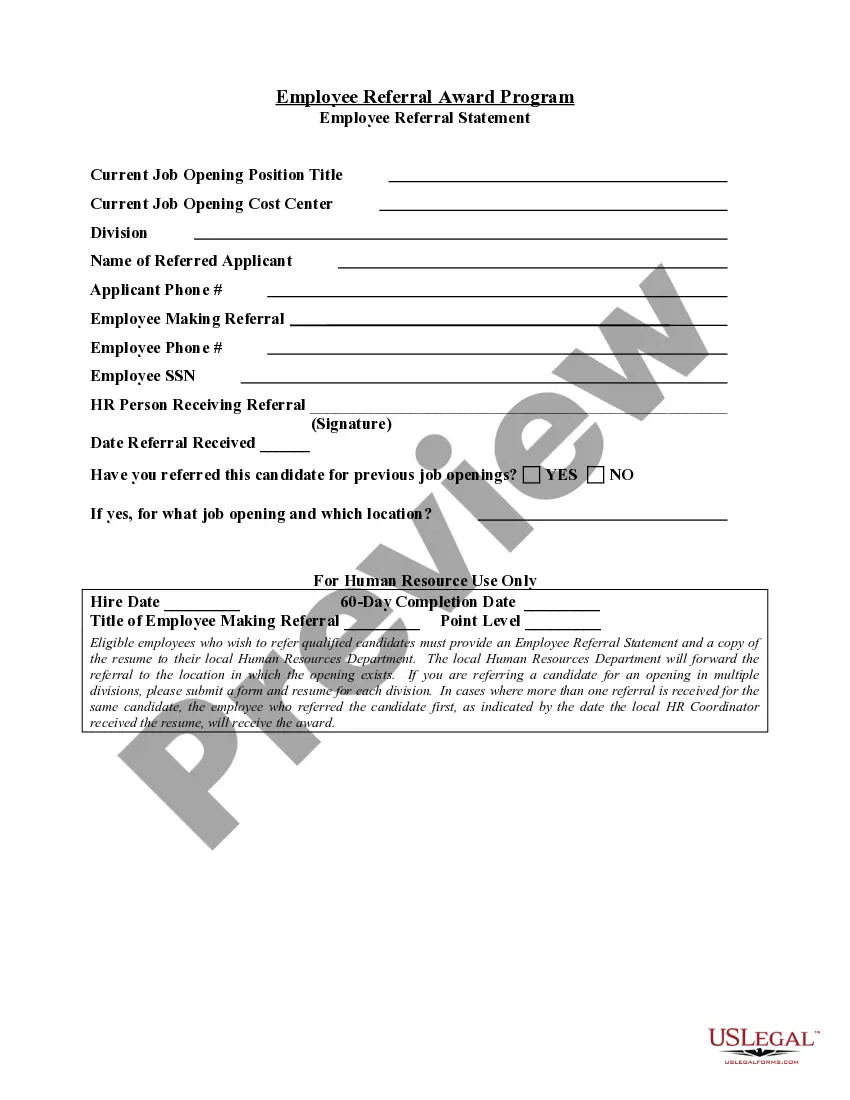
Employee Referral Statement
Understanding this form
The Employee Referral Statement is a document used by employees to formally recommend potential candidates for job openings within their organization. This form enables the human resources department to collect and review referrals effectively, distinguishing it from informal recommendations and ensuring a clear process for consideration of new hires.
What’s included in this form
- Title of employee making the referral
- Point level assigned to the referral


When to use this form
You should use the Employee Referral Statement when you know someone who is qualified for a position at your workplace and you want to recommend them officially. It is commonly used when a company has referral programs in place, offering incentives for employees whose referrals lead to successful hires.
Intended users of this form
- Current employees of the organization
- Individuals with knowledge of job openings within the company
How to complete this form
- Enter your name as the employee making the referral.
- Specify the point level corresponding to the referral as per company guidelines.
Is notarization required?
This form usually doesn’t need to be notarized. However, local laws or specific transactions may require it. Our online notarization service, powered by Notarize, lets you complete it remotely through a secure video session, available 24/7.
Get your form ready online
Our built-in tools help you complete, sign, share, and store your documents in one place.
Make edits, fill in missing information, and update formatting in US Legal Forms—just like you would in MS Word.
Download a copy, print it, send it by email, or mail it via USPS—whatever works best for your next step.
Sign and collect signatures with our SignNow integration. Send to multiple recipients, set reminders, and more. Go Premium to unlock E-Sign.
If this form requires notarization, complete it online through a secure video call—no need to meet a notary in person or wait for an appointment.
We protect your documents and personal data by following strict security and privacy standards.

Make edits, fill in missing information, and update formatting in US Legal Forms—just like you would in MS Word.

Download a copy, print it, send it by email, or mail it via USPS—whatever works best for your next step.

Sign and collect signatures with our SignNow integration. Send to multiple recipients, set reminders, and more. Go Premium to unlock E-Sign.

If this form requires notarization, complete it online through a secure video call—no need to meet a notary in person or wait for an appointment.

We protect your documents and personal data by following strict security and privacy standards.
Avoid these common issues
- Not providing accurate information about the candidate.
- Submitting the form without understanding the point level system.
- Failing to follow up after submitting the referral.
Advantages of online completion
- Convenient access to forms at any time.
- Editability allows for easy corrections before submission.
- Reliable templates ensure compliance with legal standards.
Main things to remember
- The Employee Referral Statement is essential for formalizing job candidate recommendations.
- It helps streamline the referral process for human resources.
- Accurate completion is crucial to maximize the benefits of employee referral programs.
Looking for another form?
Form popularity
FAQ
Start by explaining your relationship to the candidate. Include long you've known the candidate. Add positive personal qualities with specific examples. Close with a statement of recommendation. Offer your contact information.
What qualifies as a successful referral (e.g. referred candidate is hired or stays in the company for X months) What the rewards are for each successful referral. What limitations apply, like excluding past candidates.
Create a strong subject line. Format the email as a business letter. Emphasize your mutual acquaintance. Get straight to the point. Be concise. Be sure to attach your Resume. Thank the reader.
Write a referral letter Include these key details about the person you're referring: How well you know them. Length of time you've known them. Key skills and traits they have that align with company values.
Your subject should be something informative like, "Referral from Robert Smith - interested in Executive Assistant position". In the body of the e-mail, re-iterate who referred you and how you know them. If you're just given the hiring manager's phone number, ask your contact if there is a good time of day to call.
Include both addresses. At the top of the letter of referral, include your address, contact information, the date and address of the recipient. Write a brief introduction. Give an overview of the applicant's strengths. Share a story of the applicant. Add a closing statement. Leave a signature.
Always start with the date. State who you are recommending and what you are recommending them for. Describe how long you know the person and in what capacity. State their best qualities. Give details about the person's character, morals, and values.
Communicate constantly and enthusiastically about how your referral process is structured, highlight any monetary rewards included, and offer resources for employees to improve their chances of earning a referral bonus. Provide sample social media posts, company culture talking points, and new job openings.
First-hand knowledge of your work experience and qualifications. Do ask for the recommendation in person, rather than sending an email. Do tell the letter writer why you need the reference letter. Do mention specific experience, qualifications, and skills that you would like included in the letter.