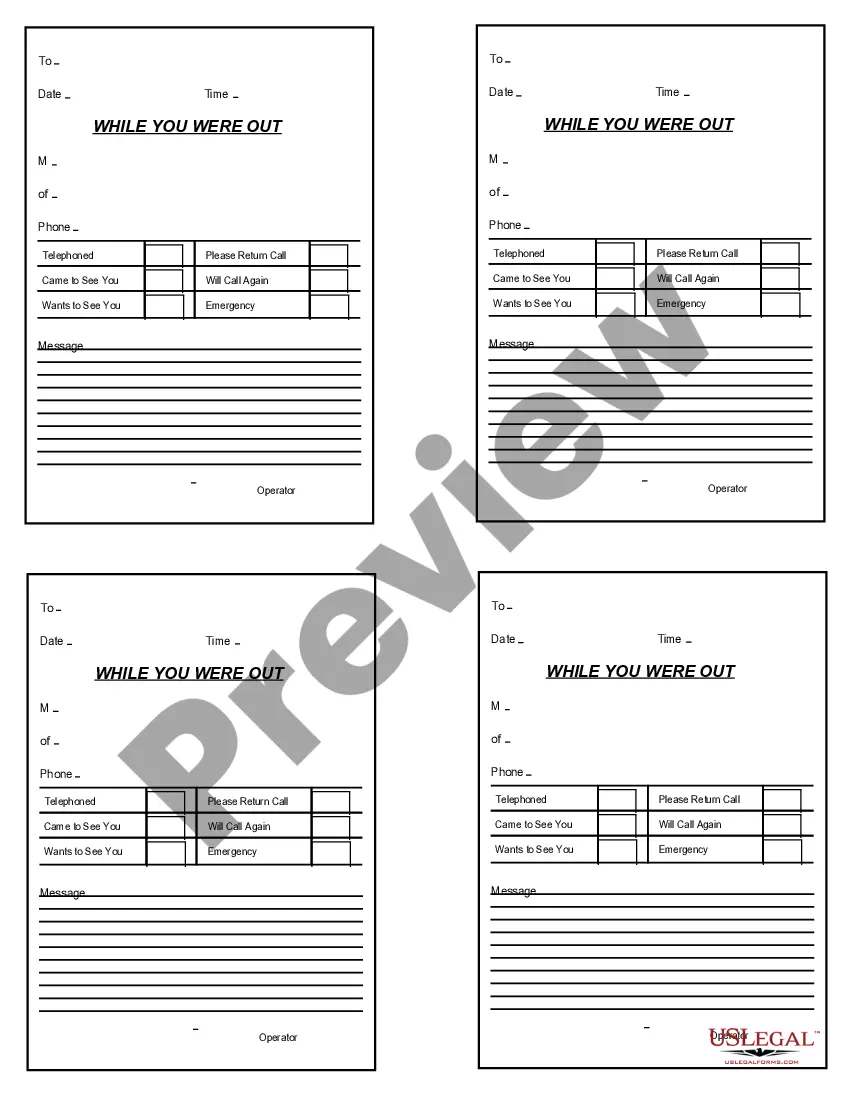
While You Were Out
What is this form?
The While You Were Out form is a business communication tool designed to document important messages or calls received in your absence. Unlike other simple note forms, this form is specifically formatted for ease of use in applications like Adobe Acrobat or Word, allowing users to fill in details directly into designated fields. This streamlined approach ensures that no important message is overlooked when you are out of the office.
Key components of this form
- Fields to record the name and contact information of the caller.
- Sections for specific messages or notes, including urgency indicators.
- Designated areas to specify the date and time of the call.
- Space to indicate follow-up actions required.

Situations where this form applies
This form is useful in any business context where communication is key. Use it when you receive phone calls or messages during your absence. It helps ensure that you can respond promptly to clients or colleagues, thereby improving overall business efficiency.
Who should use this form
The Following individuals or businesses should consider using this form:
- Office staff who manage calls and messages.
- Small business owners who frequently step away from their desks.
- Receptionists in customer-facing roles.
- Anyone who needs to document messages when unavailable.
Steps to complete this form
- Identify the caller and enter their name and phone number in the appropriate fields.
- Record the date and time of the message or call.
- Write down the message clearly, noting any urgency.
- Specify if the caller wishes to be contacted again.
- Ensure to complete any follow-up action indicated in the message.
Does this document require notarization?
Notarization is generally not required for this form. However, certain states or situations might demand it. You can complete notarization online through US Legal Forms, powered by Notarize, using a verified video call available anytime.
Get your form ready online
Our built-in tools help you complete, sign, share, and store your documents in one place.
Make edits, fill in missing information, and update formatting in US Legal Forms—just like you would in MS Word.
Download a copy, print it, send it by email, or mail it via USPS—whatever works best for your next step.
Sign and collect signatures with our SignNow integration. Send to multiple recipients, set reminders, and more. Go Premium to unlock E-Sign.
If this form requires notarization, complete it online through a secure video call—no need to meet a notary in person or wait for an appointment.
We protect your documents and personal data by following strict security and privacy standards.

Make edits, fill in missing information, and update formatting in US Legal Forms—just like you would in MS Word.

Download a copy, print it, send it by email, or mail it via USPS—whatever works best for your next step.

Sign and collect signatures with our SignNow integration. Send to multiple recipients, set reminders, and more. Go Premium to unlock E-Sign.

If this form requires notarization, complete it online through a secure video call—no need to meet a notary in person or wait for an appointment.

We protect your documents and personal data by following strict security and privacy standards.
Common mistakes to avoid
- Failing to include the date and time of the call.
- Not detailing urgent messages properly.
- Misplacing the form, leading to lost information.
Advantages of online completion
- Convenient access to templates for easy filling.
- Editability allows you to customize information efficiently.
- Reliable formatting ensures clarity and professionalism.
Quick recap
- The While You Were Out form helps track important messages during your absence.
- It is suitable for various business roles and enhances communication efficiency.
- Digital formatting makes it easy to complete and customize.
Looking for another form?


Form popularity
FAQ
The definition of personal is about you, related to you or affecting you, as opposed to the outside world or to anyone else. An example of personal information is your name, address, phone number and social security number.
1 : of, relating to, or affecting a particular person : private, individual personal ambition personal financial gain. 2a : done in person without the intervention of another also : proceeding from a single person. b : carried on between individuals directly a personal interview. 3 : relating to the person or body.
(Entry 1 of 2) 1 : of, relating to, or affecting a particular person : private, individual personal ambition personal financial gain. 2a : done in person without the intervention of another also : proceeding from a single person. b : carried on between individuals directly a personal interview.
Adjective. of, relating to, or coming as from a particular person; individual; private: a personal opinion. relating to, directed to, or intended for a particular person: a personal favor; one's personal life; a letter marked Personal.
Idiomatic, individual, individualized, particular, patented, peculiar, personalized, private,