Employment Position Announcement
What this document covers
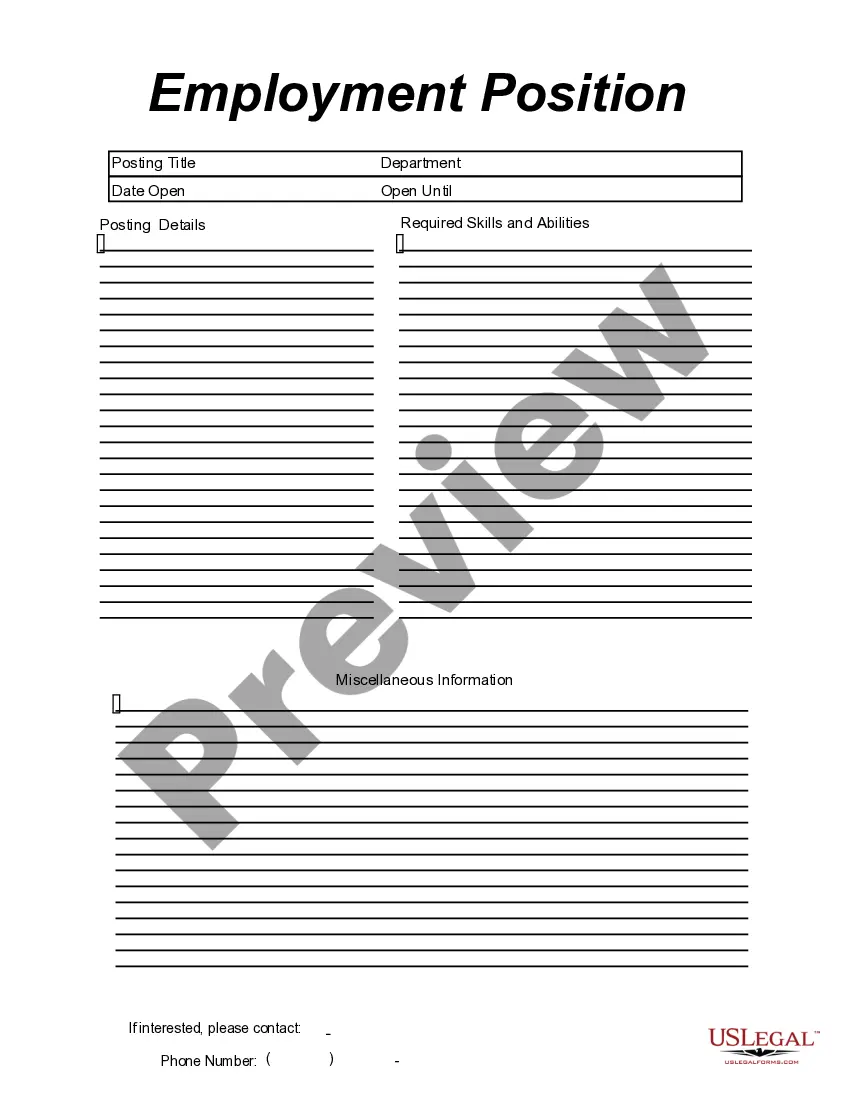
The Employment Position Announcement form is a template designed for businesses to effectively announce job openings. Unlike generic job postings, this form provides a structured format that includes essential details such as the posting title, department, and required skills. This form streamlines the recruitment process by ensuring that all necessary information is clearly presented to potential candidates.
What’s included in this form
- Posting title: The specific name of the job position.
- Department: The department or division where the position exists.
- Date open: The date the job posting is made available to applicants.
- Open until: The deadline for applications.
- Posting details: A detailed description of the job responsibilities and expectations.
- Required skills and abilities: The qualifications and skills necessary for the position.
- Miscellaneous information: Any additional details or notes relevant to the posting.
- Contact information: Phone number for applicants to reach out for more information.

When to use this form
This form should be used whenever a business needs to formally announce a job opening. It is particularly useful during the recruitment process, ensuring that all relevant details are communicated clearly and consistently. Companies of all sizes can benefit from this form to attract the right candidates for their roles.
Intended users of this form
Intended audience:
- HR professionals seeking to create job announcements.
- Hiring managers looking to communicate job openings.
- Small business owners who need a standard format for job postings.
- Recruitment agencies assisting clients with job placements.
Steps to complete this form
Steps to complete this form:
- Identify the position being filled and enter the posting title.
- Specify the department related to the job.
- Fill in the date when the position opens for applications.
- Set a closing date for the job posting.
- Provide a detailed description of the job responsibilities.
- List the required skills and abilities for candidates.
- Include any miscellaneous information that may be relevant.
- Add the contact phone number for applicants to reach out.
Notarization guidance
This form does not typically require notarization unless specified by local law. Ensure to check your stateâs regulations for specific requirements related to employment documents.
Get your form ready online
Our built-in tools help you complete, sign, share, and store your documents in one place.
Make edits, fill in missing information, and update formatting in US Legal Forms—just like you would in MS Word.
Download a copy, print it, send it by email, or mail it via USPS—whatever works best for your next step.
Sign and collect signatures with our SignNow integration. Send to multiple recipients, set reminders, and more. Go Premium to unlock E-Sign.
If this form requires notarization, complete it online through a secure video call—no need to meet a notary in person or wait for an appointment.
We protect your documents and personal data by following strict security and privacy standards.

Make edits, fill in missing information, and update formatting in US Legal Forms—just like you would in MS Word.

Download a copy, print it, send it by email, or mail it via USPS—whatever works best for your next step.

Sign and collect signatures with our SignNow integration. Send to multiple recipients, set reminders, and more. Go Premium to unlock E-Sign.

If this form requires notarization, complete it online through a secure video call—no need to meet a notary in person or wait for an appointment.

We protect your documents and personal data by following strict security and privacy standards.
Common mistakes to avoid
Common mistakes to avoid:
- Omitting the closing date for applications.
- Providing vague job details or responsibilities.
- Failing to specify the required skills and abilities accurately.
- Using unclear formatting that makes the posting difficult to read.
Advantages of online completion
Benefits of using this form online:
- Convenience: Easily fill out the form from any device.
- Editability: Adjust information as needed before finalizing.
- Structured format: Ensures all necessary fields are covered.
- Time-saving: Streamlines the job posting process.
Main things to remember
- The Employment Position Announcement form is essential for structured job postings.
- Properly completing the form ensures clear communication of job details.
- Employers can use this form across multiple states with minimal adaptations.
- Avoid common mistakes to improve the effectiveness of your job announcements.
Looking for another form?
Form popularity
FAQ
Be direct and concise in your announcement. Write a short, friendly announcement that's to the point when you're sharing positive news. Recognize what others have achieved in your announcement, and motivate your reader to reach similar goals.
Present your information in a plain and complete way, so your reader will understand you the first time (and not ask questions later). If the news you are announcing is bad, write it in a direct statement. Add a message of understanding and optimism to your announcement, in a respectful tone.
When writing a promotion announcement, be sure to include a short summary of the employee's old and new roles, and to mention any pertinent accomplishments during their tenure with the company. You are, in effect, telling the story of the employee's history with your organization in order to justify their promotion.
Select your delivery method. Address the audience. Introduce the promoted employee. Explain the reason for the promotion. Detail the employee's new responsibilities. Congratulate the employee. End on a call to action.
Decide whether to make the announcement via email or office memo. Address your staff members. Introduce the promoted employee and note their previous position. Briefly describe the promoted employee's new role and responsibilities.
Make sure the posting is easy to read. Include a company overview. Provide an overview of the position in a brief paragraph. Summarize the personality characteristics of good candidates. List the position's responsibilities. List the position's job requirements.
Be straightforward and concise. Keep it short. Motivate others to achieve the same objectives. Use the letter for your advantage. Write to avoid questions later. Avoid nonsense.
Job Opening Announcement Letter - To Employees - Internal Company Name would like to announce a new vacant position in the capacity of job title, example: accountant in the department name, example: accounting. The candidate must have at least 5 years of experience with a Masters Degree.