Lien and Tax Search Checklist
Overview of this form
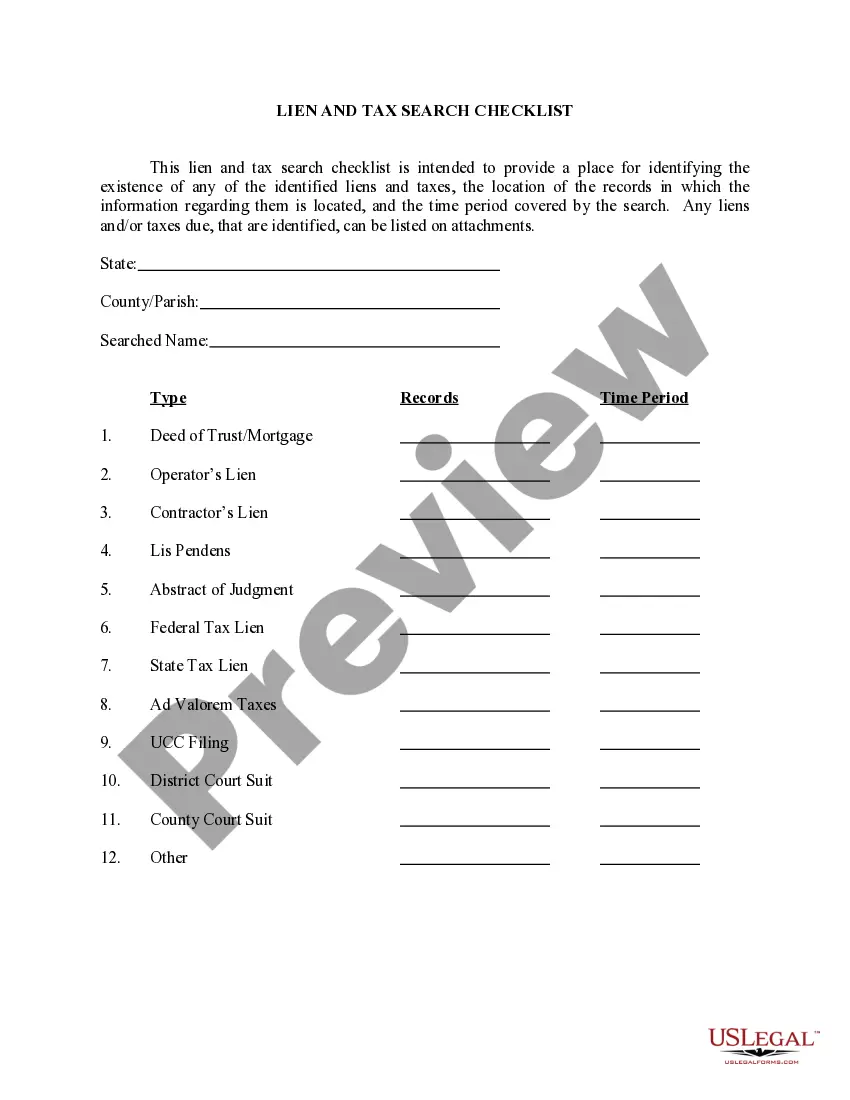
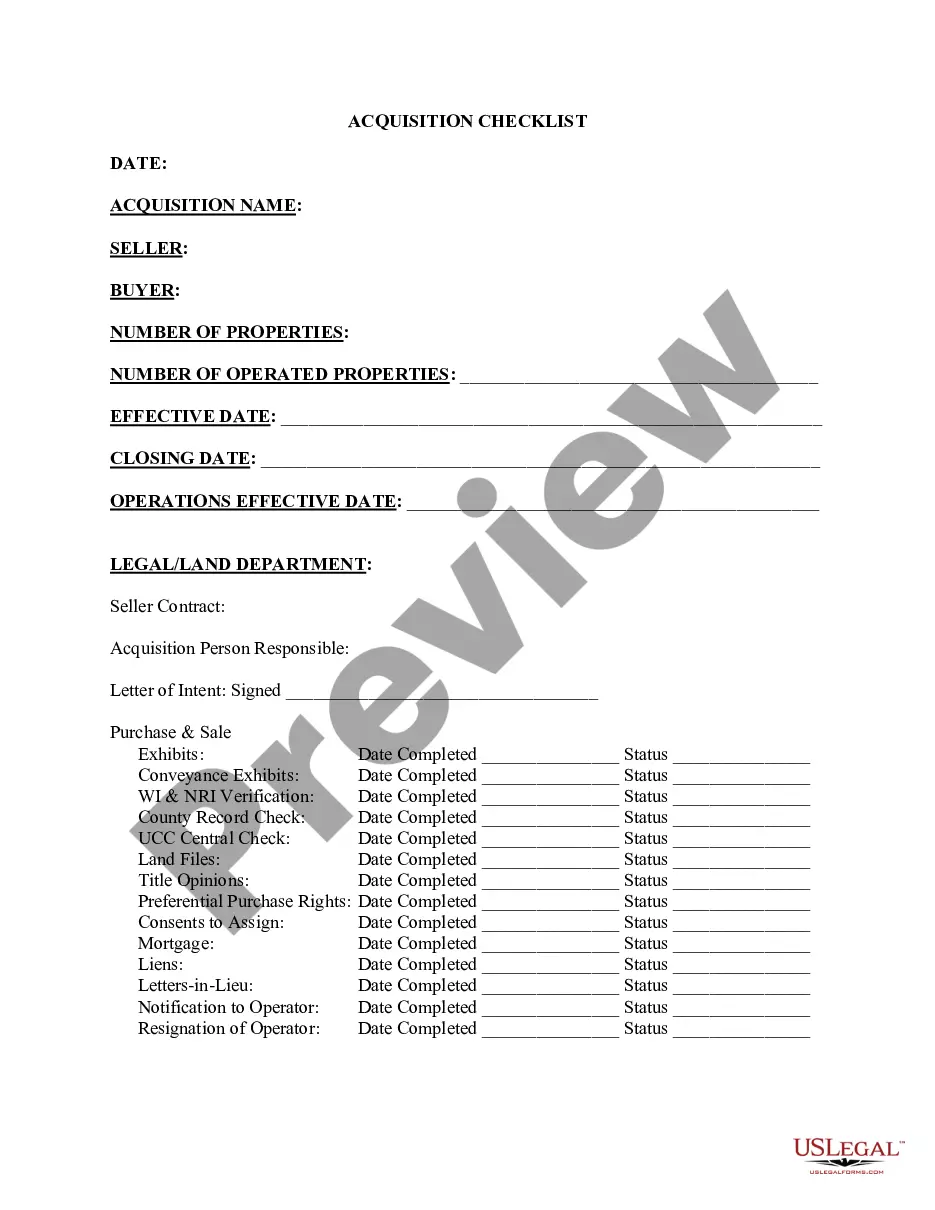
The Lien and Tax Search Checklist is a crucial tool for identifying any existing liens and taxes associated with a property. This checklist helps streamline the lien and tax search process by allowing users to catalog their findings, including the specific types of liens and the corresponding records that hold this information. Unlike other forms, this checklist provides a structured approach to document and assess potential financial encumbrances on a property, ensuring that all necessary information is collected efficiently.
Key components of this form
- State and County/Parish: Specify the jurisdiction of the property.
- Searched Name: Enter the name associated with the lien and tax search.
- Type of Lien or Tax: List different types, such as Federal Tax Lien, State Tax Lien, and Contractors Lien.
- Records: Indicate where the record information can be found.
- Time Period: Specify the duration covered by the search.
- Attachments: Include any additional information regarding identified liens or taxes.
When this form is needed
This checklist should be used when purchasing property, applying for a loan, or conducting due diligence on a real estate transaction. It is essential before closing a sale or refinancing, as it ensures that all potential tax liabilities or liens are disclosed and addressed. This form can also be helpful for prospective buyers wanting to assess the financial status of a property.
Who needs this form
- Property buyers looking to assess any liens or tax obligations before making a purchase.
- Real estate professionals assisting clients in property transactions.
- Lenders requiring a comprehensive search of liens and taxes before approving loans.
- Title companies conducting title searches to ensure clear property titles.
Instructions for completing this form
- Identify the state and county/parish where the property is located.
- Enter the name of the individual or entity associated with the property.
- List each type of lien or tax you seek information on, from the provided categories.
- Document where each record can be found for verification purposes.
- Specify the time period for which the search is being conducted.
- Include any additional information or notes as attachments if necessary.
Does this form need to be notarized?
This form does not typically require notarization unless specified by local law. It is advisable to check with your jurisdiction for any unique requirements that may affect the need for notarization in lien and tax search contexts.
Get your form ready online
Our built-in tools help you complete, sign, share, and store your documents in one place.
Make edits, fill in missing information, and update formatting in US Legal Forms—just like you would in MS Word.
Download a copy, print it, send it by email, or mail it via USPS—whatever works best for your next step.
Sign and collect signatures with our SignNow integration. Send to multiple recipients, set reminders, and more. Go Premium to unlock E-Sign.
If this form requires notarization, complete it online through a secure video call—no need to meet a notary in person or wait for an appointment.
We protect your documents and personal data by following strict security and privacy standards.

Make edits, fill in missing information, and update formatting in US Legal Forms—just like you would in MS Word.

Download a copy, print it, send it by email, or mail it via USPS—whatever works best for your next step.

Sign and collect signatures with our SignNow integration. Send to multiple recipients, set reminders, and more. Go Premium to unlock E-Sign.

If this form requires notarization, complete it online through a secure video call—no need to meet a notary in person or wait for an appointment.

We protect your documents and personal data by following strict security and privacy standards.
Common mistakes
- Neglecting to specify the correct jurisdiction, leading to incomplete searches.
- Failing to document all relevant liens or taxes found during the search.
- Ignoring to attach additional notes or explanations for complex situations.
- Overlooking the time period of the search, which could result in outdated information.
Why use this form online
- Convenient access from any device, allowing for easy updates and edits.
- Structured format helps ensure comprehensive searches are conducted accurately.
- Eliminates the need for extensive paperwork and in-person consultations.
- Designed by licensed attorneys, ensuring legal soundness and reliability.
Legal use & context
- This checklist assists in the legal verification of property status and potential obligations.
- Completing this form may support negotiation terms in property transactions.
- Helps to avoid legal disputes by ensuring all liens and taxes are accounted for prior to closing.
Quick recap
- The Lien and Tax Search Checklist helps identify outstanding financial claims against a property.
- It is vital for due diligence in real estate transactions.
- The form is easy to complete, guiding users in tracking necessary information.
Looking for another form?


Form popularity
FAQ
The IRS is a government agency, so it can work directly with local governments and even your creditors to place a lien on your property. It does this through a notice directly to those entities. To find out if there's a lien on your property, you can contact the IRS Centralized Lien Unit at (800) 913-6050.
If you have enough equity in your home to satisfy your federal tax bill, you may ask the IRS to discharge the lien and use your sales proceeds to pay off the IRS. A discharge removes the lien from the house so that it can transfer to the new owner, free of the lien.
Search the county recorder, clerk, or assessor's office website. All you need is the name of the owner and/or address to access the property records. Visit the recorder, assessor's, or county clerk's office in person. Contact a title company.
Is there a difference between a lien and a levy? Yes! When a tax lien is filed by the government, the property owner still owns the property, whereas in the case of a levy, a legal seizure of property is made to satisfy the tax debt.
A tax lien sale is a method many states use to force an owner to pay unpaid taxes.The highest bidder gets the lien against the property. The tax collector uses the money earned at the tax lien sale to compensate for unpaid back taxes. The homeowner has to pay back the lien holder, plus interest, or face foreclosure.
Purchasing a tax lien does not obligate you to pay any future property taxes that become delinquent or pay for other property liabilities.Unlike an investment in a tax lien, an investment in a tax deed requires that your adequately maintain the property until you are able to sell it.
How Can a Taxpayer Request a Federal Tax Lien Subordination? Apply for a certificate of subordination of federal tax lien by following the instructions in Publication 784. You will need to complete Form 14134. It is also a smart idea to watch this self-help IRS video.
A property-tax lien is a legal claim against a property for unpaid property taxes. A tax lien prohibits a property from being sold or refinanced until the taxes are paid and the lien is removed.
Subordination agreements are prepared by your lender. The process occurs internally if you only have one lender. When your mortgage and home equity line or loan have different lenders, both financial institutions work together to draft the necessary paperwork.