Expense Reimbursement Request
What is this form?
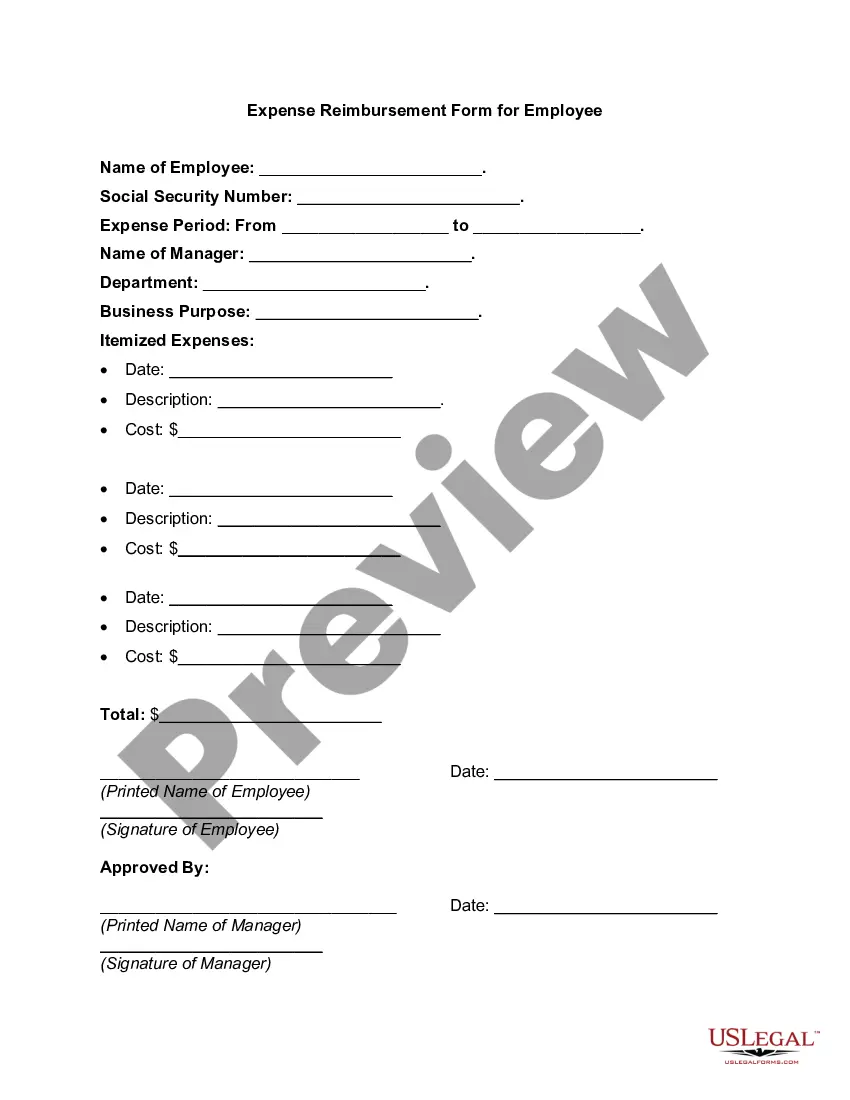
The Expense Reimbursement Request form is a document used by employees to claim reimbursement for work-related expenses they have incurred. It serves to outline the specifics of the expenses, including dates, amounts, and descriptions, ensuring a clear reimbursement process. This form is crucial for keeping financial records accurate and promoting transparency between employers and employees regarding expense management.
Key components of this form
- Employee information: space for the employee's name, department, and contact details.
- Expense details: categories for listing each expense, including the date, amount, and description.
- Attached documentation: fields for submitting supporting documents, such as receipts.
- Approval section: designated area for a supervisorâs or managerâs signature to authorize the reimbursement.
- Payment method: options for how the employee would like to receive the reimbursement.




Situations where this form applies
This form should be used when an employee incurs costs while performing their job duties that are eligible for reimbursement, such as travel expenses, supplies purchases, or meal costs incurred during business meetings. Using this form ensures that all claims are documented and submitted following company policies.
Who can use this document
Who should use this form:
- Employees submitting requests for reimbursement of business-related expenses.
- Managers or supervisors reviewing and approving expense claims.
- HR personnel managing expense reimbursement processes.
How to prepare this document
Steps to complete the Expense Reimbursement Request form:
- Fill in your personal and department information at the top of the form.
- List each expense on a separate line, including the date, amount, and specific purpose of the expense.
- Attach any relevant receipts or documentation that support your claim for reimbursement.
- Sign and date the form to confirm the accuracy of the reported expenses.
- Submit the completed form to your supervisor for approval.
Does this form need to be notarized?
This form does not typically require notarization unless specified by local law.
Get your form ready online
Our built-in tools help you complete, sign, share, and store your documents in one place.
Make edits, fill in missing information, and update formatting in US Legal Forms—just like you would in MS Word.
Download a copy, print it, send it by email, or mail it via USPS—whatever works best for your next step.
Sign and collect signatures with our SignNow integration. Send to multiple recipients, set reminders, and more. Go Premium to unlock E-Sign.
If this form requires notarization, complete it online through a secure video call—no need to meet a notary in person or wait for an appointment.
We protect your documents and personal data by following strict security and privacy standards.

Make edits, fill in missing information, and update formatting in US Legal Forms—just like you would in MS Word.

Download a copy, print it, send it by email, or mail it via USPS—whatever works best for your next step.

Sign and collect signatures with our SignNow integration. Send to multiple recipients, set reminders, and more. Go Premium to unlock E-Sign.

If this form requires notarization, complete it online through a secure video call—no need to meet a notary in person or wait for an appointment.

We protect your documents and personal data by following strict security and privacy standards.
Mistakes to watch out for
Common mistakes to avoid:
- Failing to attach receipts or documentation for claimed expenses.
- Missing signatures or dates on the form.
- Including non-reimbursable expenses in the request.
- Submitting the form late or not according to company policies.
Why use this form online
Benefits of using this form online:
- Convenience: complete the form from anywhere at any time.
- Editability: easily make changes or updates before submission.
- Secure storage: keep records of your submissions for future reference.
- Efficient processing: streamline reimbursement approvals through digital submission.
- Ensures clear communication between employees and employers regarding expense claims.
- Helps maintain accurate records for both tax and accounting purposes.
Main things to remember
Key takeaways:
- The Expense Reimbursement Request form is essential for employees seeking reimbursement for business-related expenses.
- Clear documentation and proper completion of the form help ensure timely approvals and payments.
- Understanding common mistakes can facilitate a smoother reimbursement process.
Looking for another form?

Form popularity
FAQ
Reimbursed expenses are payments made by a company to an employee who has made a claim for expenses incurred out of their own pocket for the business, through work-related activities.The reimbursement is made based on evidence, or receipts, provided in the expenses claim.
California Law Addresses Employee Business Expense Reimbursement. While not mandatory in every state, California employers are required to reimburse their employees for reasonable business expenses. This means employers must pay back employees who spend their own money for business-related expenses.
While requesting a reimbursement, your tone should be fair and courteous so that your reader won't doubt your honesty. State your reason for requesting the refund. Then request the reimbursement. Send the relevant receipts or documents and ask the reader to take a look at them.
Generally, an employee may seek reimbursement of a necessary business expense within three years of incurring the expense. However, to lessen the risk of belated claims, employers should identify a deadline to submit reimbursements (i.e. 30 days after incurring the cost) in the written reimbursement policy.
California law generally prohibits employers from requiring employees to bear the costs of business expenses.Additionally, under California Labor Code § 2804 an agreement to waive full reimbursement for expenses is not enforceable even if an employer requires the agreement as a term of employment.
At the state and local level, there are currently 10 jurisdictions that have statutes or case law specifically addressing an employer's requirement to reimburse business expenses: California, Iowa, Illinois, Massachusetts, Montana, New Hampshire, North Dakota, South Dakota, District of Columbia, and Seattle, Washington
There is no law that says employers have to offer mileage reimbursement. Many do because it's a smart way to attract and retain employees. Reimbursements made at the standard Internal Revenue Service rate are not considered income, so they are not subject to tax.
While requesting a reimbursement, your tone should be fair and courteous so that your reader won't doubt your honesty. State your reason for requesting the refund. Then request the reimbursement. Send the relevant receipts or documents and ask the reader to take a look at them.
Add personal information. Enter purchase details. Sign the form. Attach receipts. Submit to the management or accounting department.