Mileage Reimbursement Form
Understanding this form
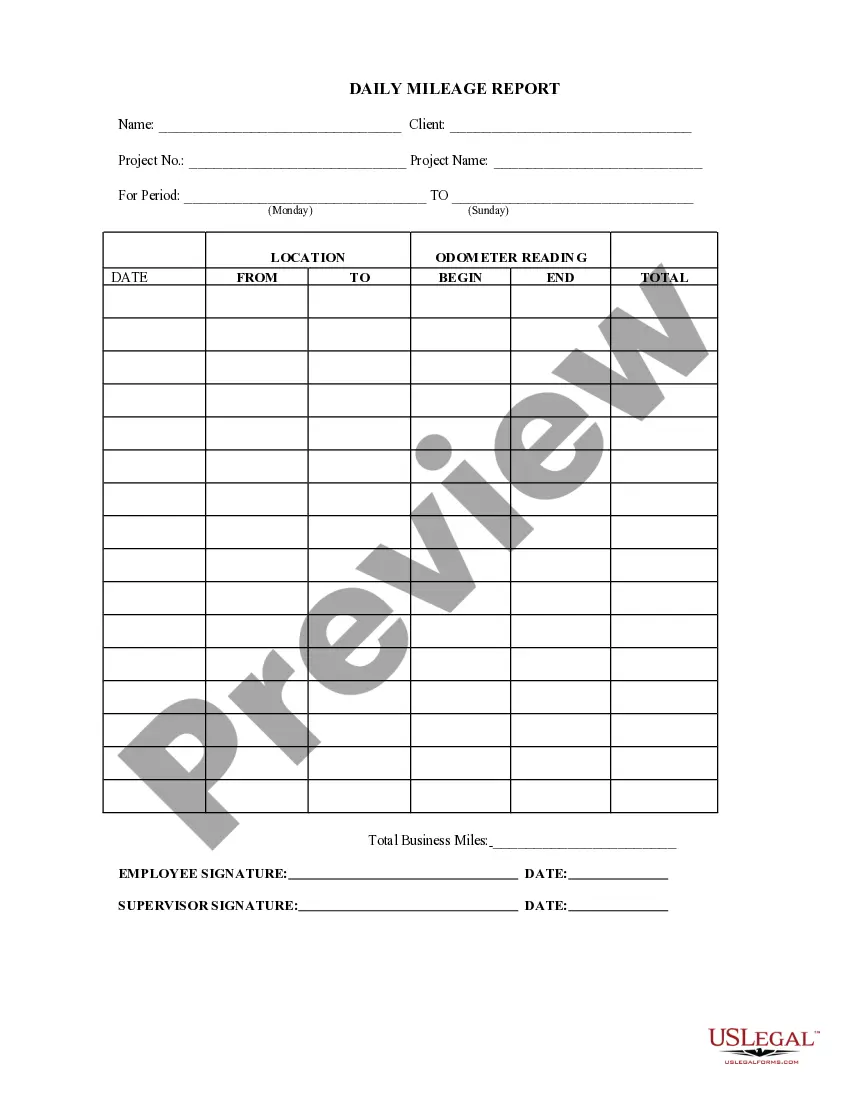
The Mileage Reimbursement Form is a document used by employers to reimburse employees for mileage incurred while performing job-related duties. This form helps ensure that employees are compensated fairly for their travel expenses, distinguishing it from general expense reimbursement forms by specifically addressing mileage costs and requirements for reporting and approval.
What’s included in this form
- Employee's name and contact information
- Date of travel and destination
- Odometer readings at the start and end of the trip
- Total miles driven for business purposes
- Employee's signature to verify accuracy



When to use this form
This form is used whenever an employee needs to report mileage traveled for work-related duties. This includes traveling to meetings, job sites, or any other locations necessary for business purposes. Employers may require this form to maintain accurate records for tax and financial accountability.
Who this form is for
- Employers looking to reimburse employees for business-related travel expenses
- Employees who have incurred travel expenses as part of their job duties
- Human resources professionals managing employee reimbursements
How to complete this form
- Enter the name and contact details of the employee.
- Provide the date(s) of travel and specify the destination.
- Record the starting and ending odometer readings.
- Calculate and enter the total miles traveled for business.
- Obtain the signature of the employee for verification.
Does this form need to be notarized?
This form does not typically require notarization unless specified by local law. Employers are encouraged to review any state-specific regulations that may necessitate notarization for mileage reimbursement claims.
Get your form ready online
Our built-in tools help you complete, sign, share, and store your documents in one place.
Make edits, fill in missing information, and update formatting in US Legal Forms—just like you would in MS Word.
Download a copy, print it, send it by email, or mail it via USPS—whatever works best for your next step.
Sign and collect signatures with our SignNow integration. Send to multiple recipients, set reminders, and more. Go Premium to unlock E-Sign.
If this form requires notarization, complete it online through a secure video call—no need to meet a notary in person or wait for an appointment.
We protect your documents and personal data by following strict security and privacy standards.

Make edits, fill in missing information, and update formatting in US Legal Forms—just like you would in MS Word.

Download a copy, print it, send it by email, or mail it via USPS—whatever works best for your next step.

Sign and collect signatures with our SignNow integration. Send to multiple recipients, set reminders, and more. Go Premium to unlock E-Sign.

If this form requires notarization, complete it online through a secure video call—no need to meet a notary in person or wait for an appointment.

We protect your documents and personal data by following strict security and privacy standards.
Mistakes to watch out for
- Failure to include all necessary odometer readings.
- Not providing sufficient detail regarding the purpose of travel.
- Submitting the form without the employee's signature.
Why use this form online
- Convenience of accessing and completing the form from anywhere.
- Editability allows for easy corrections and updates.
- Reliable storage of documents for employers and employees.
Legal use & context
- Ensures both the employer and employee agree on travel reimbursement terms.
- Provides documentation to resolve potential disputes regarding mileage claims.
- Helps in tax documentation and substantiating business expenses for employees and company records.
What to keep in mind
- The Mileage Reimbursement Form is essential for accurate employee reimbursement.
- Completing the form correctly avoids common errors and ensures timely payment.
- Local laws may affect the details included in the form, so be aware of state-specific requirements.
Looking for another form?


Form popularity
FAQ
The Mileage Reimbursement Form is a document employers use to reimburse employees for business mileage. It records travel details to ensure accurate reimbursement and proper tracking. It should be used whenever an employee reports mileage for work-related duties, such as meetings or job-site travel, to maintain records for tax and financial accountability.
To document mileage for reimbursement, fill out the employee's name and contact information, the date of travel, the destination, the odometer readings at the start and end of the trip, and the total miles driven for business purposes. The employee must sign to verify accuracy.
The form requires the fields listed in the components: employee's name and contact information; date of travel and destination; odometer readings at the start and end of the trip; total miles driven for business purposes; and the employee's signature to verify accuracy. These items help document mileage for reimbursement and records.
Do I need fuel receipts to claim mileage? The Mileage Reimbursement Form focuses on mileage documentation through odometer readings and total miles, not receipts. This form does not list fuel receipts as a required field. Employers may request supporting documents per policy, but the form itself relies on mileage data to determine reimbursement.
Do I need to issue a 1099 for mileage reimbursement? Reimbursements to employees for mileage are usually handled through payroll or a reimbursement policy, not via a 1099 form. The Mileage Reimbursement Form documents mileage for employees; for independent contractors, different procedures apply. Consult a tax professional for specific situations.
What makes the Mileage Reimbursement Form different from a general expense reimbursement form? It is mileage-specific, requiring odometer readings and total business miles, and includes a signature to verify accuracy alongside traveler details. General expense forms cover non-mileage costs and may not require mileage logs or trip-level data.