Travel Expense Reimbursement Form
Understanding this form
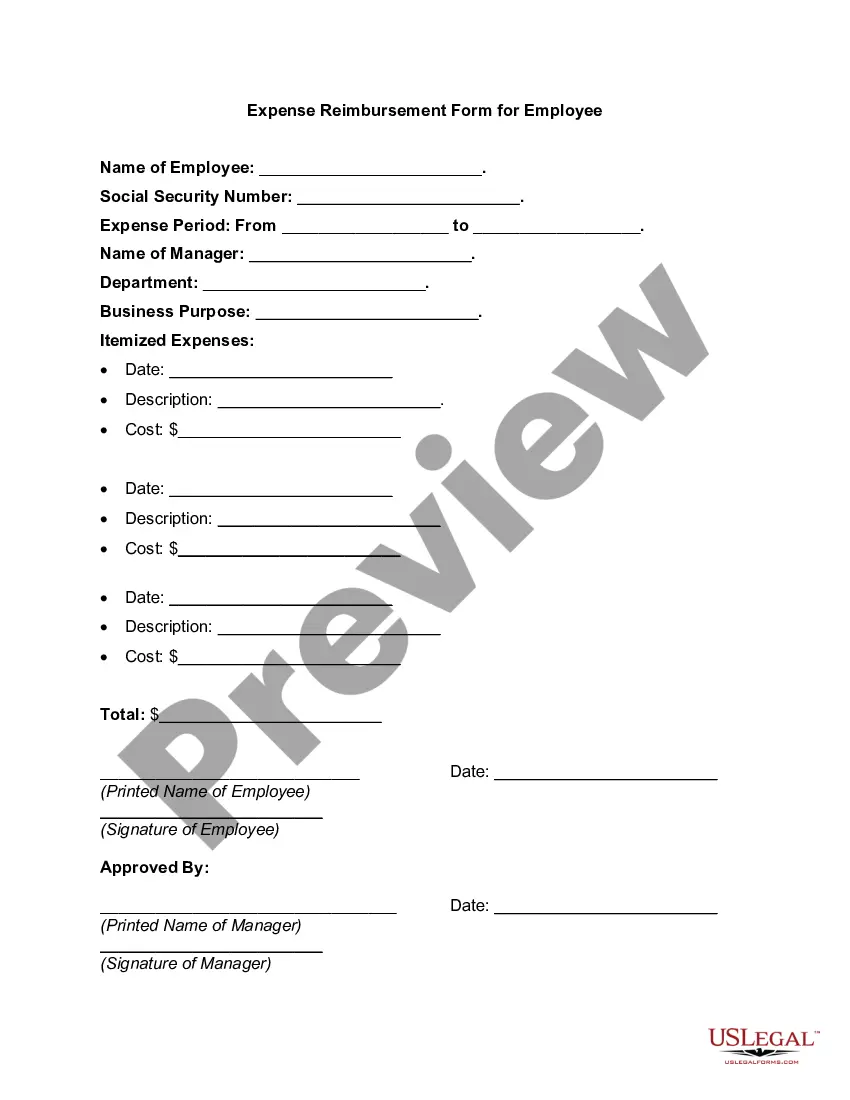
The Travel Expense Reimbursement Form is used by employees to request reimbursement for out-of-pocket expenses incurred during business travel. This form helps organizations streamline their reimbursement processes and ensures that all required information is collected to process claims efficiently. Unlike other financial documents, this form specifically addresses travel-related expenses, making it essential for accurate reporting and budgeting.
What’s included in this form
- Employee information: Name, contact details, and department.
- Trip details: Purpose of travel, dates, and destinations.
- Itemized expenses: Lists of expenses categorized by type, such as lodging, meals, and transportation.
- Total amount claimed: Summarizes total reimbursement requested.
- Signatures: Employee's declaration and supervisor's approval required for processing.




When this form is needed
This form should be used when an employee has incurred costs related to business travel that they would like to be reimbursed for. Common scenarios include attending conferences, client meetings, or any other travel that required out-of-pocket expenses. It is important to complete this form promptly after travel to ensure timely reimbursement and maintain accurate financial records.
Who can use this document
This form is intended for:
- Employees who have traveled for work-related purposes and paid for related expenses.
- Managers or supervisors who review and approve travel expense claims.
- Finance or accounting department personnel responsible for processing reimbursements.
Steps to complete this form
- Identify the employee: Fill in the employee's name, contact information, and department.
- Enter trip details: Specify the purpose of the trip, along with the start and end dates.
- List expenses: Provide a detailed account of all expenses incurred, categorized appropriately.
- Calculate total: Add up the itemized expenses to report the total amount requested for reimbursement.
- Sign and submit: The employee must sign the form, after which it should be forwarded to the designated supervisor for approval.
Does this document require notarization?
This form does not typically require notarization unless specified by local law. Employees should verify any specific requirements as per their organization's policies or state regulations.
Get your form ready online
Our built-in tools help you complete, sign, share, and store your documents in one place.
Make edits, fill in missing information, and update formatting in US Legal Forms—just like you would in MS Word.
Download a copy, print it, send it by email, or mail it via USPS—whatever works best for your next step.
Sign and collect signatures with our SignNow integration. Send to multiple recipients, set reminders, and more. Go Premium to unlock E-Sign.
If this form requires notarization, complete it online through a secure video call—no need to meet a notary in person or wait for an appointment.
We protect your documents and personal data by following strict security and privacy standards.

Make edits, fill in missing information, and update formatting in US Legal Forms—just like you would in MS Word.

Download a copy, print it, send it by email, or mail it via USPS—whatever works best for your next step.

Sign and collect signatures with our SignNow integration. Send to multiple recipients, set reminders, and more. Go Premium to unlock E-Sign.

If this form requires notarization, complete it online through a secure video call—no need to meet a notary in person or wait for an appointment.

We protect your documents and personal data by following strict security and privacy standards.
Common mistakes to avoid
- Failing to include all required receipts for expenses claimed.
- Not providing clear descriptions of travel purposes or expenses.
- Ignoring company deadlines for submission of reimbursement requests.
- Submitting the form without the necessary approvals from supervisors.
Benefits of using this form online
- Convenience of accessing and completing the form from any device.
- Editability allows for easy adjustments and additions before submission.
- Reliable storage of forms ensures easy retrieval for future reference.
Legal use & context
- The form acts as a formal request for reimbursement, creating a record for both the employee and employer.
- It reinforces accountability and transparency in the reimbursement process.
- Proper completion is essential for ensuring that expenses are reimbursed correctly and in a timely manner.
Main things to remember
- Use the Travel Expense Reimbursement Form to request repayment of travel-related costs.
- Complete the form with accurate information and timely submissions to ensure faster processing.
- Review company policies regarding reimbursement to avoid common mistakes.
Looking for another form?

Form popularity
FAQ
Choose a template or expense-tracking software. Edit the columns and categories (such as rent or mileage) as needed. Add itemized expenses with costs. Add up the total. Attach or save your corresponding receipts. Print or email the report.
Form a policy for the expense reimbursement process. Determine what expenses employees can claim. Create a system for collecting employee expense claims. Verify the legitimacy of expenses. Pay reimbursements within a specified timeframe.
Add personal information. Enter purchase details. Sign the form. Attach receipts. Submit to the management or accounting department.
I want to state that I visited _________ (Location) for ____________ (Personal/ Professional work). This visit was done on __/__/____ (Date). Therefore, I request you to kindly reimburse the amount of the expense of __________ (Amount) which I spent.
Because reimbursements under the accountable plan are not wages and are not taxed, you do not have to report the amount. Do not include the amount with the employee's wages on Form W-2. Instead, report it in Form W-2 box 12 with code L.
While requesting a reimbursement, your tone should be fair and courteous so that your reader won't doubt your honesty. State your reason for requesting the refund. Then request the reimbursement. Send the relevant receipts or documents and ask the reader to take a look at them.
Name, department, and contact information. List of itemized expense names. Date of purchase for each item. Receipts. Total amount spent. Purpose of the expense. Actual cost of item (subtraction of discounts) Repayment amount sought.
Make the expense billable. Create a new expense. Select the customer who is reimbursing you and check the box that says Billable. Save the expense. Invoice the expense. Select the particular expense. Click on the button Convert to Invoice.