Qualifying Event Notice Information for Employer to Plan Administrator
Understanding this form
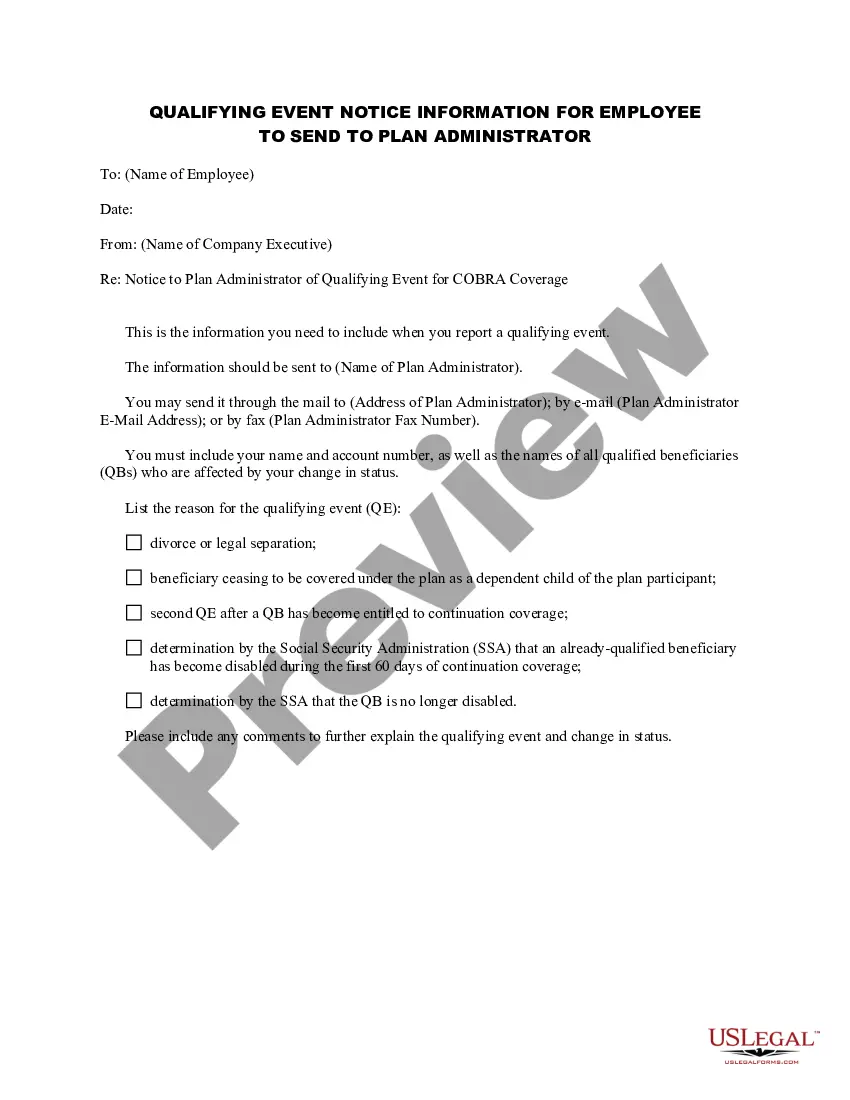
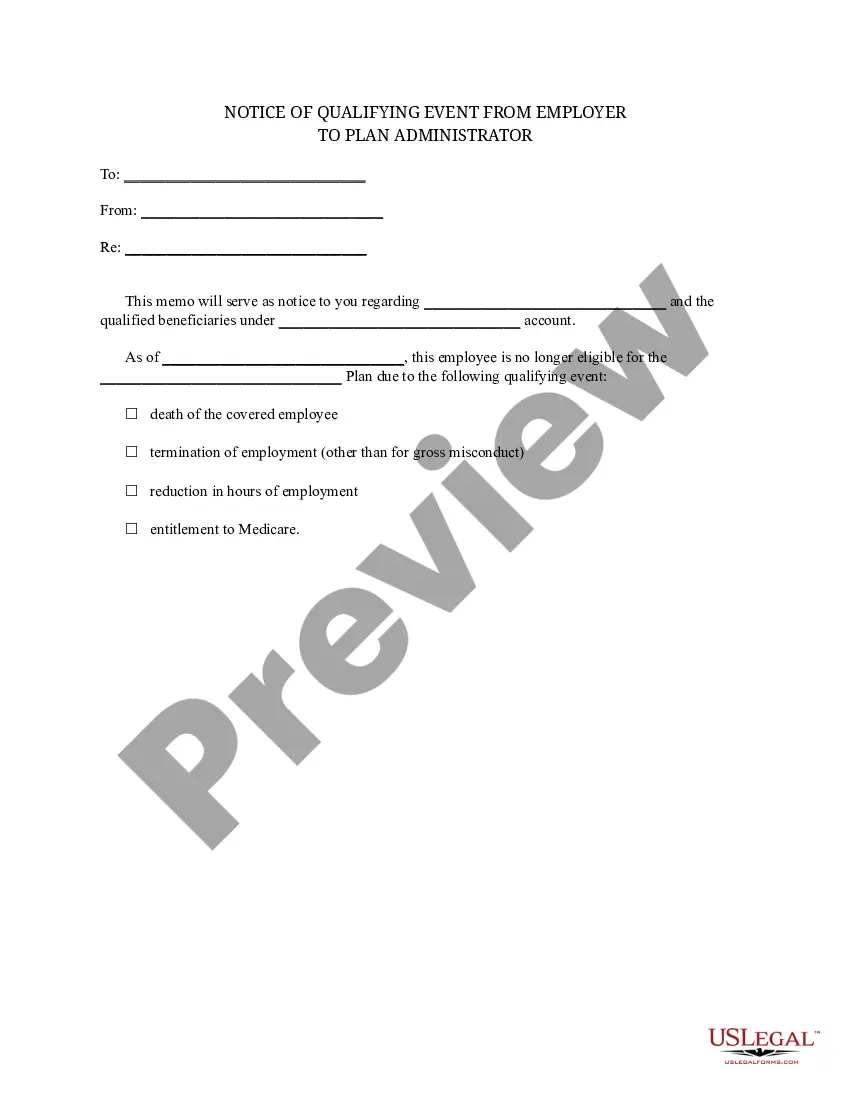
The Qualifying Event Notice Information for Employer to Plan Administrator is a legal document used to notify the plan administrator about a qualifying event that affects COBRA coverage. This form is crucial for maintaining compliance with COBRA regulations, ensuring that affected employees receive the continuation of health benefits after certain life events, such as divorce or legal separation. It differs from general notice forms by specifically outlining the necessary details that must be conveyed to the plan administrator to authorize COBRA coverage for eligible individuals.
Form components explained
- Employee's Name: The full name of the employee impacted by the qualifying event.
- Date of Notice: The date the notice is being sent to the plan administrator.
- Company Executiveâs Name: The name of the individual submitting the notice on behalf of the employer.
- Plan Administrator Details: Contact information for the plan administrator, including name, mailing address, email, and fax number.
- Details of the Qualifying Event: Specifies the reason for the notice, including options like divorce or a dependent child losing coverage.
- Comments Section: Allows for additional explanations regarding the qualifying event.
When to use this form
This form should be used when an employee experiences a qualifying event affecting their health coverage under COBRA. Situations include when an employee becomes divorced, legally separated, or when a dependent child stops being eligible for coverage. Prompt notification using this form ensures that the eligible beneficiaries can receive the proper notice about their rights to continue their health insurance coverage.
Who this form is for
This form is intended for:
- Employers who offer group health plans and are subject to COBRA regulations.
- HR professionals responsible for managing employee benefits.
- Plan administrators overseeing COBRA compliance.
How to complete this form
- Enter the employee's full name in the designated field.
- Provide the date the notice is being issued.
- Fill in the name of the company executive authorizing the notice.
- Complete the plan administrator's details, including their name and contact information.
- Select the reason for the qualifying event from the options listed.
- Add any further comments as needed to clarify the situation.
Notarization guidance
This form does not typically require notarization unless specified by local law. Ensure that all information is accurate and complete to maintain the validity of the notice.
Get your form ready online
Our built-in tools help you complete, sign, share, and store your documents in one place.
Make edits, fill in missing information, and update formatting in US Legal Forms—just like you would in MS Word.
Download a copy, print it, send it by email, or mail it via USPS—whatever works best for your next step.
Sign and collect signatures with our SignNow integration. Send to multiple recipients, set reminders, and more. Go Premium to unlock E-Sign.
If this form requires notarization, complete it online through a secure video call—no need to meet a notary in person or wait for an appointment.
We protect your documents and personal data by following strict security and privacy standards.

Make edits, fill in missing information, and update formatting in US Legal Forms—just like you would in MS Word.

Download a copy, print it, send it by email, or mail it via USPS—whatever works best for your next step.

Sign and collect signatures with our SignNow integration. Send to multiple recipients, set reminders, and more. Go Premium to unlock E-Sign.

If this form requires notarization, complete it online through a secure video call—no need to meet a notary in person or wait for an appointment.

We protect your documents and personal data by following strict security and privacy standards.
Common mistakes
- Failing to include all required contact information for the plan administrator.
- Not specifying the correct reason for the qualifying event.
- Omitting the employee's name or providing incorrect details.
Why use this form online
- Convenience: Obtain and complete the form from anywhere, anytime.
- Editability: Easily fill out the form, making updates as necessary.
- Reliability: Legal forms provided are drafted by licensed attorneys, ensuring compliance and accuracy.
Looking for another form?








Form popularity
FAQ
Coverage is available up to $1 million per person. For more information and pricing, you can call us at 1-877-262-7241 or complete a free quote online.
Blue Shield administers Cal-COBRA when an employer is subject to it under state law. Groups have the option to self-administer their federal COBRA benefits or choose a third-party COBRA administrator, including Blue Shield's preferred COBRA administrator, CONEXIS.
Your business has 90 days to provide the employee with a COBRA General Notice, which basically describes the employee's rights and obligations under COBRA. When a qualifying event occurs. Your business must notify the employee of their COBRA rights within 14 days of the qualifying event with an election notice.
COBRA beneficiaries pay the full health insurance premium plus a 2 percent administration fee. If monthly premiums for employees with single coverage are $200, for example; the COBRA beneficiary pays 102 percent of that amount, or $204.
Employers who fail to comply with the COBRA requirements can be required to pay a steep price. Failure to provide the COBRA election notice within this time period can subject employers to a penalty of up to $110 per day, as well as the cost of medical expenses incurred by the qualified beneficiary.
The following are qualifying events: the death of the covered employee; a covered employee's termination of employment or reduction of the hours of employment; the covered employee becoming entitled to Medicare; divorce or legal separation from the covered employee; or a dependent child ceasing to be a dependent under
Since losing COBRA coverage early is not a qualifying event, you would not be eligible to sign up for coverage through the Exchange. (If your COBRA runs out after the normal period, which is typically 18 or 36 months, you should be eligible for a Special Enrollment and could sign up for coverage through the Exchange).
Through the Marketplace, 1 The Department of Health and Human Services administers the COBRA provisions of the Public Health Service Act covering state and local government plans. individuals may qualify for cost-sharing reductions and a tax credit that lowers monthly premiums.
Notifying all eligible group health care participants of their COBRA rights. Providing timely notice of COBRA eligibility, enrollment forms, duration of coverage and terms of payment after a qualifying event has occurred.