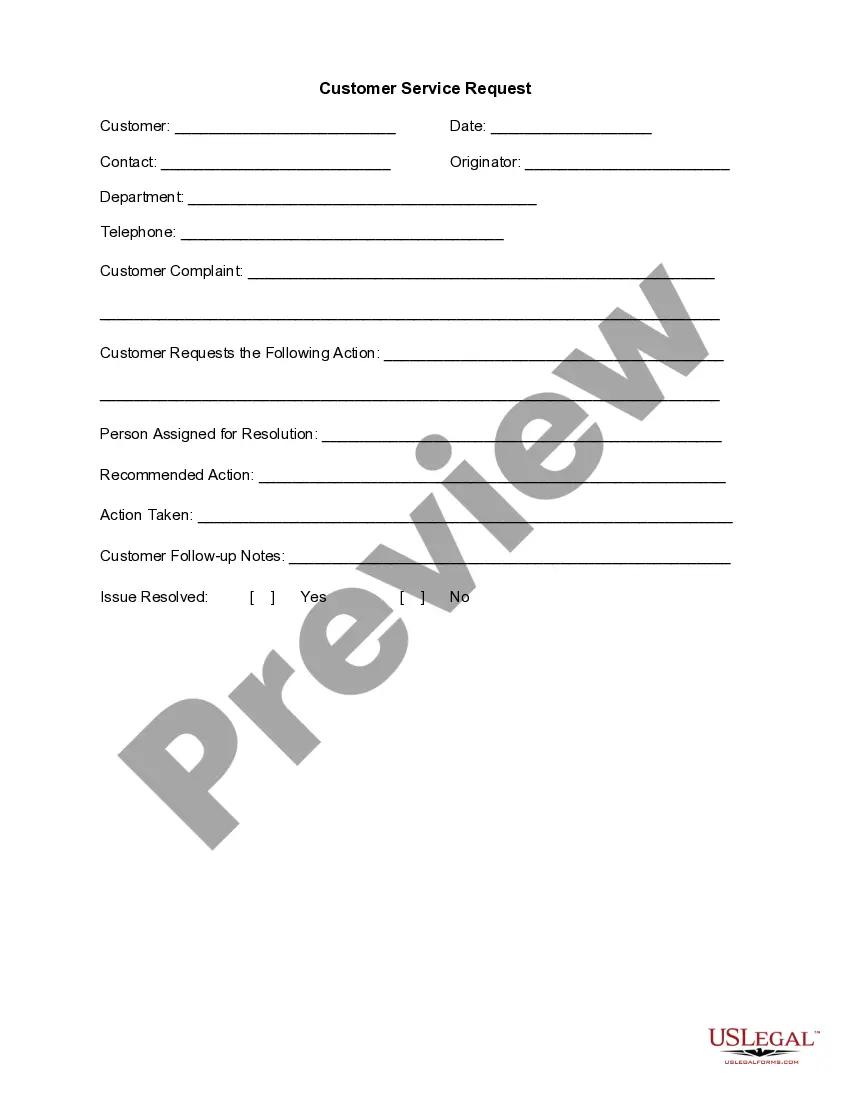
Customer Service Request
Overview of this form
The Customer Service Request form is designed to help service departments efficiently record, track, and process customer requests for support. This form streamlines communication between customers and service teams, ensuring that issues are documented clearly and addressed in a timely manner. Its structured layout distinguishes it from general complaint letters by focusing specifically on service requests and follow-up actions required to resolve issues.
Form components explained
- Customer information section: Captures the customer's name, date of request, and contact details.
- Originator details: Identifies the person or department submitting the request.
- Complaint description: Provides space for a detailed account of the customer's complaint.
- Requested action: Allows customers to specify the action they request to resolve the issue.
- Assigned personnel: Identifies who is responsible for addressing the service request.
- Resolution tracking: Includes sections for documenting recommended and taken actions, along with follow-up notes.

When to use this document
This form should be used whenever a customer has a request or complaint related to service, such as issues with products, service quality concerns, or inquiries regarding service procedures. It is ideal for situations where tracking the resolution of customer issues is essential, ensuring all parties involved have a clear understanding of the request and its status.
Intended users of this form
This form is intended for use by:
- Customers seeking assistance or expressing complaints about services.
- Service department staff responsible for recording and processing customer requests.
- Management personnel who need to monitor service issues and resolutions.
How to complete this form
- Fill in the customer information section with the customer's name, date, and contact details.
- Specify the originator and their department for accountability.
- Describe the customer complaint in detail for clear understanding.
- Specify the action requested by the customer to address the issue.
- Assign a person responsible for resolving the request and document any recommended actions.
- Record the actions taken and any follow-up notes, confirming whether the issue is resolved.
Does this form need to be notarized?
This form does not typically require notarization unless specified by local law. Ensure you check any applicable regulations that might dictate additional requirements for service request documentation.
Get your form ready online
Our built-in tools help you complete, sign, share, and store your documents in one place.
Make edits, fill in missing information, and update formatting in US Legal Forms—just like you would in MS Word.
Download a copy, print it, send it by email, or mail it via USPS—whatever works best for your next step.
Sign and collect signatures with our SignNow integration. Send to multiple recipients, set reminders, and more. Go Premium to unlock E-Sign.
If this form requires notarization, complete it online through a secure video call—no need to meet a notary in person or wait for an appointment.
We protect your documents and personal data by following strict security and privacy standards.

Make edits, fill in missing information, and update formatting in US Legal Forms—just like you would in MS Word.

Download a copy, print it, send it by email, or mail it via USPS—whatever works best for your next step.

Sign and collect signatures with our SignNow integration. Send to multiple recipients, set reminders, and more. Go Premium to unlock E-Sign.

If this form requires notarization, complete it online through a secure video call—no need to meet a notary in person or wait for an appointment.

We protect your documents and personal data by following strict security and privacy standards.
Common mistakes to avoid
- Failing to provide complete customer information.
- Not clearly defining the complaint or requested action.
- Leaving out the name of the person assigned for resolution.
- Neglecting to document follow-up notes and resolution status.
Advantages of online completion
- Convenience of immediate access and download from any device.
- Editability allows customization to fit specific service contexts.
- Secure storage of digital records for easy reference and tracking.
Legal use & context
- This form serves as a vital record that can be referred to in case of disputes.
- Completing the form ensures that all service requests are processed in an organized manner.
- Proper documentation can protect both customers and service personnel in legal circumstances.
What to keep in mind
- The Customer Service Request form is essential for effective communication between customers and service departments.
- It includes key sections that capture vital information for tracking and resolving issues.
- By avoiding common mistakes, users can ensure that their requests are handled smoothly and efficiently.
Looking for another form?
Form popularity
FAQ
Incidents, simply put, are events that result in interruption of one or more Services. Service Requests do not specifically result in the same degradation or failure. Instead, they are needs or wishes for enhancements or changes. They seldom spawn actual Change Requests (though it is possible).
Customer Service Request Management (CSRM) refers to the managing the entire lifecycle of activities linked to the fulfillment of a Service Requests made by customers and other stakeholders.A query for example, on requested logs and actions, request for information about products or services etc.
Service request - A formal user request for something new to be provided. Example: I need a new Macbook. Incident - An unplanned event that disrupts or reduces the quality of a service and requires an emergency response. Example: The website is down!
Customer Request Management (CRM) System: is Council's management system for Customer Service Requests. Its purpose is to track workflow, record conversations with customers and the actions undertaken.
A service request is defined as a request from a user or a user's authorized representative that initiates a service action which has been agreed as a normal part of service delivery. Service requests are not used in response a failure or degradation of service (which are handled as incidents).
Report highway emergencies to 911 or the California Highway Patrol immediately. To get general information about Caltrans and its services, please contact us at (916) 654-5266.
Service request - A formal user request for something new to be provided. Example: I need a new Macbook. Incident - An unplanned event that disrupts or reduces the quality of a service and requires an emergency response. Example: The website is down!
Which one of the following is the BEST description of a service request? Explanation: ServiceRequest (Service Operation) A request from a User for information or advice, or for a Standard Change or for Access to an IT Service. For example to reset a password, or to provide standard IT Services for a new User.