Secretary's Certificate
What is this form?
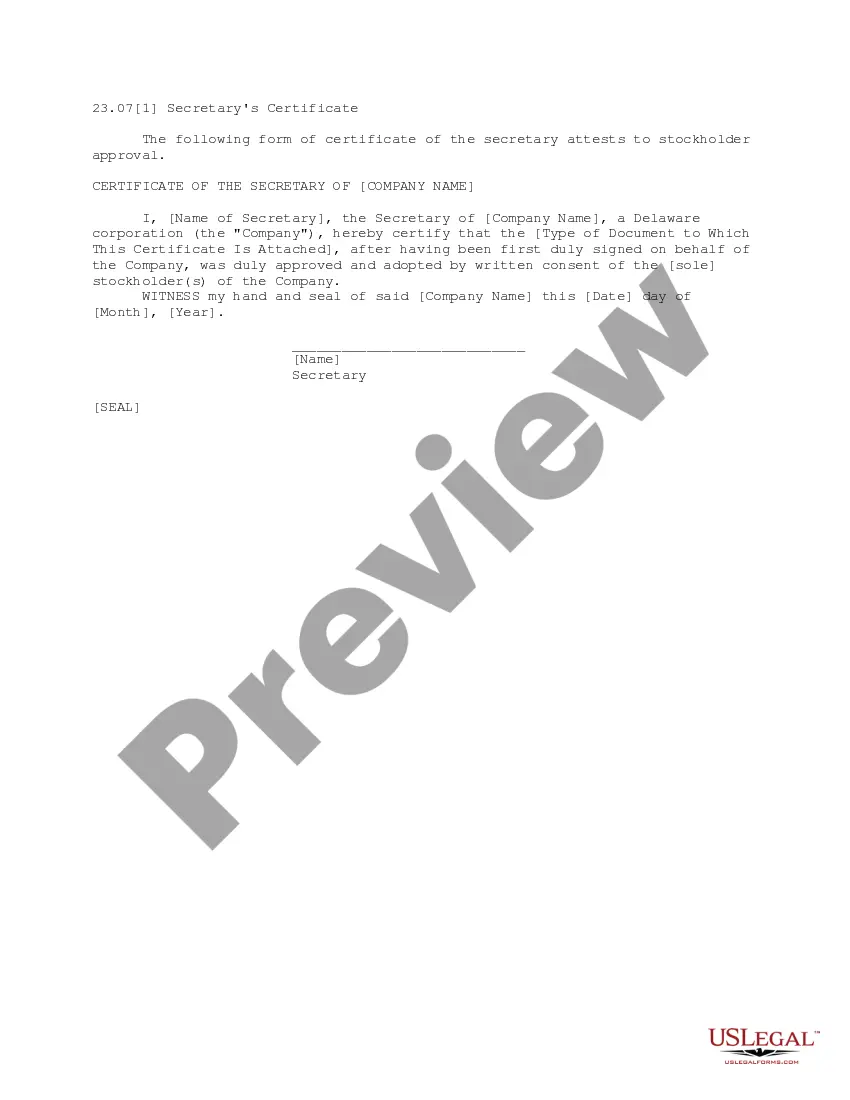
A Secretary's Certificate is an official document that verifies stockholder approval for corporate decisions or actions. This form serves to authenticate the approval process within a corporation, distinguishing it from other business forms like board resolutions or written consents. It is essential for entities to maintain proper documentation regarding shareholder agreements and decision-making authority.
Key parts of this document
- Certificate of the Secretary: Includes the name of the secretary and the corporationâs name.
- Document Approval: States that the attached document was approved by stockholders.
- Date of Certification: Indicates when the certificate was signed.
- Official Seal: Space for the company seal to validate the certificate.
Situations where this form applies
This form is commonly used when a corporation needs to document the approval of significant actions, such as changes to corporate structure, allocation of shares, or adoption of new bylaws. It is particularly useful when written consent is obtained rather than holding a formal meeting of stockholders.
Who this form is for
- Corporation secretaries responsible for maintaining company records.
- Management teams needing to document stockholder decisions.
- Lawyers assisting corporate clients with compliance and documentation.
How to prepare this document
- Identify the corporationâs name and the secretary's name.
- Attach the document that has been approved by the stockholders.
- Confirm that the document was signed on behalf of the corporation.
- Enter the date of certification in the required format.
- Place the official company seal on the certificate.
Notarization requirements for this form
This form does not typically require notarization unless specified by local law. However, if notarization is needed, it is crucial for legal validity as it adds a layer of authentication to the document.
Get your form ready online
Our built-in tools help you complete, sign, share, and store your documents in one place.
Make edits, fill in missing information, and update formatting in US Legal Forms—just like you would in MS Word.
Download a copy, print it, send it by email, or mail it via USPS—whatever works best for your next step.
Sign and collect signatures with our SignNow integration. Send to multiple recipients, set reminders, and more. Go Premium to unlock E-Sign.
If this form requires notarization, complete it online through a secure video call—no need to meet a notary in person or wait for an appointment.
We protect your documents and personal data by following strict security and privacy standards.

Make edits, fill in missing information, and update formatting in US Legal Forms—just like you would in MS Word.

Download a copy, print it, send it by email, or mail it via USPS—whatever works best for your next step.

Sign and collect signatures with our SignNow integration. Send to multiple recipients, set reminders, and more. Go Premium to unlock E-Sign.

If this form requires notarization, complete it online through a secure video call—no need to meet a notary in person or wait for an appointment.

We protect your documents and personal data by following strict security and privacy standards.
Avoid these common issues
- Failing to attach the approved document, which invalidates the certificate.
- Incorrectly citing the corporation's name or the secretary's name.
- Omitting the date or seal, which can lead to legal challenges.
Advantages of online completion
- Convenience: You can download and complete the form at your own pace.
- Editability: Easily modify the template to suit your corporationâs specific needs.
- Reliability: Form templates are drafted by licensed attorneys, ensuring compliance with legal standards.
Legal use & context
- The Secretary's Certificate can be used as legal evidence of corporate decisions in case of disputes.
- It is essential for ensuring corporate governance and compliance with state regulations.
- Proper execution of the certificate helps protect the interests of the company and its stockholders.
Quick recap
- A Secretary's Certificate is essential for validating stockholder approvals in corporate actions.
- Ensure the accuracy of details entered, including document type and signatures.
- Always check state-specific regulations to confirm compliance requirements.
Looking for another form?
Form popularity
FAQ
A Secretary's Certificate is required when amending the Articles of Incorporation to show that the amendments or amendments have been duly approved by the required vote of the stockholders or members of the corporation. It is also needed when increasing or decreasing the authorized capital stock.
A1 A Secretary's Certificate is a document that is signed and sealed by the Secretary of the Corporation that. states that the Board of Directors has voted to delegate authority to a specific individual or group and whether they have the right to further delegate that authority.
A Corporate Secretary is responsible for ensuring that the records, or minutes of the Board's actions during a Board meeting, reflect the proper exercise of those fiduciary duties.
A certified board resolution is a written document that provides an explanation of the actions of a company's board of directors that has been verified by the secretary of the organization and approved by the board's president.Both are important records of the activities of the board of directors of a company.
A certificate signed by the secretary of a company (or for an LLC without officers, a manager or managing member) and delivered at the closing of a transaction. The secretary's certificate typically contains the following: Certified copies of the organizational documents of the company.
An officer's certificate, or closing certificate, delivered at the closing of an M&A transaction, certifying that the company's representations and warranties in the transaction agreement remain true and correct and that it has completed or met the covenants and conditions precedent set out in the agreement.
The Corporate Secretary should present themselves to a notary public where they will swear to the truth of the contents of the Secretary's Certificate and sign the document in front of the notary public.Once notarized, the document may be used as necessary.
The Corporate Secretary should present themselves to a notary public where they will swear to the truth of the contents of the Secretary's Certificate and sign the document in front of the notary public. The notary public will then affix their seal and signature on the document.