Missouri Acknowledgment by a Corporate Officer
What this document covers
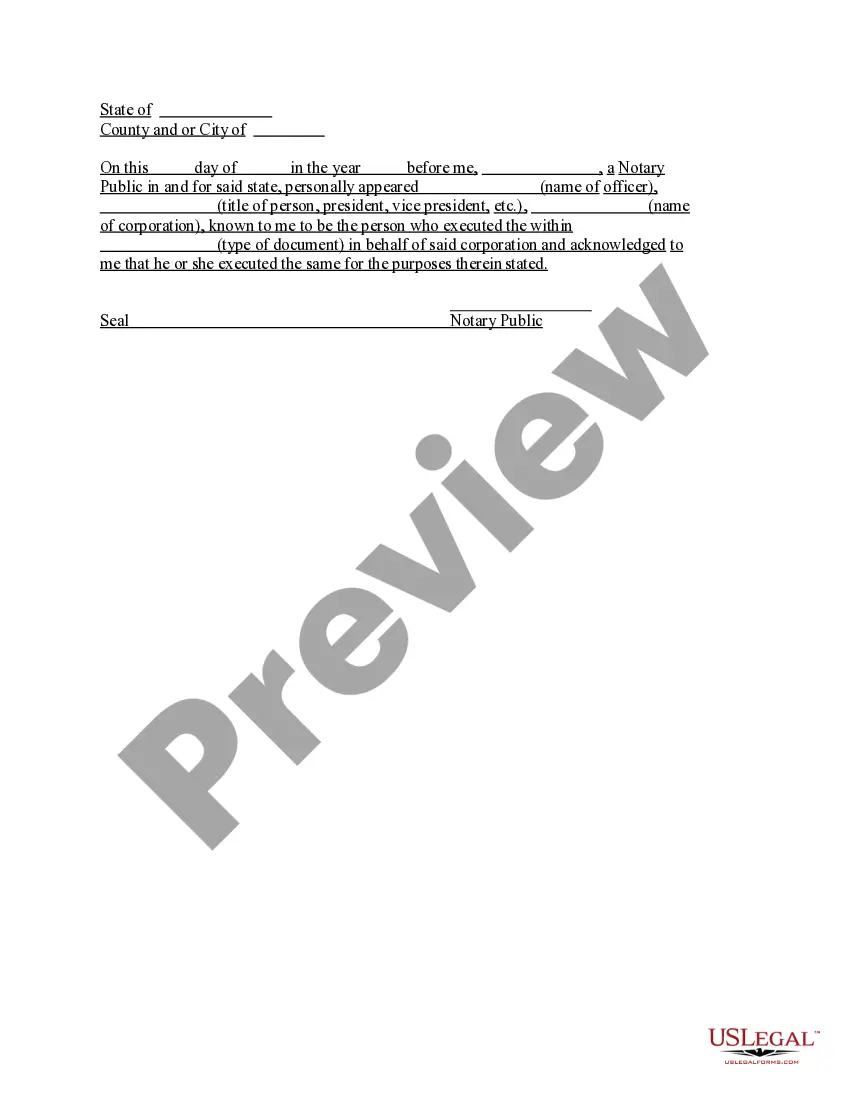
The Acknowledgment by a Corporate Officer is a legal document that verifies that an officer of a corporation has signed a document on behalf of the corporation. This form is crucial in establishing the authority of the officer to act for the corporation and is often used in conjunction with other corporate documents. Unlike other forms that simply require signatures, this acknowledgment also confirms the officer's identity and capacity to execute the document, making it essential for corporate compliance and clarity in legal transactions.
What’s included in this form
- Name of the corporate officer who is signing.
- Title of the corporate officer (e.g., president, vice president).
- Name of the corporation.
- Type of document being acknowledged.
- Notarization section for the notary public to complete.
When to use this form
This form is used when a corporate officer signs a document that requires official acknowledgment, such as contracts, agreements, or other legal documents related to business transactions. It is particularly useful when the document needs to be presented to entities such as banks, government agencies, or other businesses that require evidence of the signer's authority to act on behalf of the corporation.
Intended users of this form
- Corporate officers responsible for signing documents for their company.
- Businesses that need to verify the authority of their representatives.
- Legal professionals assisting corporations with documentation requirements.
- Notaries public who need to acknowledge legal documents for corporations.
Completing this form step by step
- Identify and enter the name of the corporate officer signing the document.
- Specify the title of the officer (e.g., president, vice president).
- Complete the name of the corporation.
- Indicate the type of document being executed.
- Both the officer and the notary public should sign and date the acknowledgment section.
Does this document require notarization?
To make this form legally binding, it must be notarized. Our online notarization service, powered by Notarize, lets you verify and sign documents remotely through an encrypted video session.
Get your form ready online
Our built-in tools help you complete, sign, share, and store your documents in one place.
Make edits, fill in missing information, and update formatting in US Legal Forms—just like you would in MS Word.
Download a copy, print it, send it by email, or mail it via USPS—whatever works best for your next step.
Sign and collect signatures with our SignNow integration. Send to multiple recipients, set reminders, and more. Go Premium to unlock E-Sign.
If this form requires notarization, complete it online through a secure video call—no need to meet a notary in person or wait for an appointment.
We protect your documents and personal data by following strict security and privacy standards.

Make edits, fill in missing information, and update formatting in US Legal Forms—just like you would in MS Word.

Download a copy, print it, send it by email, or mail it via USPS—whatever works best for your next step.

Sign and collect signatures with our SignNow integration. Send to multiple recipients, set reminders, and more. Go Premium to unlock E-Sign.

If this form requires notarization, complete it online through a secure video call—no need to meet a notary in person or wait for an appointment.

We protect your documents and personal data by following strict security and privacy standards.
Avoid these common issues
- Failing to include the full name and title of the corporate officer.
- Not specifying the type of document being acknowledged.
- Leaving the notary section incomplete or unsealed.
- Using incorrect or outdated titles for corporate positions.
Benefits of completing this form online
- Convenient access to templates 24/7, allowing for immediate use.
- Edit and customize the form easily to fit specific needs.
- Ensure reliability with templates drafted by licensed attorneys.
- Quick download option to get started without delays.
Looking for another form?
Form popularity
FAQ
Require Personal Appearance. Review The Document. Screen The Signer And Verify The Facts. Record The Notarization. Complete The Notarization.
The purpose of an acknowledgment is for a signer, whose identity has been verified, to declare to a Notary or notarial officer that he or she has willingly signed a document.The signer may either sign the document before appearing before you, or in your presence.
Unlike jurats, an acknowledgment does not need to be signed in the presence of a notary. However, the affiant does need to swear or affirm that they signed under their own free will.
Yes, you may notarize a signature on a document that includes handwritten paragraphs. A document can be typed or handwritten. If the notarial certificate under the signature is not included, be sure to attach a loose certificate chosen by your customer.
This is a form that shows that a notary public has established the identity of the signer(s) and witnessed the signature of a document. It only demonstrates that the document has been signed and does not make any claims about the information in the document.
Step 1: Require Personal Appearance. Step 2: Check Over The Document. Step 3: Carefully Identify The Signer. Step 4: Record Your Journal Entry. Step 5: Complete The Notarial Certificate. A Last Note: Never Give Advice.
It depends. You may notarize a document that does not have pre-printed notarial wording as long as the signer tells you what type of notarization is needed.As nonattorneys, Notaries cannot decide the type of notarization to perform on a document because the choice can have important legal ramifications.