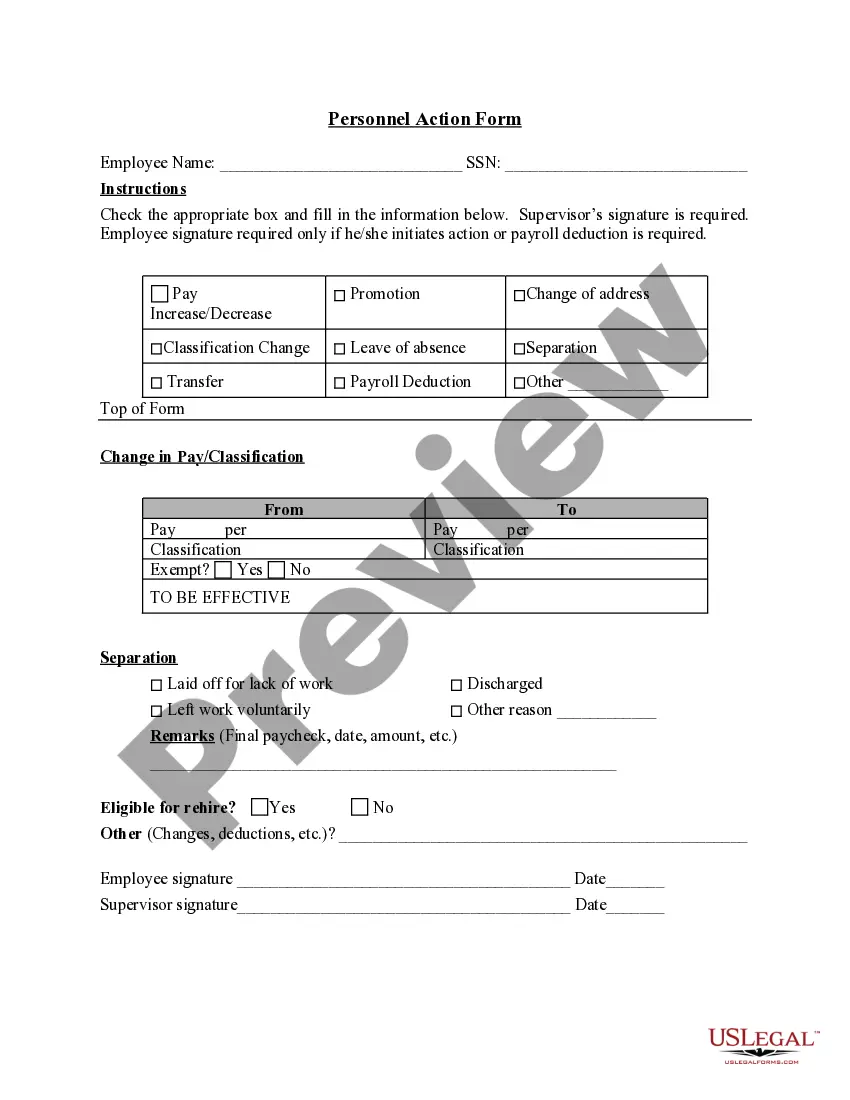
Personnel Action Form
Overview of this form
The Personnel Action Form is a document used by human resources to record changes in an individual's employment history. This form captures essential details regarding employment changes and is distinct from other HR forms that may focus on recruitment or evaluations. It ensures accurate record keeping and provides a clear trail of employment actions.
What’s included in this form
- Employee name and Social Security Number (SSN) fields for identification.
- Checkboxes to indicate the reason for the personnel action, such as voluntary resignation or other reasons.
- Remarks section for additional information, including details about final paychecks.
- Options to indicate eligibility for rehire, with yes, no, and other options.
- Signature fields for both the supervisor and the employee when applicable.


Common use cases
This form should be used whenever there is a change in an employee's status within a company. Common scenarios include resignations, terminations, or updates to employment conditions. It is crucial for maintaining accurate employee records and ensuring all necessary approvals are documented.
Who needs this form
This form is intended for use by:
- Human resource professionals managing employee records.
- Supervisors or managers who oversee personnel actions.
- Employees who may initiate actions regarding their employment status.
Instructions for completing this form
- Fill in the employee's name and SSN at the top of the form.
- Check the appropriate box to indicate the reason for the personnel action.
- In the remarks section, provide any relevant details about the employee's final paycheck or other pertinent information.
- Indicate if the employee is eligible for rehire by checking the relevant box.
- Ensure both the supervisor and the employee sign and date the form as required.
Is notarization required?
This form usually doesn’t need to be notarized. However, local laws or specific transactions may require it. Our online notarization service, powered by Notarize, lets you complete it remotely through a secure video session, available 24/7.
Get your form ready online
Our built-in tools help you complete, sign, share, and store your documents in one place.
Make edits, fill in missing information, and update formatting in US Legal Forms—just like you would in MS Word.
Download a copy, print it, send it by email, or mail it via USPS—whatever works best for your next step.
Sign and collect signatures with our SignNow integration. Send to multiple recipients, set reminders, and more. Go Premium to unlock E-Sign.
If this form requires notarization, complete it online through a secure video call—no need to meet a notary in person or wait for an appointment.
We protect your documents and personal data by following strict security and privacy standards.

Make edits, fill in missing information, and update formatting in US Legal Forms—just like you would in MS Word.

Download a copy, print it, send it by email, or mail it via USPS—whatever works best for your next step.

Sign and collect signatures with our SignNow integration. Send to multiple recipients, set reminders, and more. Go Premium to unlock E-Sign.

If this form requires notarization, complete it online through a secure video call—no need to meet a notary in person or wait for an appointment.

We protect your documents and personal data by following strict security and privacy standards.
Typical mistakes to avoid
- Failing to include the employee's SSN.
- Not obtaining the necessary signatures from supervisors or employees.
- Providing insufficient details in the remarks section.
- Overlooking the checkbox for eligibility for rehire.
Why use this form online
- Instant access to the form eliminates delays in obtaining necessary documents.
- Editable fields allow for easy customization to fit specific needs.
- Reliable formatting helps ensure compliance with legal and organizational requirements.
Legal use & context
- This form serves as a formal record of an employee's employment changes.
- Accurate completion of the form can help prevent disputes or misunderstandings.
- Maintaining this documentation is essential for compliance with labor laws.
Quick recap
- The Personnel Action Form is crucial for documenting employment changes.
- Properly completed forms are essential for accurate human resource management.
- Ensure all required fields are filled and signatures obtained to validate the document.
Looking for another form?
Form popularity
FAQ
The SF-50, Notification of Personnel Action Form is a very important document. It is your written documentation of a personnel action that affects your position or pay. Keep it with your records because it could be used to make employment, pay, and qualifications decisions about you in the future.
Personnel changes include hiring and firing as well as promotions, organizational changes, voluntary quits, mass layoffs and acquisitions. Handling these situations can be challenging for small business owners without an HR department.
An SF-52 is a Request for Personnel Action. An SF-50 is the actual personnel action. To get yourself reinstated to federal service, you must show the SF-50 to HR. HR will look at it to verify that you have competitive status.
In an effort to help streamline the personnel transaction submission process, the Personnel Action Form (PAF) has been implemented to take the place of previous traditional methods of transaction submission.