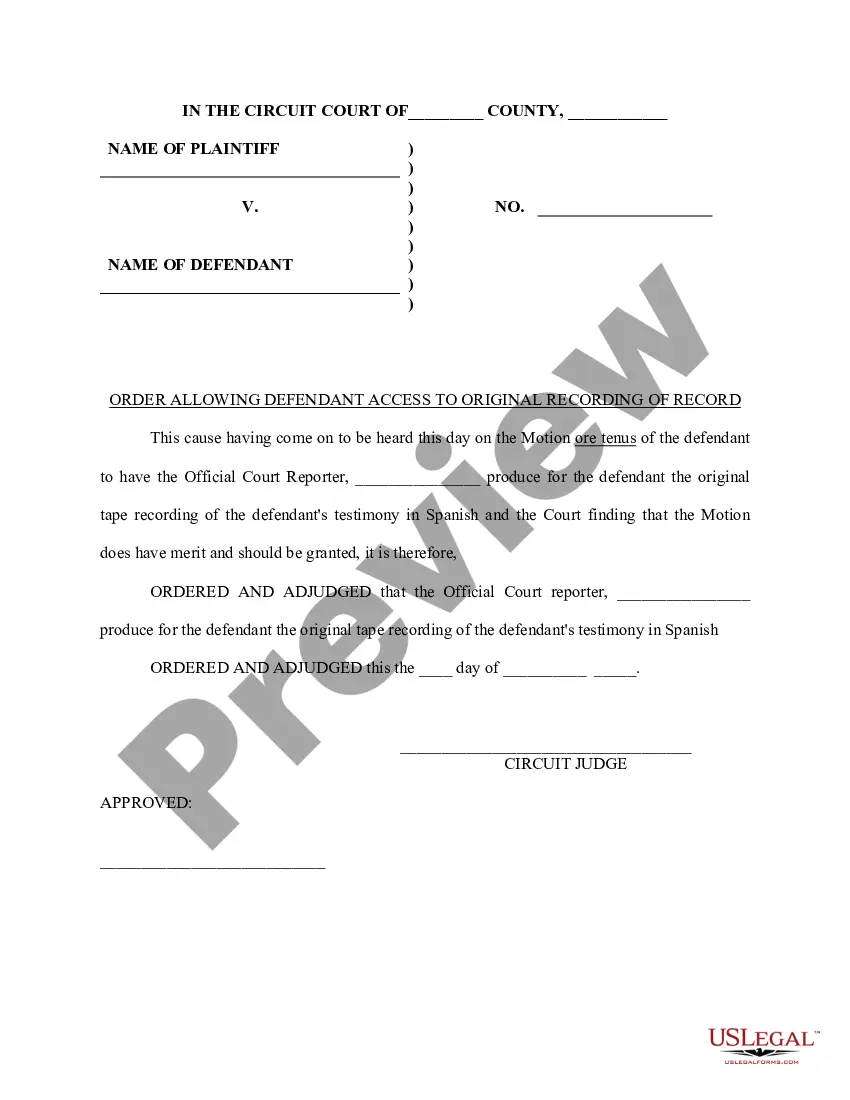
Maricopa Arizona Order Allowing Defendant Access to Original Recording of Record
Description
Get your form ready online
Our built-in tools help you complete, sign, share, and store your documents in one place.
Make edits, fill in missing information, and update formatting in US Legal Forms—just like you would in MS Word.
Download a copy, print it, send it by email, or mail it via USPS—whatever works best for your next step.
Sign and collect signatures with our SignNow integration. Send to multiple recipients, set reminders, and more. Go Premium to unlock E-Sign.
If this form requires notarization, complete it online through a secure video call—no need to meet a notary in person or wait for an appointment.
We protect your documents and personal data by following strict security and privacy standards.
Make edits, fill in missing information, and update formatting in US Legal Forms—just like you would in MS Word.
Download a copy, print it, send it by email, or mail it via USPS—whatever works best for your next step.
Sign and collect signatures with our SignNow integration. Send to multiple recipients, set reminders, and more. Go Premium to unlock E-Sign.
If this form requires notarization, complete it online through a secure video call—no need to meet a notary in person or wait for an appointment.
We protect your documents and personal data by following strict security and privacy standards.
Looking for another form?
How to fill out Order Allowing Defendant Access To Original Recording Of Record?
A document procedure consistently accompanies any legal action you undertake.
Launching a business, applying for or accepting a job opportunity, transferring ownership, and numerous other life circumstances require you to prepare official documentation that varies from state to state.
This is why having everything organized in one location is incredibly advantageous.
US Legal Forms is the largest online repository of current federal and state-specific legal templates.
This is the easiest and most reliable method to acquire legal documents. All samples provided by our library are professionally created and verified for compliance with local laws and regulations. Prepare your documentation and manage your legal matters effectively with US Legal Forms!
- On this platform, you can readily find and download a document for any personal or commercial purpose used in your area, including the Maricopa Order Allowing Defendant Access to Original Recording of Record.
- Finding samples on the platform is quite easy.
- If you already have a membership to our library, Log In to your account, locate the sample through the search field, and click Download to save it on your device.
- After that, the Maricopa Order Allowing Defendant Access to Original Recording of Record will be accessible for further use in the My documents section of your profile.
- If you're using US Legal Forms for the first time, follow this straightforward guide to obtain the Maricopa Order Allowing Defendant Access to Original Recording of Record.
- Ensure you have visited the correct page with your local form.
- Utilize the Preview feature (if available) and navigate through the template.
Form popularity
FAQ
To obtain copies of public records by phone, please call (602) 37-CLERK, or (602) 372-5375.
All hearings are available to watch live and on-demand via our websites. UKSC judgments will be handed down in the Court, on Wednesdays at 9.45am. They will continue to be live streamed via the UKSC website.
To obtain access to those records, researchers must contact the appropriate federal court. Online access to case and docket information is provided for a fee by the Administrative Office of the U.S. Courts through PACER. The court may refer you to a Federal Records Center to obtain copies.
Forms are available at the Law Library Resource Center. To order transcripts of digitally recorded court proceedings call Electronic Records Services (602-506-7100) for instructions.
Requesting Copies (Copy Request Form) 50 per page for copy requests. The number of pages of a document may be ascertained by calling the Clerk's Office at (602) 452-6700 or by emailing the court at inform@appeals.az.gov. A certification fee of $17.00 is required if the request is for a Certified Copy of the document.
A Court Transcript is a simply a written and verbatim record of a court's judgment. You can apply for a transcript of a court or tribunal hearing if the hearing was recorded. The court can refuse to provide part or all of a transcript (for example, if details of the hearing are confidential).
Call 602-506-3411 to speak with a member of the Public Records team.
By Phone. The most efficient method for customers to obtain records remotely is by submitting an online form or emailing the Clerk's Office. To obtain copies of public records by phone, please call (602) 37-CLERK, or (602) 372-5375.
Requesting Copies (Copy Request Form) The number of pages of a document may be ascertained by calling the Clerk's Office at (602) 452-6700 or by emailing the court at inform@appeals.az.gov. A certification fee of $17.00 is required if the request is for a Certified Copy of the document.