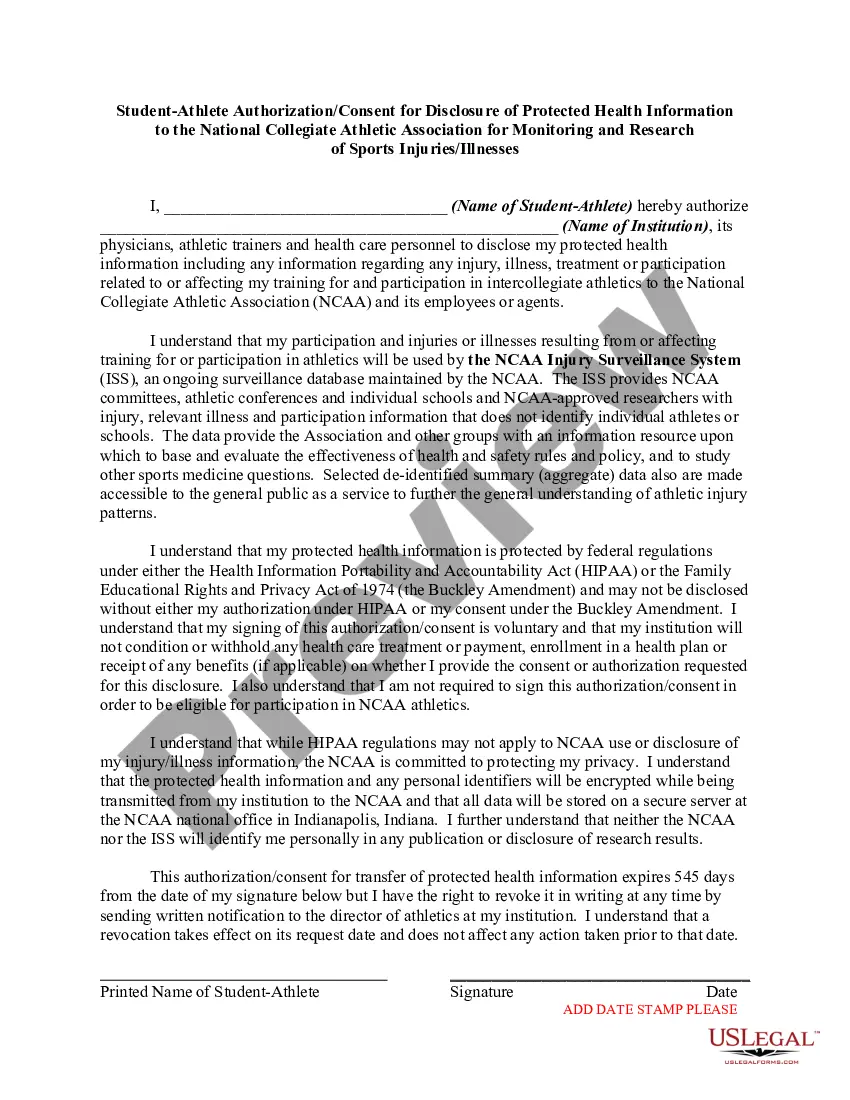
The NCAA Injury Surveillance System (ISS), an ongoing surveillance database maintained by the NCAA. The ISS provides NCAA committees, athletic conferences and individual schools and NCAA-approved researchers with injury, relevant illness and participation information that does not identify individual athletes or schools. The data provide the Association and other groups with an information resource upon which to base and evaluate the effectiveness of health and safety rules and policy, and to study other sports medicine questions. This letter is meant to satisfy requirements of the Health Insurance Portability and Accountability Act (HIPAA).
Rhode Island Student-Athlete Authorization or Consent for Disclosure of Protected Health Information to the National Collegiate Athletic Association for Monitoring and Research of Sports Injuries or Illnesses
Instant download
Description
Get your form ready online
Our built-in tools help you complete, sign, share, and store your documents in one place.
Built-in online Word editor
Make edits, fill in missing information, and update formatting in US Legal Forms—just like you would in MS Word.
Export easily
Download a copy, print it, send it by email, or mail it via USPS—whatever works best for your next step.
E-sign your document
Sign and collect signatures with our SignNow integration. Send to multiple recipients, set reminders, and more. Go Premium to unlock E-Sign.
Notarize online 24/7
If this form requires notarization, complete it online through a secure video call—no need to meet a notary in person or wait for an appointment.
Store your document securely
We protect your documents and personal data by following strict security and privacy standards.

Make edits, fill in missing information, and update formatting in US Legal Forms—just like you would in MS Word.

Download a copy, print it, send it by email, or mail it via USPS—whatever works best for your next step.

Sign and collect signatures with our SignNow integration. Send to multiple recipients, set reminders, and more. Go Premium to unlock E-Sign.

If this form requires notarization, complete it online through a secure video call—no need to meet a notary in person or wait for an appointment.

We protect your documents and personal data by following strict security and privacy standards.
Looking for another form?




How to fill out Student-Athlete Authorization Or Consent For Disclosure Of Protected Health Information To The National Collegiate Athletic Association For Monitoring And Research Of Sports Injuries Or Illnesses?
If you need to thorough, obtain, or print valid document templates, utilize US Legal Forms, the largest collection of legal forms, which can be accessed online.
Make use of the site’s straightforward and convenient search feature to find the documents you require. Various templates for business and personal purposes are organized by categories and states, or keywords.
Use US Legal Forms to acquire the Rhode Island Student-Athlete Authorization or Consent for Disclosure of Protected Health Information to the National Collegiate Athletic Association for Monitoring and Research of Sports Injuries or Illnesses in just a few clicks.
Step 5. Complete the payment process. You can use your Visa or MasterCard or PayPal account to finalize the transaction.
Step 6. Choose the format of the legal form and download it to your device.Step 7. Complete, review, and print or sign the Rhode Island Student-Athlete Authorization or Consent for Disclosure of Protected Health Information to the National Collegiate Athletic Association for Monitoring and Research of Sports Injuries or Illnesses.
Every legal document template you purchase is yours permanently. You have access to each form you downloaded in your account. Navigate to the My documents section and select a form to print or download again.
Stay competitive and obtain, and print the Rhode Island Student-Athlete Authorization or Consent for Disclosure of Protected Health Information to the National Collegiate Athletic Association for Monitoring and Research of Sports Injuries or Illnesses with US Legal Forms. There are thousands of professional and state-specific forms you can use for your personal business or personal needs.
- If you are already a US Legal Forms customer, Log In to your profile and click on the Download button to obtain the Rhode Island Student-Athlete Authorization or Consent for Disclosure of Protected Health Information to the National Collegiate Athletic Association for Monitoring and Research of Sports Injuries or Illnesses.
- You can also access forms you previously downloaded in the My documents tab of your account.
- If you are using US Legal Forms for the first time, follow the steps listed below.
- Step 1. Ensure you have selected the form for the correct city/state.
- Step 2. Use the Review option to examine the form’s content. Don’t forget to read the description.
- Step 3. If you are not satisfied with the form, utilize the Search field at the top of the screen to find other variations of the legal form template.
- Step 4. Once you have found the form you need, select the Get now button. Choose the pricing plan you prefer and enter your details to register for an account.
Form popularity
FAQ
To fill out the authorization for the release of protected health information form, begin by providing your personal details and specifying the type of information you wish to disclose. For the Rhode Island Student-Athlete Authorization or Consent for Disclosure of Protected Health Information to the National Collegiate Athletic Association for Monitoring and Research of Sports Injuries or Illnesses, clearly indicate the purpose of the disclosure and the entities involved. Finally, sign and date the form to finalize your authorization, ensuring that you understand the implications of your consent. For assistance, you may consider using the forms available on USLegalForms for a streamlined experience.
An authorization for the use and disclosure of protected health information is a document that grants permission to healthcare professionals to share an individual's medical data. Specifically, in the Rhode Island Student-Athlete Authorization or Consent for Disclosure of Protected Health Information to the National Collegiate Athletic Association for Monitoring and Research of Sports Injuries or Illnesses, this document enables student-athletes to participate in research that can improve sports safety. By completing this authorization, they contribute to a collective effort in advancing health management in athletics.
When a patient provides consent, you may disclose their protected health information to entities specified in the consent form, such as healthcare providers, insurance companies, or the National Collegiate Athletic Association. In the case of the Rhode Island Student-Athlete Authorization or Consent for Disclosure of Protected Health Information to the National Collegiate Athletic Association for Monitoring and Research of Sports Injuries or Illnesses, this means sharing vital health data that can aid in injury prevention and treatment research. It is crucial for maintaining the student's privacy while allowing necessary information flow.
A consent form to disclose medical information allows a patient to authorize the sharing of their protected health information with specific parties. In the context of the Rhode Island Student-Athlete Authorization or Consent for Disclosure of Protected Health Information to the National Collegiate Athletic Association for Monitoring and Research of Sports Injuries or Illnesses, this form ensures that information regarding a student-athlete's health can be used for monitoring and research purposes. By completing this form, you facilitate transparency and enable important health data to contribute to sports injury research.
A patient may give verbal consent to release their information, but documentation of that consent is crucial for legal protection. Many healthcare providers and organizations prefer written consent to avoid ambiguity and miscommunication. If you're considering this route, remember that obtaining a formal Rhode Island Student-Athlete Authorization or Consent for Disclosure of Protected Health Information to the National Collegiate Athletic Association for Monitoring and Research of Sports Injuries or Illnesses can significantly simplify the process.
Yes, communication of protected health information (PHI) can be verbal in certain instances, such as during direct discussions between healthcare providers. However, it is important to consider privacy and ensure that the conversation takes place in a confidential setting. For interactions that require documentation, establishing a Rhode Island Student-Athlete Authorization or Consent for Disclosure of Protected Health Information to the National Collegiate Athletic Association for Monitoring and Research of Sports Injuries or Illnesses is strongly recommended.
While an individual can provide verbal authorization, it is not the recommended practice when it comes to releasing protected health information. Written authorization is witnessed more favorably in legal contexts because it provides a reliable record. If circumstances necessitate verbal consent, it’s wise to document the conversation for your records and consider obtaining a formal Rhode Island Student-Athlete Authorization or Consent for Disclosure of Protected Health Information to the National Collegiate Athletic Association for Monitoring and Research of Sports Injuries or Illnesses afterward.
In most cases, releasing protected health information (PHI) without written authorization is not permitted. There are specific circumstances outlined by law that allow for exceptions, such as emergencies or specific legal obligations. However, it is generally best practice to have a Rhode Island Student-Athlete Authorization or Consent for Disclosure of Protected Health Information to the National Collegiate Athletic Association for Monitoring and Research of Sports Injuries or Illnesses in place to avoid violations and ensure compliance.
Verbal authorization can sometimes be considered legal, but it is generally advisable to provide written consent for clarity and protection. Many institutions, including those involved with the National Collegiate Athletic Association, prefer a written Rhode Island Student-Athlete Authorization or Consent for Disclosure of Protected Health Information to ensure there is clear documentation of the consent. If you are unsure, checking with a legal expert or utilizing platforms like uslegalforms can enhance your peace of mind.
To successfully fill out the authorization for the release of protected health information, begin by entering your personal details, including your name and contact information. Next, indicate the specific information to be released and the intended recipient. Be sure to set a date for the authorization to expire, as well as sign and date the form. Completing your Rhode Island Student-Athlete Authorization or Consent for Disclosure of Protected Health Information to the National Collegiate Athletic Association for Monitoring and Research of Sports Injuries or Illnesses accurately is essential.