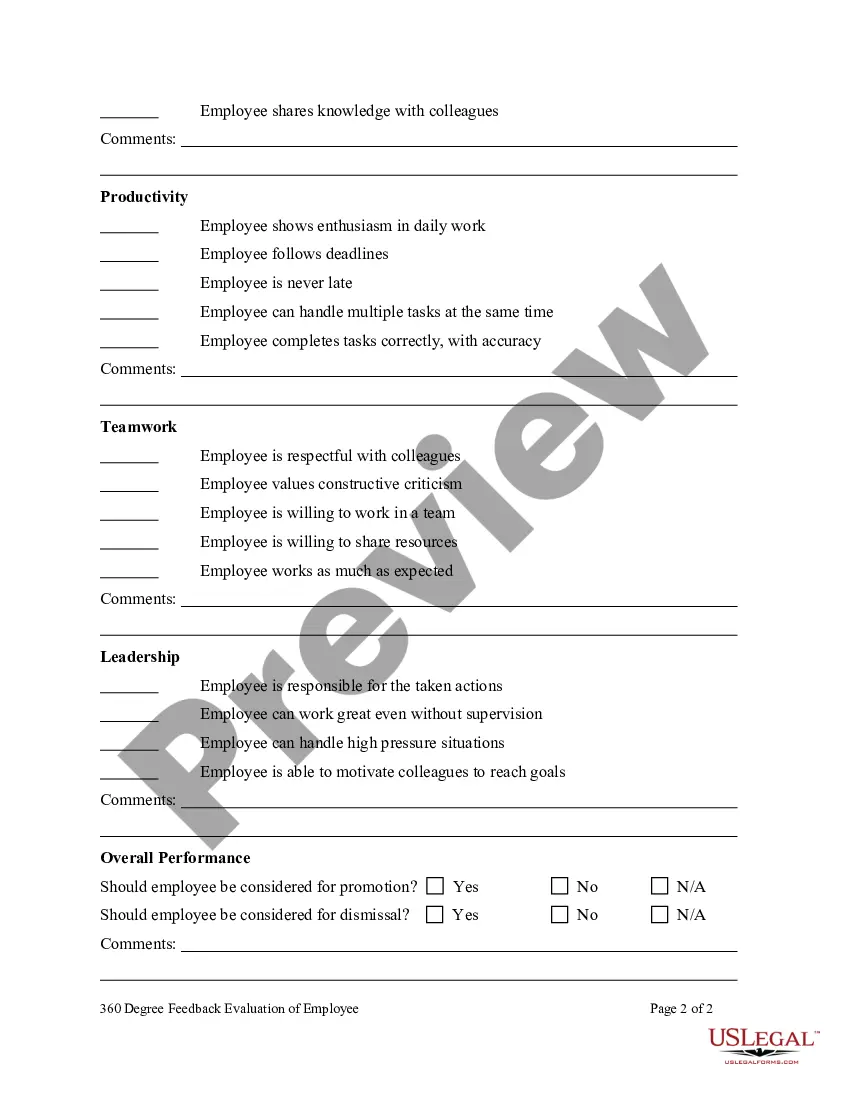
360 Degree Feedback is a system or process in which employees receive confidential, anonymous feedback from the people who work around them. This typically includes the employee's manager, peers, and direct reports. A mixture of about eight to twelve people fill out an anonymous online feedback form that asks questions covering a broad range of workplace competencies. The feedback forms include questions that are measured on a rating scale and also ask raters to provide written comments. The person receiving feedback also fills out a self-rating survey that includes the same survey questions that others receive in their forms.
Managers and leaders within organizations use 360 feedback surveys to get a better understanding of their strengths and weaknesses. The 360 feedback system automatically tabulates the results and presents them in a format that helps the feedback recipient create a development plan. Individual responses are always combined with responses from other people in the same rater category (e.g. peer, direct report) in order to preserve anonymity and to give the employee a clear picture of his/her greatest overall strengths and weaknesses.
360 Feedback can also be a useful development tool for people who are not in a management role. Strictly speaking, a "non-manager" 360 assessment is not measuring feedback from 360 degrees since there are no direct reports, but the same principles still apply. 360 Feedback for non-managers is useful to help people be more effective in their current roles, and also to help them understand what areas they should focus on if they want to move into a management role.
Oklahoma 360 Degree Feedback Evaluation of Employee
60 downloads
Description
Free preview


Get your form ready online
Our built-in tools help you complete, sign, share, and store your documents in one place.
Built-in online Word editor
Make edits, fill in missing information, and update formatting in US Legal Forms—just like you would in MS Word.
Export easily
Download a copy, print it, send it by email, or mail it via USPS—whatever works best for your next step.
E-sign your document
Sign and collect signatures with our SignNow integration. Send to multiple recipients, set reminders, and more. Go Premium to unlock E-Sign.
Notarize online 24/7
If this form requires notarization, complete it online through a secure video call—no need to meet a notary in person or wait for an appointment.
Store your document securely
We protect your documents and personal data by following strict security and privacy standards.

Make edits, fill in missing information, and update formatting in US Legal Forms—just like you would in MS Word.

Download a copy, print it, send it by email, or mail it via USPS—whatever works best for your next step.

Sign and collect signatures with our SignNow integration. Send to multiple recipients, set reminders, and more. Go Premium to unlock E-Sign.

If this form requires notarization, complete it online through a secure video call—no need to meet a notary in person or wait for an appointment.

We protect your documents and personal data by following strict security and privacy standards.
Looking for another form?
How to fill out 360 Degree Feedback Evaluation Of Employee?
US Legal Forms - one of the largest collections of legal documents in the United States - provides a variety of legal document templates that you can download or print.
By using the website, you can find thousands of templates for business and personal purposes, categorized by type, state, or keywords. You can access the latest versions of forms like the Oklahoma 360 Degree Feedback Evaluation of Employee in seconds.
If you already have a subscription, Log In and download the Oklahoma 360 Degree Feedback Evaluation of Employee from the US Legal Forms library. The Download button will appear on every form you view. You can access all previously downloaded forms in the My documents section of your account.
Make changes. Complete, modify, print, and sign the downloaded Oklahoma 360 Degree Feedback Evaluation of Employee.
Each template you save in your account has no expiration date and is yours indefinitely. Therefore, if you need to download or print another copy, simply go to the My documents section and click on the form you need.
- If you are using US Legal Forms for the first time, here are simple steps to get started.
- Ensure that you have selected the correct form for your city/state. Click the Preview button to review the contents of the form. Check the description of the form to confirm that it is the right one.
- If the form doesn't meet your requirements, use the Search box at the top of the page to find one that does.
- If you are satisfied with the form, confirm your choice by clicking the Get now button. Then, select your preferred payment plan and provide your details to register for an account.
- Complete the transaction. Use your credit card or PayPal account to finalize the transaction.
- Choose the format and download the form to your device.
Form popularity
FAQ
How to Provide Coworker Feedback for a 360 ReviewProblems With Face-to-Face Feedback.360 Feedback Provides a Better Picture.Tips for Providing Better Feedback.Make Your Feedback Honest.Don't Write a Book.Do Make Your Key Points.Provide Examples to Illustrate.Don't Expect to See Employee Action.More items...?
A 360-degree feedback (also known as multi-rater feedback, multi source feedback, or multi source assessment) is a process through which feedback from an employee's subordinates, colleagues, and supervisor(s), as well as a self-evaluation by the employee themselves is gathered.
360 Degree Feedback is a system or process in which employees receive confidential, anonymous feedback from the people who work around them. This typically includes the employee's manager, peers, and direct reports.
360 degree feedback allows you to use multiple raters such as supervisors, peers, direct reports, subordinates and external raters (clients or vendors) to leave feedback on an employee. The feedback is often used as a benchmark within the employee's development plan.
How to give useful performance feedbackKeep up-to-date information about each employee's position.Make regular notes of employee performance.Solicit information from other managers.Get to the point.Note opportunities for improvement.Use clear, actionable language.Solicit a dialogue.Ask the right questions.More items...?
360 degree feedback appraisal is an effective method for performance evaluation. During the literature review it was noted that more research on multi-source feedback as a performance rating tool is required.
The Purpose for Using 360 Degree FeedbackSelect the feedback tool and process.Choose the raters.Use the feedback.Review the feedback.Manage and integrate the process into a larger performance management system.
The Purpose for Using 360 Degree FeedbackSelect the feedback tool and process.Choose the raters.Use the feedback.Review the feedback.Manage and integrate the process into a larger performance management system.
Definition: 360-degree feedback is a feedback process where not just your superior but your peers and direct reports and sometimes even customers evaluate you. You receive an analysis of how you perceive yourself and how others perceive you.