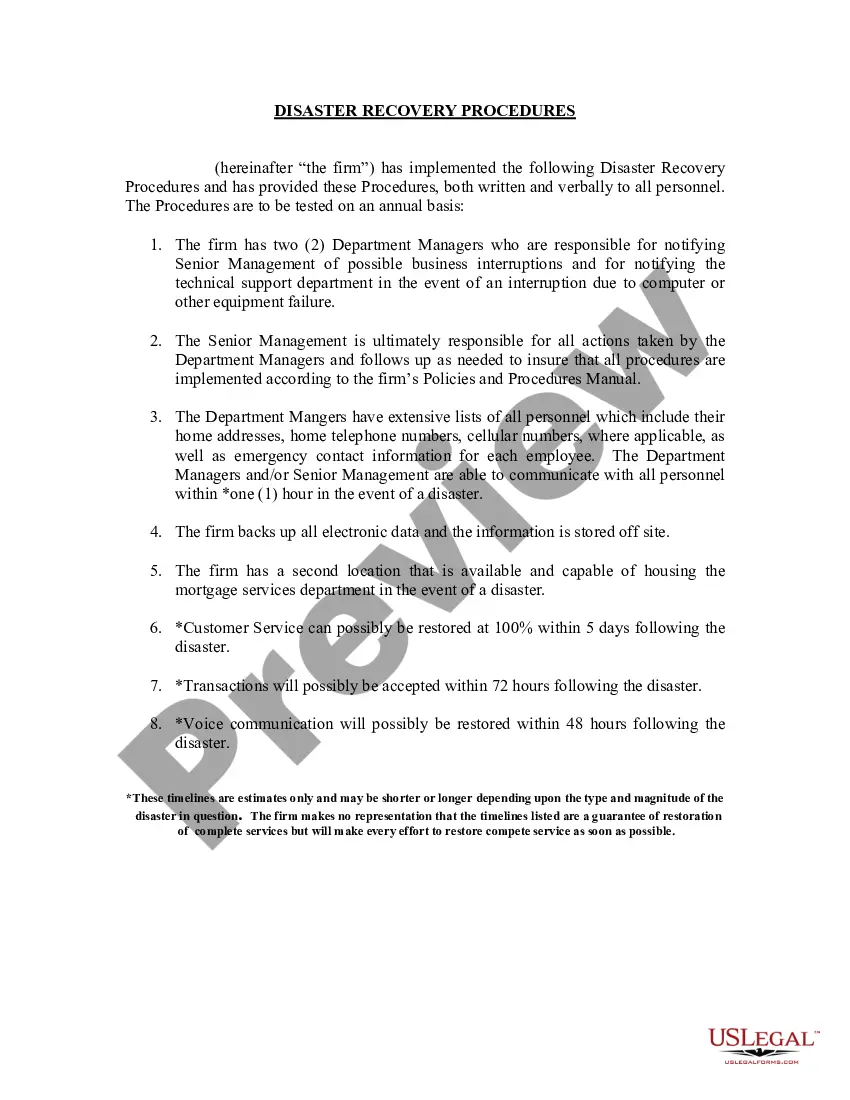
Missouri Sample Disaster Recovery Procedures
Description
Get your form ready online
Our built-in tools help you complete, sign, share, and store your documents in one place.
Make edits, fill in missing information, and update formatting in US Legal Forms—just like you would in MS Word.
Download a copy, print it, send it by email, or mail it via USPS—whatever works best for your next step.
Sign and collect signatures with our SignNow integration. Send to multiple recipients, set reminders, and more. Go Premium to unlock E-Sign.
If this form requires notarization, complete it online through a secure video call—no need to meet a notary in person or wait for an appointment.
We protect your documents and personal data by following strict security and privacy standards.

Make edits, fill in missing information, and update formatting in US Legal Forms—just like you would in MS Word.

Download a copy, print it, send it by email, or mail it via USPS—whatever works best for your next step.

Sign and collect signatures with our SignNow integration. Send to multiple recipients, set reminders, and more. Go Premium to unlock E-Sign.

If this form requires notarization, complete it online through a secure video call—no need to meet a notary in person or wait for an appointment.

We protect your documents and personal data by following strict security and privacy standards.
Looking for another form?



How to fill out Sample Disaster Recovery Procedures?
US Legal Forms - one of the most extensive collections of legal documents in the United States - offers a broad selection of legal form templates available for download or printing.
Utilizing the website, you can locate thousands of forms for business and personal use, categorized by type, state, or keywords. You can access the latest versions of forms such as the Missouri Template Disaster Recovery Procedures within moments.
If you currently hold a monthly membership, Log In to retrieve the Missouri Template Disaster Recovery Procedures from the US Legal Forms library. The Download button will appear on every document you view. You have access to all previously downloaded forms within the My documents section of your account.
Process the purchase. Use a credit card or PayPal account to complete the transaction.
Select the format and download the document to your device. Make edits. Complete, modify, and print and sign the downloaded Missouri Template Disaster Recovery Procedures.
- If you intend to use US Legal Forms for the first time, here are straightforward instructions to assist you in getting started.
- Ensure you have selected the correct form for your city/state.
- Click the Review button to examine the content of the form.
- Read the form summary to confirm that you have chosen the appropriate document.
- If the form does not fit your requirements, use the Search box at the top of the screen to find one that does.
- If you are satisfied with the document, affirm your selection by clicking the Buy now button.
- Then, select the payment plan you prefer and provide your details to register for the account.
Form popularity
FAQ
5 phases of emergency managementPrevention. Prevention focuses on preventing hazards from occurring, whether they are natural, technological or caused by humans.Mitigation. Mitigation is the effort to reduce loss of life and property by lessening the impact of disasters and emergencies.Preparedness.Response.Recovery.
10 Things You Must Include in Your Disaster Recovery Plan ChecklistRecovery Time Objective (RTO) and Recovery Point Objective (RPO)Hardware and Software Inventory.Identify Personnel Roles.List of Disaster Recovery Sites.Remote Storage of Physical Documents and Storage Media.Disaster Response Procedures.More items...
A 10-Step IT Disaster Recovery PlanCreate an inventory.Establish a recovery timeline.Communicate, communicate, communicate.Back up your data.Consider physical damages.Consider the human factor.Consider insurance.Test your disaster recovery plan.More items...?
Tiers of disaster recoveryTier 0: No off-site data.Tier 1: Physical backup with a cold site.Tier 2: Physical backup with a hot site.Tier 3: Electronic vaulting.Tier 4: Point-in-time recovery.Tier 5: Two-site commit/transaction integrity.Tier 6: Minimal to zero data loss.Tier 7: Recovery automation.
5 Elements of a Disaster Recovery Plan Is Your Business...Create a disaster recovery team.Identify and assess disaster risks.Determine critical applications, documents, and resources.Determine critical applications, documents, and resources.Specify backup and off-site storage procedures.More items...
7 Steps to a Successful Disaster Recovery Plan.
There are seven main components of any good disaster recovery plan. These include mapping out your assets, identifying your assets' criticality and context, conducting a risk assessment, defining your recovery objectives, choosing a disaster recovery setup, budgeting for your setup, and testing and reviewing the plan.
The first stage in any disaster recovery project should be to assess the risks facing the organisation. Managers should link risk assessments to a business impact analysis.
What are the five methods of testing a DRP?Walkthrough Testing.Simulation Testing.Checklist Testing.Full Interruption Testing and.Parallel Testing.
5 Simple Steps to Creating a Disaster Recovery Plan....What Should Be Included in a Disaster Recovery Plan?Identify Critical Operations.Evaluate Disaster Scenarios.Create a Communication Plan.Develop a Data Backup and Recovery Plan.Test Your Plan.