Wisconsin Name Change Notification Form
Overview of this form
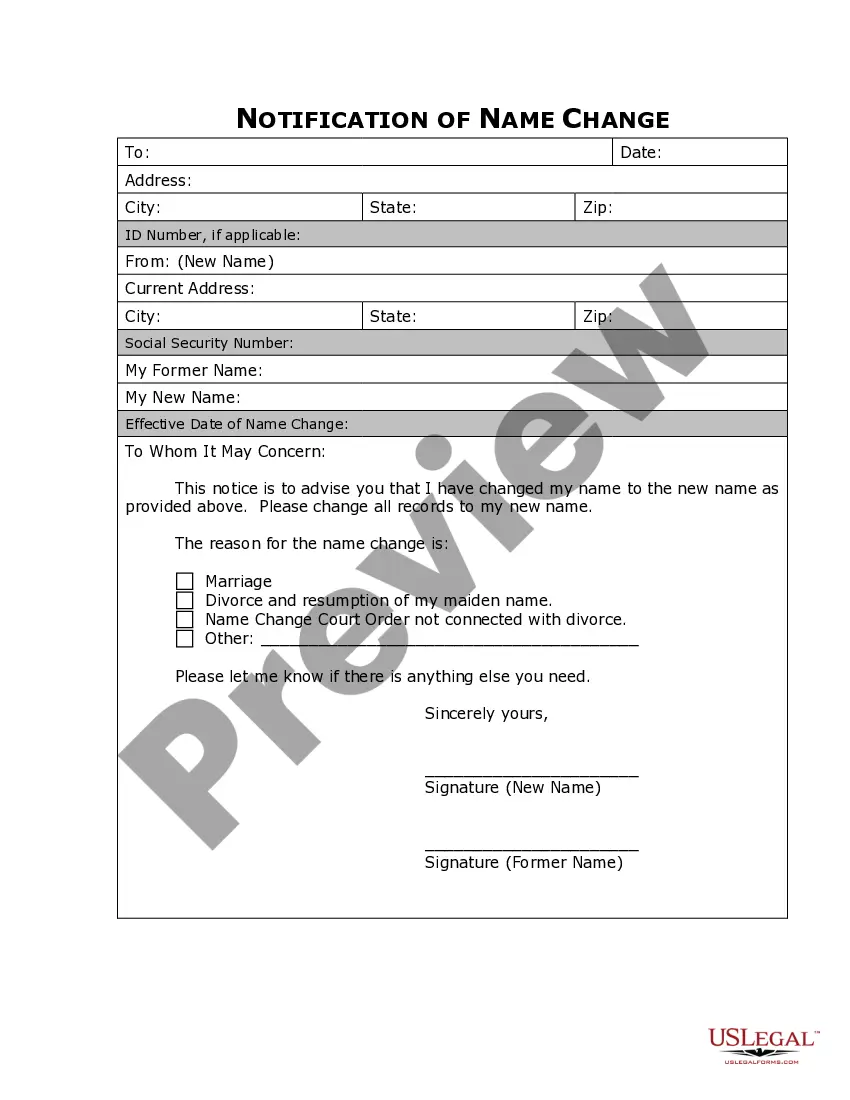
The Name Change Notification Form is a legal document used to inform companies, organizations, government agencies, and other relevant entities of your name change after it has been legally processed. This form is essential for ensuring that your records reflect your new name, differentiating it from informal notifications or updates.
Main sections of this form
- Personal information section: Includes fields for your old name, new name, and contact information.
- Notification fields: Specify which organizations and individuals are being notified of the name change.
- Date of the name change: Section to indicate when the name change became effective.
- Signature section: A place to sign and date the notification for verification purposes.




Situations where this form applies
This form should be used after you have legally changed your name, either through marriage, divorce, or a court order. You will need to notify various parties such as banks, government agencies, employers, and other institutions to update your records accordingly.
Who this form is for
- Individuals who have legally changed their name.
- Persons looking to update their identity with various organizations.
- Anyone needing to ensure their legal documentation reflects their new name.
Instructions for completing this form
- Enter your old name in the designated field.
- Fill in your new name as it appears legally.
- Provide your contact information for follow-up questions.
- List all organizations and individuals being notified.
- Sign and date the form to validate the notification.
Notarization guidance
Notarization is generally not required for this form. However, certain states or situations might demand it. You can complete notarization online through US Legal Forms, powered by Notarize, using a verified video call available anytime.
Get your form ready online
Our built-in tools help you complete, sign, share, and store your documents in one place.
Make edits, fill in missing information, and update formatting in US Legal Forms—just like you would in MS Word.
Download a copy, print it, send it by email, or mail it via USPS—whatever works best for your next step.
Sign and collect signatures with our SignNow integration. Send to multiple recipients, set reminders, and more. Go Premium to unlock E-Sign.
If this form requires notarization, complete it online through a secure video call—no need to meet a notary in person or wait for an appointment.
We protect your documents and personal data by following strict security and privacy standards.

Make edits, fill in missing information, and update formatting in US Legal Forms—just like you would in MS Word.

Download a copy, print it, send it by email, or mail it via USPS—whatever works best for your next step.

Sign and collect signatures with our SignNow integration. Send to multiple recipients, set reminders, and more. Go Premium to unlock E-Sign.

If this form requires notarization, complete it online through a secure video call—no need to meet a notary in person or wait for an appointment.

We protect your documents and personal data by following strict security and privacy standards.
Common mistakes
- Failing to list all relevant entities that need to be notified.
- Not signing or dating the form, which could render it invalid.
- Leaving out important personal information such as your old name or contact details.
Benefits of using this form online
- Convenience of downloading your form immediately after completion.
- Editability allows you to customize the form to your specific needs.
- Reliable access to templates drafted by licensed attorneys.
Summary of main points
- The Name Change Notification Form is essential for updating records after a legal name change.
- Carefully identify and list all entities that should receive your name update.
- Ensure to provide accurate information and a signature to validate the form.
Looking for another form?

Form popularity
FAQ
You should know that you can take on your partner's name as soon as you like in social circles and you don't actually have to change your name on any documentation. It's called Name by Association and is perfectly legal. If you decide to go the whole hog, the process is quite straightforward, but can be time-consuming.
Changing your name after marriageYou can usually change identity documents such as your driver's licence and passport to your married surname by providing a copy of your standard marriage certificate.
General information about the name change process is contained in Wisconsin Statutes 786.36 and 786.37. There is a $164.50 filing fee to file a Name Change action. The Clerk of Courts cannot give you legal advice. If you need further help, you may consult the Wisconsin Statutes, Sections 786.36 and 786.37.
Petition to change your name by filling out a name change form, an order to show cause for legally changing your name, and a decree to legally change your name. Take these forms to the court clerk and file them along with your state's required filing fees.
When you have your Name Change Court Order signed by the judge, you can get A Certified Copy of it that day from the same court. You need the Certified Copy to get your most important records changed. It will take you from 6 weeks to 6 months (usually 8 weeks or so) to get your Court Order.
Social Security: Now that you have your marriage certificate, you can easily make your social security name change official. You can update your name at no cost at your local Social Security Administration office, which you can find at ssa.gov or by calling 1.800. 772.1213.
If you were born in the state of Wisconsin, the cashier will forward the Vital Statistics Form to the State Registrar to change the name on your birth certificate, and this will cost you approximately $30 (and is required if born in this state).
A: You will have to ask the court for special permission to get the name change without letting the other parent know. To do this, the judge will ask you to look for the other parent, and you have to look as hard as possible, asking friends and family and looking up public records.
File the Petition for Name Change, Notice and Order for Name Change Hearing and Order for Name Change (if required in your county) forms. The original forms and any required copies must be filed and a fee paid to the Clerk of Court in the county where you are filing your case.