Illinois Acknowledgment for Corporation
What this document covers
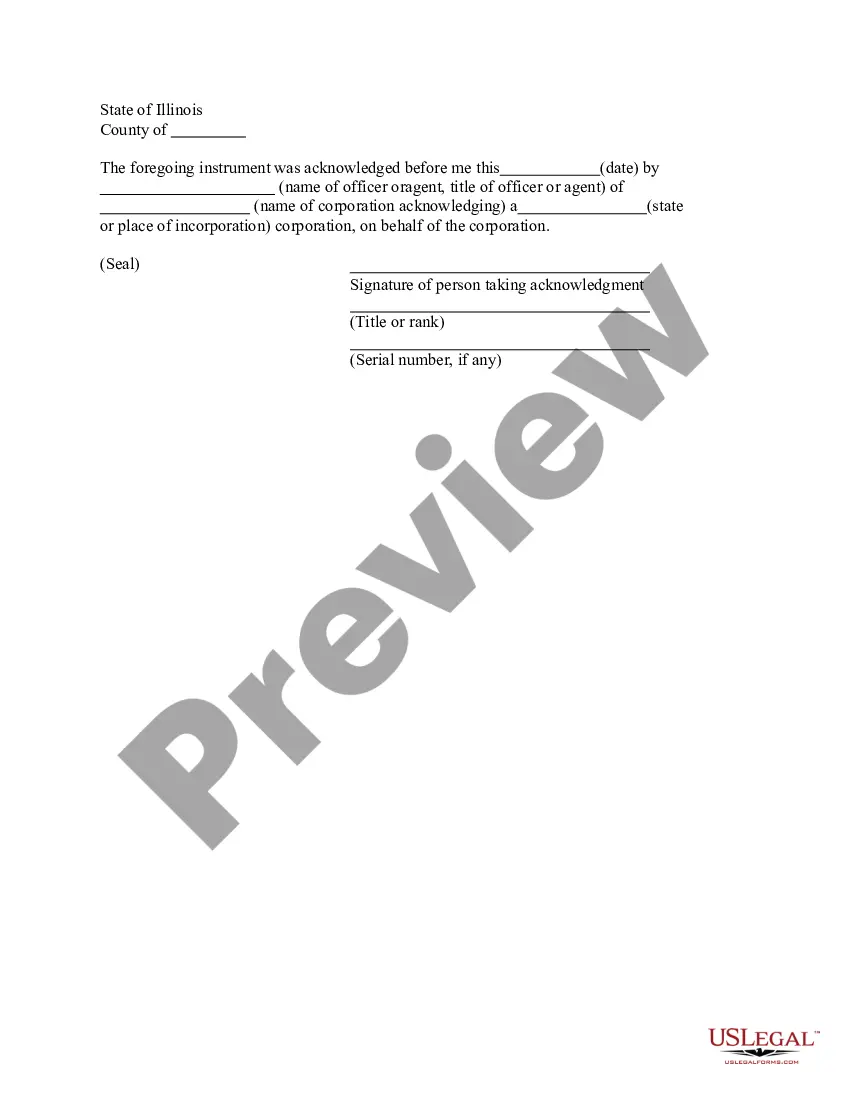
The Acknowledgment for Corporation is a legal document used to confirm that a corporate officer or agent has executed a document on behalf of their corporation. This form serves as proof or validation that the appropriate individual has acknowledged their authority to act on the corporation's behalf. Unlike other corporate forms, this acknowledgment specifically addresses the notarization and official recognition of signatures in a business context.
What’s included in this form
- Date of acknowledgment: The date when the acknowledgment was made.
- Name of officer or agent: The person who is acknowledging on behalf of the corporation.
- Title of officer or agent: The official position held by the individual acknowledging the document.
- Name of the corporation: The legal name of the corporation involved.
- Place of incorporation: The state or place where the corporation is legally registered.
- Signature line: Space for the officer or agent's signature and title.

Common use cases
This form is required when a corporate officer or agent needs to formally acknowledge the execution of a document or agreement on behalf of the corporation. Common scenarios include signing contracts, obtaining loans, or filing legal documents where proof of acknowledgment is necessary. It is particularly important in transactions where the corporation's authority to act is challenged or needs validation.
Intended users of this form
- Corporate officers: Individuals holding positions such as president, secretary, or treasurer.
- Authorized agents: Individuals acting on behalf of a corporation with the legal authority to do so.
- Business owners: Owners of private corporations needing to formalize agreements.
- Legal representatives: Attorneys representing corporations in legal matters.
Instructions for completing this form
- Identify the date of acknowledgment and enter it in the designated field.
- Enter the name of the corporate officer or agent who is acknowledging the document.
- Specify the title of the officer or agent for clarity on their authority.
- Fill in the legal name of the corporation being acknowledged.
- Indicate the state or place of incorporation where the corporation is registered.
- Have the officer or agent sign the document and include their title.
Notarization guidance
To make this form legally binding, it must be notarized. Our online notarization service, powered by Notarize, lets you verify and sign documents remotely through an encrypted video session.
Get your form ready online
Our built-in tools help you complete, sign, share, and store your documents in one place.
Make edits, fill in missing information, and update formatting in US Legal Forms—just like you would in MS Word.
Download a copy, print it, send it by email, or mail it via USPS—whatever works best for your next step.
Sign and collect signatures with our SignNow integration. Send to multiple recipients, set reminders, and more. Go Premium to unlock E-Sign.
If this form requires notarization, complete it online through a secure video call—no need to meet a notary in person or wait for an appointment.
We protect your documents and personal data by following strict security and privacy standards.

Make edits, fill in missing information, and update formatting in US Legal Forms—just like you would in MS Word.

Download a copy, print it, send it by email, or mail it via USPS—whatever works best for your next step.

Sign and collect signatures with our SignNow integration. Send to multiple recipients, set reminders, and more. Go Premium to unlock E-Sign.

If this form requires notarization, complete it online through a secure video call—no need to meet a notary in person or wait for an appointment.

We protect your documents and personal data by following strict security and privacy standards.
Common mistakes
- Failing to include the date of acknowledgment.
- Omitting the title of the person providing acknowledgment.
- Using an incorrect corporate name or misspelling it.
- Not having the form notarized if required by state laws.
Why use this form online
- Convenience: Easily accessible from anywhere without the need for in-person visits.
- Editability: Simplify adjustments and updates to the form prior to completion.
- Reliability: Ensure you are using a legally reviewed and compliant form tailored for your needs.
Looking for another form?

Form popularity
FAQ
If a document doesn't have a notarial acknowledgment, it may not be considered valid for legal purposes. Many institutions require an Illinois Acknowledgment for Corporation for documents to establish their legitimacy. If you find yourself in this situation, it's important to obtain a valid acknowledgment. Consider using USLegalForms to ensure that your documents meet all necessary requirements.
Yes, you can notarize a document without an acknowledgment under certain circumstances. However, for an Illinois Acknowledgment for Corporation, having an acknowledgment is typically required to verify that the signer is affirming the truth of the contents. If you have questions about specific documents, it’s wise to consult a legal expert or use platforms like USLegalForms for assistance.
It depends. You may notarize a document that does not have pre-printed notarial wording as long as the signer tells you what type of notarization is needed.As nonattorneys, Notaries cannot decide the type of notarization to perform on a document because the choice can have important legal ramifications.
The purpose of an acknowledgment is for a signer, whose identity has been verified, to declare to a Notary or notarial officer that he or she has willingly signed a document.The signer may either sign the document before appearing before you, or in your presence.
A certified copy of a document can be produced by any registered solicitor.A certified copy is generally quicker than obtaining a notarised copy. If validity of the information contained within the document is required, supporting documents could be requested from the institution which issued the document.
Bring the unsigned document and your photo identification to the notary. Sign the document in the notary's presence. Show the notary your photo identification. Pay the notary fee (usually $1) The notary signs and stamps your document.
There is no requirement in Illinois that a notary public keep a log book or journal. However, a notary may keep a journal for his or her own record keeping.
You will need to fill out the Schedule an Appointment/Online Intake form, submit it, and then come into the office with your "original" document to arrange for an appointment for certification. Do NOT bring in a photocopy as copies you make cannot be certified. For more information see our brochure Notaries Public.
A notarized copy is signed by a notary public (not to be confused with a notary in a civil law country). The certified copy is signed by a person nominated by the person or agency asking for it. Typically, the person is referred to as an authorised person.
Writing 'Certified to be a true copy of the original seen by me' on the document. Signing and dating it. Printing their name under the signature. Adding their occupation, address and telephone number.