Closing Statement Form For Accountant
Description

Get your form ready online
Our built-in tools help you complete, sign, share, and store your documents in one place.
Make edits, fill in missing information, and update formatting in US Legal Forms—just like you would in MS Word.
Download a copy, print it, send it by email, or mail it via USPS—whatever works best for your next step.
Sign and collect signatures with our SignNow integration. Send to multiple recipients, set reminders, and more. Go Premium to unlock E-Sign.
If this form requires notarization, complete it online through a secure video call—no need to meet a notary in person or wait for an appointment.
We protect your documents and personal data by following strict security and privacy standards.

Make edits, fill in missing information, and update formatting in US Legal Forms—just like you would in MS Word.

Download a copy, print it, send it by email, or mail it via USPS—whatever works best for your next step.

Sign and collect signatures with our SignNow integration. Send to multiple recipients, set reminders, and more. Go Premium to unlock E-Sign.

If this form requires notarization, complete it online through a secure video call—no need to meet a notary in person or wait for an appointment.

We protect your documents and personal data by following strict security and privacy standards.
Looking for another form?






How to fill out Texas Closing Statement?
The Closing Statement Document For Accountant you encounter on this webpage is a reusable legal template crafted by expert attorneys in compliance with federal and state regulations.
For over 25 years, US Legal Forms has delivered individuals, businesses, and lawyers with more than 85,000 verified, state-specific documents for any corporate and personal situation. It is the fastest, simplest, and most dependable method to secure the documentation you require, as the service ensures bank-level data protection and anti-virus safeguards.
Subscribe to US Legal Forms to have verified legal templates for all of life's situations at your fingertips.
- Search for the document you require and evaluate it.
- Review the sample you searched and preview it or examine the form description to confirm it meets your criteria. If it does not, utilize the search bar to find the appropriate one. Click Buy Now once you have located the template you need.
- Register and Log In.
- Choose the pricing plan that works for you and establish an account. Use PayPal or a credit card for a quick payment. If you already possess an account, Log In and verify your subscription to proceed.
- Obtain the fillable template.
- Choose the format you prefer for your Closing Statement Document For Accountant (PDF, Word, RTF) and store the sample on your device.
- Complete and endorse the paperwork.
- Print the template to finish it manually. Alternatively, use an online versatile PDF editor to swiftly and accurately complete and sign your form with a legally-binding electronic signature.
- Download your documents once more.
- Reutilize the same document whenever necessary. Access the My documents tab in your profile to redownload any forms you have previously saved.
Form popularity
FAQ
Yes, the title company often prepares the closing disclosure. They have the expertise needed to ensure that all details are accurate and comply with legal standards. However, it is essential for you to review the closing statement form for accountant to verify that all information matches your transaction. Always keep an eye on any discrepancies that may arise.
Closing entries are entries used to shift balances from temporary to permanent accounts at the end of an accounting period. These journal entries condense your accounts so you can determine your retained earnings, or the amount your business has after paying expenses and dividends.
There are four closing entries; closing revenues to income summary, closing expenses to income summary, closing income summary to retained earnings, and close dividends to retained earnings.
How to Post Closing Entries Step 1: Clear revenue to the income summary account. Identify the Temporary Revenue Account: ... Step 2: Clear expenses to the income summary account. ... Step 3: Clear the balance in the income summary account to retained earnings. ... Step 4: Clear the dividends straight to retained earnings.
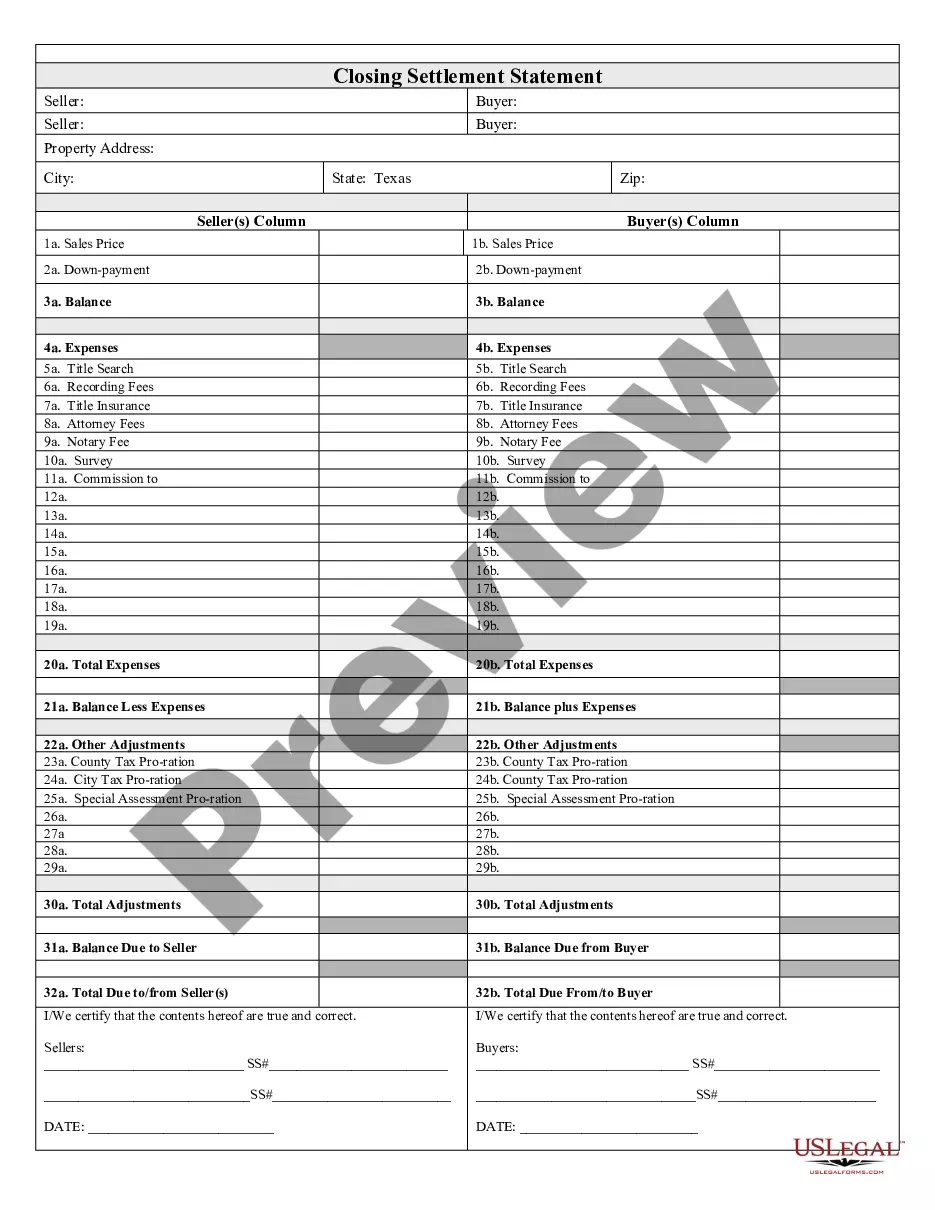
The closing statement typically lists fees in two columns, one detailing the buyer's expenses and one detailing the seller's expenses. The amount of cash the buyer must give the seller has its own entry at the bottom of the document.
The closing entries are the journal entry form of the Statement of Retained Earnings. The goal is to make the posted balance of the retained earnings account match what we reported on the statement of retained earnings and start the next period with a zero balance for all temporary accounts.