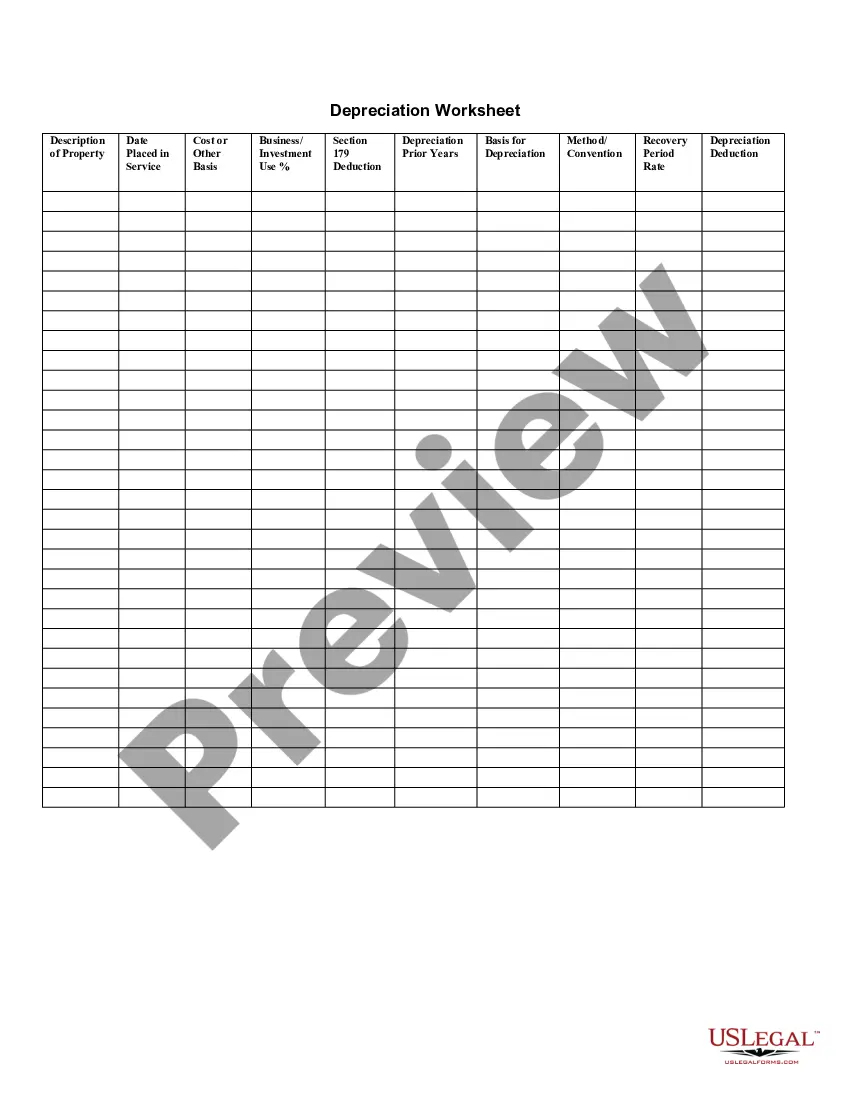
Depreciation Calculation Sheet In Excel Format
Description
Get your form ready online
Our built-in tools help you complete, sign, share, and store your documents in one place.
Make edits, fill in missing information, and update formatting in US Legal Forms—just like you would in MS Word.
Download a copy, print it, send it by email, or mail it via USPS—whatever works best for your next step.
Sign and collect signatures with our SignNow integration. Send to multiple recipients, set reminders, and more. Go Premium to unlock E-Sign.
If this form requires notarization, complete it online through a secure video call—no need to meet a notary in person or wait for an appointment.
We protect your documents and personal data by following strict security and privacy standards.

Make edits, fill in missing information, and update formatting in US Legal Forms—just like you would in MS Word.

Download a copy, print it, send it by email, or mail it via USPS—whatever works best for your next step.

Sign and collect signatures with our SignNow integration. Send to multiple recipients, set reminders, and more. Go Premium to unlock E-Sign.

If this form requires notarization, complete it online through a secure video call—no need to meet a notary in person or wait for an appointment.

We protect your documents and personal data by following strict security and privacy standards.
Looking for another form?






How to fill out Depreciation Worksheet?
Utilizing legal templates that adhere to federal and state regulations is essential, and the internet provides a plethora of choices to select from.
However, what is the use of spending time searching for the appropriate Depreciation Calculation Sheet In Excel Format template online if the US Legal Forms digital library already has such templates gathered in one location.
US Legal Forms is the largest online legal repository with over 85,000 editable templates created by lawyers for any business and personal situation.
Review the template using the Preview option or through the text outline to ensure it fits your requirements.
- They are simple to navigate with all documents categorized by state and intended use.
- Our experts keep up with legal updates, ensuring your documentation is always current and compliant when obtaining a Depreciation Calculation Sheet In Excel Format from our site.
- Acquiring a Depreciation Calculation Sheet In Excel Format is quick and easy for both existing and new users.
- If you already have an account with an active subscription, Log In and save the document template you need in your desired format.
- If you're new to our site, follow the instructions below.
Form popularity
FAQ
To format calculations in Excel, highlight the cells containing your formulas and choose the appropriate number format from the Home tab. You can set formats for currency, percentages, or even custom formats to enhance clarity. A well-formatted depreciation calculation sheet in Excel format not only looks professional but also makes it easier to interpret financial data.
To create a depreciation table, start by listing your assets, their initial costs, and useful life spans. Next, choose a depreciation method, such as straight-line or declining balance, and apply the appropriate formulas in Excel. A well-structured depreciation calculation sheet in Excel format will help you track the value of your assets accurately over time, making it easier to manage your financial health.
The DDB function in Excel stands for Double Declining Balance. It is a method used for calculating depreciation in a way that expenses are higher in the earlier years of an asset's life. By using the DDB function, you can create an effective depreciation calculation sheet in Excel format that allows for quick assessments of asset value over time. This function simplifies your financial analysis and helps you maintain accurate records.
1. The four methods for calculating depreciation allowable under GAAP include straight-line, declining balance, sum-of-the-years' digits, and units of production. 2. The best method for a business depends on size and industry, accounting needs, and types of assets purchased.
Depreciation can be calculated on fixed assets in excel by: For straight-line depreciation method: =SLN (cost, salvage, life).
Depreciation Expense = (Cost ? Salvage value) / Useful life. Periodic Depreciation Expense = Beginning book value x Rate of depreciation. Depreciation Expense = (Number of units produced / Life in number of units) x (Cost ? Salvage value)
In the straight-line method, the depreciation amount is a constant percentage of the basis, equal to d=1/n. For a useful life of 5 years, the depreciation rate (d) for years 1 through 5 is 1/5, 1/5, 1/5, 1/5, 1/5. The total sums to 5/5 or 100%.
To calculate depreciation using the straight-line method, subtract the asset's salvage value (what you expect it to be worth at the end of its useful life) from its cost. The result is the depreciable basis or the amount that can be depreciated. Divide this amount by the number of years in the asset's useful lifespan.