Service Site Report
What this document covers
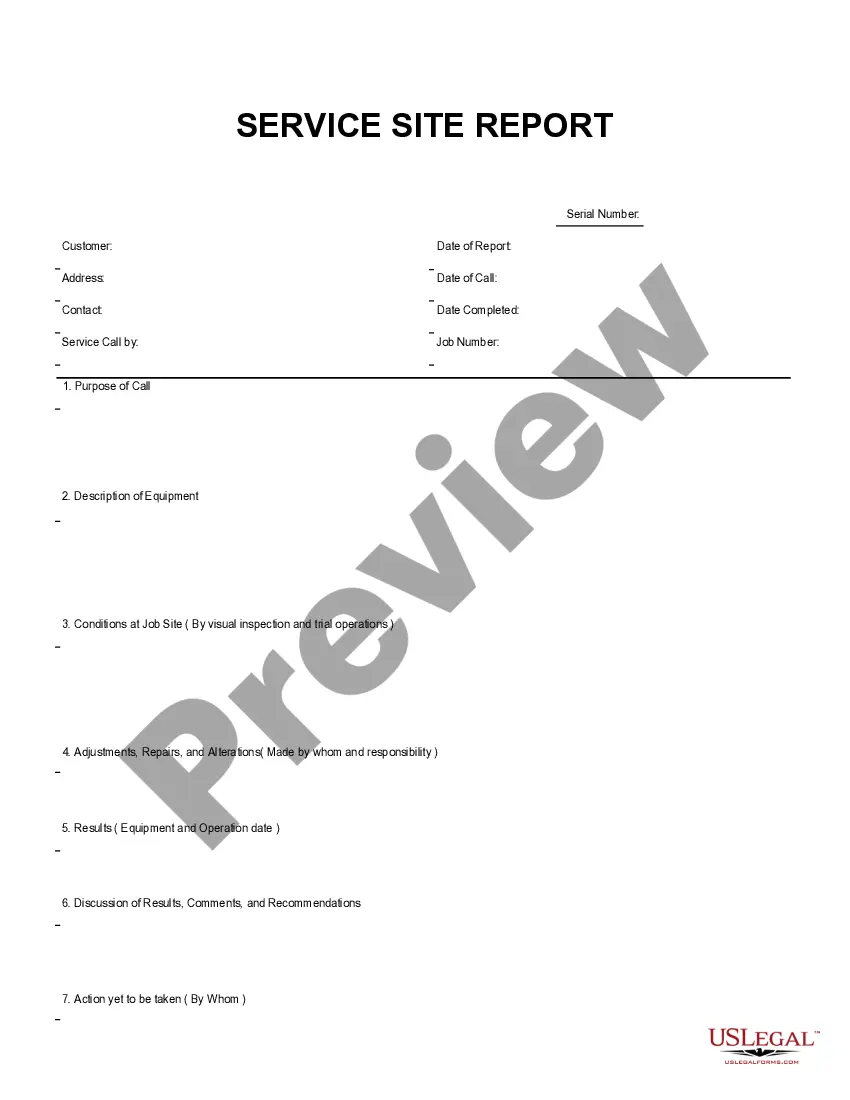
The Service Site Report is a specialized business form designed to document conditions, adjustments, repairs, and results at a job site. This form differs from general reports by focusing specifically on visual inspections and operational trials. The structured format allows for easy completion using Adobe Acrobat or Word, making it accessible for users with varying levels of expertise.
Main sections of this form
- Conditions at Job Site: Document findings based on visual inspections and trial operations.
- Adjustments, Repairs, and Alterations: Specify who made the adjustments and their responsibilities.
- Results: Record the equipment used and operational dates.
- Discussion of Results, Comments, and Recommendations: Provide an analysis of findings and suggestions.
- Action yet to be taken: Identify pending actions and responsible parties.

Situations where this form applies
This form should be used in scenarios where a comprehensive assessment of a job site is required. For instance, it is useful when conducting safety inspections, preparing for maintenance work, or documenting changes made to equipment or operations. Utilizing this report helps ensure that all aspects of the site are officially recorded and can aid in future project evaluations.
Intended users of this form
The following individuals or entities should consider using the Service Site Report:
- Contractors overseeing construction or maintenance projects.
- Facility managers coordinating site operations and inspections.
- Business owners seeking to maintain compliance and operational standards.
- Safety inspectors conducting evaluations of job sites.
How to prepare this document
- Identify the job site and provide a detailed description of the conditions.
- Document any adjustments, repairs, or alterations made, along with responsible parties.
- Record the results of the visual inspections and trial operations, including relevant dates.
- Include any discussions, comments, and recommendations based on your findings.
- List any actions that are yet to be taken, assigning responsibilities for those actions.
Is notarization required?
This form does not typically require notarization to be legally valid. However, some jurisdictions or document types may still require it. US Legal Forms provides secure online notarization powered by Notarize, available 24/7 for added convenience.
Get your form ready online
Our built-in tools help you complete, sign, share, and store your documents in one place.
Make edits, fill in missing information, and update formatting in US Legal Forms—just like you would in MS Word.
Download a copy, print it, send it by email, or mail it via USPS—whatever works best for your next step.
Sign and collect signatures with our SignNow integration. Send to multiple recipients, set reminders, and more. Go Premium to unlock E-Sign.
If this form requires notarization, complete it online through a secure video call—no need to meet a notary in person or wait for an appointment.
We protect your documents and personal data by following strict security and privacy standards.

Make edits, fill in missing information, and update formatting in US Legal Forms—just like you would in MS Word.

Download a copy, print it, send it by email, or mail it via USPS—whatever works best for your next step.

Sign and collect signatures with our SignNow integration. Send to multiple recipients, set reminders, and more. Go Premium to unlock E-Sign.

If this form requires notarization, complete it online through a secure video call—no need to meet a notary in person or wait for an appointment.

We protect your documents and personal data by following strict security and privacy standards.
Avoid these common issues
- Failing to thoroughly inspect the job site before completing the form.
- Omitting important dates or signatures.
- Not specifying who is responsible for adjustments and repairs.
- Neglecting to document all comments and recommendations clearly.
Advantages of online completion
- Convenience: Downloadable and easily accessible from anywhere.
- Editability: Fillable fields allow for quick and accurate information entry.
- Reliability: Created by licensed attorneys to ensure legal compliance and effectiveness.
Summary of main points
- The Service Site Report is essential for documenting job site conditions and equipment operations.
- Accurate completion helps ensure compliance and proper maintenance.
- Available in a user-friendly format suitable for digital completion.
Looking for another form?
Form popularity
FAQ
Keep sentences short and simple. Include only one main idea in each sentence, with extra information in following sentences, introduced by a appropriate linking word (see below). Use linking words. Use everyday English. Avoid passive forms where possible. Keep an eye on punctuation.
Customer details. These details are essential in making your service report. Product/service details. When writing a report for service, always provide a space for product or service details. Feedback/comment.
A field service report is a document to be filled out by field technicians involved in a service task, inspection, or site visit upon its completion. The report provides dispatchers and technicians with a summary and results of every service task.
Service Report means documentation for each visit, including detailed information on work completed. The report shall include all pertinent data including time of arrival and departure, equipment serviced, location, findings, repairs, workers names, etc.
In order to ensure customer loyalty, it is necessary to provide what they want.Customer reports are critical for setting and meeting customer expectations. The Purpose of a customer service report is to get direct feedback, and then take that user generated data to make better decisions in the future.
Step 1: Know your brief. You will usually receive a clear brief for a report, including what you are studying and for whom the report should be prepared. Step 2: Keep your brief in mind at all times. Executive Summary. Introduction. Report Main Body. Conclusions and Recommendations.
To this end, the field service mobile app is a tool built for field technicians or mobile employees. With the field app, field technicians can easily carry out their day-to-day activities such as planning schedules, tracking the time spent on an issue, and communicating with customer support agents and customers.