Sample Disaster Recovery Procedures
Understanding this form
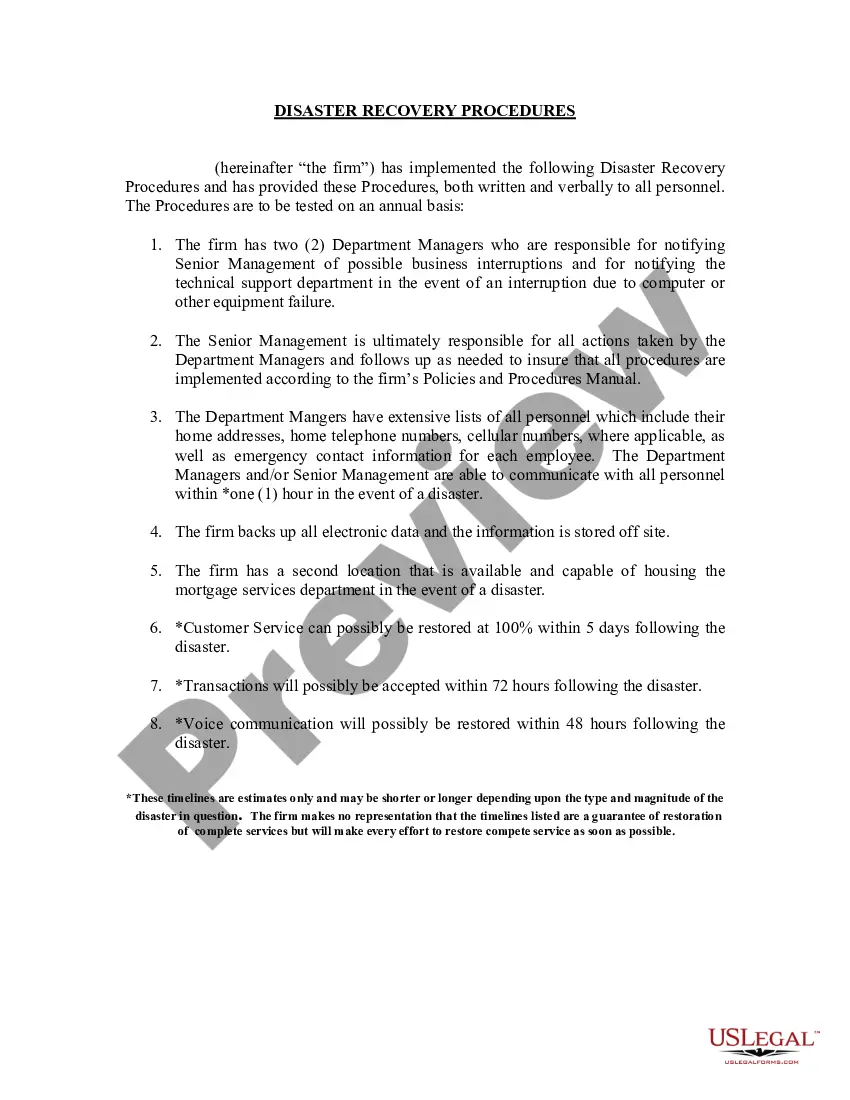
The Sample Disaster Recovery Procedures form outlines the steps an organization should take in case of a disaster. This document is critical for ensuring continuous operations and minimizing the impact of unexpected events. Unlike general emergency plans, this form is specifically tailored to establish communication protocols, data backup processes, and recovery timelines for employees and departments, giving comprehensive guidance to maintain business continuity during distressing circumstances.
Key parts of this document
- Responsibilities of Department Managers for notifying management and technical support.
- Procedures for communicating with employees during a disaster.
- Data backup and off-site storage information.
- Availability of a secondary location for housing essential departments.
- Estimated timelines for restoring services and operations post-disaster.
When to use this form
This form should be used by organizations to prepare for potential disasters that may interrupt business operations. It is essential for companies of all sizes to establish clear recovery procedures. Use this form when creating or revising your disaster recovery plan to ensure all employees understand their roles and the processes that need to be followed during emergencies.
Intended users of this form
This form is particularly useful for:
- Employers across various industries seeking to develop or update their disaster recovery procedures.
- Department Managers responsible for operational continuity and crisis management.
- Human resources professionals tasked with employee communication during emergencies.
- Senior Management overseeing business operations and recovery strategies.
How to complete this form
- Identify and list the Department Managers responsible for disaster notifications.
- Outline the specific communication procedures for reaching employees in case of a disaster.
- Document data backup processes, including off-site storage details.
- Specify the location of the secondary facility for housing services during emergencies.
- Estimate the timelines required for restoring operations and specify any variables that might affect these estimates.
Notarization requirements for this form
In most cases, this form does not require notarization. However, some jurisdictions or signing circumstances might. US Legal Forms offers online notarization powered by Notarize, accessible 24/7 for a quick, remote process.
Get your form ready online
Our built-in tools help you complete, sign, share, and store your documents in one place.
Make edits, fill in missing information, and update formatting in US Legal Forms—just like you would in MS Word.
Download a copy, print it, send it by email, or mail it via USPS—whatever works best for your next step.
Sign and collect signatures with our SignNow integration. Send to multiple recipients, set reminders, and more. Go Premium to unlock E-Sign.
If this form requires notarization, complete it online through a secure video call—no need to meet a notary in person or wait for an appointment.
We protect your documents and personal data by following strict security and privacy standards.

Make edits, fill in missing information, and update formatting in US Legal Forms—just like you would in MS Word.

Download a copy, print it, send it by email, or mail it via USPS—whatever works best for your next step.

Sign and collect signatures with our SignNow integration. Send to multiple recipients, set reminders, and more. Go Premium to unlock E-Sign.

If this form requires notarization, complete it online through a secure video call—no need to meet a notary in person or wait for an appointment.

We protect your documents and personal data by following strict security and privacy standards.
Common mistakes
- Failing to regularly update the form with new personnel or procedures.
- Neglecting to test the communication protocols outlined in the procedures.
- Not informing all employees of their roles and responsibilities during a disaster.
- Overlooking the need for regular data backups or failing to check the integrity of backup systems.
Why use this form online
- Convenient access to the form at any time, allowing for quick updates and reviews.
- Editable templates that can be customized to fit your organization's specific needs.
- Reliability of professionally drafted content that meets legal standards.
Key takeaways
- The Sample Disaster Recovery Procedures form is vital for ensuring business continuity during emergencies.
- Employers must establish clear communication guidelines to keep staff informed during a disaster.
- Regular updates and training on the disaster recovery plan are essential to maintain effectiveness.
Looking for another form?

Form popularity
FAQ
Step 1: Audit All of Your IT Resources. Step 2: Determine What's Mission-Critical Step 3: Establish Roles and Responsibilities for Everyone in the DR Plan. Step 4: Set Your Recovery Goals.
Step 1: Set Clear Recovery Objectives. Step 2: Identify Involved Professionals. Step 3: Draft a Detailed Documentation on Network Infrastructure. Step 4: Choose Your Data Recovery Technique. Step 5: Explicitly Define an Incident Criteria Checklist.
The scope of your plan. Organisational roles and responsibilities. Your critical business functions and the tolerance for downtime. A communication plan.
Disaster recovery as a service(DRaaS) is a cloud computing service model that allows an organization to back up its data and IT infrastructure in a third party cloud computing environment and provide all the DR orchestration, all through a SaaS solution, to regain access and functionality to IT infrastructure after a
Disaster recovery : diz-as-tur ree-cohv-ur-ee noun. Disaster recovery planning involves establishing processes and procedures that ensure an organization's IT infrastructure will function properly after a disruptive event, such as a natural or man-made disaster.
Tier 0 - No off-site data. Tier 1 - Physical backup with a cold site. Tier 2 - Physical backup with a hot site. Tier 3 - Electronic vaulting. Tier 4 - Point-in-time copies/active secondary site. Tier 5- Two-site commit/transaction integrity. Tier 6 - Minimal to zero data loss.
Data Center Disaster Recovery. Cloud-Based Disaster Recovery. Virtualization Disaster Recovery.
Create a disaster recovery team. Identify and assess disaster risks. Determine critical applications, documents, and resources. Determine critical applications, documents, and resources. Specify backup and off-site storage procedures. Specify backup and off-site storage procedures. Test and maintain the DRP.