Sample Letter for Forwarding of Documentation
Overview of this form
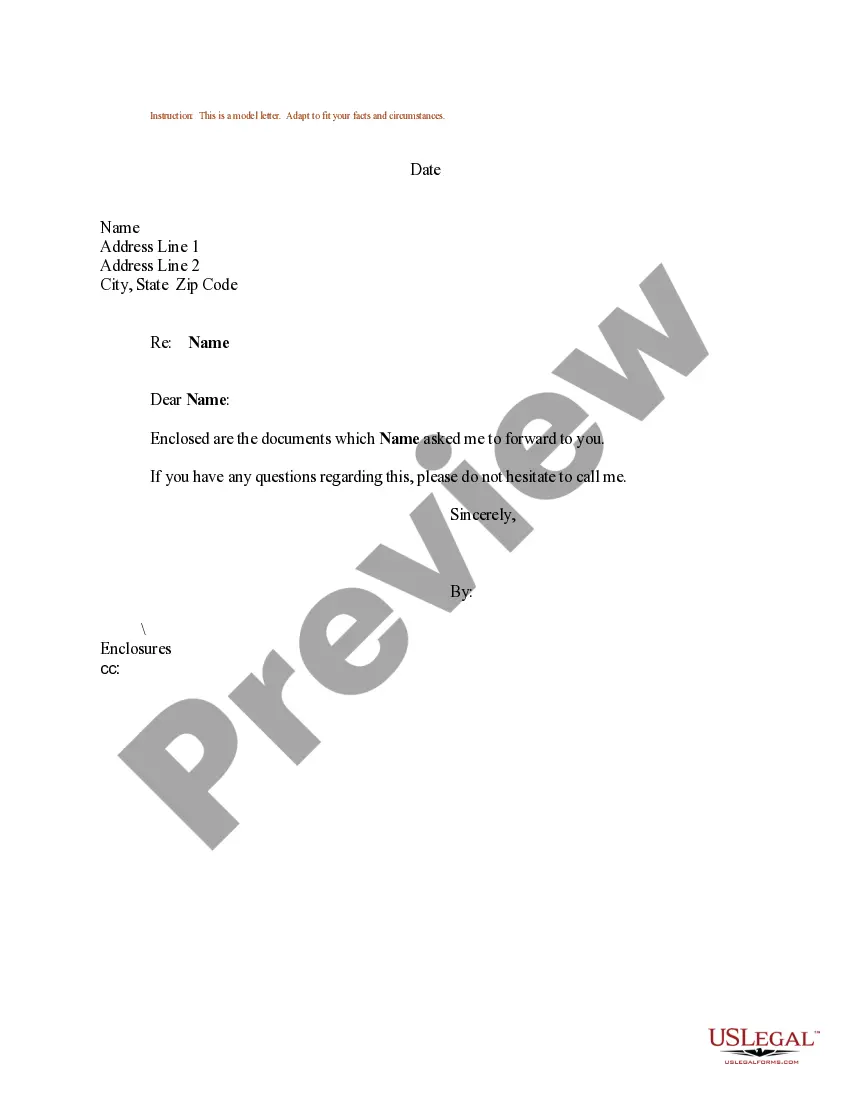
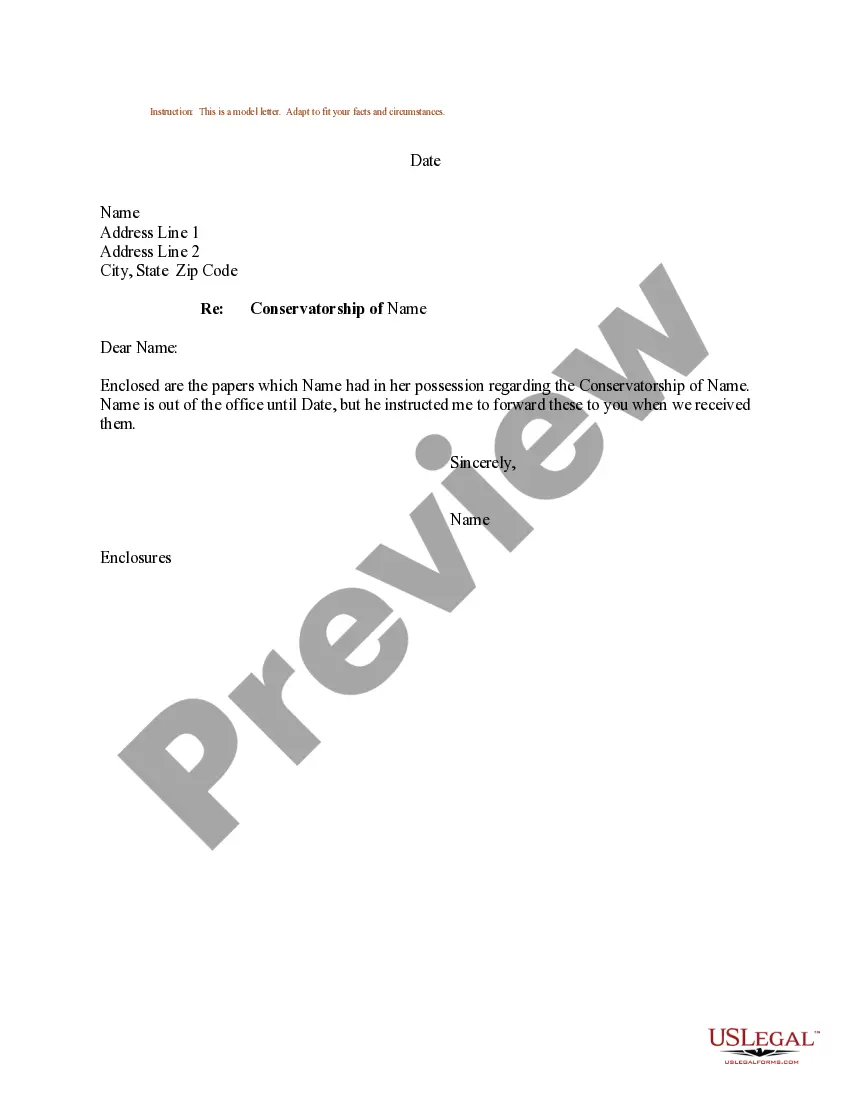
The Sample Letter for Forwarding of Documentation is a ready-to-use template designed to simplify the process of sending documents on behalf of someone else. This form serves as a formal communication tool to ensure that all necessary documents are clearly identified and delivered, making it easier to maintain organization. Unlike generic letters, this sample is tailored to legal contexts, ensuring it meets professional standards.
Key components of this form
- Date: Specify the date when the letter is created.
- Sender's information: Include the name and address of the sender.
- Recipient's information: Clearly state the name and address of the recipient.
- Subject line: Indicate the purpose of the letter.
- Body text: State that the documents are enclosed and provide a contact for questions.
- Closing signature: Include a space for the sender's signature and name.

Common use cases
This form is ideal when you need to send important documents to a third party at someone's request. Use it in situations such as transferring legal documents, sharing contracts, or any instance where formal communication is necessary to ensure the documents reach their intended recipient correctly.
Who this form is for
- Individuals acting on behalf of another person.
- Businesses needing to communicate with clients or partners regarding document transfers.
- Legal professionals who require a formal method of correspondence.
Steps to complete this form
- Identify the date at the top of the letter.
- Provide the sender's full name and address.
- Clearly state the recipient's name and address beneath the sender's information.
- Fill in the subject line to indicate the purpose of the letter.
- Draft the body text to mention the enclosed documents and provide contact information for any questions.
- Sign the letter and include the sender's printed name at the end.
Notarization guidance
This form does not typically require notarization to be legally valid. However, some jurisdictions or document types may still require it. US Legal Forms provides secure online notarization powered by Notarize, available 24/7 for added convenience.
Get your form ready online
Our built-in tools help you complete, sign, share, and store your documents in one place.
Make edits, fill in missing information, and update formatting in US Legal Forms—just like you would in MS Word.
Download a copy, print it, send it by email, or mail it via USPS—whatever works best for your next step.
Sign and collect signatures with our SignNow integration. Send to multiple recipients, set reminders, and more. Go Premium to unlock E-Sign.
If this form requires notarization, complete it online through a secure video call—no need to meet a notary in person or wait for an appointment.
We protect your documents and personal data by following strict security and privacy standards.

Make edits, fill in missing information, and update formatting in US Legal Forms—just like you would in MS Word.

Download a copy, print it, send it by email, or mail it via USPS—whatever works best for your next step.

Sign and collect signatures with our SignNow integration. Send to multiple recipients, set reminders, and more. Go Premium to unlock E-Sign.

If this form requires notarization, complete it online through a secure video call—no need to meet a notary in person or wait for an appointment.

We protect your documents and personal data by following strict security and privacy standards.
Avoid these common issues
- Forgetting to include the recipient's correct address.
- Not signing the letter before sending it.
- Using vague language that does not specify the enclosed documents.
- Neglecting to include a way for the recipient to contact the sender with questions.
Why use this form online
- Convenience of downloading and editing as needed.
- Access to a professionally drafted letter without the need for legal consultation.
- Time-saving by eliminating the need to create a letter from scratch.
Looking for another form?

Form popularity
FAQ
Step 1: Put your contact details (and the employer's) in the header. Step 2: Address the hiring manager by their name. Step 3: Hook the hiring manager with a strong introduction. Step 4: Prove that you're the perfect candidate for the job.
Don't use this overused opening line. I'm writing to apply for the role of2026 is the most overused opening line job seekers use on their cover letters. Cut meaningless buzzwords. Don't mention every past job. Use snappy, short words rather than long phrases.
Introduce yourself. mention the job (or kind of job) you're applying for (or looking for) show that your skills and experience match the skills and experience needed to do the job. encourage the reader to read your resume.
Always indicate the purpose of an attachment or attachments somewhere in the letter body or after the signature or initials. Discuss the attachment or the topic it covers in the body of your letter. For example, you might refer to a specific document that you want the letter recipient to review.
Inform the recipient about which documents you require. Use a polite and courteous tone in writing. Put the recipient at ease, don't let them feel that it would be burdensome to respond. Express your willingness to reciprocate for the recipient's kindness.
Follow the directions from the job ad. Attach your resume and a cover letter in the proper format. Find the hiring manager's name and email address. Use a strong subject line. Make your resume email short. Finish with a call to action.
9 alternative ways to say please see attached Here is 2026 Take a look at the attached 2026 Don't say anything. I've attached 2026 I'm sharing (file/ document/ whatever you are actually sharing) with you. You'll find the (attachment) below. Please do not hesitate to contact me should you have any inquiries about the attachment.
Introduce yourself. mention the job (or kind of job) you're applying for (or looking for) show that your skills and experience match the skills and experience needed to do the job. encourage the reader to read your resume.
Have an established process. What are the basics of your process? Be specific. Ask multiple times, in more than one way. Provide more than one way for them to get things to you. Have an open door policy. Let them know that deadlines may be missed.