Commission Summary
Understanding this form
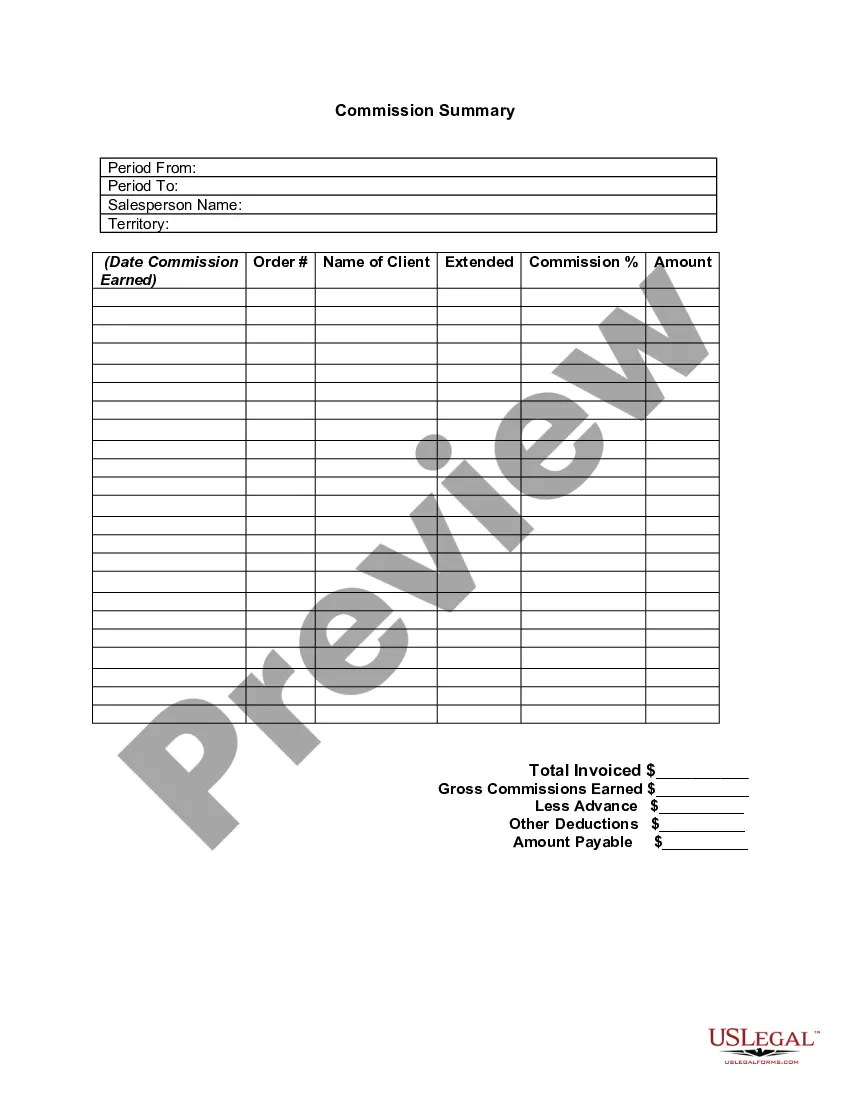
The Commission Summary is a detailed document that helps businesses track and summarize commissions earned by salespersons over a specific period. This form differs from other financial tracking tools by focusing exclusively on commission-related metrics, making it easier for companies to manage sales compensation effectively.
Key components of this form
- Period from and Period to: Indicates the duration for which commissions are calculated.
- Salesperson name: The name of the salesperson earning the commission.
- Territory: The geographical area where the salesperson operates.
- Date commission earned: The date when the commission was credited.
- Order number: The reference number associated with the sale.
- Name of client: The client who placed the order.
- Extended commission amount: The total commission due for the reported period.
- Total invoiced: The total dollar amount invoiced to the client.
- Gross commissions earned: The total commissions before deductions.
- Amount payable: The final amount due to the salesperson after deductions.



When to use this document
This form is essential for businesses that need to calculate and track the commissions their sales representatives earn. It's particularly useful for sales teams operating in commission-based environments, allowing for precise accounting of earnings over specified periods, including regular business reviews or payment cycles.
Who needs this form
- Sales managers who oversee commission payments.
- Accountants responsible for payroll and financial reporting.
- Business owners who want to maintain clear records of sales commissions.
- Human resources professionals managing incentive programs.
How to complete this form
- Enter the start and end dates for the commission period in the corresponding fields.
- Fill in the salesperson's name and the territory they cover.
- List the date the commission was earned along with the order number and client's name.
- Specify the extended commission amount and total invoiced for the sale.
- Calculate and enter the gross commissions earned along with any deductions to determine the final amount payable.
Is notarization required?
Notarization is not commonly needed for this form. However, certain documents or local rules may make it necessary. Our notarization service, powered by Notarize, allows you to finalize it securely online anytime, day or night.
Get your form ready online
Our built-in tools help you complete, sign, share, and store your documents in one place.
Make edits, fill in missing information, and update formatting in US Legal Forms—just like you would in MS Word.
Download a copy, print it, send it by email, or mail it via USPS—whatever works best for your next step.
Sign and collect signatures with our SignNow integration. Send to multiple recipients, set reminders, and more. Go Premium to unlock E-Sign.
If this form requires notarization, complete it online through a secure video call—no need to meet a notary in person or wait for an appointment.
We protect your documents and personal data by following strict security and privacy standards.

Make edits, fill in missing information, and update formatting in US Legal Forms—just like you would in MS Word.

Download a copy, print it, send it by email, or mail it via USPS—whatever works best for your next step.

Sign and collect signatures with our SignNow integration. Send to multiple recipients, set reminders, and more. Go Premium to unlock E-Sign.

If this form requires notarization, complete it online through a secure video call—no need to meet a notary in person or wait for an appointment.

We protect your documents and personal data by following strict security and privacy standards.
Mistakes to watch out for
- Not filling out all required fields, leading to incomplete information.
- Neglecting to double-check totals for accuracy.
- Failing to update commission amounts after deductions.
Why complete this form online
- Convenience of downloading and filling out the form at any time.
- Editability allows users to make changes easily before finalizing.
- Reliability with professionally drafted templates that ensure legal compliance.
Legal use & context
- Serves as a comprehensive record for sales transactions relevant to commissions.
- This form can be utilized for internal tracking and reporting purposes.
- Important for maintaining transparency in commission payments for audits and financial assessments.
What to keep in mind
- The Commission Summary is essential for tracking sales commissions accurately.
- Completing the form is straightforward and crucial for financial accountability.
- Ensuring accurate entries can help prevent common mistakes that lead to discrepancies in payments.
Legal terms and meanings
- Commission: A payment made to a salesperson based on the sales they generate.
- Salesperson: An individual responsible for making sales, often within a specific territory.
- Deductions: Amounts subtracted from gross commissions for advances or other expenses.
Looking for another form?
Form popularity
FAQ
In terms of structure, a commission is money paid by an employer to an employee on a regular basis, in payment for services rendered on the job. Upon being established as a for-commission worker, fully or partially, that employee will receive his or her paycheck, either via regular paycheck or automatic deposit.
A fee paid for services, usually a percentage of the total cost. Example: City Gallery sold Amanda's painting for $500, so Amanda paid them a 10% commission (of $50).
The Commission Summary report summarizes the compensation for all salespeople for the period you specify and year-to-date.If you run this report in salesrep currency, then the amounts reflect the currency associated with the value in the Rep Name field (the salesperson's name).
Under the cash basis of accounting, you should record a commission when it is paid, so there is a credit to the cash account and a debit to the commission expense account. You can classify the commission expense as part of the cost of goods sold, since it directly relates to the sale of goods or services.
Just take sale price, multiply it by the commission percentage, divide it by 100. An example calculation: a blue widget is sold for $70 . The sales person works on a commission - he/she gets 14% out of every transaction, which amounts to $9.80 .