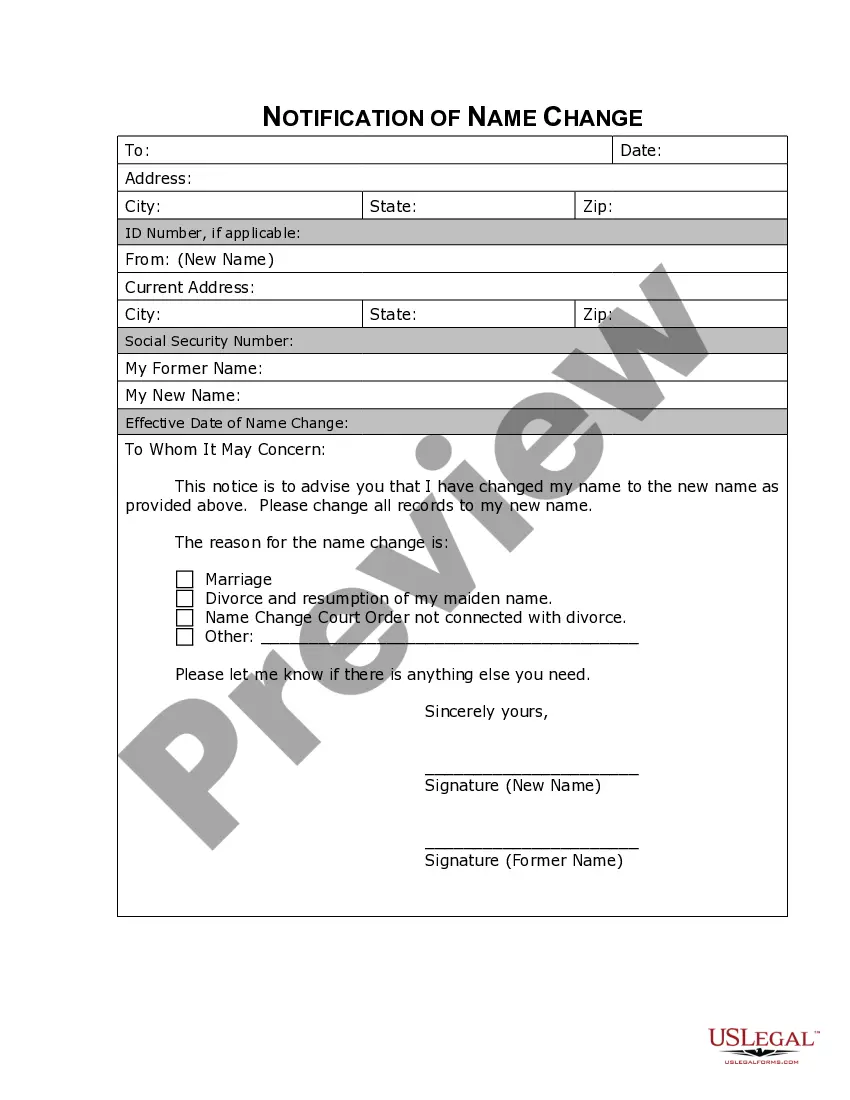
South Carolina Name Change Notification Form
About this form
The Name Change Notification Form is a legal document used to inform companies, organizations, and government agencies about your name change following a legal process. This form is essential for ensuring that all your records are updated to reflect your new name, helping to avoid confusion and maintain your legal rights. Unlike other forms that may only deal with legal name changes, this specific form serves the purpose of communication to various entities affected by your name change.
What’s included in this form
- Personal information section: Includes your old and new name along with contact details.
- Notification recipients: Areas to list the companies, organizations, or agencies being notified.
- Signatures: Space for your signature to confirm the notification has been sent.
- Date of change: Indicates when the name change took effect.


When this form is needed
You should use the Name Change Notification Form after officially changing your name through a court order, marriage, or other legal process. This form is necessary when you need to update important records, such as bank accounts, social security files, or identification documents, after your name has changed. It helps prevent potential complications in your personal and professional transactions.
Who this form is for
- Individuals who have legally changed their name and wish to inform various organizations.
- Anyone needing to update their name with government agencies, banks, and service providers.
- People who recently underwent significant life changes, such as marriage or divorce, resulting in a name change.
How to complete this form
- Identify your old name and your new name clearly at the top of the form.
- Fill out your contact information accurately.
- List all organizations, agencies, and companies that need to be notified.
- Sign and date the form to confirm the information is correct and that you are issuing this change.
- Distribute the completed form to all listed recipients.
Is notarization required?
Notarization is not commonly needed for this form. However, certain documents or local rules may make it necessary. Our notarization service, powered by Notarize, allows you to finalize it securely online anytime, day or night.
Get your form ready online
Our built-in tools help you complete, sign, share, and store your documents in one place.
Make edits, fill in missing information, and update formatting in US Legal Forms—just like you would in MS Word.
Download a copy, print it, send it by email, or mail it via USPS—whatever works best for your next step.
Sign and collect signatures with our SignNow integration. Send to multiple recipients, set reminders, and more. Go Premium to unlock E-Sign.
If this form requires notarization, complete it online through a secure video call—no need to meet a notary in person or wait for an appointment.
We protect your documents and personal data by following strict security and privacy standards.

Make edits, fill in missing information, and update formatting in US Legal Forms—just like you would in MS Word.

Download a copy, print it, send it by email, or mail it via USPS—whatever works best for your next step.

Sign and collect signatures with our SignNow integration. Send to multiple recipients, set reminders, and more. Go Premium to unlock E-Sign.

If this form requires notarization, complete it online through a secure video call—no need to meet a notary in person or wait for an appointment.

We protect your documents and personal data by following strict security and privacy standards.
Avoid these common issues
- Failing to list all necessary recipients for notification.
- Not updating personal information on the form accurately.
- Forgetting to sign and date the form before submission.
Why use this form online
- Convenience: Download and fill the form from home at your own pace.
- Editability: Easily modify the form as needed before finalizing it.
- Reliability: Access forms drafted by licensed attorneys to ensure legal compliance.
What to keep in mind
- The Name Change Notification Form is essential for updating records after a legal name change.
- Provide accurate information to avoid any delays in recognition of your new name.
- Easily complete the form online for convenience and reliability.
Looking for another form?


Form popularity
FAQ
You'll need to fill out SCDMV Form 4057 (Application for a Name and/or Address Change) and Form 447-NC (Application for a Driver's License, Beginner's Permit, or Identification Card). Bring along documentation of your name change (your certified marriage license or court order) too.
South Carolina allows a person to legally change their name or the name of their child by formally petitioning the Family Court. The process involves petitioning the Court with information such as the former and requested name and the reasons for the change, which must be valid and reasonable.
Social Security Administration. Department of Motor Vehicles. Passport Office. Post Office. IRS. Voter Registration. Banks and other financial institutions. Credit Card companies (or issuers)
How much does it cost to change a name? For an adult, changing a name involves a $150 filing fee with the court for the petition.
Changing your name after marriageYou can usually change identity documents such as your driver's licence and passport to your married surname by providing a copy of your standard marriage certificate.
In SC you must wait at least 48 hours after visiting the SS office before going to the DMV to get your license or ID card with your new name. The waiting time is due to the fact that the SS administration needs to update their computer database.
How much does it cost to change a name? For an adult, changing a name involves a $150 filing fee with the court for the petition.
South Carolina allows a person to legally change their name or the name of their child by formally petitioning the Family Court. The process involves petitioning the Court with information such as the former and requested name and the reasons for the change, which must be valid and reasonable.