Minnesota Acknowledgment for Corporation
Overview of this form
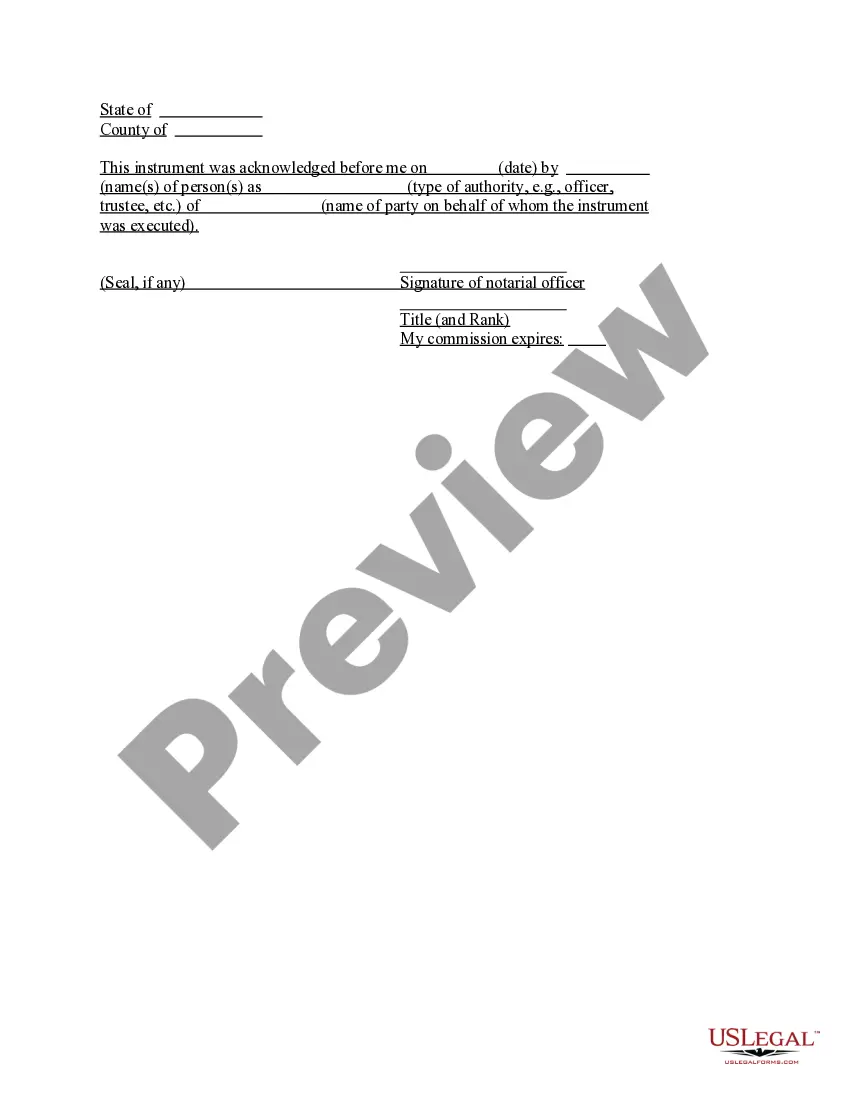
The Acknowledgment for Corporation is a legal document used to confirm the execution of a document on behalf of a corporation. This form is essential for establishing the authenticity of the signatures and the authority of the individuals signing on behalf of the corporation. Unlike standard acknowledgment forms, this version is specifically tailored for corporate needs, ensuring compliance with corporate governance and legal standards.
Key components of this form
- Date of acknowledgment
- Names of individuals executing the document
- Type of authority (e.g., officer, trustee)
- Name of the corporation
- Signature of the notarial officer, if applicable
- Space for corporate seal, if applicable

When this form is needed
This form should be used when a corporation needs to officially acknowledge a document that has been executed by its representatives. It is commonly required in situations such as signing contracts, agreements, or other legal documents where the corporation's liability or consent is being confirmed. Utilizing this form helps in maintaining accurate records and supports the validity of corporate actions.
Intended users of this form
- Corporations needing to verify the execution of documents
- Corporate officers or trustees authorized to act on behalf of the corporation
- Legal representatives managing corporate governance
Completing this form step by step
- Identify the date on which the acknowledgment is made.
- Enter the names of the individuals who are executing the document.
- Specify the authority under which the individuals are acting (e.g., officer, trustee).
- Input the name of the corporation on behalf of which the document is executed.
- Have the notarial officer sign and date the form, if required.
- Affix the corporate seal if applicable.
Notarization guidance
Yes, this form must be notarized to be legally valid. This ensures that the signatures are authentic and the document is properly executed. US Legal Forms offers integrated online notarization, providing a secure video call with a licensed notary, making the process simple and effective.
Get your form ready online
Our built-in tools help you complete, sign, share, and store your documents in one place.
Make edits, fill in missing information, and update formatting in US Legal Forms—just like you would in MS Word.
Download a copy, print it, send it by email, or mail it via USPS—whatever works best for your next step.
Sign and collect signatures with our SignNow integration. Send to multiple recipients, set reminders, and more. Go Premium to unlock E-Sign.
If this form requires notarization, complete it online through a secure video call—no need to meet a notary in person or wait for an appointment.
We protect your documents and personal data by following strict security and privacy standards.

Make edits, fill in missing information, and update formatting in US Legal Forms—just like you would in MS Word.

Download a copy, print it, send it by email, or mail it via USPS—whatever works best for your next step.

Sign and collect signatures with our SignNow integration. Send to multiple recipients, set reminders, and more. Go Premium to unlock E-Sign.

If this form requires notarization, complete it online through a secure video call—no need to meet a notary in person or wait for an appointment.

We protect your documents and personal data by following strict security and privacy standards.
Common mistakes
- Failing to include the correct date of acknowledgment.
- Omitting the names of the individuals executing the document.
- Not specifying the type of authority clearly.
- Leaving out the corporation's name or seal.
- Not having the form notarized when required.
Benefits of using this form online
- Convenience of accessing the form anytime and anywhere.
- Editability to customize the form to meet specific needs.
- Reliability as the forms are drafted by licensed attorneys.
Looking for another form?
Form popularity
FAQ
To perform an acknowledgment, the individual must appear in front of a notary public or authorized official. They must declare that they are signing the document willingly and that they understand its content. This process validates the document's authenticity and is crucial for the Minnesota Acknowledgment for Corporation. Utilizing our platform can provide guidance and templates to streamline this process.
The acknowledgment certificate must include the name of the corporation, the date of the acknowledgment, and the signature of the person executing the document. Additionally, it should state the capacity in which the person is signing, confirming their authority to act on behalf of the corporation. For those looking to ensure compliance, using our services can simplify the process of creating a valid Minnesota Acknowledgment for Corporation.
Filing a DBA (Doing Business As) in Minnesota requires you to first conduct a name search to ensure your desired DBA name is available. Once you confirm its availability, you can file the registration form with the appropriate county office where your business operates. This process helps protect your business name and ensures compliance with the Minnesota Acknowledgment for Corporation. Consider using USLegalForms for simplified filing and guidance throughout the process.
To file an annual report for your LLC in Minnesota, visit the Minnesota Secretary of State's website and navigate to the business filing section. You can complete the annual report online or download a paper form. Make sure to provide accurate information about your LLC, including its address and registered agent. Submitting your report on time is crucial to maintain good standing, and using a service like USLegalForms can simplify this process.
In the context of the Minnesota Acknowledgment for Corporation, the authorized individual must sign the acknowledgment on behalf of the corporation. This is often the president, vice president, or another designated officer of the corporation. It’s important to ensure the signer has the authority to act on behalf of the corporation to validate the acknowledgment properly.
To form an S Corp in Minnesota, you start by choosing a unique name for your corporation that complies with state rules. Next, file the Articles of Incorporation with the Minnesota Secretary of State. After that, you will need to apply for an Employer Identification Number (EIN) from the IRS. Lastly, make an election to be treated as an S Corporation by filing Form 2553 with the IRS, ensuring that you meet the requirements for the Minnesota Acknowledgment for Corporation.
NOTARY CHECKLIST: Register your commission with the county in which you reside. If you are not a Minnesota resident, you may register in any Minnesota county. The fee to register a commission with a county is $20. Visit www.sos.state.mn.us for county office locations.
Unlike jurats, an acknowledgment does not need to be signed in the presence of a notary. However, the affiant does need to swear or affirm that they signed under their own free will.
The purpose of an acknowledgment is for a signer, whose identity has been verified, to declare to a Notary or notarial officer that he or she has willingly signed a document.The signer may either sign the document before appearing before you, or in your presence.
Yes, you may notarize a signature on a document that includes handwritten paragraphs. A document can be typed or handwritten. If the notarial certificate under the signature is not included, be sure to attach a loose certificate chosen by your customer.