Florida Notice Of Transfer To Security Form - Construction - Mechanic Liens
What this document covers
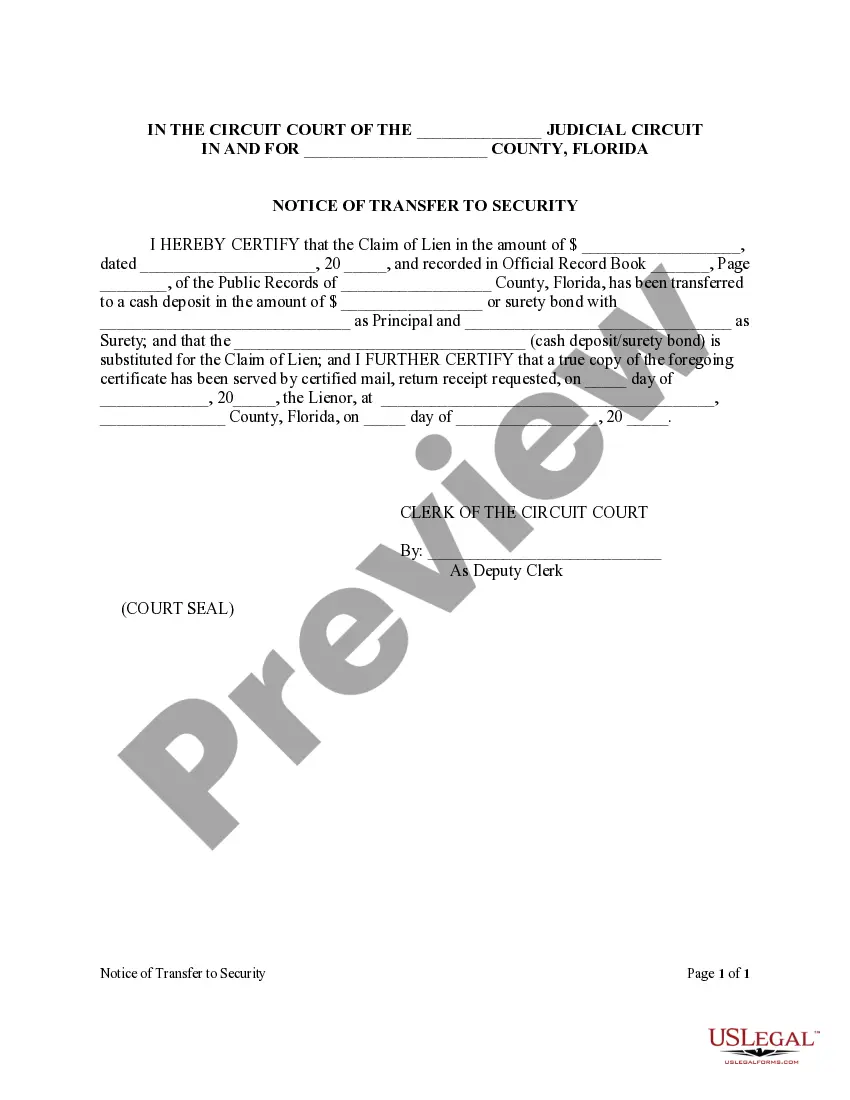
The Notice of Transfer to Security Form for Mechanic Liens allows an individual with an interest in real property to transfer a lien against that property to alternative security such as a cash deposit or surety bond. This process protects the lien claimant's rights while facilitating the transfer of the security from the property itself. Unlike other lien forms, this document specifically addresses the substitution of a legal claim with alternative forms of collateral, ensuring compliance with Florida law regarding mechanic liens.
Main sections of this form
- Identification of the lien amount and date
- Details of the original claim of lien and its recording information
- Information regarding the cash deposit or surety bond being utilized
- Certification of the transfer and service to the lienor
- Signature lines for the Clerk of the Circuit Court
When to use this document
This form should be used when a lien claimant wishes to transfer a mechanic lien secured against real property to another type of security. This often occurs during a construction project when the property owner needs to replace a lien with a cash deposit or a surety bond, either to resolve a dispute or to make the property marketable again.
Who this form is for
- Property owners seeking to transfer mechanic liens on their property
- Lien claimants, including contractors and subcontractors, wishing to secure their claims
- Attorneys assisting clients in real estate and construction matters
Instructions for completing this form
- Identify the judicial circuit and county where the form is being filed.
- Enter the lien amount and date, along with recording details of the original claim.
- Specify whether the lien is being transferred to a cash deposit or surety bond.
- Fill in the names of the principal and surety if using a surety bond.
- Serve a true copy of the certification to the lienor by certified mail and provide the date and address.
Is notarization required?
In most cases, this form does not require notarization. However, some jurisdictions or signing circumstances might. US Legal Forms offers online notarization powered by Notarize, accessible 24/7 for a quick, remote process.
Get your form ready online
Our built-in tools help you complete, sign, share, and store your documents in one place.
Make edits, fill in missing information, and update formatting in US Legal Forms—just like you would in MS Word.
Download a copy, print it, send it by email, or mail it via USPS—whatever works best for your next step.
Sign and collect signatures with our SignNow integration. Send to multiple recipients, set reminders, and more. Go Premium to unlock E-Sign.
If this form requires notarization, complete it online through a secure video call—no need to meet a notary in person or wait for an appointment.
We protect your documents and personal data by following strict security and privacy standards.

Make edits, fill in missing information, and update formatting in US Legal Forms—just like you would in MS Word.

Download a copy, print it, send it by email, or mail it via USPS—whatever works best for your next step.

Sign and collect signatures with our SignNow integration. Send to multiple recipients, set reminders, and more. Go Premium to unlock E-Sign.

If this form requires notarization, complete it online through a secure video call—no need to meet a notary in person or wait for an appointment.

We protect your documents and personal data by following strict security and privacy standards.
Mistakes to watch out for
- Failing to include accurate recording information for the original claim.
- Not serving the lienor or failing to document the service correctly.
- Omitting details about the cash deposit or surety bond.
- Not signing the document or including the Clerk's signature.
Why use this form online
- Convenient access to downloadable templates at any time.
- Editable forms allow users to customize the document for their specific needs.
- Reliable templates designed by licensed attorneys ensure legal compliance.
Looking for another form?

Form popularity
FAQ
To get a lien release form, you can visit legal websites or consult with a lawyer specialized in property law. It’s crucial to have the right form that complies with Florida laws. The Florida Notice Of Transfer To Security Form - Construction - Mechanic Liens from US Legal Forms is specifically designed to meet legal requirements, making the process straightforward.
To remove a mechanics lien in Florida, you need to either secure a lien release from the lienor or contest the lien in court if it's deemed invalid. Start by gathering evidence to dispute the lien, such as proof of payment or contractual agreements. Using the Florida Notice Of Transfer To Security Form - Construction - Mechanic Liens can help formalize any agreements you reach regarding the removal.
Creating a release of lien involves filling out the appropriate forms and ensuring that all relevant information is complete and accurate. You will need to include details about the original lien, such as the property address and the parties involved. The Florida Notice Of Transfer To Security Form - Construction - Mechanic Liens provides a clear template for drafting your release efficiently.
The speed at which you can obtain a lien release largely depends on the cooperation of the involved parties. Typically, you can expect to receive a lien release within several days to a couple of weeks once all necessary paperwork is submitted. Using the Florida Notice Of Transfer To Security Form - Construction - Mechanic Liens can streamline this process, ensuring your release is properly documented and submitted.
Filling out a mechanics lien waiver requires attention to detail. Start with your name, the property address, and the amount for which the waiver applies. Utilizing templates like the Florida Notice Of Transfer To Security Form - Construction - Mechanic Liens streamlines this process. Ensuring all parties sign the document escalates its effectiveness in settling any claims.
To fill out a mechanic's lien waiver, begin by entering your name and the property information. Follow the structure outlined in the Florida Notice Of Transfer To Security Form - Construction - Mechanic Liens, ensuring clarity and accuracy. Specify the payment received and include a declaration that satisfies both parties involved. This straightforward process helps in building trust.
Filling out a conditional waiver of lien involves specifying the amount of payment associated with the waiver. Include the project details and reference the Florida Notice Of Transfer To Security Form - Construction - Mechanic Liens as a guiding template. Make it clear that the waiver becomes effective only after payment is made. This proactive approach protects your interests.
A lien waiver is a document that relinquishes the right to file a lien against a property for work completed. It is primarily used to assure property owners that they won’t face claims of unpaid work once payment is made. Using the Florida Notice Of Transfer To Security Form - Construction - Mechanic Liens can help simplify this process. Understanding this concept protects both the owner and the contractor.
To release a mechanic's lien in Florida, the lienholder must file a release form with the local clerk’s office. It is important to refer to the guidelines of the Florida Notice Of Transfer To Security Form - Construction - Mechanic Liens when drafting this document. You will need to ensure that all parties involved are in agreement. Recordkeeping of all transactions can facilitate this process.
Typically, lien waivers do not require notarization in Florida, but it is a good practice to have them notarized for added security. This can establish the authenticity of the document and strengthen your position if disputes arise. The Florida Notice Of Transfer To Security Form - Construction - Mechanic Liens provides templates that can be tailored to meet your needs. Always check specific requirements for your situation.