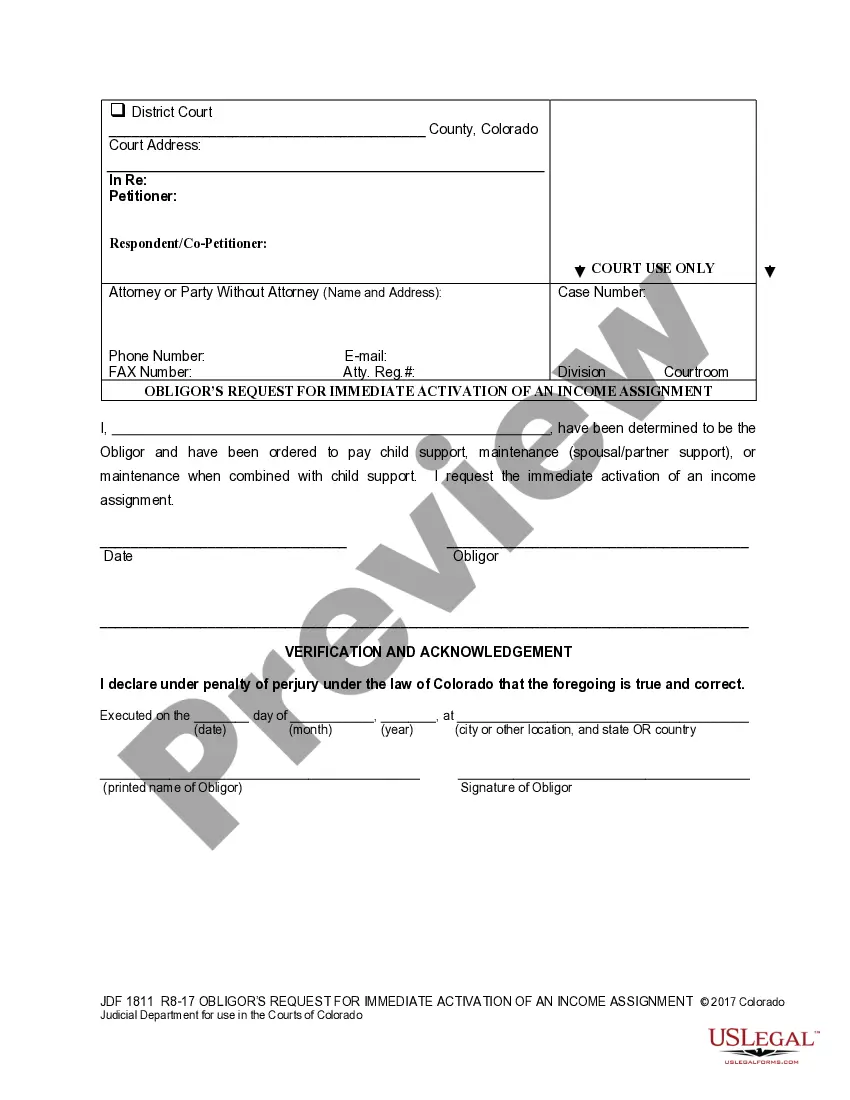
Colorado Obligor's Request for an Income Assignment
What is this form?
The Obligor's Request for Immediate Activation of an Income Assignment is a legal document used in Colorado when a person (the Obligor) requests the activation of an income assignment related to child support or spousal support obligations. This form is crucial for initiating the withholding of income to fulfill support payments and helps ensure compliance with court orders. Unlike other forms, this document specifically addresses the immediate activation of income assignments, making it essential for those who have received a court order for support payments.
Form components explained
- Obligor's personal information, including name and case number.
- Request for immediate activation of the income assignment.
- Verification statement acknowledging the truthfulness of the declaration.
- Signature and printed name of the Obligor, along with the date and place of execution.
Situations where this form applies
This form should be used when an Obligor has a legal obligation to pay child support or maintenance and wants to request the immediate activation of an income assignment. It is critical to use this form when there is a need for prompt enforcement of support payments through income withholding, particularly after a court order has been issued.
Who should use this form
- Individuals identified as Obligors in a court order for child support or maintenance.
- Those required to provide support payments and wish to initiate income withholding.
- Individuals seeking to comply with the judicial mandates regarding support obligations.
Steps to complete this form
- Provide your full name and case number at the top of the form.
- Clearly stately your request for the immediate activation of an income assignment.
- Sign and date the form, ensuring the date aligns with your request.
- Enter the city and state where you are completing the form.
- Ensure that all personal information is accurate to avoid delays in processing.
Does this form need to be notarized?
This form does not typically require notarization unless specified by local law. However, check with relevant authorities to ensure compliance with specific requirements.
Get your form ready online
Our built-in tools help you complete, sign, share, and store your documents in one place.
Make edits, fill in missing information, and update formatting in US Legal Forms—just like you would in MS Word.
Download a copy, print it, send it by email, or mail it via USPS—whatever works best for your next step.
Sign and collect signatures with our SignNow integration. Send to multiple recipients, set reminders, and more. Go Premium to unlock E-Sign.
If this form requires notarization, complete it online through a secure video call—no need to meet a notary in person or wait for an appointment.
We protect your documents and personal data by following strict security and privacy standards.

Make edits, fill in missing information, and update formatting in US Legal Forms—just like you would in MS Word.

Download a copy, print it, send it by email, or mail it via USPS—whatever works best for your next step.

Sign and collect signatures with our SignNow integration. Send to multiple recipients, set reminders, and more. Go Premium to unlock E-Sign.

If this form requires notarization, complete it online through a secure video call—no need to meet a notary in person or wait for an appointment.

We protect your documents and personal data by following strict security and privacy standards.
Typical mistakes to avoid
- Failing to provide complete and accurate personal information.
- Not signing and dating the form, which can lead to rejection.
- Omitting necessary case numbers or details required by the court.
Why complete this form online
- Convenience of downloading the form anytime, from anywhere.
- Editability allows for quick updates to personal information.
- Reliability of using a form drafted by licensed attorneys ensures compliance with state laws.
Looking for another form?
Form popularity
FAQ
Colorado-source income includes any income derived from sources within Colorado including, but not limited to: (a)Ownership of Real or Tangible Personal Property.
You must file a Colorado income tax return if during the year you were: A full-year resident of Colorado, or. A part-year resident of Colorado with taxable income during that part of the year you were a resident, or.
However, verify the refund amount you have entered and verify that you are using the primary SSN for the refund. If it's still not showing anything, you may contact customer service at 1-303-238-7378, Monday through Friday, 8 a.m. to p.m. or contact the Colorado Department of Revenue.
To check the status of your Colorado state refund online, go to https://www.colorado.gov/revenueonline/. There is no need to login. Simply choose the option Check the Status of Your Refund under Welcome to Revenue Online.
Colorado has a flat income tax rate of 4.63%.
DENVER (KDVR) The Colorado Department of Revenue announced Thursday that it will extend the individual income tax payment and filing deadline.Individuals now have the option to postpone any 2020 income tax payments due on April 15, 2021 to May 17, 2021 without penalties and interest, regardless of the amount owed.
Find out if Your Tax Return Was Submitted Using the IRS Where's My Refund tool. Viewing your IRS account information. Calling the IRS at 1-800-829-1040 (Wait times to speak to a representative may be long.) Looking for emails or status updates from your e-filing website or software.
You must file a Colorado income tax return if during the year you were: A full-year resident of Colorado, or. A part-year resident of Colorado with taxable income during that part of the year you were a resident, or.
You can check the status of your refund on Revenue Online. There is no need to login. Simply choose the option "Tax Refund for Individuals" in the box labeled "Where's my Refund?". Then, enter your SSN or ITIN and the refund amount you claimed on your current year income tax return.