North Carolina Acknowledgment for Individuals
About this form
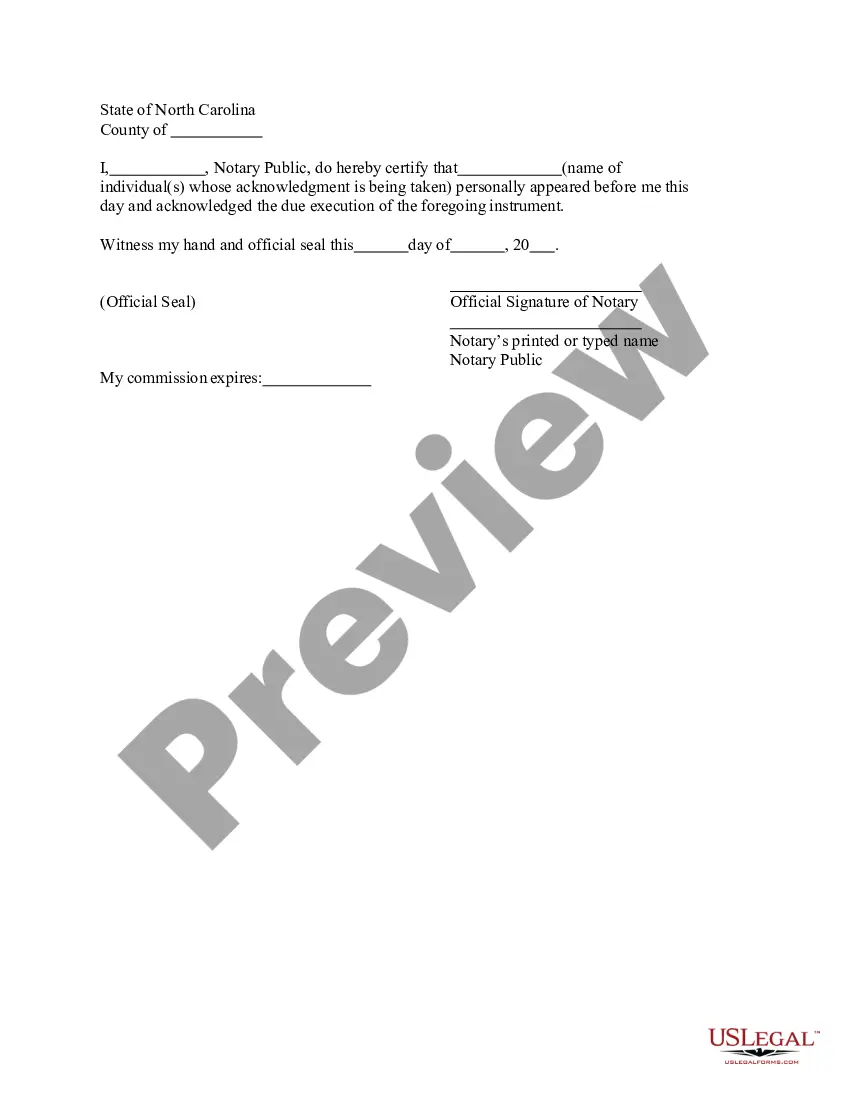
The Acknowledgment for Individuals is a legal document used to formally recognize the signing of another document by an individual. This form is essential for verifying that a person has acknowledged their signature, often required in legal contexts. It differs from other notarial forms by focusing specifically on individual acknowledgment, rather than general notarization or affirmation of other actions.
What’s included in this form
- Name of the individual(s) whose acknowledgment is being taken.
- Date of acknowledgment.
- Notary public's certification statement.
- Official seal of the notary.
- Signature of the notary public.
Situations where this form applies
This form should be used in scenarios where an individual has signed a document and that signature needs to be confirmed by a notary public. Common situations include property transactions, legal agreements, and any situation where formal acknowledgment of a signature is required for authenticity.
Who can use this document
- Individuals who need to confirm their signature on a legal document.
- Notaries public who are required to document acknowledgment of signatures.
- Legal professionals involved in transactions requiring verified signatures.
Instructions for completing this form
- Enter the name(s) of the individual(s) who are acknowledging their signature.
- Specify the date the acknowledgment is being taken.
- Notary public should complete the certification statement, confirming the individualâs identity.
- Affix the official seal of the notary at the designated area.
- Notary public should sign the form to finalize the acknowledgment.
Does this form need to be notarized?
Yes, this form must be notarized to be legally valid. It requires the presence of a notary public who will confirm the acknowledgment of the signature. US Legal Forms provides integrated online notarization services, allowing for secure video calls that are legally equivalent to in-person notarization, with availability twenty-four hours a day, eliminating the need for travel.
Get your form ready online
Our built-in tools help you complete, sign, share, and store your documents in one place.
Make edits, fill in missing information, and update formatting in US Legal Forms—just like you would in MS Word.
Download a copy, print it, send it by email, or mail it via USPS—whatever works best for your next step.
Sign and collect signatures with our SignNow integration. Send to multiple recipients, set reminders, and more. Go Premium to unlock E-Sign.
If this form requires notarization, complete it online through a secure video call—no need to meet a notary in person or wait for an appointment.
We protect your documents and personal data by following strict security and privacy standards.

Make edits, fill in missing information, and update formatting in US Legal Forms—just like you would in MS Word.

Download a copy, print it, send it by email, or mail it via USPS—whatever works best for your next step.

Sign and collect signatures with our SignNow integration. Send to multiple recipients, set reminders, and more. Go Premium to unlock E-Sign.

If this form requires notarization, complete it online through a secure video call—no need to meet a notary in person or wait for an appointment.

We protect your documents and personal data by following strict security and privacy standards.
Mistakes to watch out for
- Failing to include the date of acknowledgment.
- Not obtaining the notary's signature or seal.
- Incorrectly identifying the individual(s) who are acknowledging.
Why use this form online
- Convenience of downloading and printing from home.
- Editability ensures that all necessary information can be accurately filled out.
- Reliable legal templates drafted by licensed attorneys.
Main things to remember
- The Acknowledgment for Individuals confirms that a person has acknowledged their signature on a document.
- It is essential for legal transactions that require notarization of signatures.
- Accuracy in filling out the form is critical to avoid common mistakes.
Looking for another form?
Form popularity
FAQ
North Carolina allows its commissioned notaries to perform electronic notarizations only. With the DocVerify e-Notary platform, notaries will be enabled to electronically notarize a document or a set of documents without the use of paper or a rubber stamp.
North Carolina authorizes Notaries to charge no more than $5 per notarization. You may not charge travel or mileage expenses to your signers. If you charge a fee for notarizations, you are required to display a fee schedule.
A notary public who has a direct or indirect financial (or other beneficial) interest in a document may not notarize such a document. The better practice is not to notarize for a spouse or family member in order to preserve the integrity of the notarization and to prevent a challenge to the notarization.
The Individual Acknowledgment certificate is used when an individual is signing and acknowledging on his or her own behalf.
Step 1: Require Personal Appearance. Step 2: Check Over The Document. Step 3: Carefully Identify The Signer. Step 4: Record Your Journal Entry. Step 5: Complete The Notarial Certificate. A Last Note: Never Give Advice.
Appear before a North Carolina Notary Public to sign the document; Obtain a certified copy which is notarized by the issuing entity (i.e., diploma, etc.); If necessary, you may use a "True Copy" affidavit for North Carolina documents and obtain a notary acknowledgment of your signature;
When you see (here insert the name and character of the officer) next to a blank as shown below, it means you should insert Your name, Notary Public in the blank.