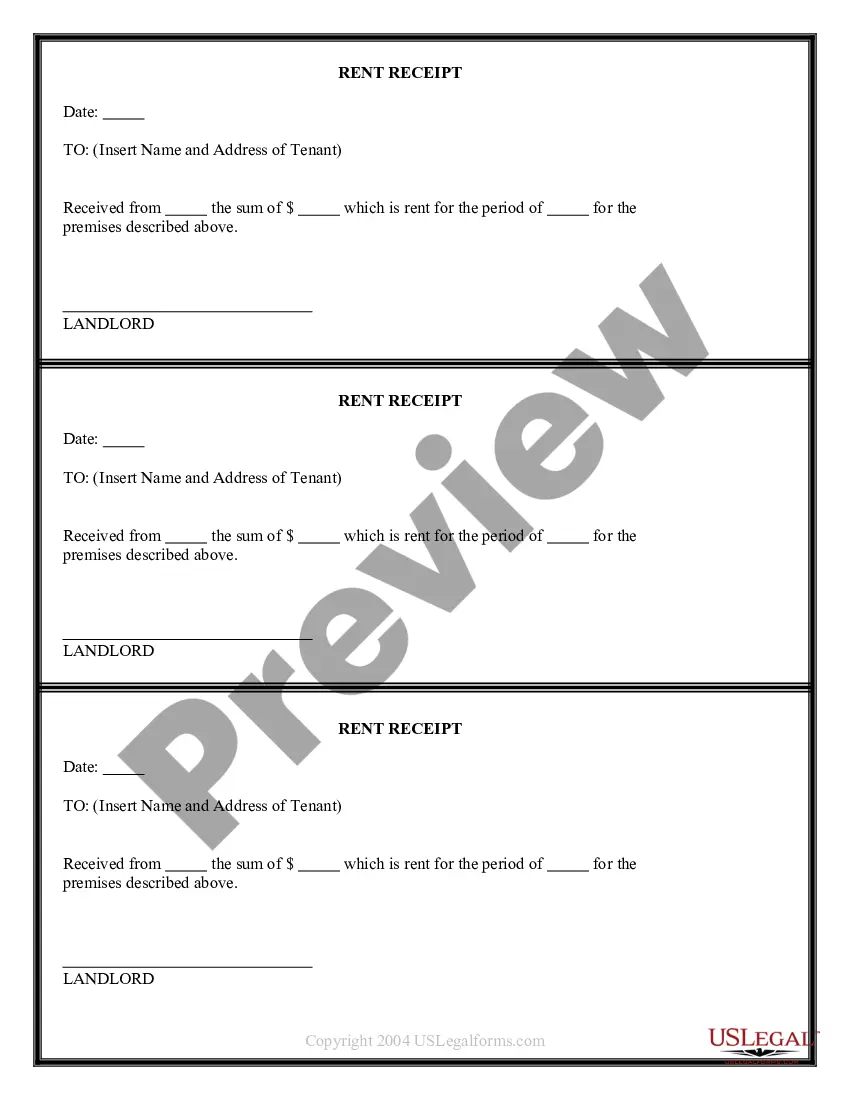
Receipt Tenant Forms With Carbon Copy
Description
Get your form ready online
Our built-in tools help you complete, sign, share, and store your documents in one place.
Make edits, fill in missing information, and update formatting in US Legal Forms—just like you would in MS Word.
Download a copy, print it, send it by email, or mail it via USPS—whatever works best for your next step.
Sign and collect signatures with our SignNow integration. Send to multiple recipients, set reminders, and more. Go Premium to unlock E-Sign.
If this form requires notarization, complete it online through a secure video call—no need to meet a notary in person or wait for an appointment.
We protect your documents and personal data by following strict security and privacy standards.

Make edits, fill in missing information, and update formatting in US Legal Forms—just like you would in MS Word.

Download a copy, print it, send it by email, or mail it via USPS—whatever works best for your next step.

Sign and collect signatures with our SignNow integration. Send to multiple recipients, set reminders, and more. Go Premium to unlock E-Sign.

If this form requires notarization, complete it online through a secure video call—no need to meet a notary in person or wait for an appointment.

We protect your documents and personal data by following strict security and privacy standards.
Looking for another form?







How to fill out Apartment Complex Rent Receipt?
Locating a reliable source to find the most up-to-date and suitable legal templates is a significant part of dealing with bureaucracy.
Selecting the correct legal documents demands precision and meticulousness, which is why it's crucial to obtain samples of Receipt Tenant Forms With Carbon Copy solely from trustworthy providers, such as US Legal Forms.
Eliminate the hassle associated with your legal paperwork. Explore the extensive US Legal Forms catalog to discover legal templates, verify their relevance to your situation, and download them immediately.
- Employ the catalog browsing or search function to locate your sample.
- Examine the form's details to confirm if it meets the criteria of your state and locality.
- View the form preview, if accessible, to make sure the template is indeed the one you seek.
- Return to the search and locate the appropriate template if the Receipt Tenant Forms With Carbon Copy does not fulfill your requirements.
- If you are certain about the form's applicability, download it.
- If you are a logged-in user, click Log in to verify and access your chosen templates in My documents.
- If you do not have an account yet, click Buy now to acquire the template.
- Choose the pricing plan that fits your needs.
- Continue to the registration to finalize your purchase.
- Complete your purchase by selecting a payment option (credit card or PayPal).
- Choose the file format for downloading Receipt Tenant Forms With Carbon Copy.
- Once the form is on your device, you can modify it using the editor or print it and complete it manually.
Form popularity
FAQ
A carbon copy receipt is a type of receipt that automatically produces two copies—one for the payer and one for the payee. This helps maintain accountability between both parties involved in a transaction, especially in rental situations. Using receipt tenant forms with carbon copy simplifies this process by ensuring accurate documentation.
How to use a receipt book: Essential items to fill out in a receipt Fill in the date. ... Fill in the company name and contact information. ... Include other related details. ... Include product details. ... Include the price. ... Add the subtotal amount. ... Add taxes, additional charges, and the grand total.
How to write a receipt - YouTube YouTube Start of suggested clip End of suggested clip So i will write for lock rental. Here with the circles. Most often it will be cash or check. But ifMoreSo i will write for lock rental. Here with the circles. Most often it will be cash or check. But if the student is paying in cash.
It is important to fill out a rent receipt properly, with all the following information: The date of the payment. The rental period the payment is for. Which rental property is the payment for. The tenant's full name. Who received the payment. The property address. The payment amount. The method of payment.
When you make a purchase, you usually get a piece of paper called a receipt. The one on top, which is given to you, is called the original receipt (thermal paper) and it's usually white. The business keeps a copy of this on yellow paper, which is called the duplicate or carbon copy.
No matter how you're making your receipt, every receipt you issue should include: The number, date, and time of the purchase. Invoice number or receipt number. The number of items purchased and price totals. The name and location of the business the items have been bought from. Any tax charged. The method of payment.