360 Evaluation Form Template In Montgomery
Description


Get your form ready online
Our built-in tools help you complete, sign, share, and store your documents in one place.
Make edits, fill in missing information, and update formatting in US Legal Forms—just like you would in MS Word.
Download a copy, print it, send it by email, or mail it via USPS—whatever works best for your next step.
Sign and collect signatures with our SignNow integration. Send to multiple recipients, set reminders, and more. Go Premium to unlock E-Sign.
If this form requires notarization, complete it online through a secure video call—no need to meet a notary in person or wait for an appointment.
We protect your documents and personal data by following strict security and privacy standards.

Make edits, fill in missing information, and update formatting in US Legal Forms—just like you would in MS Word.

Download a copy, print it, send it by email, or mail it via USPS—whatever works best for your next step.

Sign and collect signatures with our SignNow integration. Send to multiple recipients, set reminders, and more. Go Premium to unlock E-Sign.

If this form requires notarization, complete it online through a secure video call—no need to meet a notary in person or wait for an appointment.

We protect your documents and personal data by following strict security and privacy standards.
Looking for another form?



Form popularity
FAQ
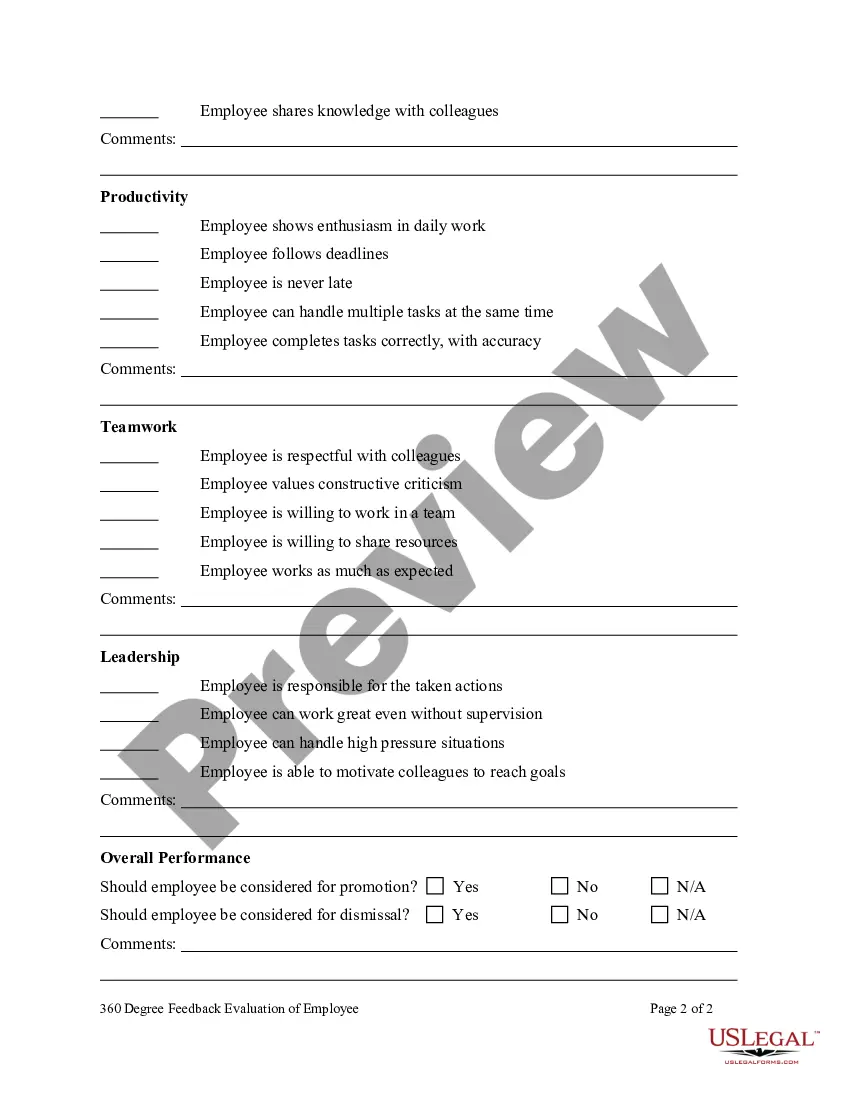
10 Open-Ended 360-Degree Feedback Questions What would you say are this person's strengths? What is one thing this employee should start doing? What is one thing this employee should continue doing? What is one thing this employee should stop doing? How well does this person manage their time and workload?
Are there any areas you think I'm weaker on? Is there any training you think would benefit my performance/role? Is there anything I'm currently doing that you would like done differently or for me to stop doing? How is my communication? Would you prefer less, more or the same level of communication?
Feedback Like a Pro: 3 Simple Questions to Ask 1. What am I/you doing great? 2. Where do I/you get stuck? 3. How can I/you do even better?
A 360 performance review measures employee performance typically using feedback from six to 12 people. It also includes an employee self-evaluation to provide a comprehensive look at an employee's efficiency, productivity, contributions and work behavior.
Here are the steps the process: Develop an employee questionnaire. Ensure the confidentiality of participants. Provide training and orientations. Start to elicit feedback from the survey. Analyse the data. Develop and distribute results.
These close-ended questions are useful for adding to management 360 feedback reviews, to ask relevant questions for this particular role. Does the manager work in a respectful manner to others? Does the manager consider other team members' opinions before making a decision? Does the manager effectively solve problems?
How to design an effective 360 degree feedback questionnaire Identify the themes you want to measure. Create specific 360 questions based on your themes. Example 360 degree feedback questionnaire questions. Define your 360 degree feedback questionnaire rating scale. In conclusion.
Who can give an employee 360 degree feedback? 360 feedback is multi rater feedback. This means it should be given by those colleagues who work directly with the person who's receiving the feedback. This can include supervisors, colleagues, direct reports, customers, and vendors.
8-Step 360 Degree Feedback Process Timeline Define the Purpose of the 360 Degree Review. Select Raters. Design the Questionnaire. Communicate the 360 Degree Feedback. Distributing surveys. Collate and Analyze Feedback. Conduct Feedback Discussion. Implement Action Plan.
These steps can help you establish a 360 evaluation system. Establish criteria for rating each employee. Choose who will assess each employee. Send surveys. Send the survey to the employee. Schedule the 360 evaluation. Review ratings with employee. Follow up on progress.
