Sample Resume Form
Overview of this form
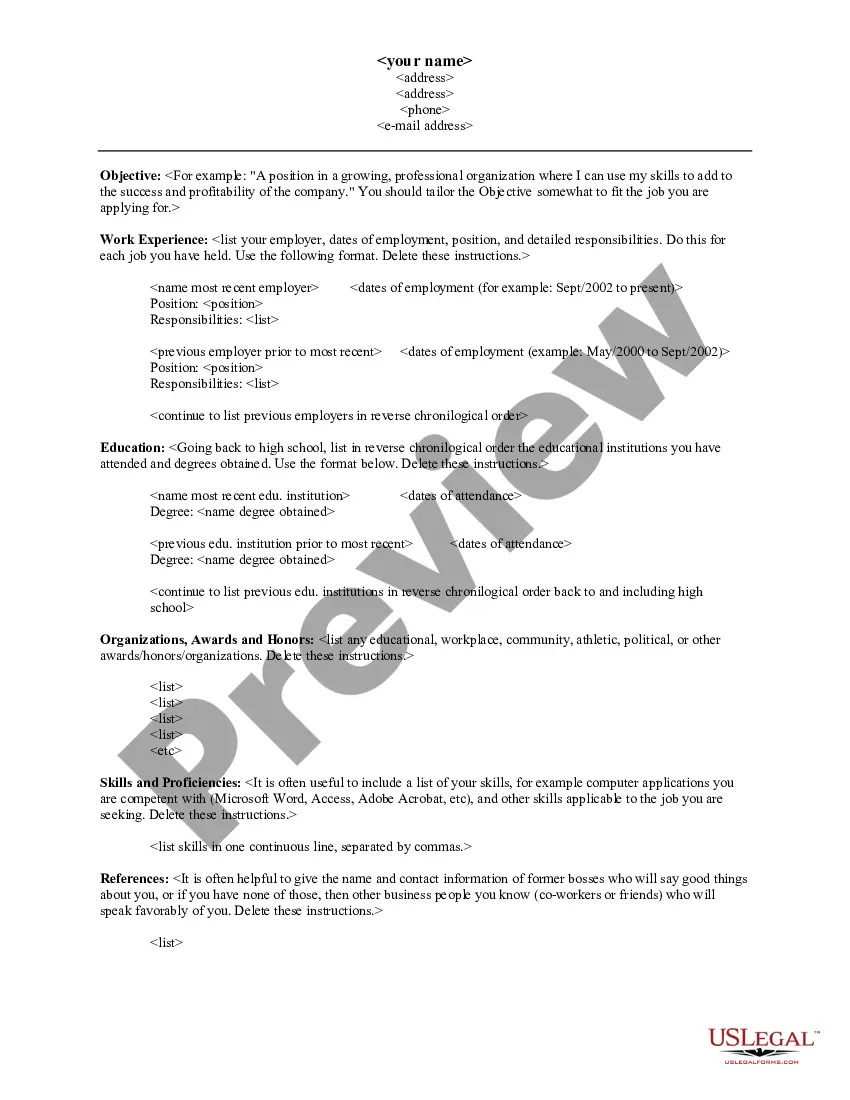
The Sample Resume Form is a straightforward template designed to help job seekers create a professional resume. This form assists users in organizing their work experiences, educational background, skills, and references into a coherent document. Unlike other forms that may focus on procedural elements like job applications, this resume template emphasizes showcasing an individual's qualifications effectively.
Key components of this form
- Contact Information: Includes fields for your address, phone number, and email.
- Objective Statement: A tailored statement outlining your career goals and the position you are seeking.
- Work Experience: Sections to list your previous employers, job titles, dates of employment, and responsibilities.
- Education: Fields for listing educational institutions attended and degrees obtained in reverse chronological order.
- Organizations, Awards, and Honors: A section for noting any relevant recognitions or memberships.
- Skills and Proficiencies: A list of your relevant skills, particularly those pertinent to the desired job.
- References: Space to provide names and contact information of individuals who can vouch for your qualifications.

When to use this form
This form is essential when you are preparing to apply for a job. It is particularly useful for both new graduates and experienced professionals who need to put their qualifications into a formalized structure. If you are transitioning careers, seeking advancement in your current field, or entering the job market for the first time, the Sample Resume Form can help you present your information clearly and effectively.
Who this form is for
This form is suitable for:
- Job seekers of all experience levels, including recent graduates.
- Individuals changing careers and needing to highlight transferable skills.
- Professionals looking to refresh their resume for job applications.
- Anyone wanting to create a polished resume to enhance their job prospects.
How to complete this form
- Begin by entering your contact information at the top of the form.
- Write a clear and concise objective statement tailored to the job you want.
- List your work experience in reverse chronological order, including responsibilities for each role.
- Document your educational background from the most recent institution attended back to high school.
- Include any relevant organizations, awards, or honors received in a dedicated section.
- Compile a list of skills and potential references to provide further insight into your qualifications.
Notarization requirements for this form
This form does not typically require notarization unless specified by local law. You can complete and use your resume without the need for a notary, allowing you to efficiently apply for jobs without additional steps.
Get your form ready online
Our built-in tools help you complete, sign, share, and store your documents in one place.
Make edits, fill in missing information, and update formatting in US Legal Forms—just like you would in MS Word.
Download a copy, print it, send it by email, or mail it via USPS—whatever works best for your next step.
Sign and collect signatures with our SignNow integration. Send to multiple recipients, set reminders, and more. Go Premium to unlock E-Sign.
If this form requires notarization, complete it online through a secure video call—no need to meet a notary in person or wait for an appointment.
We protect your documents and personal data by following strict security and privacy standards.

Make edits, fill in missing information, and update formatting in US Legal Forms—just like you would in MS Word.

Download a copy, print it, send it by email, or mail it via USPS—whatever works best for your next step.

Sign and collect signatures with our SignNow integration. Send to multiple recipients, set reminders, and more. Go Premium to unlock E-Sign.

If this form requires notarization, complete it online through a secure video call—no need to meet a notary in person or wait for an appointment.

We protect your documents and personal data by following strict security and privacy standards.
Common mistakes to avoid
- Leaving out key contact information or using an unprofessional email address.
- Writing a generic objective statement instead of customizing it for each application.
- Failing to proofread for spelling and grammatical errors.
- Listing responsibilities without emphasizing achievements or contributions made in previous roles.
- Including too much irrelevant information that does not pertain to the job applied for.
Advantages of online completion
- Convenient access to a structured template that can be filled out quickly.
- Easy editing and customization to fit your unique experiences and target jobs.
- Reliable guidance with standardized sections to make your resume professional.
- Ability to download and save your resume in multiple formats for sharing with potential employers.
- Quick updates as your career progresses can easily be made using the template.
Quick recap
- The Sample Resume Form is ideal for job seekers needing a clear and professional presentation of their qualifications.
- Tailoring your resume for each application increases your chances of standing out to potential employers.
- Utilizing a structured template helps organize information effectively, saving you time.
- Common mistakes can be avoided by carefully reviewing your resume before submission.
Looking for another form?
Form popularity
FAQ
Professional summary (even if you have no experience in your resume) Key skills you've learned in school and other experiences. Education and academic achievements. Classes, training and certifications. Personal or academic projects relevant to the job. Awards and accomplishments.
Watch your formatting. This is the key component to making your resume look visually appealing and uniform. Choose the right content layout. Use achievements to give your resume value. Make sure you have your five Ws, Hows, and So Whats. Use buzzwords.
Choose a resume format. Add your name and contact information. Write a standout resume headline. Add your professional resume summary statement. Detail your work experience. List relevant skills and keywords. Add your education, certifications, and any other relevant information.
Read the job description thoroughly and follow all directions. Use a professionally written resume. Proofread, proofread, proofread. Follow online resume submission file directions closely. Unless instructed otherwise, use a cover letter with your resume.
Keep It Simple. Unless you're applying for a design role, a clean, simple layout is best. Use a Summary Statement Instead of an Objective. Spotlight Key Skills. Put Your Latest Experience First. Break It Down. Consider Adding Volunteer or Other Experience. Quantify Your Bullets.
Pick the right resume layout. Make a meaningful education section. Focus on your relevant experience. Sprinkle the entire resume with your key skills. Include additional sections to boost your chances. Compose a powerful introductory paragraph.
Choose a resume format. Add your name and contact information. Write a standout resume headline. Add your professional resume summary statement. Detail your work experience. List relevant skills and keywords. Add your education, certifications, and any other relevant information.
Pick the Right Resume Format & Layout. Mention Your Personal Details & Contact Information. Use a Resume Summary or Objective. List Your Work Experience & Achievements. Mention Your Top Soft & Hard Skills. (Optional) Include Additional Resume Sections - Languages, Hobbies, etc.