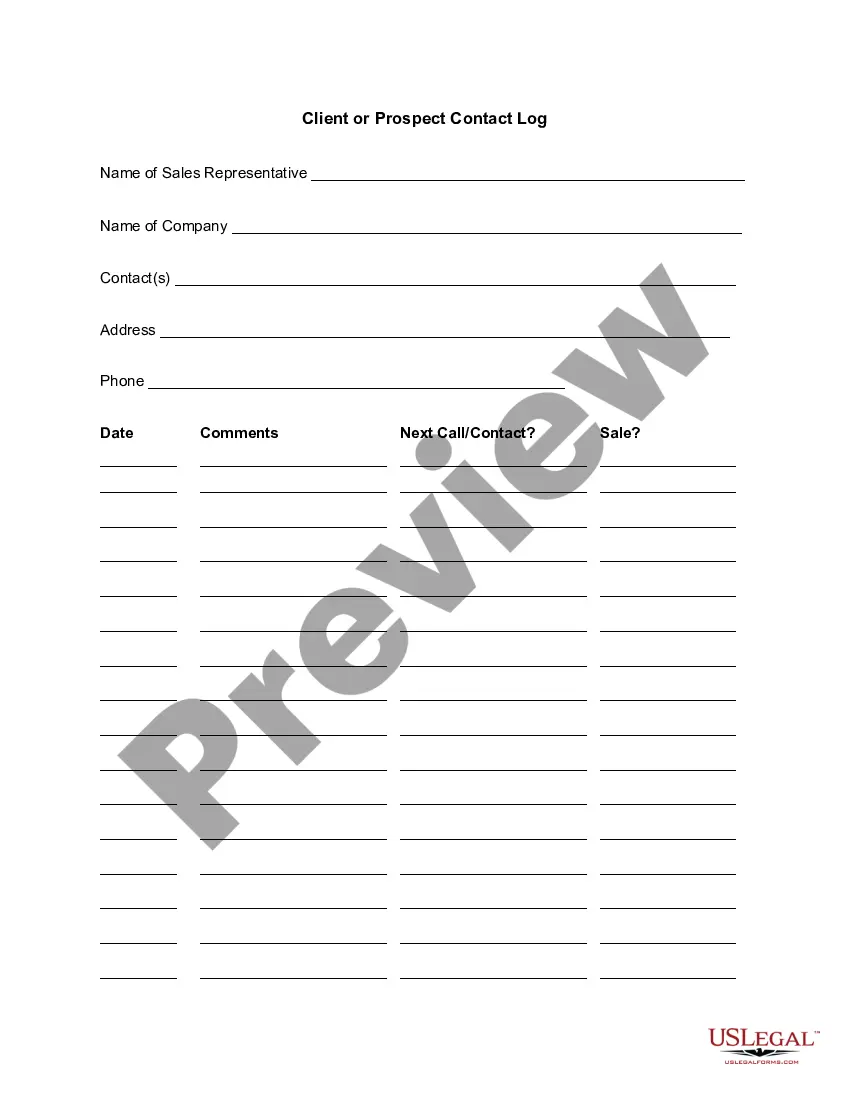
Client or Prospect Contact Log
Understanding this form
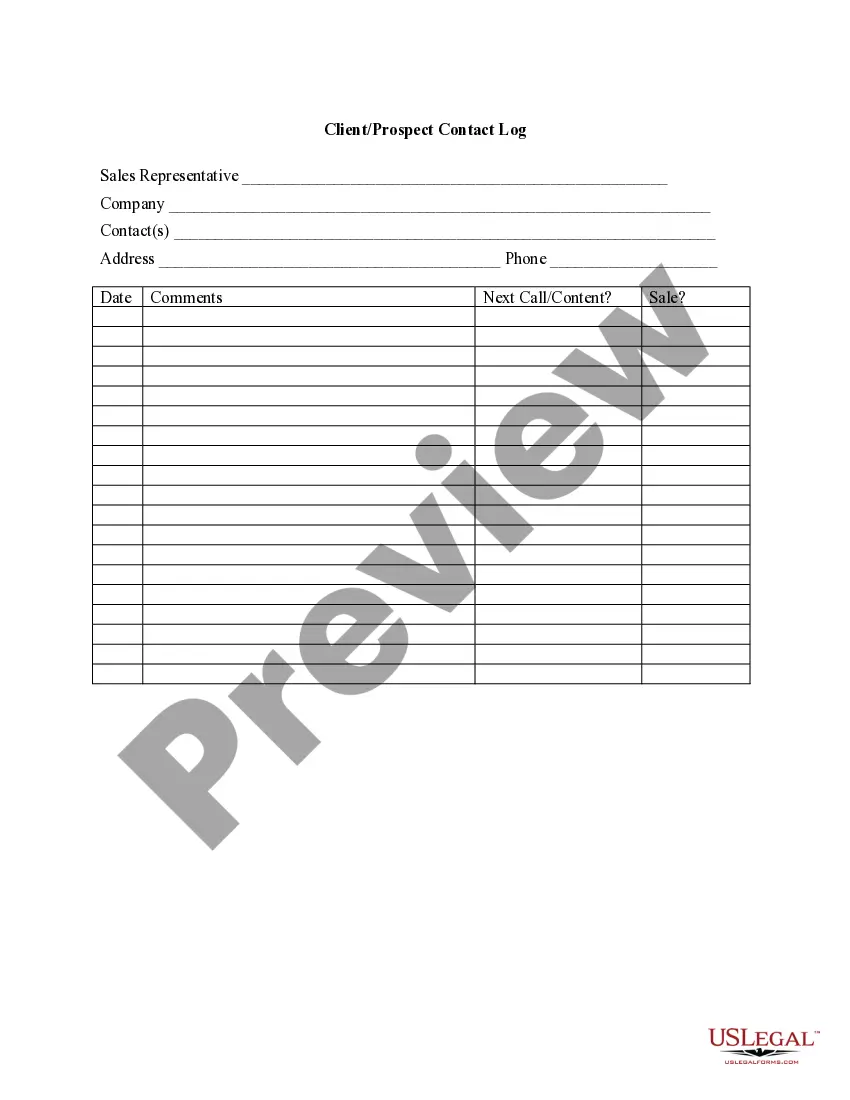
The Client or Prospect Contact Log is a valuable tool for sales representatives to efficiently track interactions with potential clients. This form serves as a summary of calls and contacts made to specific prospects, distinguishing it from other forms like the Sales Call Log by focusing solely on maintaining an organized record of outreach efforts. It helps sales teams monitor follow-ups and evaluate customer engagement, ensuring no opportunity is missed.
Key parts of this document
- Name of Sales Representative: Space to enter the name of the individual responsible for the outreach.
- Name of Company: Field for recording the prospective customer's company name.
- Contact(s): Area to note the names of the individuals at the prospect's company that were reached.
- Address: Field to capture the prospect's mailing address.
- Phone: Area to document the prospect's contact number for follow-up calls.
- Date: Section to specify the date of the interaction.
- Comments: Space for additional notes regarding the conversation or the prospect's potential interest.
- Next Call/Contact: Field to outline the plan for future follow-up with the prospect.
- Sale: Designate whether a sale has been made or the status of the sales process.
When this form is needed
This form is ideal for sales teams that engage frequently with prospects. Use the Client or Prospect Contact Log when initiating contact with new prospects, following up after meetings or calls, or when you need to summarize outreach efforts for reporting purposes. It is particularly useful during sales campaigns where tracking progress and scheduling future communications is crucial for success.
Who needs this form
- Sales representatives and account managers seeking to maintain a systematic approach to their outreach.
- Marketing teams looking to monitor potential leads and capture contact history.
- Business owners who manage sales efforts and want to keep track of interactions with prospects.
- Any professionals who engage with new clients or need to document their sales activities.
Steps to complete this form
- Identify the sales representative responsible for the interaction and fill in their name in the designated field.
- Enter the name of the company you are contacting to ensure accurate tracking.
- Note the contact person's name(s) to personalize follow-ups.
- Fill in the address and phone number for reference and future communication.
- Document the date of the contact to keep records current.
- Make observations about the interaction under the comments section, noting any important details.
- Plan the next steps by detailing the date and nature of the following contact attempt.
- Indicate if a sale has been made or outline the prospect's status in the sales pipeline.
Is notarization required?
This form usually doesn’t need to be notarized. However, local laws or specific transactions may require it. Our online notarization service, powered by Notarize, lets you complete it remotely through a secure video session, available 24/7.
Get your form ready online
Our built-in tools help you complete, sign, share, and store your documents in one place.
Make edits, fill in missing information, and update formatting in US Legal Forms—just like you would in MS Word.
Download a copy, print it, send it by email, or mail it via USPS—whatever works best for your next step.
Sign and collect signatures with our SignNow integration. Send to multiple recipients, set reminders, and more. Go Premium to unlock E-Sign.
If this form requires notarization, complete it online through a secure video call—no need to meet a notary in person or wait for an appointment.
We protect your documents and personal data by following strict security and privacy standards.

Make edits, fill in missing information, and update formatting in US Legal Forms—just like you would in MS Word.

Download a copy, print it, send it by email, or mail it via USPS—whatever works best for your next step.

Sign and collect signatures with our SignNow integration. Send to multiple recipients, set reminders, and more. Go Premium to unlock E-Sign.

If this form requires notarization, complete it online through a secure video call—no need to meet a notary in person or wait for an appointment.

We protect your documents and personal data by following strict security and privacy standards.
Typical mistakes to avoid
- Neglecting to record details immediately after calls can lead to forgetting critical information.
- Failing to update the next call/contact field may result in missed opportunities.
- Not including all relevant contacts from the prospect's company reduces effectiveness.
- Leaving the comments section blank may lose valuable insights about the prospect's needs.
Benefits of using this form online
- Convenient access to a structured format allows for easy record-keeping and updates.
- The form is editable and can be saved, ensuring you can make changes as needed.
- Using this form online ensures reliability and a backup of your contact history.
Legal use & context
- The information recorded in this log can serve as documentation for follow-up sales activities.
- Fulfilling legal obligations may require keeping detailed records of client communication.
- This form provides a structured method for tracking outreach and responses, which is useful in dispute resolution contexts.
Summary of main points
- The Client or Prospect Contact Log is essential for effective sales tracking and communication.
- Its structured format guides users in capturing details systematically.
- Utilizing this form can significantly improve follow-up efficiency and enhance sales performance.
Looking for another form?

Form popularity
FAQ
Enter the name of the database field (column headings). Enter data into the database. We are keeping order in the format of the cells. To use the database turn to tools «DATAA». Assign the name of the database. Select the range of data - from the first to the last cell.
Send Follow-Up Information Immediately After. I always make sure I bring a contract with me to every sales meeting. Restate The Points That Got The Client Excited. When your prospect leaves your first meeting excited, it's your job to keep up that excitement. State A Point You Agree With In Your Follow Up.
Spend some time on the subject line. Introduce yourself. Consider where they're at in the buyer's journey. Hone in on their pains and provide value. Push your value proposition.
Yes, depending on what your accounting and finance requirements are. Excel can help with most of the basic ones (e.g., bookkeeping, invoice management), but if you're looking for help with advanced accounting functions such as cash flow and tax management, you might want to consider accounting software.
Click the "File" tab on the command ribbon and then select "New" to open the page of template thumbnails. Enter "Call log" (without quotations) in the "Search for Online Templates" field and then press "Enter" to display the results.
Open your Microsoft Excel software. Click on the File tab then choose New to see the page with selections of template thumbnails. Click on the Search for Online Templates field and type in call log then press enter to see the display results.
Microsoft Excel lets you swiftly create a variety of useful records to log sales calls, service calls and other kinds of call information you need to run your business. In just a few minutes, you can create your own call log customized to your needs or use a pre-made call log template that's ready to go.
Open your Microsoft Excel software. Click on the File tab then choose New to see the page with selections of template thumbnails. Click on the Search for Online Templates field and type in call log then press enter to see the display results.