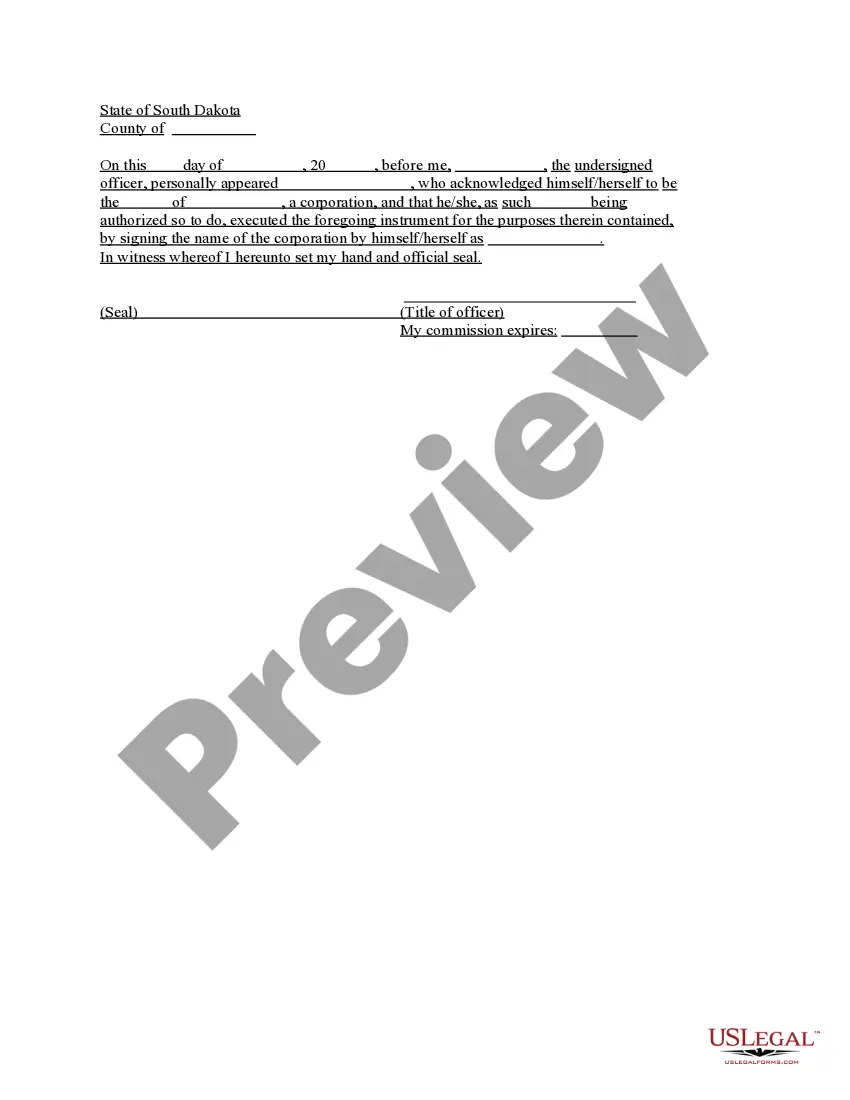
South Dakota Acknowledgment for Corporation
Understanding this form
The Acknowledgment for Corporation is a legal document used to validate actions taken on behalf of a corporation. It serves as a formal acknowledgment by an authorized officer of the corporation regarding their capacity to act for the entity. This form is essential for ensuring that corporate actions, agreements, or documents presented in legal contexts carry the necessary authority and legitimacy, differentiating it from other acknowledgments that may not reflect corporate structure or authority.
Key parts of this document
- Date of acknowledgment
- Name and title of the individual acting on behalf of the corporation
- Name of the corporation
- Signature of the authorized officer
- Official seal of the corporation, if applicable

When to use this document
This form is typically used when a corporation needs to formally acknowledge a signature, document, or action taken by its officers. Situations may include signing contracts, completing financial documents, or validating corporate resolutions where it's necessary to confirm that the signatory has the appropriate authority to act on behalf of the corporation.
Intended users of this form
- Corporate officers acting on behalf of the corporation
- Legal representatives needing to validate corporate actions
- Individuals or entities entering into contracts with the corporation
- CFOs, CEOs, or other authorized personnel within a corporation
Steps to complete this form
- Enter the date of the acknowledgment.
- Input the name and title of the corporation officer signing the form.
- Specify the name of the corporation as it appears in official documentation.
- Have the authorized officer sign the form.
- If needed, affix the corporate seal to the document.
Does this document require notarization?
This form does not typically require notarization unless specified by local law. However, it is advisable to check specific state requirements to guarantee its enforceability.
Get your form ready online
Our built-in tools help you complete, sign, share, and store your documents in one place.
Make edits, fill in missing information, and update formatting in US Legal Forms—just like you would in MS Word.
Download a copy, print it, send it by email, or mail it via USPS—whatever works best for your next step.
Sign and collect signatures with our SignNow integration. Send to multiple recipients, set reminders, and more. Go Premium to unlock E-Sign.
If this form requires notarization, complete it online through a secure video call—no need to meet a notary in person or wait for an appointment.
We protect your documents and personal data by following strict security and privacy standards.

Make edits, fill in missing information, and update formatting in US Legal Forms—just like you would in MS Word.

Download a copy, print it, send it by email, or mail it via USPS—whatever works best for your next step.

Sign and collect signatures with our SignNow integration. Send to multiple recipients, set reminders, and more. Go Premium to unlock E-Sign.

If this form requires notarization, complete it online through a secure video call—no need to meet a notary in person or wait for an appointment.

We protect your documents and personal data by following strict security and privacy standards.
Typical mistakes to avoid
- Failing to include the date of acknowledgment.
- Not having the form signed by an authorized officer.
- Omitting the corporation's official seal, if required.
- Writing the name of the corporation incorrectly.
Advantages of online completion
- Easy access to customizable templates
- No need to schedule appointments; complete at your convenience
- Generated by legal professionals to ensure accuracy and compliance
- Downloadable for immediate use
Legal use & context
- This form is enforceable as a legal document when correctly completed and executed.
- It serves as an official record of an officer's authority to act on behalf of the corporation.
- Limitations may vary based on state-specific laws governing corporate governance.
Main things to remember
- The Acknowledgment for Corporation verifies an officer's authority.
- It is essential in corporate legal transactions and filings.
- Completing the form accurately is crucial for credibility and compliance.
Looking for another form?

Form popularity
FAQ
A notary public or other officer completing this certificate verifies only the identity of the individual who signed the document to which this certificate is attached, and not the truthfulness, accuracy, or validity of that document.
Unlike jurats, an acknowledgment does not need to be signed in the presence of a notary. However, the affiant does need to swear or affirm that they signed under their own free will.
The certificate of a notary public, justice of the peace, or other authorized officer, attached to a deed, mortgage, or other instrument, setting forth that the parties thereto personally appeared before him on such a date and acknowledged the instrument to be their free and voluntary act and deed. Read v.
The Individual Acknowledgment certificate is used when an individual is signing and acknowledging on his or her own behalf.
What Is An Acknowledgment? The purpose of an acknowledgment is for a signer, whose identity has been verified, to declare to a Notary or notarial officer that he or she has willingly signed a document.The signer may either sign the document before appearing before you, or in your presence.
Yes, you may notarize a signature on a document that includes handwritten paragraphs. A document can be typed or handwritten. If the notarial certificate under the signature is not included, be sure to attach a loose certificate chosen by your customer.
This is a form that shows that a notary public has established the identity of the signer(s) and witnessed the signature of a document. It only demonstrates that the document has been signed and does not make any claims about the information in the document.
The purpose of an acknowledgment is for a signer, whose identity has been verified, to declare to a Notary or notarial officer that he or she has willingly signed a document.The signer may either sign the document before appearing before you, or in your presence.