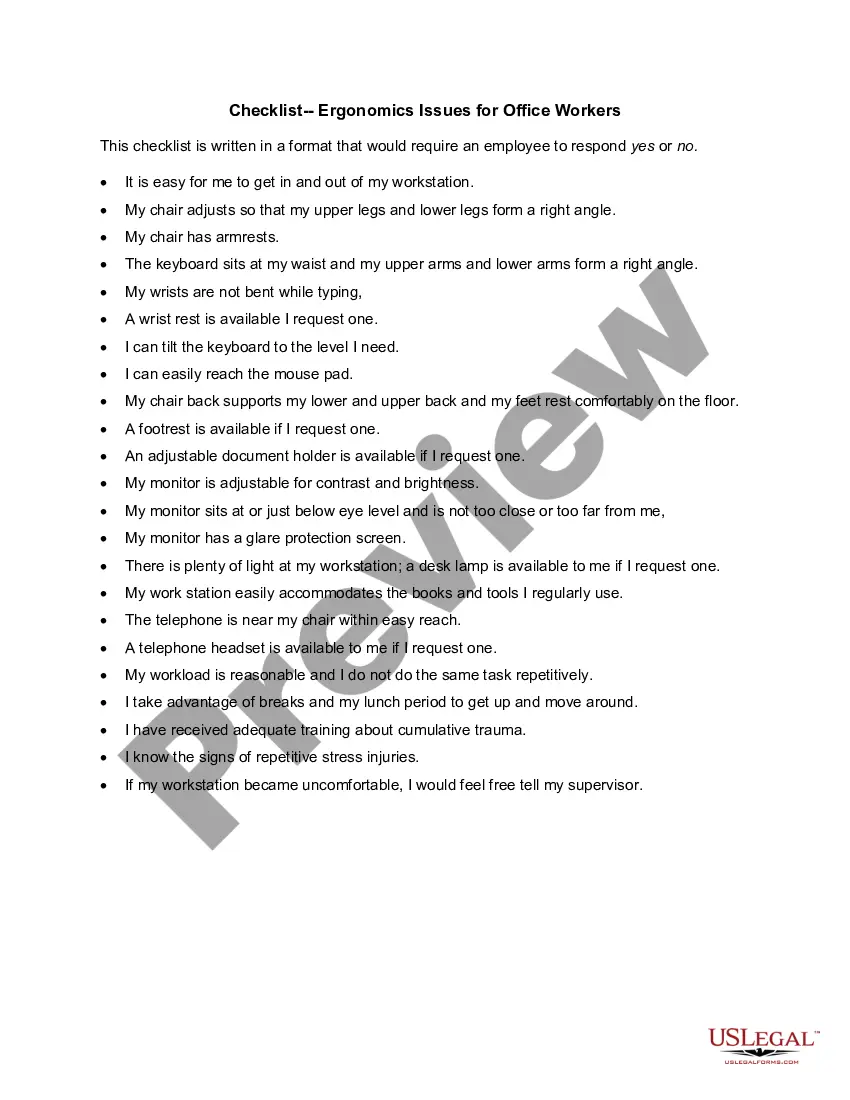
New Jersey Checklist - Ergonomics Issues for Office Workers
Description

Get your form ready online
Our built-in tools help you complete, sign, share, and store your documents in one place.
Make edits, fill in missing information, and update formatting in US Legal Forms—just like you would in MS Word.
Download a copy, print it, send it by email, or mail it via USPS—whatever works best for your next step.
Sign and collect signatures with our SignNow integration. Send to multiple recipients, set reminders, and more. Go Premium to unlock E-Sign.
If this form requires notarization, complete it online through a secure video call—no need to meet a notary in person or wait for an appointment.
We protect your documents and personal data by following strict security and privacy standards.

Make edits, fill in missing information, and update formatting in US Legal Forms—just like you would in MS Word.

Download a copy, print it, send it by email, or mail it via USPS—whatever works best for your next step.

Sign and collect signatures with our SignNow integration. Send to multiple recipients, set reminders, and more. Go Premium to unlock E-Sign.

If this form requires notarization, complete it online through a secure video call—no need to meet a notary in person or wait for an appointment.

We protect your documents and personal data by following strict security and privacy standards.
Looking for another form?




How to fill out Checklist - Ergonomics Issues For Office Workers?
You can spend hours on the web searching for the valid document template that meets the federal and state requirements you require.
US Legal Forms offers thousands of valid templates that can be assessed by experts.
You can easily obtain or create the New Jersey Checklist - Ergonomics Issues for Office Workers from your service.
If provided, use the Review button to go through the document template as well.
- If you already have a US Legal Forms account, you can sign in and click the Download button.
- Then, you can complete, alter, print, or sign the New Jersey Checklist - Ergonomics Issues for Office Workers.
- Every valid document template you purchase is yours indefinitely.
- To get another copy of any purchased form, navigate to the My documents section and click the appropriate button.
- If you are visiting the US Legal Forms website for the first time, follow the simple instructions below.
- First, ensure that you have selected the correct document template for your state/city of choice.
- Review the form description to confirm you have chosen the right form.
Form popularity
FAQ
An ergonomic checklist is a tool that outlines key factors to consider for improving workplace ergonomics. The New Jersey Checklist - Ergonomics Issues for Office Workers serves as a practical guide to assessing the work environment. It helps identify ergonomic risk factors and highlights necessary adjustments to enhance comfort. By following this checklist, organizations can implement effective changes that support employee health and productivity.
An ergonomic risk assessment for office workers is a systematic evaluation of workplace conditions that may cause discomfort or injury. It identifies specific areas of concern such as workstation height, chair comfort, and repetitive task patterns. By applying the New Jersey Checklist - Ergonomics Issues for Office Workers, teams can pinpoint high-risk areas and suggest solutions. This not only mitigates potential injuries but also fosters a culture of well-being in the workplace.
An ergonomic assessment in an office setting reviews how work tasks and environments impact employee comfort and efficiency. This process uses tools like the New Jersey Checklist - Ergonomics Issues for Office Workers to evaluate factors such as furniture, equipment, and workflow. By identifying issues, companies can make informed adjustments that support employee health. This proactive approach significantly enhances overall workplace morale and productivity.
Ergonomic risk factors for office workers include poor posture, repetitive motions, and inadequate workstation setup. These factors can lead to discomfort and injuries over time. Utilizing the New Jersey Checklist - Ergonomics Issues for Office Workers helps identify these risks effectively. By recognizing and addressing these issues, you can create a healthier and more productive workspace.
To complete an ergonomic assessment, start by evaluating the workplace setup, including desks, chairs, and equipment. Use the New Jersey Checklist - Ergonomics Issues for Office Workers to identify potential problem areas. Observe employee posture and movements to pinpoint any discomfort or inefficiencies. Finally, document your findings and create a list of recommended changes to enhance comfort and productivity.
Ergonomic requirements encompass adjustments to furniture and equipment to promote comfort and safety. This includes ensuring chairs provide adequate back support and that computer screens are at eye level. To achieve these requirements, the New Jersey Checklist - Ergonomics Issues for Office Workers serves as a comprehensive tool to address essential ergonomic needs in your office.
The Occupational Safety and Health Administration (OSHA) advises organizations to assess and minimize ergonomic risks to protect workers. While there’s no strict OSHA rule specific to office ergonomics, compliance with general safety standards is essential. Utilizing the New Jersey Checklist - Ergonomics Issues for Office Workers can help you align with OSHA guidelines effectively.
The 30/30 rule in ergonomics suggests that office workers should take a break from their screens every 30 minutes for at least 30 seconds. This practice helps to reduce eye strain and physical fatigue. Following the New Jersey Checklist - Ergonomics Issues for Office Workers can reinforce healthy habits like the 30/30 rule in your daily routine.
Ergonomic requirements for working in an office focus on maintaining proper body alignment and minimizing discomfort. This includes using adjustable chairs, desks, and computer monitors that suit individual needs. The New Jersey Checklist - Ergonomics Issues for Office Workers highlights essential requirements to ensure a comfortable and safe workspace.
Primary ergonomic risks for office workers include repetitive movements, poor posture, and insufficient breaks. These factors can contribute to chronic pain and decreased productivity over time. Understanding these risks with the New Jersey Checklist - Ergonomics Issues for Office Workers helps you implement changes to protect your health and well-being.