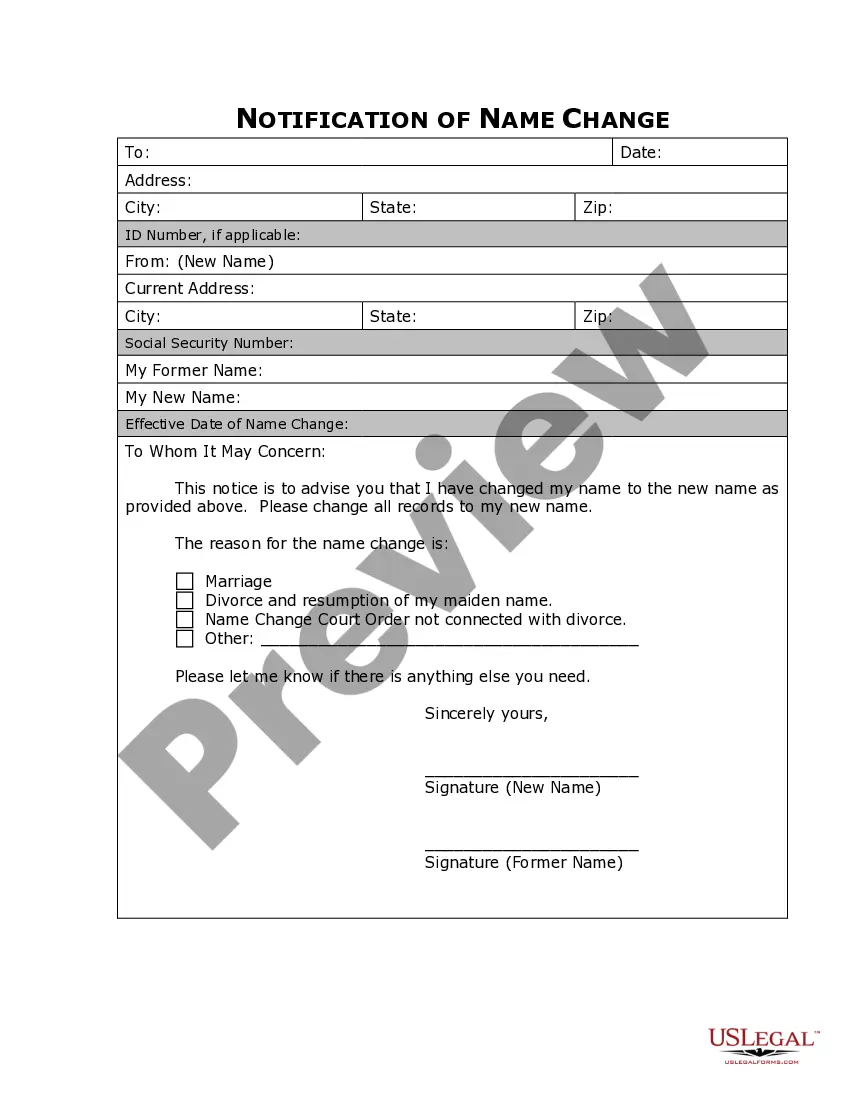
Missouri Name Change Notification Form
About this form
The Name Change Notification Form is a legal document used to inform various entities, such as companies, organizations, and government agencies, of your change of name after a legal name change process. This form is crucial for updating records and ensuring that your new name is recognized across all platforms, differentiating it from other forms that may be used to initiate a name change rather than notify others of it.
Main sections of this form
- Current name: Your legal name before the change.
- New name: The name you have legally adopted.
- Date of name change: The date when the name change was legally completed.
- Recipient information: Details of the company or agency you are notifying.
- Signature: Your signature to validate the notification.




Situations where this form applies
This form should be used after you have successfully changed your name through a legal process, such as marriage, divorce, or court order. It is essential to use this form whenever you need to update your name with various organizations, such as banks, insurance companies, and government agencies, to ensure all your personal records reflect your new name.
Who needs this form
- Individuals who have legally changed their name.
- Those needing to notify banks, creditors, and employers of their name change.
- People wanting to update their personal records in governmental agencies.
Completing this form step by step
- Enter your current legal name as it appears on your official documents.
- Provide your new name that you have adopted through the legal process.
- Specify the date when the name change occurred.
- Fill in the information of the entity you are notifying, including their name and address.
- Sign and date the form to confirm the notification.
Notarization requirements for this form
This form usually doesn’t need to be notarized. However, local laws or specific transactions may require it. Our online notarization service, powered by Notarize, lets you complete it remotely through a secure video session, available 24/7.
Get your form ready online
Our built-in tools help you complete, sign, share, and store your documents in one place.
Make edits, fill in missing information, and update formatting in US Legal Forms—just like you would in MS Word.
Download a copy, print it, send it by email, or mail it via USPS—whatever works best for your next step.
Sign and collect signatures with our SignNow integration. Send to multiple recipients, set reminders, and more. Go Premium to unlock E-Sign.
If this form requires notarization, complete it online through a secure video call—no need to meet a notary in person or wait for an appointment.
We protect your documents and personal data by following strict security and privacy standards.

Make edits, fill in missing information, and update formatting in US Legal Forms—just like you would in MS Word.

Download a copy, print it, send it by email, or mail it via USPS—whatever works best for your next step.

Sign and collect signatures with our SignNow integration. Send to multiple recipients, set reminders, and more. Go Premium to unlock E-Sign.

If this form requires notarization, complete it online through a secure video call—no need to meet a notary in person or wait for an appointment.

We protect your documents and personal data by following strict security and privacy standards.
Common mistakes
- Not providing complete or accurate recipient information.
- Failing to sign and date the form.
- Using old names or incorrect new names.
Benefits of completing this form online
- Immediate access to a professionally drafted template.
- Convenient downloading and printing options.
- Ensures compliance with legal requirements specific to your state.
Looking for another form?
Form popularity
FAQ
After getting married, you can change your name by updating your identification and legal documents. Start by obtaining a certified copy of your marriage certificate, which you will need to submit with the Missouri Name Change Notification Form. Update your Social Security card, driver’s license, and bank accounts with your new name. USLegalForms offers templates and support to simplify this process, ensuring you cover all necessary steps efficiently.
To legally change your name in Missouri, you must file a petition in your local court. After the court approves your petition, you will receive a court order that confirms your name change. It's essential to complete the Missouri Name Change Notification Form to inform various agencies and organizations about your new name. For a smooth process, consider using USLegalForms to access the necessary forms and guidance.
Social Security Administration. Department of Motor Vehicles. Passport Office. Post Office. IRS. Voter Registration. Banks and other financial institutions. Credit Card companies (or issuers)
Show the required documents. You will need proof of your identity. Fill out and print an Application for a Social Security Card; and. Mail your application and documents to your local Social Security office.
In order for Missouri residents to legally change their name, they must submit a petition to the circuit court of the county in which they reside. Upon approval of a name change request, notice of the name change must be published for a minimum of three (3) weeks.
Petition to change your name by filling out a name change form, an order to show cause for legally changing your name, and a decree to legally change your name. Take these forms to the court clerk and file them along with your state's required filing fees.
Costs are different depending on the county where the petition is filed. It will likely cost between $150.00 and $200.00.
The passport office (see more details below) The DVLA (driving licence, vehicle registration) HM Revenue and Customs. Child Benefit. Local Authority (Council tax and electoral register) Land Registry. Student Loans. Your employer.
There are no fees associated with filing for a name change with the Social Security Administration. Two weeks after your filing, a new SS card will arrive in the mail with your new married name!
In order for Missouri residents to legally change their name, they must submit a petition to the circuit court of the county in which they reside. Upon approval of a name change request, notice of the name change must be published for a minimum of three (3) weeks.