Indiana Chronological Case Summary Entry Form
About this form
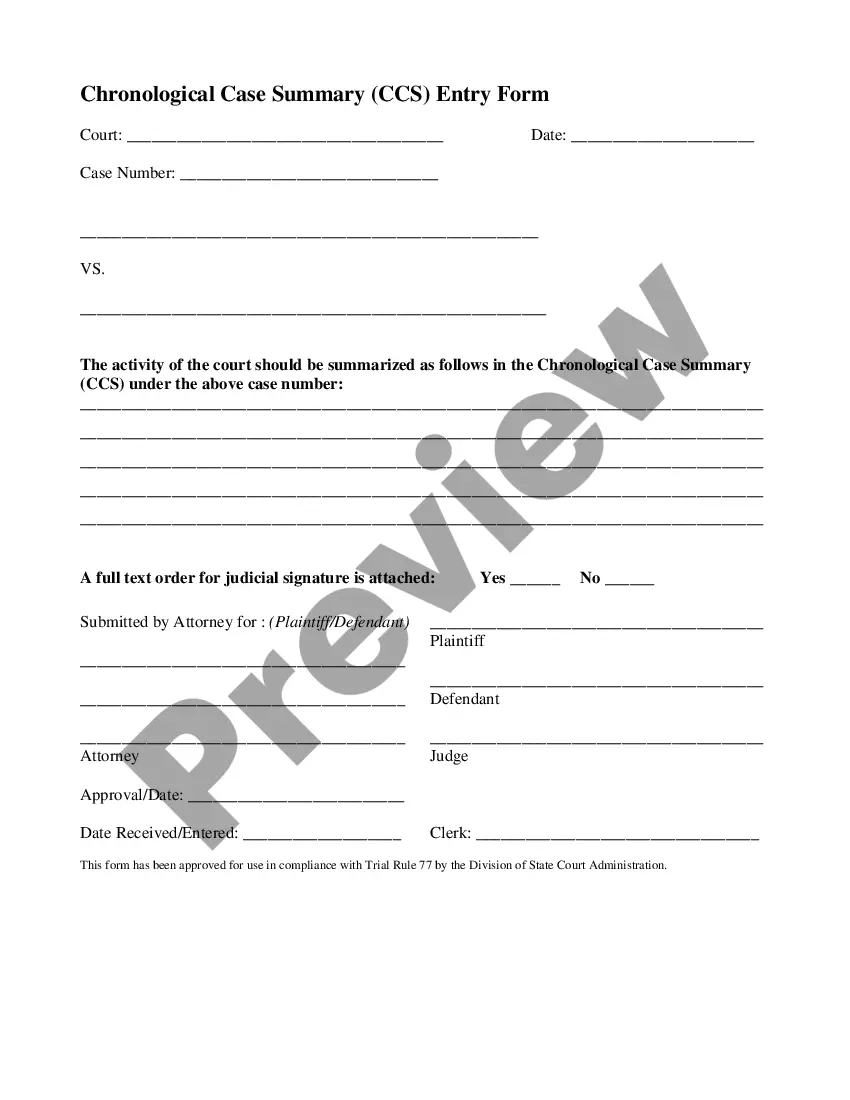
The Chronological Case Summary Entry Form is an official document used in Indiana courts. This form summarizes the activities and key developments in a court case in a chronological order. Unlike other legal forms, the Chronological Case Summary is specifically designed for attorneys to present a clear timeline of case events for the judge's review and signature. This form ensures compliance with state and federal legal standards, facilitating better case management in the court system.
Key components of this form
- Court Information: Specify the court name where the case is filed.
- Date: Enter the date of completing the form.
- Case Number: Include the unique case number assigned by the court.
- Summary of Activities: Describe the chronological events related to the case.
- Attorney Information: Detail the attorney's name and signature who is submitting the form.
- Judicial Approval: Space for the judge's signature and approval date.
When this form is needed
This form should be used by attorneys when they need to provide the court with a detailed summary of the case proceedings. It is particularly useful during pre-trial phases, as it helps judges quickly understand the case history and the actions taken by both parties. Use this form when filing for motions, requesting court orders, or during status updates in ongoing cases.
Who needs this form
This form is intended for:
- Attorneys representing plaintiffs or defendants in court cases.
- Legal professionals needing to document case activities for court submissions.
- Pro se litigants who are formally trained in presenting legal documents.
How to complete this form
- Identify the court and enter the date at the top of the form.
- Input the unique case number assigned by the court.
- Summarize the key events of the case in detail, ensuring clarity and accuracy.
- Indicate whether a full text order is attached for judicial signature.
- Complete the attorney's information section, including signature and date.
- Leave space for the judge's approval and the date received by the court clerk.
Is notarization required?
This form does not typically require notarization unless specified by local law. However, it's advisable to check with the local court requirements to ensure compliance.
Get your form ready online
Our built-in tools help you complete, sign, share, and store your documents in one place.
Make edits, fill in missing information, and update formatting in US Legal Forms—just like you would in MS Word.
Download a copy, print it, send it by email, or mail it via USPS—whatever works best for your next step.
Sign and collect signatures with our SignNow integration. Send to multiple recipients, set reminders, and more. Go Premium to unlock E-Sign.
If this form requires notarization, complete it online through a secure video call—no need to meet a notary in person or wait for an appointment.
We protect your documents and personal data by following strict security and privacy standards.

Make edits, fill in missing information, and update formatting in US Legal Forms—just like you would in MS Word.

Download a copy, print it, send it by email, or mail it via USPS—whatever works best for your next step.

Sign and collect signatures with our SignNow integration. Send to multiple recipients, set reminders, and more. Go Premium to unlock E-Sign.

If this form requires notarization, complete it online through a secure video call—no need to meet a notary in person or wait for an appointment.

We protect your documents and personal data by following strict security and privacy standards.
Typical mistakes to avoid
- Omitting the case number or court information.
- Failing to provide a clear and concise summary of case events.
- Not including the necessary signatures from the attorney and judge.
- Submitting the form without verifying that it adheres to current laws and guidelines.
Benefits of completing this form online
- Convenient download options allow for immediate access to forms.
- Forms are easily editable, enabling attorneys to customize summaries as needed.
- Compliance assurance as forms are regularly updated to reflect current legal statutes.
- Secure storage options ensure your completed forms are readily accessible.
Legal use & context
- Used formally in court proceedings to document the progression of a case.
- Helps establish a reliable timeline of events that can be referenced in future hearings.
- Ensures formal submission aligns with judicial expectations for case summaries.
Summary of main points
- The Chronological Case Summary Entry Form is essential for documenting court case activities.
- It is designed specifically for attorneys in Indiana to streamline judicial processes.
- Accurate completion of this form supports effective case management in court.
Looking for another form?
Form popularity
FAQ
Excluding confidential records, public court records are available to anyone and may be used for news publications, academic research and non-profit organizations. They may not, however be used for commercial purposes of any nature.
To obtain access to those records, researchers must contact the appropriate federal court. Online access to case and docket information is provided for a fee by the Administrative Office of the U.S. Courts through PACER. The court may refer you to a Federal Records Center to obtain copies.
First, start by searching mycase.in.gov. Some types of court documents and filings are available there at no cost. If the document you're looking for isn't available online, you'll need to contact the clerk's office in the county where the case is being heard.
A CCS entry must be made on the date that an order is entered into the Record of Judgments and Orders (RJO) indicating that is the date on which the order may be found in the RJO. The CCS serves as the index, or locator, of orders, decrees, and judgments of the court.
First, start by searching mycase.in.gov. Some types of court documents and filings are available there at no cost. If the document you're looking for isn't available online, you'll need to contact the clerk's office in the county where the case is being heard.
On the Welcome page, click on the map of Indiana in the "Search Court Cases" area. Scroll down to find the county and click on the county name. There is a section for "List of Courts" on the county page that lists the courts for that county. Choose a day or week calendar, if available.
A Chronological Case Summary (abbreviated CCS) is a standard sequential record-keeping format for case information in Indiana. It mainly contains a sequence of minute entries that summarize important events.