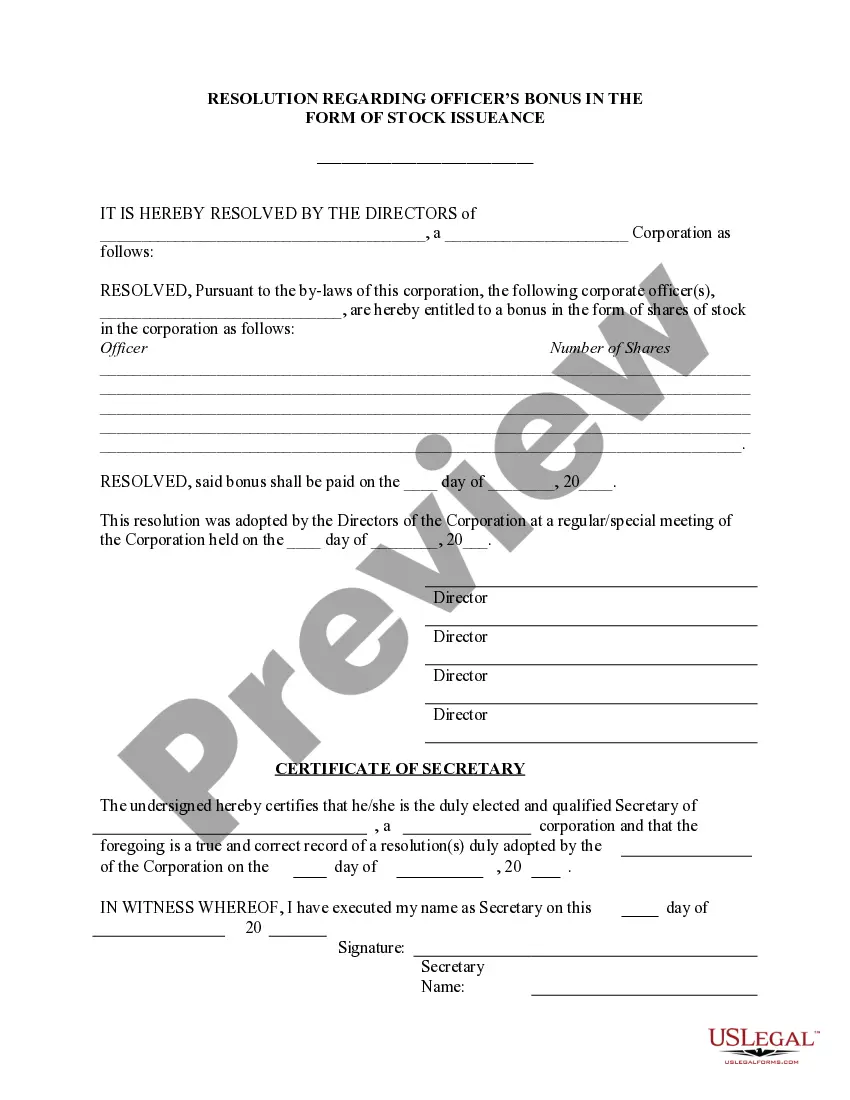
Stock Issue Format
Description
Get your form ready online
Our built-in tools help you complete, sign, share, and store your documents in one place.
Make edits, fill in missing information, and update formatting in US Legal Forms—just like you would in MS Word.
Download a copy, print it, send it by email, or mail it via USPS—whatever works best for your next step.
Sign and collect signatures with our SignNow integration. Send to multiple recipients, set reminders, and more. Go Premium to unlock E-Sign.
If this form requires notarization, complete it online through a secure video call—no need to meet a notary in person or wait for an appointment.
We protect your documents and personal data by following strict security and privacy standards.

Make edits, fill in missing information, and update formatting in US Legal Forms—just like you would in MS Word.

Download a copy, print it, send it by email, or mail it via USPS—whatever works best for your next step.

Sign and collect signatures with our SignNow integration. Send to multiple recipients, set reminders, and more. Go Premium to unlock E-Sign.

If this form requires notarization, complete it online through a secure video call—no need to meet a notary in person or wait for an appointment.

We protect your documents and personal data by following strict security and privacy standards.
Looking for another form?




How to fill out Officers Bonus In Form Of Stock Issuance - Resolution Form?
The Stock Issue Format presented on this page is a versatile, formal template crafted by experienced attorneys in compliance with national and local regulations.
For over 25 years, US Legal Forms has supplied individuals, businesses, and legal experts with over 85,000 authenticated, state-specific documents for both business and personal needs. It is the quickest, simplest, and most reliable method to acquire the files you require, as the service ensures bank-level security for data and protection against malware.
Register with US Legal Forms to have verified legal templates available for all of life’s situations.
- Explore the document you need and review it.
- Browse through the sample you found and preview it or examine the form description to verify it meets your specifications. If it doesn't, use the search feature to discover the appropriate one. Click Buy Now when you have located the template you require.
- Register and Log In.
- Select the pricing package that fits you and create an account. Use PayPal or a credit card for a swift payment. If you already possess an account, Log In and verify your subscription to continue.
- Obtain the editable template.
- Choose the format you prefer for your Stock Issue Format (PDF, Word, RTF) and download the sample to your device.
- Fill out and sign the document.
- Print the template to fill it in manually. Alternatively, use an online multifunctional PDF editor to efficiently and accurately complete and sign your form with a legally-binding electronic signature.
- Re-download your documents whenever needed.
- Use the same document again at any time. Access the My documents tab in your profile to retrieve any previously purchased forms.
Form popularity
FAQ
The first way is to have an addendum added to your will. A codicil is a document used to amend the existing version with new information. For example, you are adding a beneficiary for a recently acquired property or asset. The second way is to revoke your current will and obtain and execute a new one.
As a rule, gifts of a set amount of money in a will should be paid out within a year of death. If the executor isn't able to pay the legacy within that time, the beneficiaries will be entitled to claim interest.
If you've acquired more money and assets after creating your first estate plan, it's probably time to revisit it. As long as the assets are in your name, they should pass via a will. However, you might want to change who will receive them. There might also be tax considerations that alter how you leave your estate.
How Do I Change My Will in Florida? People who have a Will that no longer reflects their intentions can change it. There are two basic ways to change a will: (1) by writing a new Will; or (2) by amending a current Will with a codicil. Creating a new Will has become the preferred way to change an estate plan.
Executing the Codicil After the codicil is entirely typed, the testator must sign and date the document. Under Florida Statutes §732.502 (5), ?a codicil shall be executed with the same formalities as a will.? Therefore, the codicil must be signed by the testator at the end of the document.
A: While there are many different ways to approach estate planning, the four foundational documents we're focusing on here are wills, trusts, advance directives, and powers of attorney.
How to write a codicil to a will Read through your existing will. Take note of desired alterations. Write the opening statement and last will information. Propose your amendments. Sign the codicil. Secure the document. Consult with estate planning professionals (optional)
Does a codicil need to be notarized in Florida? No, a codicil does not need to be notarized. A codicil only needs the proper testator and witness signatures. However, most codicils also have a self-proving affidavit attached, and that affidavit does require notarization.