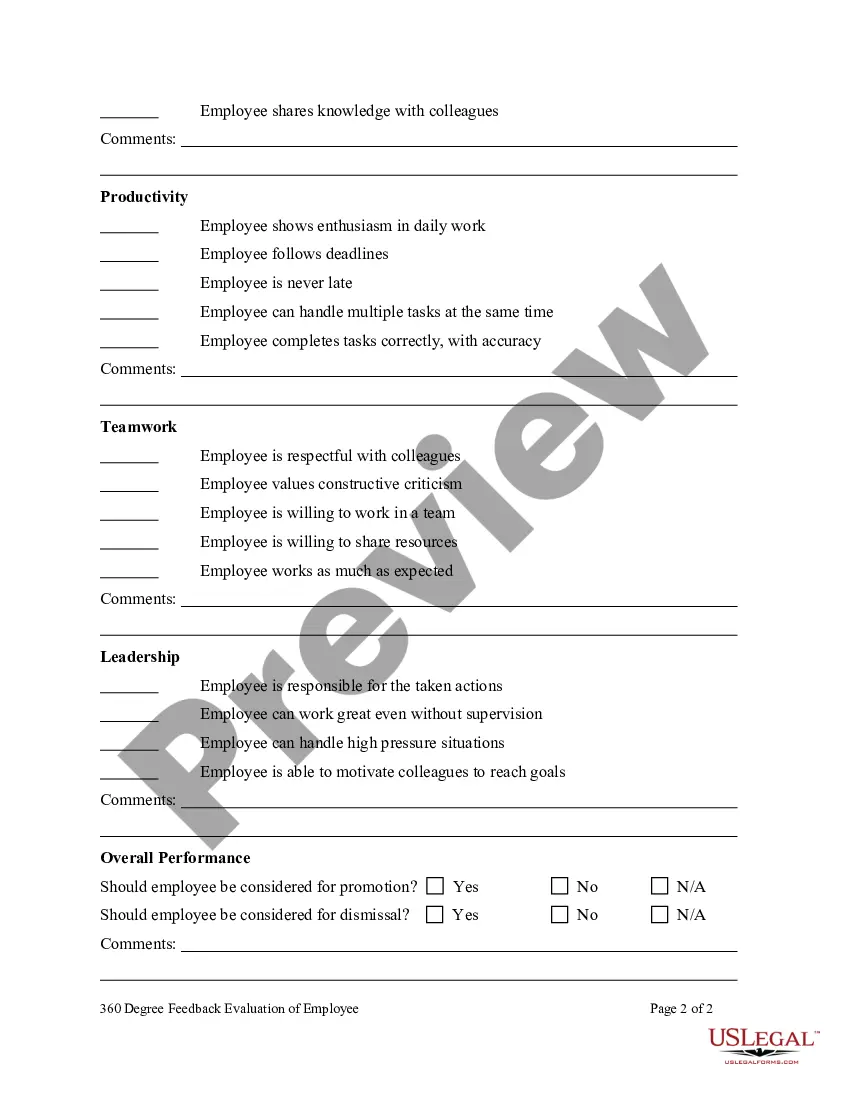
360 Degree Feedback Form For Employees In San Jose
Description


Get your form ready online
Our built-in tools help you complete, sign, share, and store your documents in one place.
Make edits, fill in missing information, and update formatting in US Legal Forms—just like you would in MS Word.
Download a copy, print it, send it by email, or mail it via USPS—whatever works best for your next step.
Sign and collect signatures with our SignNow integration. Send to multiple recipients, set reminders, and more. Go Premium to unlock E-Sign.
If this form requires notarization, complete it online through a secure video call—no need to meet a notary in person or wait for an appointment.
We protect your documents and personal data by following strict security and privacy standards.

Make edits, fill in missing information, and update formatting in US Legal Forms—just like you would in MS Word.

Download a copy, print it, send it by email, or mail it via USPS—whatever works best for your next step.

Sign and collect signatures with our SignNow integration. Send to multiple recipients, set reminders, and more. Go Premium to unlock E-Sign.

If this form requires notarization, complete it online through a secure video call—no need to meet a notary in person or wait for an appointment.

We protect your documents and personal data by following strict security and privacy standards.
Looking for another form?

Form popularity
FAQ
These close-ended questions are useful for adding to management 360 feedback reviews, to ask relevant questions for this particular role. Does the manager work in a respectful manner to others? Does the manager consider other team members' opinions before making a decision? Does the manager effectively solve problems?
360 Degree Feedback Examples for Time Management “John consistently meets deadlines and manages his time effectively, ensuring that projects are completed on schedule.” “Emily is skilled at prioritizing tasks and managing her workload, minimizing stress and maximizing productivity.”
How to conduct 360 reviews Establish criteria for rating each employee. Invest time into developing useful, relevant questions that provide valuable insight. Choose who will assess each employee. Send surveys. Send the survey to the employee. Schedule the 360 evaluation. Review ratings with employee. Follow up on progress.
360 surveys can offer a comprehensive view of performance, and more importantly, identify areas for improvement. A 360 survey generally includes a list of statements or questions that are organized into competency categories. The scores are averaged out in each category, which is then presented to the employee.
“A 360-degree review is a talent development tool used to provide the recipient with feedback from all directions,” Inoa said. “This typically includes upward feedback from their direct reports, peer feedback from those they work closely with, and downward feedback from their manager.”
Open-ended questions for 360 degree feedback assessments What else would you like to share about this employee? What has this employee done particularly well? What would make this employee more effective in their role? What other comments do you have?
7 steps for designing an effective 360 degree feedback review program Set clear goals. Train raters. Focus on natural strengths. Involve managers and leaders. Create buy-in and trust in the 360 feedback program. Know what to ask and how to ask it. Personalise the 360 degree feedback program to your organisation.
Respondents may not complete them. Or they may give any old answer, just to get finished. Either way, the quality of the feedback reduces as the 360 gets longer! We recommend around 6 competencies, each with 5 questions, so 30 ratings, plus 3 text questions, giving a total of 33.
A 360 performance review measures employee performance typically using feedback from six to 12 people. It also includes an employee self-evaluation to provide a comprehensive look at an employee's efficiency, productivity, contributions and work behavior.
Positive feedback is associated with better performance and higher productivity. Sadly, 360-degree feedback often focuses excessively on the negative, with employees typically ignoring their strengths. This usually comes from a place of good intention—employees want to address their weaknesses.