Invoice Template for Software Engineer
About this form
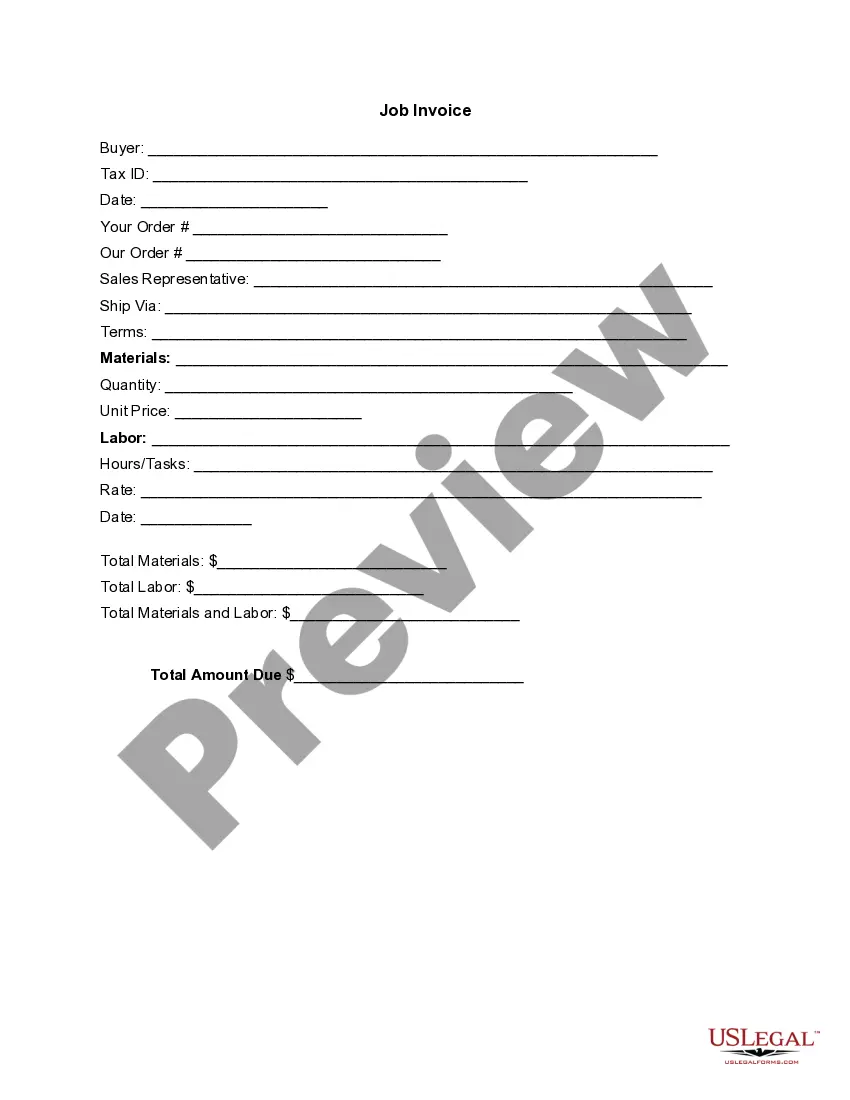
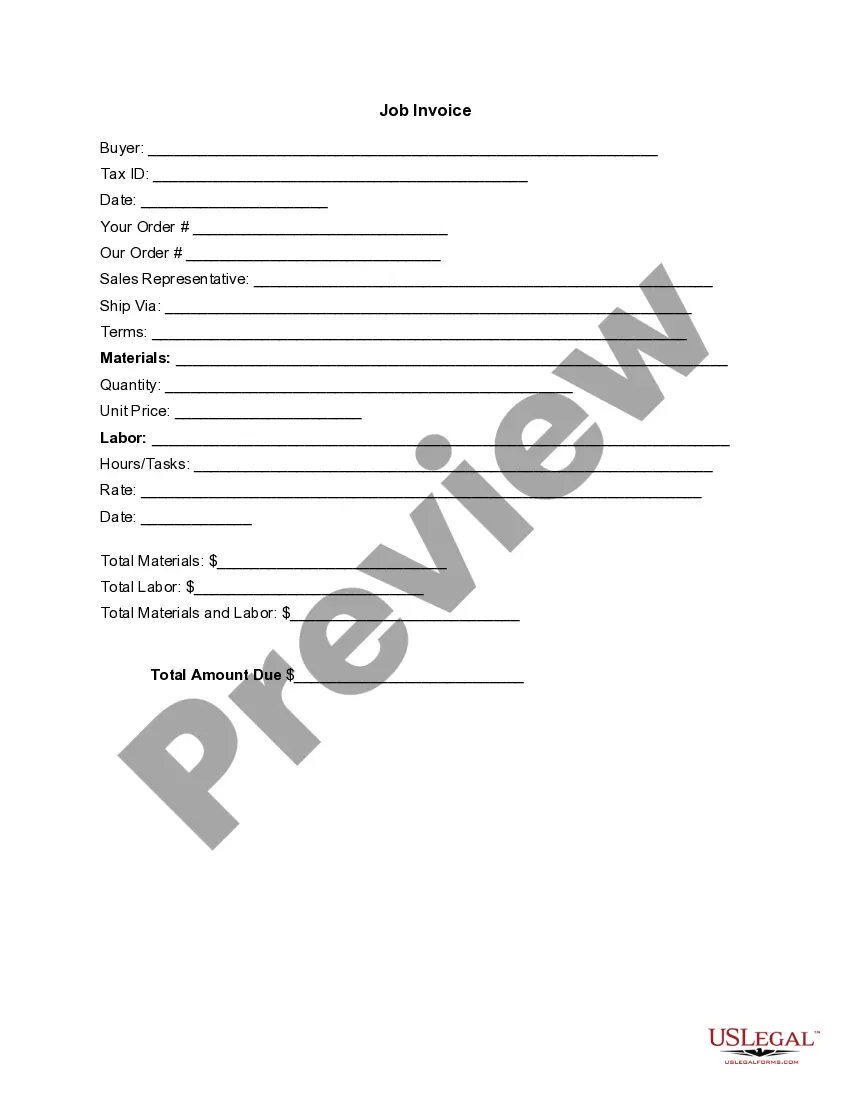
The Invoice Template for Software Engineer is a document used to request payment for services rendered by a software engineer. This form provides a detailed breakdown of the services and materials provided, as well as their associated costs. Unlike generic invoices, this template is specifically designed for software engineering professionals, ensuring that all relevant details are included for clear communication with clients.
Key components of this form
- Buyer's information, including Tax ID and order details
- Date of invoice issuance
- Sales representative and shipping information
- Detailed listing of materials, including quantity and unit price
- Labor section outlining hours worked and associated rates
- Total amounts due for materials, labor, and overall total


When to use this form
This invoice template should be used whenever a software engineer completes a project for a client and needs to obtain payment. It is suitable for both freelance engineers and those working as contractors. The form is beneficial for detailing various services and materials utilized throughout the project, ensuring transparency in billing.
Who can use this document
- Freelance software engineers seeking payment for their services
- Contractors who perform software development work
- Small businesses hiring software engineers for specific projects
- Any software professional wanting to maintain a clear record of services rendered
How to complete this form
- Identify the buyer and enter their information, including the Tax ID.
- Specify the date of the invoice and the order details for both parties.
- List the materials used, quantity, and unit price in the appropriate sections.
- Detail the labor completed, including hours worked and rate charged.
- Calculate and enter the totals for materials, labor, and overall amount due.
Notarization guidance
This form does not typically require notarization unless specified by local law. Be sure to check your jurisdiction for any specific requirements related to invoicing or contracts.
Get your form ready online
Our built-in tools help you complete, sign, share, and store your documents in one place.
Make edits, fill in missing information, and update formatting in US Legal Forms—just like you would in MS Word.
Download a copy, print it, send it by email, or mail it via USPS—whatever works best for your next step.
Sign and collect signatures with our SignNow integration. Send to multiple recipients, set reminders, and more. Go Premium to unlock E-Sign.
If this form requires notarization, complete it online through a secure video call—no need to meet a notary in person or wait for an appointment.
We protect your documents and personal data by following strict security and privacy standards.

Make edits, fill in missing information, and update formatting in US Legal Forms—just like you would in MS Word.

Download a copy, print it, send it by email, or mail it via USPS—whatever works best for your next step.

Sign and collect signatures with our SignNow integration. Send to multiple recipients, set reminders, and more. Go Premium to unlock E-Sign.

If this form requires notarization, complete it online through a secure video call—no need to meet a notary in person or wait for an appointment.

We protect your documents and personal data by following strict security and privacy standards.
Common mistakes
- Failing to include all relevant buyer information.
- Not itemizing services clearly for transparency.
- Leaving out tax or additional fees, leading to underpayment.
- Using unclear descriptions of tasks or materials, which can confuse clients.
- Not keeping a copy of the invoice for personal records.
Advantages of online completion
- Easy to edit and customize according to project needs.
- Quickly generates a professional-looking invoice.
- Access to attorney-approved templates ensures legal compliance.
- Downloadable format allows for easy distribution via email or print.
- Eliminates the need for manual invoice creation, saving time and effort.
Looking for another form?
Form popularity
FAQ
Akaunting. Akaunting is a completely free web tool that lets you invoice, track expenses, and handle all of your freelance or small business accounting needs right in the browser. It works well on PC, Android, and iOS devices.
Download the Square Invoices app on your iOS or Android device. Create your free Square account or sign in with your existing Square account. Tap the '+' sign on the navigation bar and select 'Invoice'.When your clients receive the invoice in their email, they can pay you securely online.
PayPal for creating invoices on mobile devices. Square for accepting POS (point of sale) and online payments. Wave for all-in-one invoicing and accounting for small businesses. Zoho Invoice for automated invoice workflows. Harvest for time-tracking invoicing software.
FreshBooks. : Best overall. Zoho Books. : Best automation. Wave. : Most affordable accounting integration. Square. : Best for low volume. Sage Business Cloud Accounting. : Best reporting. Xero. : Best collaboration. QuickBooks Online. : Best transaction fees. Hiveage.
QuickBooks is an easy cloud accounting software that helps you organize your finances in one place. You can create and send custom online invoices from any device. Top features: Create & send custom invoices, sales receipts, and estimates.
PayPal (Web, iOS, Android) for creating invoices on mobile devices. Square (Web, iOS, Android) for accepting in-person and online payments. Wave (Web, iOS, Android) for invoicing and accounting for small businesses. Zoho Invoice (Web, iOS, Android) for invoice workflows.
Sign up for your free account here. Go to Invoices in your online Square Dashboard. Click Create Invoice. Select a customer from your Customer Directory, or enter a new name and email address. Add the invoice details and any applicable discounts. Click Send.
Download the basic Simple Invoice Template in PDF, Word or Excel format. Open the new invoice doc in Word or Excel. Add your business information and branding, including your business name and logo. Customize the fields in the template to create your invoice. Name your invoice. Save