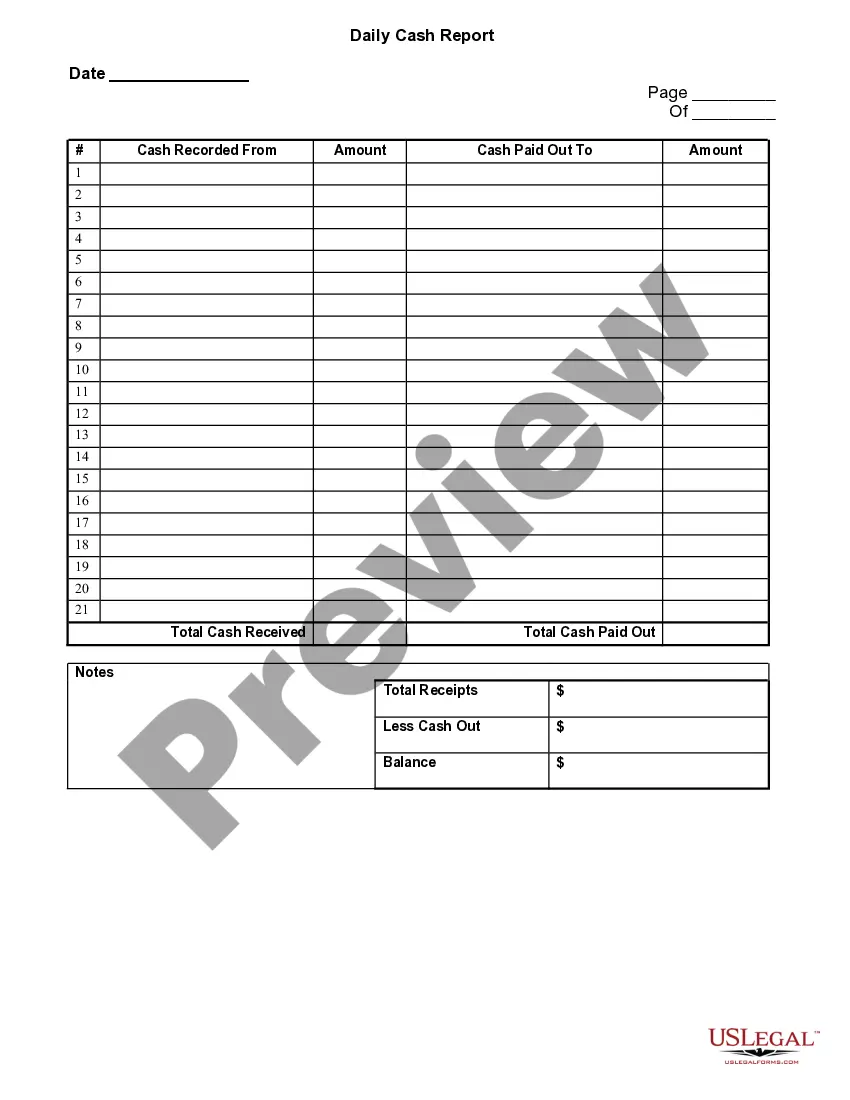
Oregon Daily Cash Report
Description
Get your form ready online
Our built-in tools help you complete, sign, share, and store your documents in one place.
Make edits, fill in missing information, and update formatting in US Legal Forms—just like you would in MS Word.
Download a copy, print it, send it by email, or mail it via USPS—whatever works best for your next step.
Sign and collect signatures with our SignNow integration. Send to multiple recipients, set reminders, and more. Go Premium to unlock E-Sign.
If this form requires notarization, complete it online through a secure video call—no need to meet a notary in person or wait for an appointment.
We protect your documents and personal data by following strict security and privacy standards.

Make edits, fill in missing information, and update formatting in US Legal Forms—just like you would in MS Word.

Download a copy, print it, send it by email, or mail it via USPS—whatever works best for your next step.

Sign and collect signatures with our SignNow integration. Send to multiple recipients, set reminders, and more. Go Premium to unlock E-Sign.

If this form requires notarization, complete it online through a secure video call—no need to meet a notary in person or wait for an appointment.

We protect your documents and personal data by following strict security and privacy standards.
Looking for another form?






How to fill out Daily Cash Report?
US Legal Forms - one of the largest repositories of legal forms in the United States - provides an extensive selection of legal document templates that you can download or create.
By using the website, you can access a multitude of forms for both business and personal purposes, organized by categories, states, or keywords. You can obtain the latest versions of forms like the Oregon Daily Cash Report in just a few minutes.
If you have a monthly subscription, Log In and download the Oregon Daily Cash Report from the US Legal Forms library. The Download option will be visible on every form you view. You can access all previously downloaded forms from the My documents section of your account.
Once you are satisfied with the form, confirm your selection by clicking the Order now button. Then, choose your preferred pricing plan and provide your information to register for an account.
Complete the transaction. Use your credit card or PayPal account to finalize the purchase. Select the format and download the form to your device. Make edits. Fill out, modify, and print and sign the downloaded Oregon Daily Cash Report. Each template you add to your account does not have an expiration date and is yours permanently. Therefore, if you wish to download or print another copy, simply visit the My documents section and click on the form you desire.
- If you are using US Legal Forms for the first time, here are some simple instructions to help you begin.
- Ensure you have selected the correct form for your city/state.
- Click the Preview option to review the form’s details.
- Read the form summary to confirm that you’ve selected the correct form.
- If the form does not meet your needs, use the Search field at the top of the page to find the one that does.
Form popularity
FAQ
Oregon Combined Quarterly Report- Form OQUse this form to determine how much tax is due each quarter for state unemployment insurance, withholding, Tri-Met & Lane Transit excise taxes, and the Workers' Benefit Fund.
Choose a quarterly report filing method:Oregon Payroll Reporting System (OPRS) electronic filing.Combined Payroll Tax Reports Form OQ.Interactive voice response system, call 503-378-3981. Use only to report quarters with no payroll or no hours worked.
Form 132 is filed with Form OQ on a quarterly basis. Oregon Combined Quarterly Report- Form OQUse this form to determine how much tax is due each quarter for state unemployment insurance, withholding, Tri-Met & Lane Transit excise taxes, and the Workers' Benefit Fund.
File Form OR-WR on Revenue Online at . Mail your Form OR-WR separately from your 2018 4th quarter Form OQ and 4th quarter statewide transit tax form. If you amend Form OR-WR, you will also need to amend Form OQ and 4th quarter statewide transit tax form. Make a copy for your records.
If you don't have extra funds to spend on a payroll service, the DIY approach can save you some cash. Doing manual payroll isn't the most straightforward task, but armed with the right knowledge, time, and a sturdy calculator, you can do payroll for your small business yourself.
To electronically pay state payroll taxes (including the WBF assessment) by electronic funds transfer (EFT), use the Oregon Department of Revenue's self-service site, Revenue Online200b. You can make ACH debit payments through this system at any time, with or without a Revenue Online account.
Here are your basic steps for running payroll in Oregon.Step 1: Set up your business as an employer.Step 2: Register with Oregon.Step 3: Create your payroll process.Step 4: Have employees fill out relevant forms.Step 5: Review and approve timesheets.Step 6: Calculate employee gross pay and taxes.More items...?
How to process payroll yourselfStep 1: Have all employees complete a W-4 form.Step 2: Find or sign up for Employer Identification Numbers.Step 3: Choose your payroll schedule.Step 4: Calculate and withhold income taxes.Step 5: Pay payroll taxes.Step 6: File tax forms & employee W-2s.
An Operational Qualification Report is a report which documents the Preliminary Conclusions, Execution Summary, OQ Activities Summary, any Deviations, and Product Disposition of the OQ Qualification.
If you do not have payroll to report for a quarter, you can file your "no payroll" report by phone. The automated voice system will lead you through the steps to submit your "no payroll" report for Unemployment Insurance, State Withholding, TriMet, Lane Transit District and the Workers' Benefit Fund (WBF) assessment.