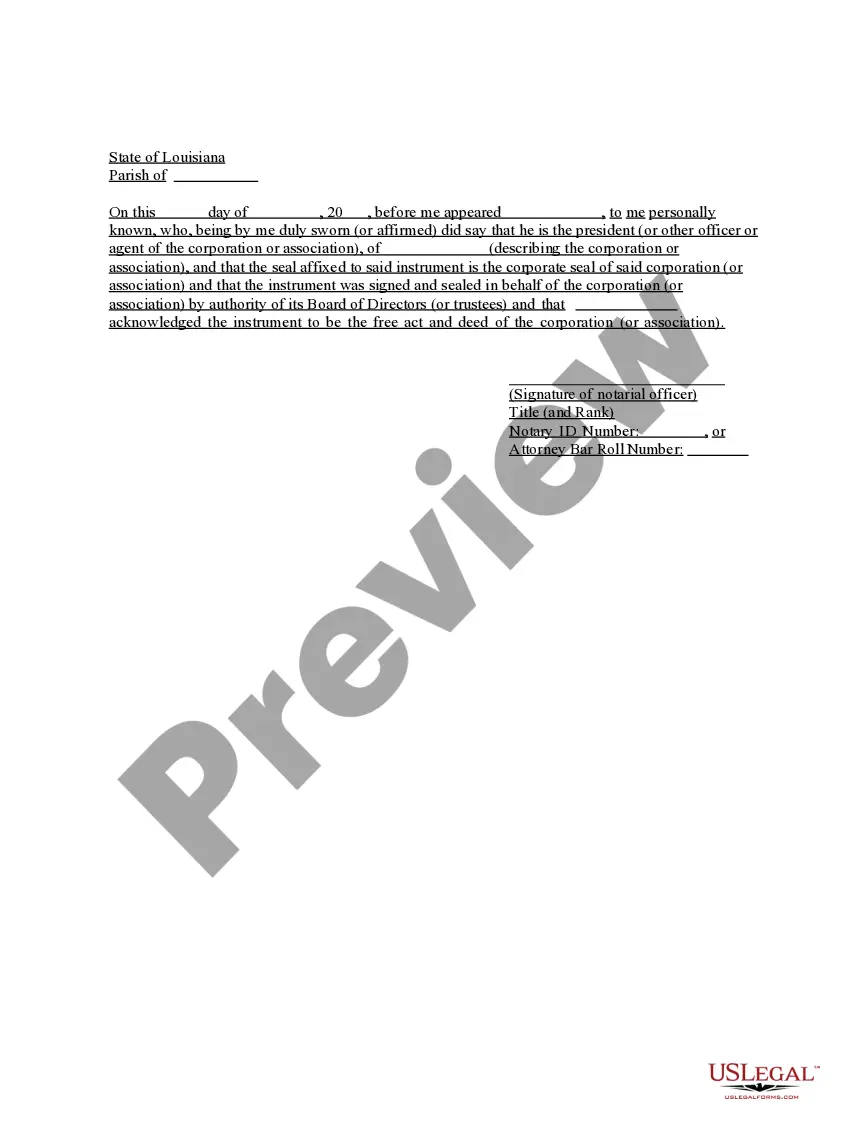
Louisiana Acknowledgment for Corporation
What this document covers
The Acknowledgment for Corporation is a legal form that provides a certified statement from an officer or agent of a corporation regarding the authenticity of a document. This form is essential for affirming that a corporate seal and signature are genuine and that they were executed under proper authority. It differs from similar forms by specifically addressing corporate entities and their governance structures, ensuring that all actions taken by the corporation are legally recognized and binding.
Key components of this form
- Date and location of the acknowledgment.
- Name and title of the corporate officer appearing.
- Description of the corporation or association.
- Declaration of the authority under which the document was signed.
- Verification of the corporate seal affixed to the document.
- Signature and title of the notarial officer.


Situations where this form applies
This form should be used when a corporation needs to verify the authenticity of a signing officer's actions. It is commonly required in situations involving the notarization of corporate documents, such as contracts, real estate transactions, or other legal agreements that require formal acknowledgment by a corporate representative.
Who this form is for
- Corporation officers or agents who are required to validate corporate documents.
- Notaries public involved in corporate documentation.
- Legal professionals assisting corporations with formal proceedings.
How to complete this form
- Fill in the date and location at the top of the form.
- Enter the name and official title of the corporate officer appearing before the notary.
- Describe the corporation or association being acknowledged.
- Include the exact language used to affirm the authenticity of the signing and the existence of a corporate seal.
- Collect signatures from the officer and the notarial officer, including their titles and identification numbers.
Notarization requirements for this form
Yes, this form must be notarized to be legally valid. US Legal Forms provides integrated online notarization for this process, allowing you to complete your acknowledgment securely via video call, ensuring all legal requirements are met without the need for travel.
Get your form ready online
Our built-in tools help you complete, sign, share, and store your documents in one place.
Make edits, fill in missing information, and update formatting in US Legal Forms—just like you would in MS Word.
Download a copy, print it, send it by email, or mail it via USPS—whatever works best for your next step.
Sign and collect signatures with our SignNow integration. Send to multiple recipients, set reminders, and more. Go Premium to unlock E-Sign.
If this form requires notarization, complete it online through a secure video call—no need to meet a notary in person or wait for an appointment.
We protect your documents and personal data by following strict security and privacy standards.

Make edits, fill in missing information, and update formatting in US Legal Forms—just like you would in MS Word.

Download a copy, print it, send it by email, or mail it via USPS—whatever works best for your next step.

Sign and collect signatures with our SignNow integration. Send to multiple recipients, set reminders, and more. Go Premium to unlock E-Sign.

If this form requires notarization, complete it online through a secure video call—no need to meet a notary in person or wait for an appointment.

We protect your documents and personal data by following strict security and privacy standards.
Typical mistakes to avoid
- Failing to include the corporate seal when required.
- Not properly identifying the corporate officerâs title.
- Leaving the date or location fields blank.
- Neglecting to sign the form or provide necessary notarial information.
Why complete this form online
- Convenience of downloading and printing the form at your pace.
- Editability to customize specific fields easily.
- Reliable templates drafted by licensed attorneys to ensure compliance.
- Immediate access to legal forms without the need for appointment or wait time.
What to keep in mind
- The Acknowledgment for Corporation solidifies the authenticity of corporate document executions.
- Completion requires accurate information, including documents' date and corporate seal.
- This form is vital for all corporations involved in legal dealings that require proof of authority.
Looking for another form?
Form popularity
FAQ
This is a form that shows that a notary public has established the identity of the signer(s) and witnessed the signature of a document. It only demonstrates that the document has been signed and does not make any claims about the information in the document.
What Is An Acknowledgment? The purpose of an acknowledgment is for a signer, whose identity has been verified, to declare to a Notary or notarial officer that he or she has willingly signed a document.The signer may either sign the document before appearing before you, or in your presence.
The Individual Acknowledgment certificate is used when an individual is signing and acknowledging on his or her own behalf.
It depends. You may notarize a document that does not have pre-printed notarial wording as long as the signer tells you what type of notarization is needed.As nonattorneys, Notaries cannot decide the type of notarization to perform on a document because the choice can have important legal ramifications.
Yes, you may notarize a signature on a document that includes handwritten paragraphs. A document can be typed or handwritten. If the notarial certificate under the signature is not included, be sure to attach a loose certificate chosen by your customer.
The purpose of an acknowledgment is for a signer, whose identity has been verified, to declare to a Notary or notarial officer that he or she has willingly signed a document.The signer may either sign the document before appearing before you, or in your presence.
Unlike jurats, an acknowledgment does not need to be signed in the presence of a notary. However, the affiant does need to swear or affirm that they signed under their own free will.