Connecticut Certificate of Transfer
Overview of this form
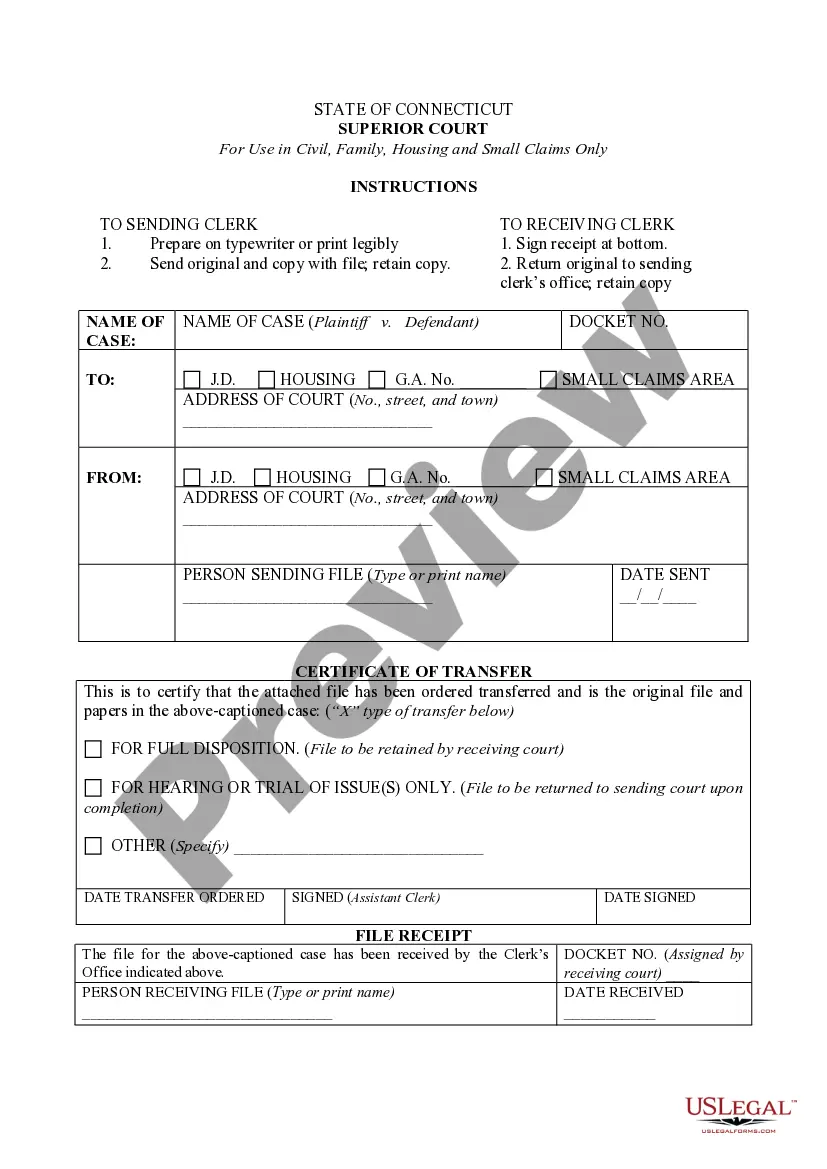
The Certificate of Transfer is a legal document used in the context of small claims cases. It certifies that a case has been transferred from a small claims court to a regular court docket. This form is essential for ensuring that all necessary documents and files related to the case are correctly managed during the transfer process, distinguishing itself from other forms that may only concern filing or initiating cases.
Form components explained
- Case name and docket number fields for identification.
- Details of the sending and receiving courts, including addresses.
- Signature line for the assistant clerk who processes the transfer.
- Options for the type of transfer, specifying whether for full disposition or just for hearing or trial.
- File receipt confirmation for record-keeping once the transfer is complete.
When to use this document
This form is used when a small claims case needs to be transferred to a regular court for further proceedings. This may occur if the case requires more extensive examination or if the monetary amount exceeds the jurisdictional limits of the small claims court. Use this form to ensure proper documentation and communication between courts.
Who can use this document
- Individuals or businesses involved in small claims cases.
- Legal representatives handling small claims disputes.
- Clerical staff at the courts managing case transfers.
- Plaintiffs or defendants needing to escalate matters to higher courts.
How to complete this form
- Enter the name of the case, including the names of the plaintiff and defendant.
- Fill in the docket number for easy identification and tracking.
- Provide the addresses for both the sending and receiving courts.
- Select the type of transfer by marking the appropriate option.
- Have the assistant clerk sign and date the form to validate the transfer.
Notarization guidance
This form does not typically require notarization unless specified by local law. However, having it notarized can help affirm its authenticity in court.
Get your form ready online
Our built-in tools help you complete, sign, share, and store your documents in one place.
Make edits, fill in missing information, and update formatting in US Legal Forms—just like you would in MS Word.
Download a copy, print it, send it by email, or mail it via USPS—whatever works best for your next step.
Sign and collect signatures with our SignNow integration. Send to multiple recipients, set reminders, and more. Go Premium to unlock E-Sign.
If this form requires notarization, complete it online through a secure video call—no need to meet a notary in person or wait for an appointment.
We protect your documents and personal data by following strict security and privacy standards.

Make edits, fill in missing information, and update formatting in US Legal Forms—just like you would in MS Word.

Download a copy, print it, send it by email, or mail it via USPS—whatever works best for your next step.

Sign and collect signatures with our SignNow integration. Send to multiple recipients, set reminders, and more. Go Premium to unlock E-Sign.

If this form requires notarization, complete it online through a secure video call—no need to meet a notary in person or wait for an appointment.

We protect your documents and personal data by following strict security and privacy standards.
Mistakes to watch out for
- Failing to correctly fill out the docket number, which can hinder case tracking.
- Omitting signatures or dates from crucial sections.
- Selecting the wrong type of transfer option, leading to procedural delays.
- Not retaining copies of the file for the sending court.
Benefits of using this form online
- Instant access to the form, allowing for quick and efficient case management.
- Editability to tailor the document to specific needs or circumstances.
- Reliability of the templates, drafted by licensed attorneys to ensure legal compliance.
Looking for another form?

Form popularity
FAQ
To transfer registration in Connecticut, you must prepare a few key documents. You will need the Connecticut Certificate of Transfer, your driver's license, proof of insurance, and any relevant paperwork the DMV requests. Using a reliable service like USLegalForms can help ensure you gather the right documents efficiently.
While a bill of sale is not strictly required to transfer title in Connecticut, it is highly recommended. The document serves as proof of the sale and helps ensure clarity between both parties. Along with the Connecticut Certificate of Transfer, having a bill of sale protects you in case of any future disputes.
When you sell your car in Connecticut, you need to decide what to do with your license plates. Generally, you should keep the plates and return them to the DMV unless the buyer wishes to keep them. This process helps ensure your Connecticut Certificate of Transfer is clear and records are up to date.
When visiting the Connecticut DMV for registration, bring all necessary documents to facilitate your visit. You'll need your current driver’s license or ID, the Connecticut Certificate of Transfer, proof of residency, and any vehicle-related documents. Having these items ready will help speed up your registration process.
To transfer registration in Connecticut, you need specific documents to ensure the process goes smoothly. First, gather your current registration, proof of identity, and proof of insurance. Additionally, you'll also need the Connecticut Certificate of Transfer, which certifies the ownership change.
To transfer ownership of a car to a family member in Connecticut, you'll need to complete the title transfer process. This includes filling out the required sections on the title and providing proof of familial relationship if necessary. Don’t forget to submit the completed title to the DMV for proper documentation. This simple process can ensure that you efficiently manage your new Connecticut Certificate of Transfer.
Typically, the certificate of title is prepared by the seller of the vehicle. When transferring a vehicle, they will complete the necessary sections of the title, ensuring all details are correct. After that, the buyer takes the signed title to their local DMV for processing. If you need assistance, platforms like uslegalforms can help guide you through obtaining your Connecticut Certificate of Transfer.
To fill out a certification of title, carefully read the instructions provided with the title document. You will need to provide information such as the vehicle identification number (VIN), odometer reading, and both seller and buyer signatures. Ensure that all information is accurate to avoid delays in processing. This process is crucial, especially if you are looking to obtain a Connecticut Certificate of Transfer.
To transfer a title in Massachusetts, you need to complete the title transfer form, available from the Massachusetts Registry of Motor Vehicles. You will also need to provide the current title, which must be signed by the seller. Make sure to have the payment for any required fees ready. This process will establish a clear record, ensuring compliance when obtaining a Connecticut Certificate of Transfer.
When transferring a license in Connecticut, you typically need your current license, proof of residency, and identification. It's vital to have the completed application for the transfer and any applicable fees ready as well. With the Connecticut Certificate of Transfer, you can streamline your license transfer with clarity.