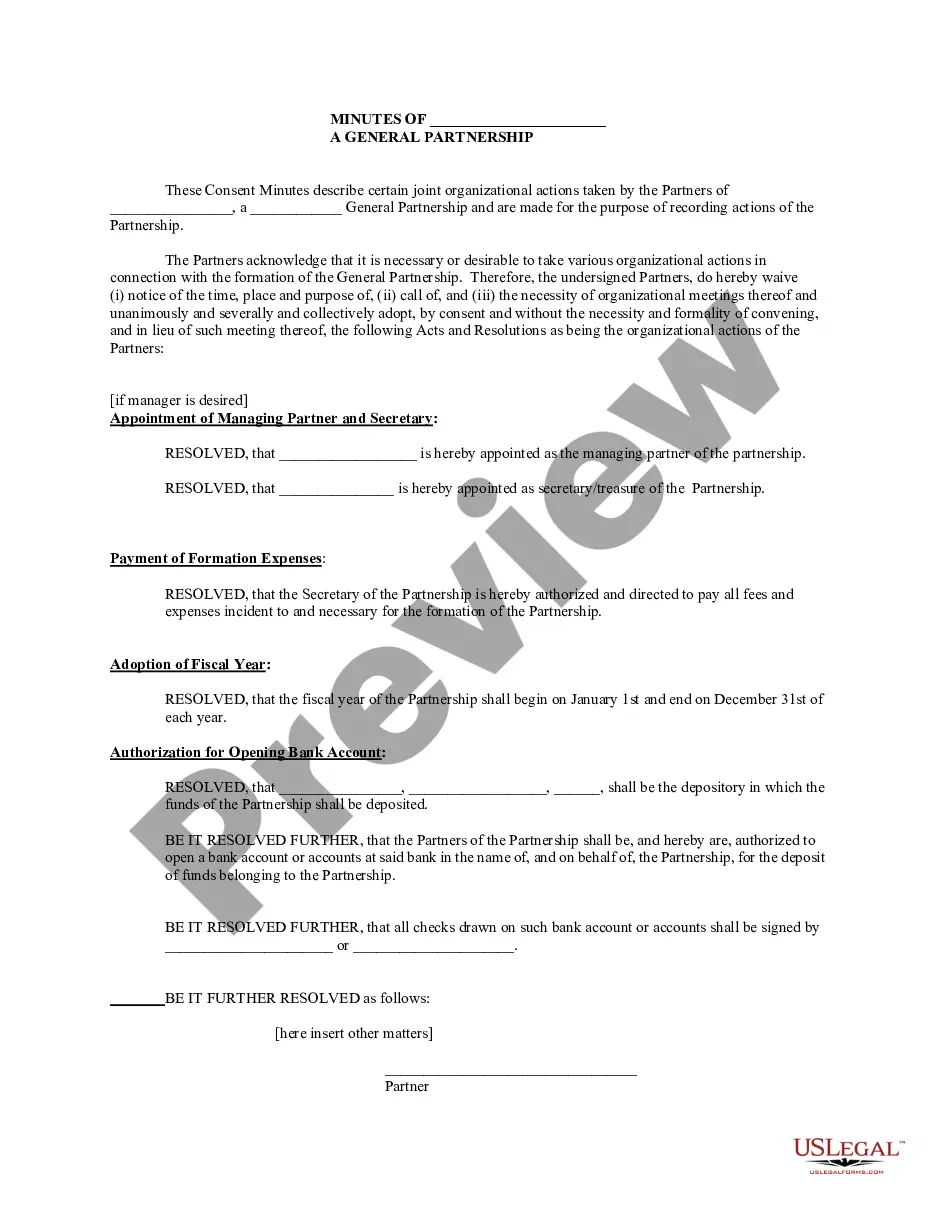
Partnership Meeting Minutes Template For Email
Description

Get your form ready online
Our built-in tools help you complete, sign, share, and store your documents in one place.
Make edits, fill in missing information, and update formatting in US Legal Forms—just like you would in MS Word.
Download a copy, print it, send it by email, or mail it via USPS—whatever works best for your next step.
Sign and collect signatures with our SignNow integration. Send to multiple recipients, set reminders, and more. Go Premium to unlock E-Sign.
If this form requires notarization, complete it online through a secure video call—no need to meet a notary in person or wait for an appointment.
We protect your documents and personal data by following strict security and privacy standards.

Make edits, fill in missing information, and update formatting in US Legal Forms—just like you would in MS Word.

Download a copy, print it, send it by email, or mail it via USPS—whatever works best for your next step.

Sign and collect signatures with our SignNow integration. Send to multiple recipients, set reminders, and more. Go Premium to unlock E-Sign.

If this form requires notarization, complete it online through a secure video call—no need to meet a notary in person or wait for an appointment.

We protect your documents and personal data by following strict security and privacy standards.
Looking for another form?









How to fill out Minutes For Partnership?
The Collaboration Meeting Notes Template For Email you observe on this page is a reusable legal document created by professional attorneys in accordance with federal and state laws.
For over 25 years, US Legal Forms has supplied individuals, businesses, and legal experts with more than 85,000 authenticated, state-specific forms for any commercial and personal situation. It’s the fastest, easiest, and most reliable method to acquire the documents you require, as the service ensures bank-grade data security and anti-malware safeguards.
Select the format you prefer for your Collaboration Meeting Notes Template For Email (PDF, Word, RTF) and save the sample on your device.
- Explore the document you require and review it.
- Browse through the sample you searched and preview it or check the form description to ensure it meets your requirements. If it doesn’t, use the search feature to locate the suitable one. Click Buy Now when you have discovered the template you need.
- Select and Log In.
- Choose the pricing option that fits you and create an account. Use PayPal or a credit card to make a swift payment. If you already have an account, Log In and verify your subscription to proceed.
- Obtain the editable template.
Form popularity
FAQ
To write an effective email for sending meeting minutes, start with a clear subject line that indicates the purpose, such as 'Minutes from Date Meeting'. Use the partnership meeting minutes template for email to structure your content, ensuring it includes key points discussed, decisions made, and action items. Conclude your email with a call to action, inviting recipients to review the minutes and confirm their approval or provide feedback.
Yes, meeting minutes can be approved via email. When you send the partnership meeting minutes template for email to the attendees, they can review the content and provide their approvals directly in their responses. This method promotes efficiency and ensures everyone is on the same page. Just make sure to include a clear request for feedback or approval in your email.
What to Include in Your Meeting Minutes Basic Facts About the Meeting Date and Time. ... A Record of Meeting Attendance. ... A Rundown of Any Reports Given. ... Financial Updates. ... Any Motions, Votes, or Discussions. ... Closing Information. ... Any Tangents or Irrelevant Discussions. ... Editorial Comments or Emotions.
Following are 10 steps that can help you compose an effective meeting minutes report: Make an outline. ... Include factual information. ... Write down the purpose. ... Record decisions made. ... Add details for the next meeting. ... Be concise. ... Consider recording. ... Edit and proofread.
How to send a meeting recap Take notes during the meeting. ... Decide who should receive the email. ... Thank everyone for their time. ... List what was discussed in the meeting. ... Highlight action items or next steps. ... Attach supporting documents. ... Include a reminder of the next meeting date. ... Proofread and send to recipients.
Dear [Recipient Name], I hope this email finds you well. As a follow-up to our recent meeting for [Meeting Name] held on [Meeting Date], I wanted to provide a recap of the meeting minutes. [Give a brief overview of the main discussion points and decisions made during the meeting.]
Our meeting experts compiled 7 best practices that apply to all sorts of teams and scenarios. 1 Date and time of the meeting. ... 2 Names of the participants. ... 3 Purpose of the meeting. ... 4 Agenda items and topics discussed. ... 5 Key decisions and action items. ... 6 Next meeting date and place. ... 7 Documents to be included in the report.