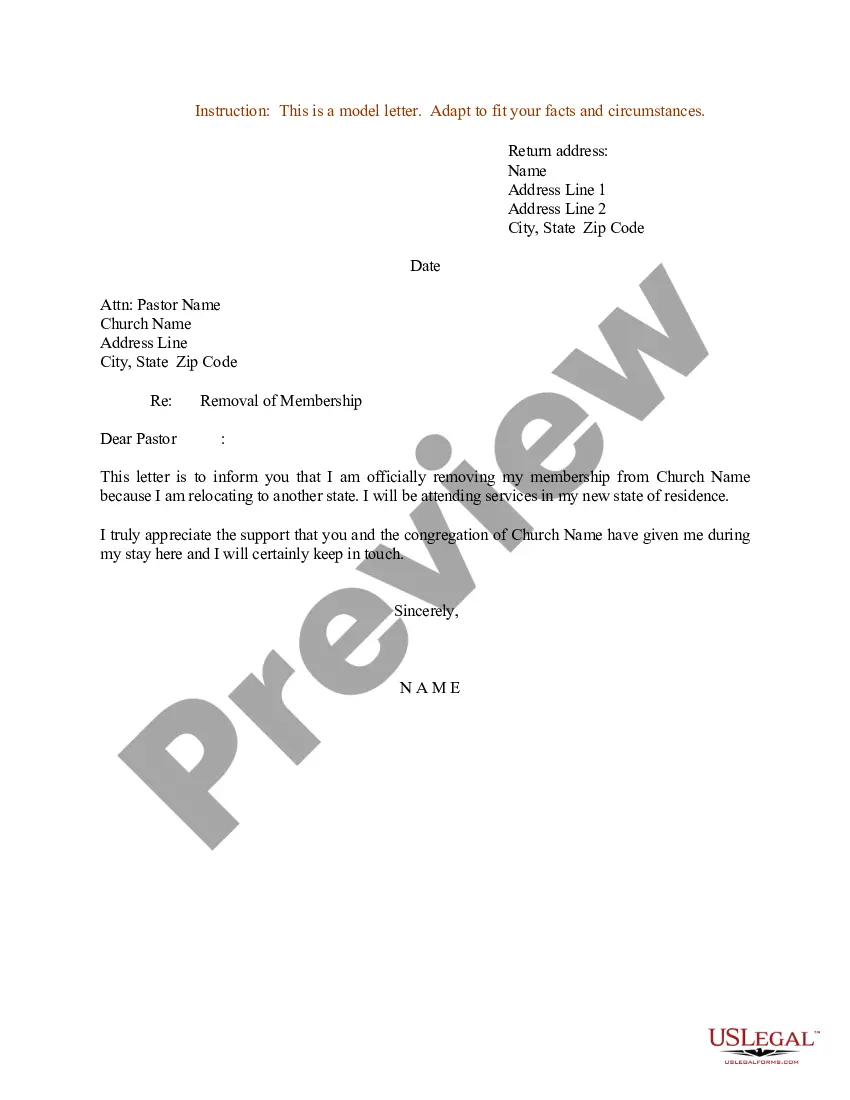
Sample Church Membership Withdrawal Letter For Church
Description
Get your form ready online
Our built-in tools help you complete, sign, share, and store your documents in one place.
Make edits, fill in missing information, and update formatting in US Legal Forms—just like you would in MS Word.
Download a copy, print it, send it by email, or mail it via USPS—whatever works best for your next step.
Sign and collect signatures with our SignNow integration. Send to multiple recipients, set reminders, and more. Go Premium to unlock E-Sign.
If this form requires notarization, complete it online through a secure video call—no need to meet a notary in person or wait for an appointment.
We protect your documents and personal data by following strict security and privacy standards.

Make edits, fill in missing information, and update formatting in US Legal Forms—just like you would in MS Word.

Download a copy, print it, send it by email, or mail it via USPS—whatever works best for your next step.

Sign and collect signatures with our SignNow integration. Send to multiple recipients, set reminders, and more. Go Premium to unlock E-Sign.

If this form requires notarization, complete it online through a secure video call—no need to meet a notary in person or wait for an appointment.

We protect your documents and personal data by following strict security and privacy standards.
Looking for another form?
How to fill out Sample Letter For Removal Of Membership From Church?
The Example Church Membership Withdrawal Document For Church displayed on this webpage is a versatile legal template crafted by experienced attorneys in accordance with national and local laws.
For over 25 years, US Legal Forms has supplied individuals, organizations, and lawyers with more than 85,000 verified, state-specific documents for any professional and personal scenario. It is the quickest, easiest, and most reliable method to obtain the forms you require, as the service guarantees the utmost level of data protection and anti-virus safeguards.
Join US Legal Forms to have validated legal templates for all of life's events readily available.
- Search for the document you require and examine it.
- Browse through the sample you sought and preview it or evaluate the form details to confirm it meets your needs. If it does not, use the search function to find the appropriate one. Click 'Buy Now' once you have identified the template you need.
- Choose a subscription plan and Log In.
- Select the payment plan that fits you and create an account. Use PayPal or a credit card for prompt payment processing. If you already have an account, Log In and verify your subscription to continue.
- Obtain the editable template.
- Select the format you prefer for your Example Church Membership Withdrawal Document For Church (PDF, Word, RTF) and download the sample to your device.
- Fill out and sign the document.
- Print the template to complete it manually. Alternatively, use a web-based multifunctional PDF editor to quickly and precisely fill out and sign your form with a legally-valid electronic signature.
- Download your document again.
- Reuse the same document whenever needed. Access the 'My documents' section in your account to redownload any previously acquired documents.
Form popularity
FAQ
Give us a call at 1-844-898-8542 or email forms@dor.sc.gov so we can direct you to the proper form, or discuss the online filing option that best fits your needs. Filing online using MyDORWAY makes finding the right form easy!
If you file as a full-year resident, file the SC1040. Report all your income as though you were a resident for the entire year. You will be allowed a credit for taxes paid on income taxed by South Carolina and another state. Complete the SC1040TC and attach a copy of the other state's Income Tax return.
In this article, we'll walk you through the steps you need to take to file your personal injury lawsuit in South Carolina. Step 1: Make sure you have legal standing. ... Step 2: Hire a lawyer or prepare to represent your case. ... Step 3: Determine where to file your lawsuit. ... Step 4: File and serve your complaint.
Give us a call at 1-844-898-8542 or email forms@dor.sc.gov so we can direct you to the proper form, or discuss the online filing option that best fits your needs. Filing online using MyDORWAY makes finding the right form easy!
All personal service income earned in South Carolina must be reported to this state. You may choose the way that is most beneficial to you. This option is only available for the year you are a part- year resident. You must also attach a copy of your federal return.
State Only Return Requirements ? The South Carolina e-file program supports federal/state (piggyback) filing and state-only filing through the Federal/State Electronic Filing Program (Modernized e-File System). Both part-year and nonresident returns can be e-filed.
If you are a South Carolina resident, you are generally required to file a South Carolina Income Tax return if you are required to file a federal return.
If you elect to file as a full-year resident, file SC1040. Report all your income as though you were a resident for the entire year. You will be allowed a credit for taxes paid on income taxed by South Carolina and another state. You must complete SC1040TC and attach a copy of the other state's income tax return.