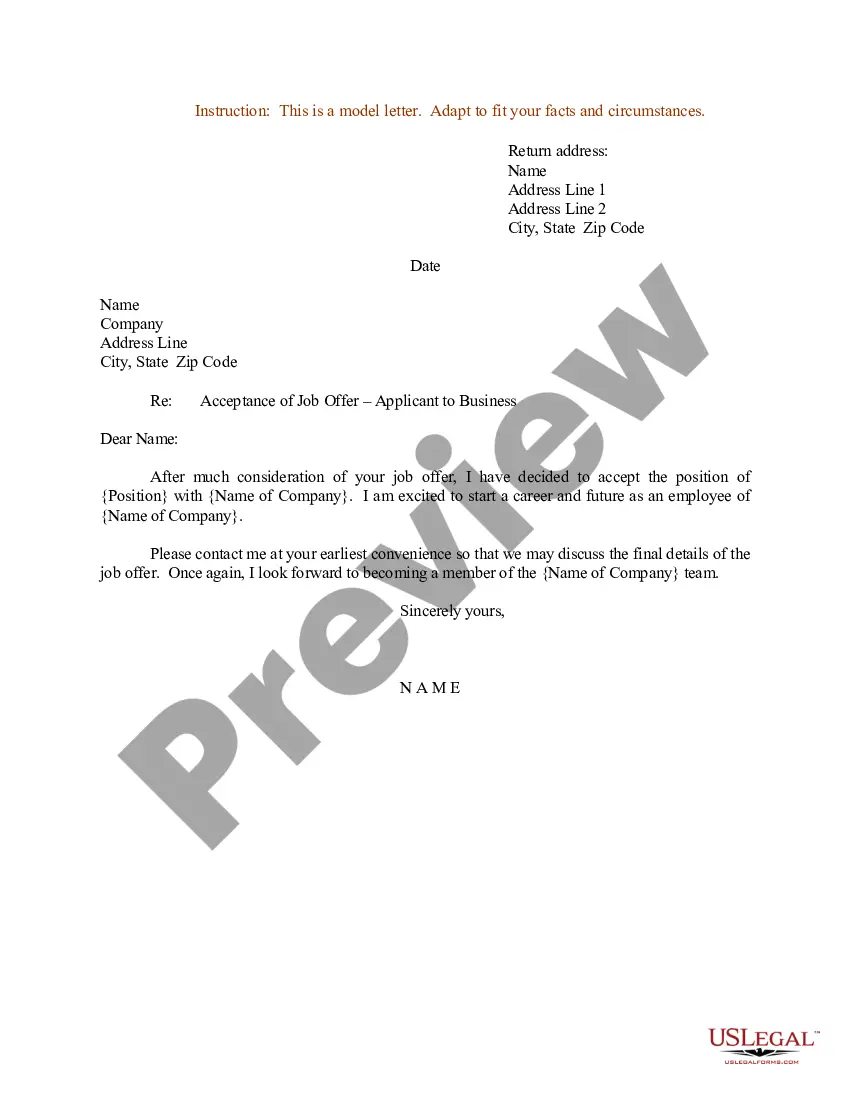
Letter To Accept School Offer In Nevada
Description




Get your form ready online
Our built-in tools help you complete, sign, share, and store your documents in one place.
Make edits, fill in missing information, and update formatting in US Legal Forms—just like you would in MS Word.
Download a copy, print it, send it by email, or mail it via USPS—whatever works best for your next step.
Sign and collect signatures with our SignNow integration. Send to multiple recipients, set reminders, and more. Go Premium to unlock E-Sign.
If this form requires notarization, complete it online through a secure video call—no need to meet a notary in person or wait for an appointment.
We protect your documents and personal data by following strict security and privacy standards.

Make edits, fill in missing information, and update formatting in US Legal Forms—just like you would in MS Word.

Download a copy, print it, send it by email, or mail it via USPS—whatever works best for your next step.

Sign and collect signatures with our SignNow integration. Send to multiple recipients, set reminders, and more. Go Premium to unlock E-Sign.

If this form requires notarization, complete it online through a secure video call—no need to meet a notary in person or wait for an appointment.

We protect your documents and personal data by following strict security and privacy standards.
Looking for another form?








Form popularity
FAQ
Applications for admission are reviewed when they are complete. A complete application is one which includes official transcripts from each institution the applicant attended previously. A final decision will be made on each complete application within 10 business days of receipt of the last official transcript.
The admission letter highlights your interest for a program, potentially boosting your chances of admission. Include your details, date, greeting, purpose, reasons, conclusion, and sign-off. Write a concise and specific admission letter that highlights your fit, uniqueness, and enthusiasm for the college.
Let them know why you value their input, and be clear about your needs and deadlines. Indicate what is important to your child about the school applying to and how your child's experience with the person relates. When asking, let the person know how soon you will need the letter and give them amply time to write it.
How to write an application letter Address your letter. Use proper salutation. Create a subject line. Introduce yourself, your purpose and your interests. Highlight your skills and achievements. Reiterate your interest. Thank the reviewer. Closing salutation and sign.
Log-into MyNEVADA. The first step is to log-in to MyNEVADA using your NSHE ID and password. Once you log-in, you will see your submitted application along with a link to "Accept or Decline." After clicking on the link, you will be prompted to select "I Accept Admission" or "I Decline Admission."
There are three ways you'll receive your letter of acceptance: by mail, email, or on your online portal. How schools choose to tell students about their university entry will vary. Check with your school's office of admissions to see when and how you'll get your letter of acceptance.
Log Into the College's Student Portal You likely set up an applicant portal with a school once you submitted your application. You can often accept admission within the portal.
I am pleased to accept your job offer as (position title) at (Company XYZ). I look forward to working under (Supervisor) and hope to meet the goals outlined with the position. The duties of this role are well aligned with my qualifications and skills.
Acceptance Letter Format I am writing to confirm my acceptance of your employment offer from April 1. I am delighted to be joining International Engineering Corporation as a Project Manager. The work is exactly what I have prepared for and hoped to do.
Thank the admissions office for their time and consideration during the application process. Conclude the letter politely, such as ``Sincerely'' or ``Best regards,'' followed by your name. It's important to respond promptly, as colleges often have deadlines for students to accept or decline their offers.

