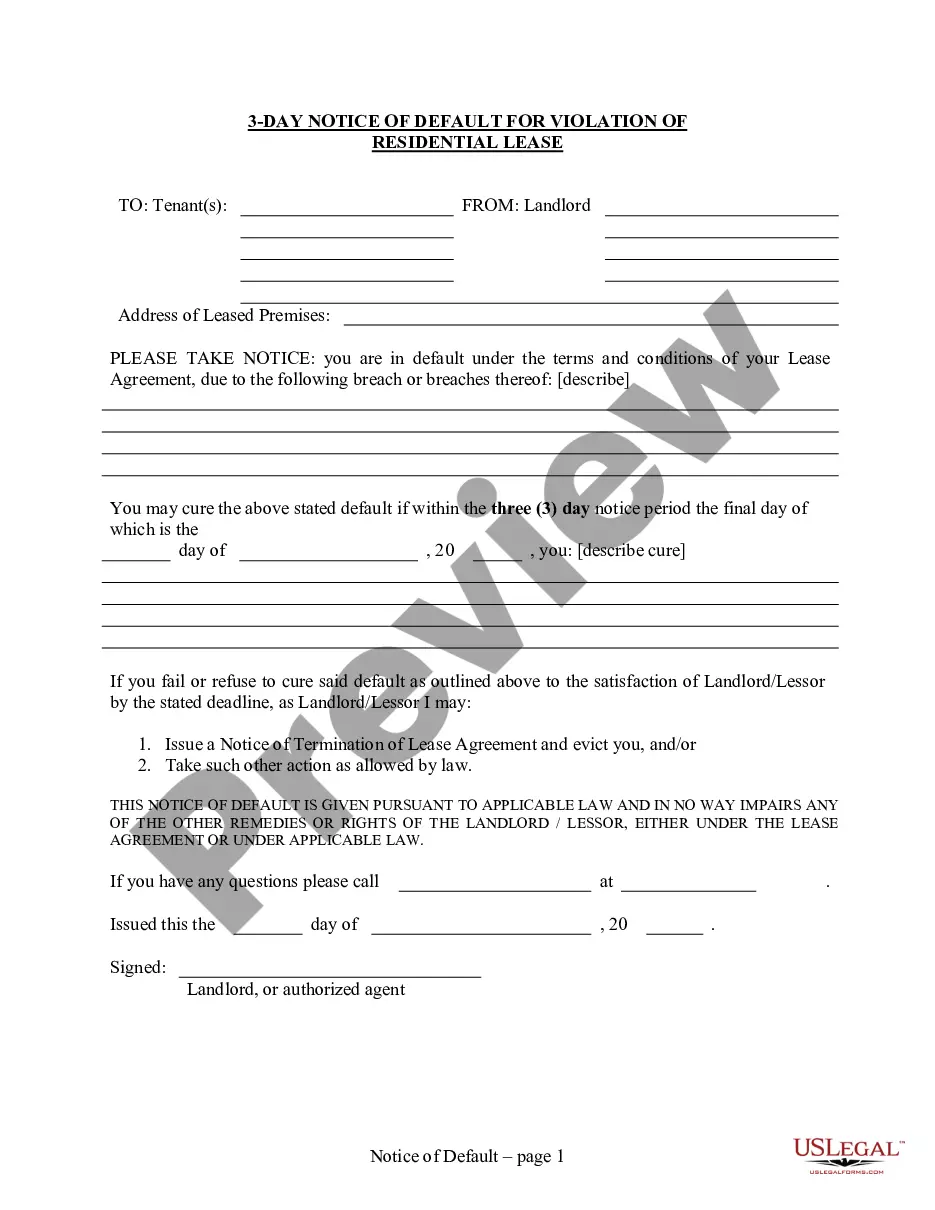
3 Day Notice to Cure Breach of Lease or Lease Terminated for Residential from Landlord to Tenant
1161 Civ. Proc.
A tenant
of real property, for a term less than life, or the executor or administrator
of his or her estate heretofore qualified and now acting or hereafter to
be qualified and act, is guilty of unlawful detainer:
1. When
he or she continues in possession, in person or by subtenant, of the property,
or any part thereof, after the expiration of the term for which it is let
to him or her; provided such expiration is of a nondefault
nature however brought about without the permission of his or her landlord,
or the successor in estate of his or her landlord, if any there be; including
the case where the person to be removed became the occupant of the premises
as a servant, employee, agent, or licensee and the relation of master and
servant or employer and employee or principal and agent or licensor and
licensee has been lawfully terminated or the time fixed for such occupancy
by the agreement between the parties has expired; but nothing in this subdivision
contained shall be construed as preventing the removal of such occupant
in any other lawful manner; but in case of a tenancy at will, it must first
be terminated by notice, as prescribed in the Civil Code.
2. When he or she continues in possession, in person or by subtenant,
without the permission of his or her landlord, or the successor in estate
of his or her landlord, if any there be, after default in the payment of
rent, pursuant to the lease or agreement under which the property is held,
and three days' notice, in writing, requiring its payment, stating the
amount which is due, or possession of the property, shall have been served
upon him or her and if there is a subtenant in actual occupation of the
premises, also upon such subtenant.
Such notice may be served at any time within one year after the rent
becomes due. In all cases of tenancy upon agricultural lands, where the
tenant has held over and retained possession for more than 60 days after
the expiration of the term without any demand of possession or notice to
quit by the landlord or the successor in estate of his or her landlord,
if any there be, he or she shall be deemed to be holding by permission
of the landlord or successor in estate of his or her landlord, if any there
be, and shall be entitled to hold under the terms of the lease for another
full year, and shall not be guilty of an unlawful detainer during that
year, and the holding over for that period shall be taken and construed
as a consent on the part of a tenant to hold for another year.
3. When he or she continues in possession, in person or by subtenant,
after a neglect or failure to perform other conditions or covenants of
the lease or agreement under which the property is held, including any
covenant not to assign or sublet, than the one for the payment of rent,
and three days'notice, in writing, requiring the performance of such conditions
or covenants, or the possession of the property, shall have been served
upon him or her, and if there is a subtenant in actual occupation of the
premises, also, upon the subtenant. Within three days after the service
of the notice, the tenant, or any subtenant in actual occupation of the
premises, or any mortgagee of the term, or other person interested in its
continuance, may perform the conditions or covenants of the lease or pay
the stipulated rent, as the case may be, and thereby save the lease from
forfeiture; provided, if the conditions and covenants of the lease, violated
by the lessee, cannot afterward be performed, then no notice, as last prescribed
herein, need be given to said lessee or his or her subtenant, demanding
the performance of the violated conditions or covenants of the lease.
A tenant may take proceedings, similar to those prescribed in this chapter,
to obtain possession of the premises let to a subtenant or held by a servant,
employee, agent, or licensee, in case of his or her unlawful detention
of the premises underlet to him or her or held by him or her.
4. Any tenant, subtenant, or executor or administrator of his or her
estate heretofore qualified and now acting, or hereafter to be qualified
and act, assigning or subletting or committing waste upon the dernised
premises, contrary to the conditions or covenants of his or her lease,
or maintaining, committing, or permitting the maintenance or commission
of a nuisance upon the demised premises or using such premises for an unlawful
purpose, thereby terminates the lease, and the landlord, or his or her
successor in estate, shall upon service of three days' notice to quit upon
the person or persons in possession, be entitled to restitution of possession
of the demised premises under this chapter. For purposes of this subdivision,
a person who illegally sells a controlled substance upon the premises or
uses the premises to further that purpose, shall be deemed to have committed
a nuisance upon the premises.
5. When he or she gives written notice as provided in Section 1946 Civ.
of the Civil Code of his or her intention to terminate the hiring of the
real property, or makes a written offer to surrender which is accepted
in writing by the landlord, but fails to deliver up possession at the time
specified in that written notice, without the permission of his or her
landlord, or the successor in estate of the landlord, if any there be.
As used in this section, tenant includes any person who hires real property
except those persons whose occupancy is described in subdivision (b) of
Section 1940 Civ. of the Civil Code.
(Amended by Stats. 1996, Ch. 658, Sec. 2. Effective January 1)
1161.1 Civ. Proc.
With respect to application of Section 1161 in cases of possession of
commercial real property after default in the payment of rent:
(a) If the amount stated in the notice provided to the tenant pursuant
to subdivision (2) of Section 1161 is clearly identified by the notice
as an estimate and the amount claimed is not in fact correct, but it is
determined upon the trial or other judicial determination that rent was
owing, and the amount claimed in the notice was reasonably estimated, the
tenant shall be subject to judgment for possession and the actual amount
of rent and other sums found to be due. However, if (1) upon receipt of
such a notice claiming an amount identified by the notice as an estimate,
the tenant tenders to the landlord within the time for payment required
by the notice, the amount which the tenant has reasonably estimated to
be due and (2) if at trial it is determined that the amount of rent then
due was the amount tendered by the tenant or a lesser amount, the tenant
shall be deemed the prevailing party for all purposes. If the court determines
that the amount so tendered by the tenant was less than the amount due,
but was reasonably estimated, the tenant shall retain the right to possession
if the tenant pays to the landlord within five days of the effective date
of the judgment (1) the amount previously tendered if it had not been previously
accepted, (2) the difference between the amount tendered and the amount
determined by the court to be due, and (3) any other sums as ordered by
the court.
(b) If the landlord accepts a partial payment of rent, including any
payment pursuant to subdivision (a), after serving notice pursuant to Section
1161, the landlord, without any further notice to the tenant, may commence
and pursue an action under this chapter to recover the difference between
the amount demanded in that notice and the payment actually received, and
this shall be specified in the complaint.
(c) If the landlord accepts a partial payment of rent after filing the
complaint pursuant to Section 1166, the landlord!s acceptance of the partial
payment is evidence only of that payment, without waiver of any rights
or defenses of any of the parties. The landlord shall be entitled to amend
the complaint to reflect the partial payment without creating a necessity
for the filing of an additional answer or other responsive pleading by
the tenant, and without prior leave of court, and such an amendment shall
not delay the matter from proceeding. However,
this subdivision shall apply only if the landlord provides actual notice
to the tenant that acceptance of the partial rent payment does not constitute
a waiver of any rights, including any right the landlord may have to recover
possession of the property.
(d) "Commercial real property" as used in this section, means all real
property in this state except dwelling units made subject to Chapter 2
(commencing with Section 1940 Civ.) of Title 5 of Part 4 of Division 3
of the Civil Code, mobilehomes as defined in Section 798.3 Civ. of the
Civil Code, or recreational vehicles as defined in Section 799.24 Civ.
of the Civil Code.
(e) For the purposes of this section, there is a presumption affecting
the burden of proof that the amount of rent claimed or tendered is reasonably
estimated if, in relation to the amount determined to be due upon the trial
or otherjudicial determination of that issue, the amount claimed or tendered
was no more than 20 percent more or less than the amount determined to
be due. However, if the rent due is contingent upon information primarily
within the knowledge of the one party to the lease and that information
has not been furnished to, or has not accurately been furnished to, the
other party, the court shall consider that fact in determining the reasonableness
of the amount of rent claimed or tendered pursuant to subdivision (a).
(Added by Stats. 1990, Ch. 890, Sec. 1.)
When the notice required by Section 1161 Civ. Proc. states that the
lessor or the landlord may elect to declare the forfeiture of the lease
or rental agreement, that declaration shall be nullified and the lease
or rental agreement shall remain in effect if the lessee or tenant performs
within three days after service of the notice or if the breach is waived
by the lessor or the landlord after service of the notice.
(a) Except as provided in subdivision (b), in all leases of lands or
tenements, or of any interest therein, from week to week, month to month,
or other period less than a month, the landlord may, upon giving notice
in writing to the tenant, in the manner prescribed by Section 1162 Civ.
Proc. of the Code of Civil Procedure, change the terms of the lease to
take effect, as to tenancies for less than one month, upon the expiration
of a period at least as long as the term of the hiring itself, and, as
to tenancies from month to month, to take effect at the expiration of not
less than 30 days, but if that change takes effect within a rental term,
the rent accruing from the first day of the term to the date of that change
shall be computed at the rental rate which obtained immediately prior to
that change; provided, however, that it shall be competent for the parties
to provide by an agreement in writing that a notice changing the terms
thereof may be given at any time not less than seven days before the expiration
of a term, to be effective upon the expiration of the term.
The notice, when served upon the tenant, shall of itself operate and
be effectual to create and establish, as a part of the lease, the terms,
rents, and conditions specified in the notice, if the tenant>shall continue
to
hold the premises after the notice takes effect.
(b) (1) In all leases of a residential dwelling, or of any interest
therein, from week to week, month to month, or other period less than a
month, the landlord may increase the rent provided in the lease or rental
agreement, upon giving written notice to the tenant, as follows, by either
of the following procedures:
(A) By delivering a copy to the tenant personally.
(B) By serving a copy by mail under the procedures prescribed in Section
1013 Civ. Proc. of the Code of Civil Procedure.
(2) If the proposed rent increase for that tenant is 10 percent or less
of the rental amount charged to that tenant at any time during the 12 months
prior to the effective date of the increase, either in and of itself or
when combined with any other rent increases for the 12 months prior to
the effective date of the increase, the notice shall be delivered at least
30 days prior to the effective date of the increase, and subject to Section
1013 Civ. Proc. of the Code of Civil Procedure if served by mail.
(3) For an increase in rent greater than the amount described in paragraph
(2), the minimum notice period required pursuant to that paragraph shall
be increased by an additional 30 days, and subject to Section 10 13 Civ.
Proc. of the Code of Civil Procedure if served by mail.
(c) If a state or federal statute, state or federal regulation, recorded
regulatory agreement, or contract provides for a longer period of notice
regarding a (d) This section shall be operative only until January 1, 2006, and
as of that date is repealed, unless a later enacted statute, which is enacted
on or before January 1, 2006, deletes or extends that date.