Preliminary 20-Day Notice - Mechanic Liens - Individual
Note: This summary is not intended to be an all inclusive discussion of the law of mechanic liens in Arizona, but does contain basic and other provisions.
Lien for labor; professional services or materials used in construction, alteration or repair of structures; preliminary twenty day notice; exceptions
A. Except as provided in sections 33-1002(owner-occupied residence) and 33-1003 (payment bond recorded), every person who labors or furnishes professional services, materials, machinery, fixtures or tools in the construction, alteration or repair of any building, or other structure or improvement, shall have a lien on such building, structure or improvement for the work or labor done or professional services, materials, machinery, fixtures or tools furnished, whether the work was done or the articles were furnished at the instance of the owner of the building, structure or improvement, or his agent.
B. Every contractor, subcontractor, architect, builder or other person having charge or control of the construction, alteration or repair, either wholly or in part, of any building, structure or improvement is the agent of the owner for the purposes of this article, and the owner shall be liable for the reasonable value of labor or materials furnished to his agent.
C. A person who is required to be licensed as a contractor but who does not hold a valid license as such contractor issued pursuant to title 32, chapter 10 shall not have the lien rights provided for in this section.
D. A person required to give preliminary twenty day notice pursuant to section 33- 992.01 is entitled to enforce the lien rights provided for in this section only if he has given such notice and has made proof of service pursuant to section 33-992.02.
E. A person who furnishes professional services but who does not hold a valid certificate of registration issued pursuant to title 32, chapter 1 shall not have the lien rights provided for in this section.
F. A person who furnishes professional services is entitled to enforce the lien rights provided for in this section only if such person has an agreement with the owner of the property or with an architect, an engineer or a contractor who has an agreement with the owner of the property. 33-981.
Preliminary twenty day notice; definitions; content; election; waiver; service; single service; contract:
A. For the purposes of this section:
1. “Construction lender” means any mortgagee or beneficiary under a deed of trust lending funds with which the cost of the construction, alteration, repair or improvement is, wholly or in part, to be defrayed, or any assignee or successor in interest of either.
2. “Original contractor” means any contractor who has a direct contractual relationship with the owner.
3. “Owner” means the person, or his successor in interest, who causes a building, structure or improvement to be constructed, altered or repaired, whether the interest or estate of the person is in fee, as vendee under a contract to purchase, as lessee, or other interest or estate less than fee. Where such interest or estate is held by two or more persons as community property, joint tenants or tenants in common, any one or more of the persons may be deemed the owner.
4. “Preliminary twenty day notice” means one or more written notices from a claimant that are given prior to the recording of a mechanic’s lien and which are required to be given pursuant to this section.
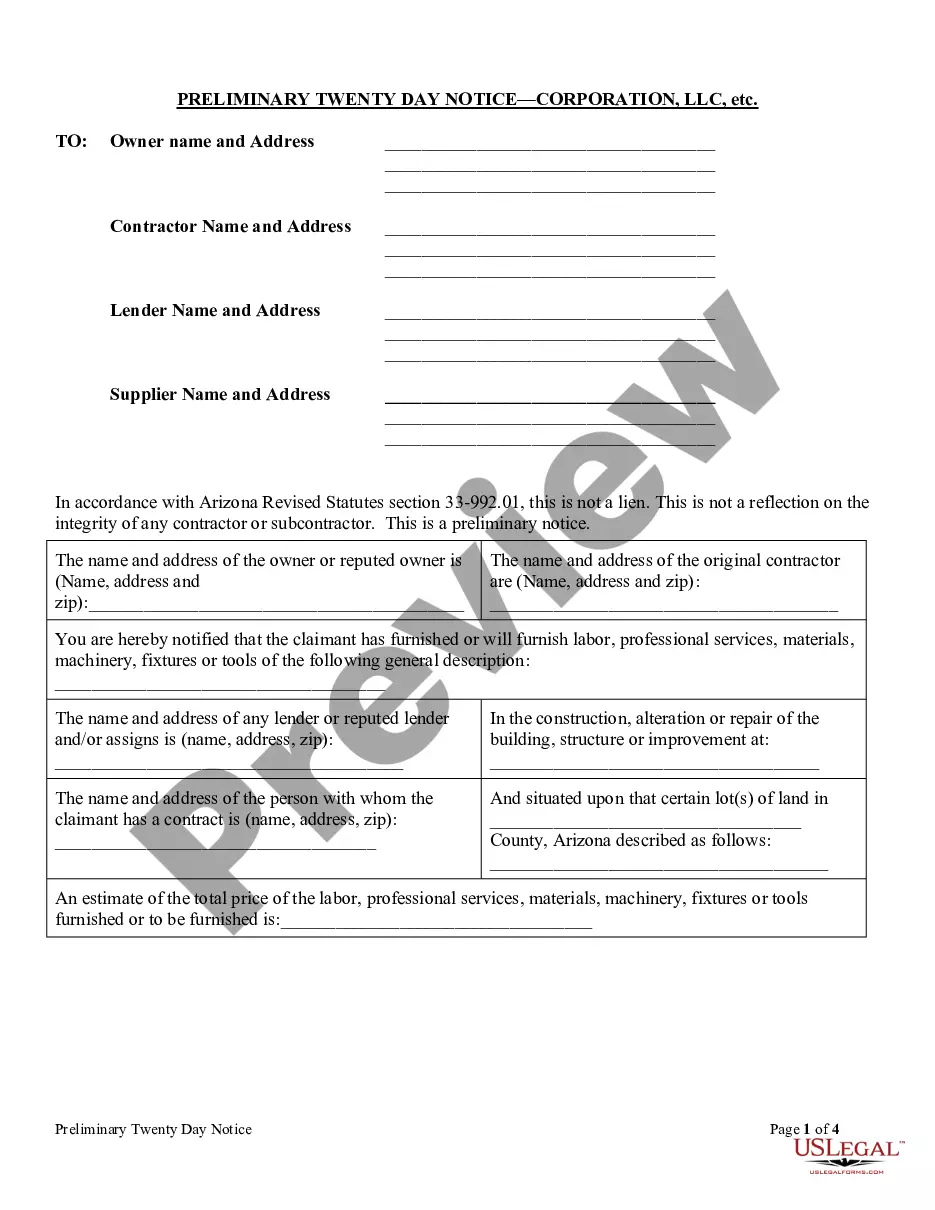
B. Every person who may claim a lien shall, as a necessary prerequisite to the validity of any claim of lien, serve the owner or reputed owner, the original contractor or reputed contractor, the construction lender, if any, or reputed construction lender, if any, and the person with whom the claimant has contracted for the purchase of those items with a written preliminary twenty day notice.
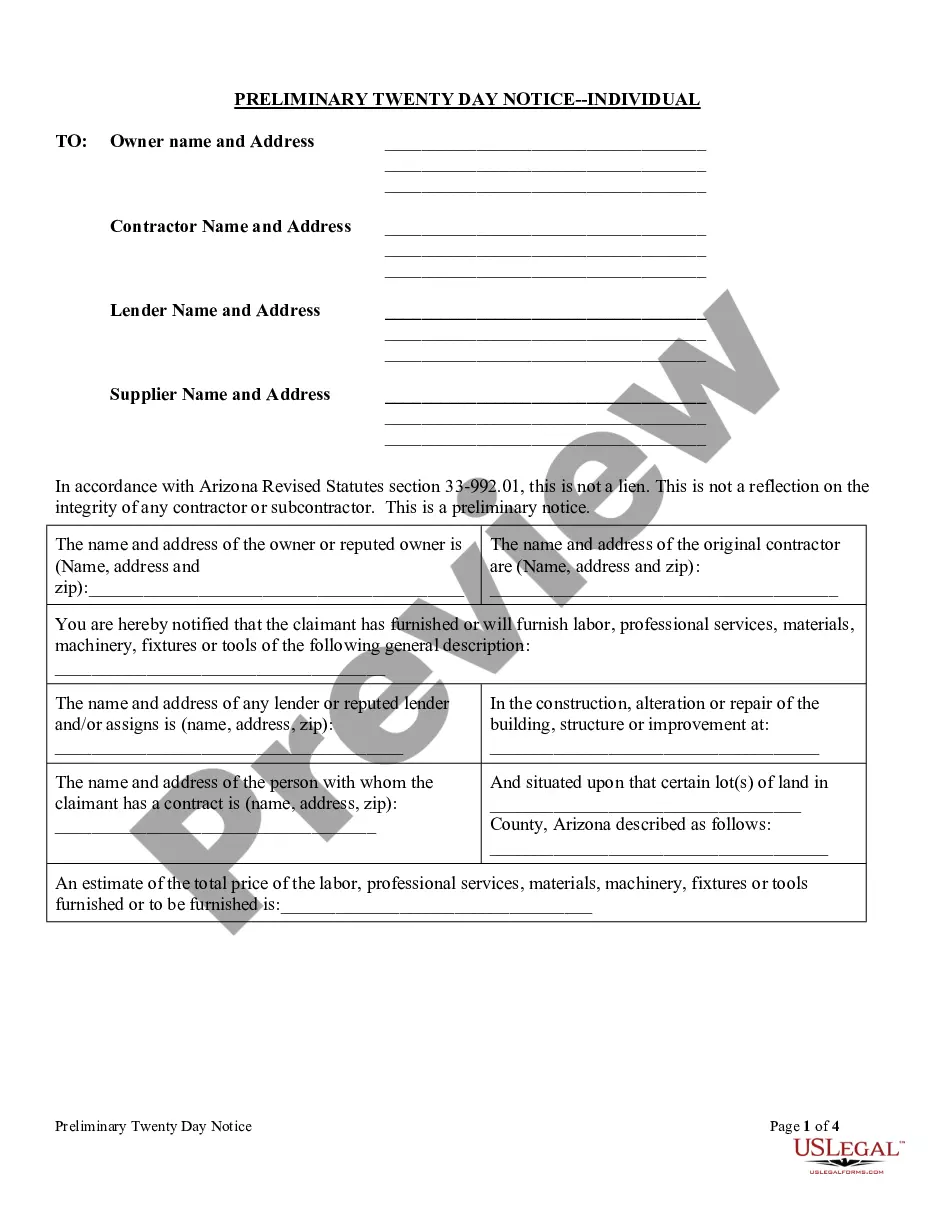
C. The preliminary twenty day notice shall be given not later than twenty days after the claimant has first furnished labor, professional services, materials, machinery, fixtures or tools to the jobsite and shall contain the following information: See Forms AZ-01-09 or AZ-01A-09.
D. The preliminary notice given by any claimant shall follow substantially the following form. See Form AZ-01-09 or AZ-01A-09.
E. If labor, professional services, materials, machinery, fixtures or tools are furnished to a jobsite by a person who elects not to give a preliminary twenty day notice, such person is not precluded from giving a preliminary twenty day notice not later than twenty days after furnishing other labor, professional services, materials, machinery, fixtures or tools to the same jobsite. Such person, however, is entitled to claim a lien only for such labor, professional services, materials, machinery, fixtures or tools furnished within twenty days prior to the service of such notice and at any time thereafter.
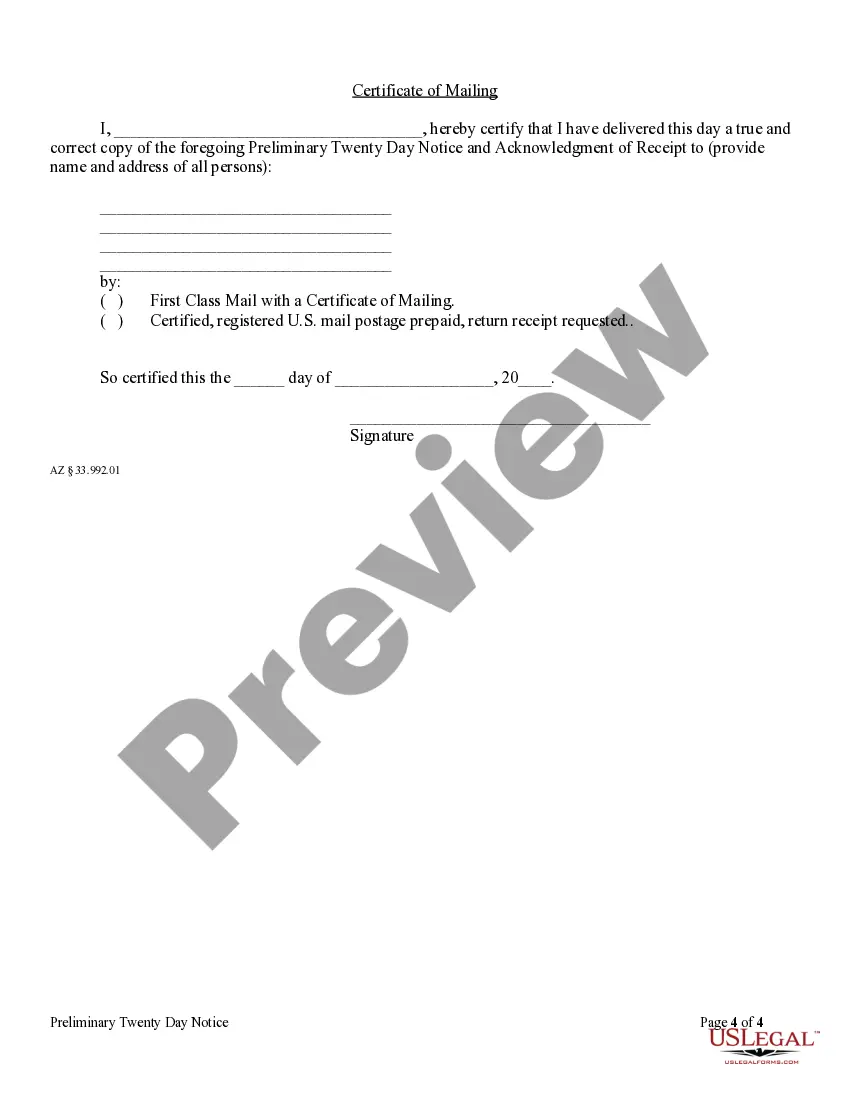
F. The notice or notices required by this section may be given by mailing the notice by first class mail sent with a certificate of mailing, registered or certified mail, postage prepaid in all cases, addressed to the person to whom notice is to be given at his residence or business address. Service is complete at the time of the deposit of such mail.
G. A person required to give a premilinary notice need give only one such notice unless the actual estimated total price for the labor, professional services, materials, machinery, fixtures or tools furnished or to be furnished exceeds by twenty per cent or more the total price in any prior original or subsequent preliminary notice or unless the labor, professional services, materials, machinery, fixtures or tools are furnished under contracts with more than one subcontractor, in which case notice requirements shall be met for all such additional labor, professional services, materials, machinery, fixtures or tools.
H. If a notice contains a general description of the labor, professional services, materials, machinery, fixtures or tools furnished up to the date of notice, it is not defective because after such date the person giving notice furnishes labor, professional services, materials, machinery, fixtures or tools that are not within the scope of such general description, or exceed by less than twenty per cent the estimated total price thereof.
I. Within ten days after receipt of a written request from any person or his agent intending to file a preliminary twenty day notice, which request shall identify the person, his address, the job site and the general nature of the person’s labor, professional services, materials, machinery or tools to which the preliminary twenty day notice shall apply, or within ten days of the receipt of a preliminary twenty day notice, the owner or other interested party shall furnish such person a written statement containing the following information: See forms AZ-03-09 or AZ-03A-09.
J. Failure of the owner or other interested party to furnish the information required by subsection I above does not excuse any claimant from timely giving a preliminary twenty day notice, but it does stop the owner from raising as a defense any inaccuracy of such information in a preliminary twenty day notice, provided the claimant’s preliminary twenty day notice of lien otherwise complies with the provisions of this chapter. If the information is received by the claimant after the claimant has given a preliminary twenty-day notice and the information contained in the preliminary twenty-day notice is inaccurate, the claimant shall, within thirty days of the receipt of this information, give an amended preliminary twenty day notice in the manner provided in this section. Such amended preliminary twenty day notice shall be considered as having been given at the same time as the original preliminary twenty day notice, except that the amended preliminary twenty day notice shall be effective only as to work performed, materials supplied or professional services rendered twenty days prior to the date of the amended preliminary twenty day notice or the date the original preliminary twenty day notice was given to the owner, whichever occurs first. If a payment bond has been recorded in compliance with section 33-1003 and the owner or other interested party fails to furnish a copy of the bond and the other information as required by this section, the claimant shall retain lien rights to the extent precluded or prejudiced from asserting a claim against the bond as a direct result of not timely receiving a copy of the bond and the other information from the owner or other interested party. 33-992.01.
Proof of mailing of preliminary twenty day notice; receipt; affidavit: Proof that the preliminary twenty day notice was given shall be made as follows:
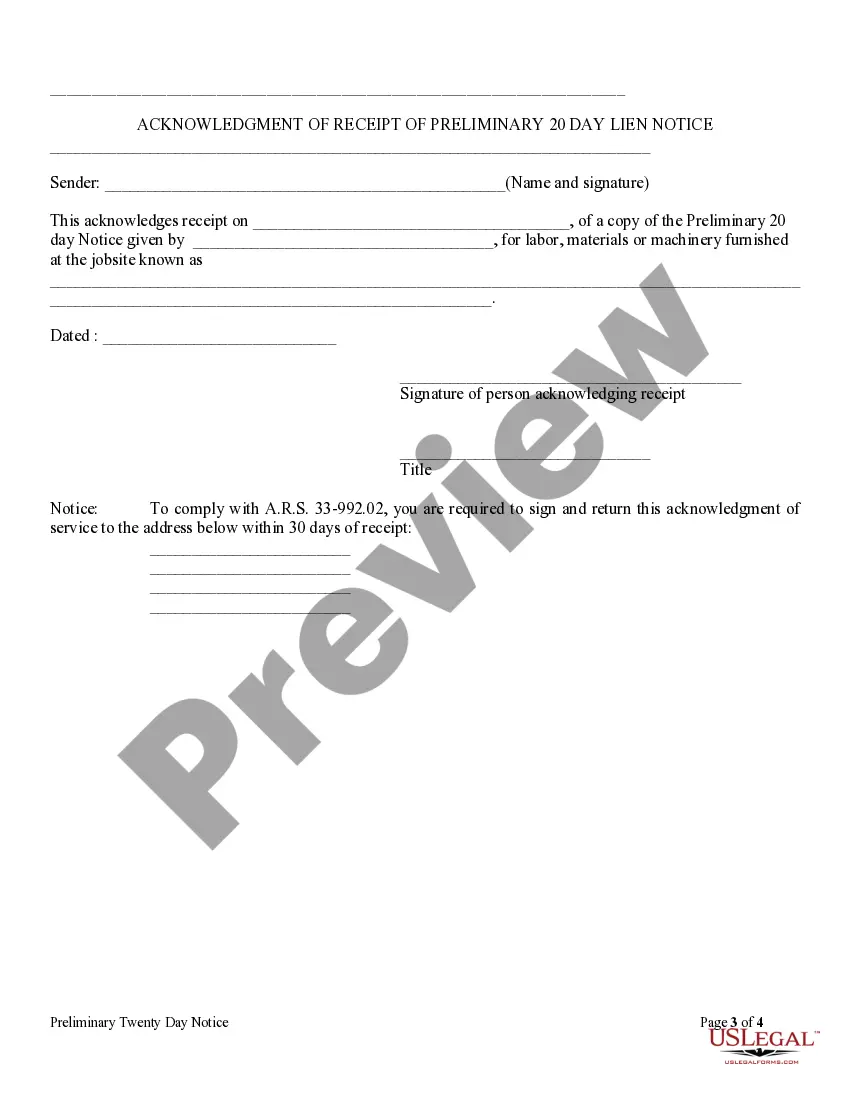
1. If given by mail, by an acknowledgment of receipt of the notice in a form substantially as follows: See AZ-01-09 or AZ-01A-09.
2. If a person to whom the notice is served fails to complete the acknowledgment or fails to complete and return the acknowledgment within thirty days from the date of mailing, proof of mailing may be made by affidavit of the person making the mailing, showing the time, place and manner of mailing and facts showing that such service was made in accordance with law. The affidavit shall show the name and address of the person to whom a copy of the preliminary twenty day notice was mailed, and, if appropriate, the title or capacity in which he was given the notice. If mailing was made by first class mail sent with a certificate of mailing, the certificate of mailing shall be attached to the affidavit. If the mailing was by certified or registered mail, the receipt of certification or registration shall be attached to the affidavit. 33-992.02. See forms AZ-04-09 or AZ-04A-09.
Procedure to perfect lien; notice and claim of lien; service; recording; definitions
A. In order to impress and secure the lien provided for in this article, every person claiming the benefits of this article, within one hundred twenty days after completion of a building, structure or improvement, or any alteration or repair of such building, structure or improvement, or if a notice of completion has been recorded, within sixty days after recordation of such notice, shall make duplicate copies of a notice and claim of lien and record one copy with the county recorder of the county in which the property or some part of the property is located, and within a reasonable time thereafter serve the remaining copy upon the owner of the building, structure or improvement, if he can be found within the county. The notice and claim of lien shall be made under oath by the claimant or someone with knowledge of the facts and shall contain: See Forms AZ-05-09 or AZ-05A-09.
B. For purposes of this section, if a work of improvement consists of the construction for residential occupancy of more than one separate building without regard to whether the buildings are constructed pursuant to separate contracts or a single contract, each building is a separate work and the time within which to perfect a lien by recording the notice of lien pursuant to subsection A of this section commences to run on the completion of each separate building. For purposes of this subsection, “separate building” means one structure of a work of improvement and any garages or other appurtenant buildings in a multibuilding residential project or residential subdivision.
C. For the purposes of subsection A of this section, “completion” means the earliest of the following events:
1. Thirty days after final inspection and written final acceptance by the governmental body which issued the building permit for the building, structure or improvement.
2. Cessation of labor for a period of sixty consecutive days, except when such cessation of labor is due to a strike, shortage of materials or act of God.
D. If no building permit is issued or if the governmental body that issued the building permit for the building, structure or improvement does not issue final inspections and written final acceptances, then “completion” for the purposes of subsection A of this section means the last date on which any labor, materials, fixtures or tools were furnished to the property.
E. For the purposes of this section, “notice of completion” means a written notice which the owner or its agent may elect to record at any time after completion of construction as defined in subsection C of this section for the purpose of shortening the lien period, as provided in subsection A of this section. A notice of completion shall be signed and verified by the owner or its agent and shall contain the following information: See forms AZ-06-09 or AZ-06A-09.
F. The notice of completion shall follow substantially the following form: See forms AZ-06-09 or AZ-06A-09.
G. If there is more than one owner, any notice of completion signed by less than all such owners shall recite the name and address of all such owners. If the notice of completion is signed by a successor in interest, it shall recite the names and addresses of his transferor or transferors.
H. A notice of completion shall be recorded in the office of the county recorder of the county in which the property or some part of the property is located. The county recorder of the county in which the notice of completion is recorded shall index the notice of completion under the index classification in which mechanics’ and materialmen’s liens are recorded.
I. If a notice of completion has been recorded, the person recording the notice, within fifteen days of recording, shall mail by certified or registered mail postage prepaid a copy of the notice of completion and a written statement of the date of recording and the county recorder’s record location information to the original contractor and all persons from whom the owner has previously received a preliminary twenty day notice. In the event the owner or its agent fails to mail a copy of the notice of completion and a written statement of the date of recording and the county recorder’s record location information within fifteen days of recording to any person from whom the owner has received a preliminary twenty day notice, such person shall have one hundred twenty days from completion as defined in section 33-993 to impress and secure the lien provided for in this article. 33-993. See forms AZ-07-09 or AZ-07A-09.
Right of owner of property against which lien is claimed to withhold payment to original contractor; procedure
Upon service of the notice and claim of lien, the owner may retain, out of the amount due or to become due the original contractor, the value of the labor or material furnished as shown by the notice and claim of lien. The owner shall furnish the original contractor with a true copy of the notice and claim of lien and if the contractor does not, within ten days after receipt of the copy, give the owner written notice that he intends to dispute the claim, he shall be considered as assenting to the demand, which shall be paid by the owner when it becomes due. 33-994.
Definitions; inapplicability of certain liens to owner-occupied dwelling; waiver void
A. In this section:
1. “Dwelling” means real property upon which there has been constructed or is to be constructed any building, structure or improvement which is designed for either single one-family or single two-family residential purposes or activities related thereto, including an apartment in a horizontal property regime or other condominium.
2. “Owner-occupant” means a natural person who:
(a) Prior to commencement of the construction, alteration, repair or improvement holds legal or equitable title to the dwelling by a deed or contract for the conveyance of real property recorded with the county recorder of the county in which the dwelling is located, and
(b) Resides or intends to reside in the dwelling at least thirty days during the twelve-month period immediately following completion of the construction, alteration, repair or improvement and does not intend to sell or lease the dwelling to others. Residence in the dwelling or intent to reside in the dwelling may be evidenced by the following or other physical acts:
(i) The placing of his or her personal belongings and furniture in the dwelling, and
(ii) Occupancy either by the person or members of his or her family. A single act shall not establish a person as an owner-occupant if such person permits exclusive occupancy by other than members of his or her family for other than temporary purposes thereby negating his or her intent to reside in the dwelling primarily for use as his or her home.
B. No lien provided for in this article shall be allowed or recorded by the person claiming a lien against the dwelling of a person who became an owner-occupant prior to the construction, alteration, repair or improvement, except by a person having executed in writing a contract directly with the owner-occupant.
C. Any provision of an agreement made or entered into by an owner-occupant which waives the provisions of this section is void. 33-1002.
Release of mechanic’s and materialman’s liens; liability: A. When any lien established by the provisions of this article has been satisfied, the lienholder shall, within twenty days after satisfaction, issue a release of the lien.
B. When any lien prohibited to be filed against the dwelling of an owner-occupant as defined in section 33-1002 has been recorded, the person claiming the lien shall, within twenty days of the written request of the owner-occupant, issue a release of the lien.
C. The release issued pursuant to this section shall be in document form as specified in section 11-480. Failure to grant such a release shall subject the lienholder or person to liability in the amount of one thousand dollars and also to liability for actual damages. 33-1006. See form AZ-014-09.
Definition of professional services: In this article, unless the context otherwise requires, “professional services” means architectural practice, engineering practice or land surveying practice as defined in section 32-101. 33-1007.
Waiver of lien: A. An owner or contractor by any term of their contract, or otherwise, may not waive or impair the claims or liens of other persons whether with or without notice except by their written consent or as prescribed by section 33-1003. Any term of the contract to that effect shall be void. Any written consent given by any claimant pursuant to this section is unenforceable unless the claimant executes and delivers a waiver and release. This waiver and release is effective to release the property for the benefit of the owner, the construction lender, the contractor and the surety on a payment bond from claims and liens only if the waiver and release follows substantially one of the forms set forth in this section and is signed by the claimant or his authorized agent, and, in the case of a conditional release, if there is evidence of payment to the claimant. Evidence of payment may be by the claimant’s endorsement on a single or joint payee check that has been paid by the bank on which it was drawn or by written acknowledgment of payment given by theclaimant.
B. No oral or written statement purporting to waive, release or otherwise adversely affect a claim is enforceable or creates any estoppel or impairment of a claim unless it is pursuant to a waiver and release prescribed by this section or the claimant had actually received payment in full for the claim.
C. This section does not affect the enforceability of either an accord and satisfaction regarding a bona fide dispute or any agreement made in settlement of an action pending in any court provided the accord and satisfaction or agreement and settlement make specific reference to the mechanic’s lien or bond claims.
D. The waiver and release given by any claimant is unenforceable unless it follows substantially the following forms in the following circumstances:
1. Where the claimant is required to execute a waiver and release in exchange for or in order to induce the payment of a progress payment and the claimant is not in fact paid in exchange for the waiver and release or a single payee check or joint payee check is given in exchange for the waiver and release, the waiver and release shall follow substantially the following form: See forms AZ-08-09 or AZ-08A-09.
2. Where the claimant is required to execute a waiver and release in exchange for or in order to induce the payment of a progress payment and the claimant asserts in the waiver that it has been paid the progress payment, the waiver and release shall follow substantially the following form: See forms AZ-09-09 or AZ-09A-09.
3. Where the claimant is required to execute a waiver and release in exchange for or in order to induce payment of a final payment and the claimant is not paid in exchange for the waiver and release or a single payee check or joint payee check is given in exchange for the waiver and release, the waiver and release shall follow substantially the following form: See forms AZ-010-09 or AZ-010A-09
4. Where the claimant is required to execute a waiver and release in exchange for or in order to induce payment of a final payment and the claimant asserts in the waiver that it has been paid the final payment, the waiver and release shall follow substantially the following form: See forms AZ-011-09 or AZ-011A-09.
Other Statutes:
Lien for labor or materials furnished mill, factory or hoisting works: Foundrymen, boilermakers, and other persons who labor or furnish materials for the construction, alteration, repair or operation of a mill, factory or hoisting works at the request of the owner shall have a lien thereon for the amount due. If the hoist, factory or mill is located on property not belonging to the owner of the hoist, factory or mill, the purchaser at the sale on foreclosure of the lien may remove them within sixty days after the sale, whether the hoist, factory or mill is a fixture or not. If the hoist, factory or mill is located on a mine, mining claim or mill site which is the property of the owner, the lien shall embrace the surface ground, not exceeding five acres, upon which the hoist, factory or mill is located. 33-984.
Lien for labor or materials furnished domestic vessel: Persons who furnish supplies or material or do repairs or perform labor for or on account of a domestic vessel owned wholly or in part in this state, shall have a lien on the vessel, her tackle, apparel, furniture and freight money for the amount due. 33-985.
Lien for labor in cutting wood, logs or ties: Persons who cut or cord wood, cut, saw or skid logs, cut, saw, hew or pile ties at the request of the owner thereof, shall have a lien thereon for the amount due for the labor performed. 33-986.
Lien for labor or materials furnished on waterways, highways, excavations or land: A person who labors or furnishes labor or materials in the construction, alteration or repair of any canal, water ditch, flume, aqueduct or reservoir, bridge, fence, road, highway, cellar, excavation or other structure or improvement, or in the clearing, ditching, bordering or leveling of land, and to whom wages or monies are due or owing therefor, shall have a lien upon such property for all amounts due and unpaid. Materials includes the use of mules, horses, machinery or equipment used in or about such projects. 33-987.
Lien for labor or materials furnished railroad: A person who labors or furnishes labor, teams, materials, machinery, fixtures or tools in the construction, repair or operation of a railroad, locomotive, car or other equipment, and to whom money or wages are due or owing therefor, and any person who furnishes provisions or supplies of any kind in the construction or repair of a railroad or to a contractor or subcontractor engaged in such construction or repair, for the housing, maintenance or subsistence of humans or animals employed or used in such construction or repair, and to whom any amount is due or owing therefor, shall have a lien upon the railroad and its equipment for the amounts unpaid. 33-988.
Lien for labor or material furnished mines and mining claims; priority: A. A person who labors or furnishes materials or merchandise of any kind, designed for or used in or upon a mine or mining claim, and to whom any amount is due for labor, material or merchandise, shall have a lien upon the mine or mining claim for the unpaid amounts.
B. The lien provided for in subsection A shall attach when the labor was performed or the material or merchandise furnished:
1. Under a contract between the person performing the labor or furnishing the material or merchandise and the owner of the mining claim, or his contractor.
2. Under a contract between the person performing the labor or furnishing the material or merchandise and the lessee of the mine or mining claim, or his contractor, where the lease from the owner to the lessee permits the lessee to develop or work the mine or mining claim.
3. Under a contract between persons performing the labor or furnishing the material or merchandise, and any person having an option to buy or contract to purchase the mine or mining claim from the owner thereof, where the option or contract permits the person to go upon the mine or mining claim, and to work or develop it.
C. The lien shall attach to the mine or mining claim in or on which the labor was performed or material or merchandise furnished, in preference to any prior lien or encumbrance or mortgage upon the mine or mining claim.
Posting of “no lien” notice by owner not operating mine; violation; classification
A. The provisions of section 33-989 shall not apply and the owner of a mine or mining claim shall not be responsible for any debts when the mine or claim is worked under lease, bond or option from the owner thereof, when the owner conspicuously posts at the collar of all working shafts, tunnels and entrances to the mine and boarding houses, on or before the day the lessee or those working the claim under bond, lease or option begin operations, and records in the office of the county recorder of the county within which the mine or mining claim is located within thirty days from the date of the lease, bond or option, a notice that:
1. The mine or claim is not being operated by the owner.
2. The owner will not be liable for labor performed or materials or merchandise furnished in the operation or development of the mine or mining claim.
3. The mine or claim will not be subject to a lien therefor, referring to the contract, and particularly describing the mine or claim.
B. The lessee or person operating the mine shall keep the notices posted, and upon failure to do so is guilty of a class 2 misdemeanor. 33-990.
Preference of liens over subsequent encumbrances; professional services liens: A. The liens provided for in this article, except as provided in subsection B of this section or unless otherwise specifically provided, are preferred to all liens, mortgages or other encumbrances upon the property attaching subsequent to the time the labor was commenced or the materials commenced to be furnished except any mortgage or deed of trust that is given as security for a loan made by a construction lender as defined in section 33-992.01, subsection A, paragraph 1, if the mortgage or deed of trust is recorded within ten days after labor was commenced or the materials commenced to be furnished. The liens provided for in this article except as provided in subsection B of this section are also preferred to all liens, mortgages and other encumbrances of which the lienholder had no actual or constructive notice at the time he commenced labor or commenced to furnish materials except any mortgage or deed of trust that is given as security for a loan made by a construction lender as defined in section 33-992.01, subsection A, paragraph 1, if the mortgage or deed of trust is recorded within ten days after labor was commenced or the materials commenced to be furnished.
B. A notice and claim of lien for professional services shall not attach to the property for priority purposes until labor has commenced on the property or until materials have commenced to be furnished to the property so that it is apparent to any person inspecting the property that construction, alteration or repair of any building or other structure or improvement has commenced.
C. If no labor commences on a property or no materials are furnished to the property, a registered professional may record and foreclose on a lien at any time after the registered professional’s work has commenced if the registered professional’s work has added value to the property. If labor or materials are furnished to the property, the priority of the registered professional’s lien is governed by subsection B of this section.
D. Liens for professional services shall attach not before but at the same time, and shall have the same priority, as other liens provided for in this article.
E. If any improvement at the site is not provided for in any contract for the construction of a building or other structure, the improvement at the site is a separate work and the commencement of the improvement is not commencement of the construction of the building or other structure. The liens arising from work and labor done or professional services or materials furnished for each improvement at the site shall have a separate priority from liens arising from work and labor done or professional services or materials furnished for the construction of the building or other structure. For purposes of this subsection, “improvement at the site” means any of the following on any lot or tract of land or the street, highway or sidewalk in front of or adjoining any lot or tract of land:
1. Demolition or removal of improvements, trees or other vegetation.
2. Drilling of test holes.
3. Grading, filling or otherwise improving.
4. Constructing or installing sewers or other public utilities.
5. Constructing or installing streets, highways or sidewalks. 33-992.
Claim of lien by assignee of contract or account for material furnished or labor performed: An assignee of a contract or account for material furnished or labor performed may verify, file, record and enforce the contract as if he had been the original owner or holder thereof. 33-982.
Lien for improvements to city lots or other land: A. A person who furnishes professional services or material or labors upon a lot in an incorporated city or town, or any parcel of land not exceeding one hundred sixty acres in the aggregate, or fills in or otherwise improves the lot or such parcel of land, or a street, alley or proposed street or alley, within, in front of or adjoining the lot or parcel of land at the instance of the owner of the lot or parcel of land, shall have a lien on the lot or parcel of contiguous land not exceeding one hundred sixty acres in the aggregate, and the buildings, structures and improvements on the lot for professional services or material furnished and labor performed.
B. Every contractor, subcontractor, architect, builder, subdivider or other person having charge or control of the improvement or work on any such lot or parcel of land, either wholly or in part, is the agent of the owner for the purposes of this section, and the owner shall be liable for the reasonable value of professional services, labor or material furnished at the instance of such agent, upon a lot or parcel of land as prescribed in this section, or any street, alley or proposed street or alley, within, in front of or adjoining such lot or parcel of land. 33-983.
Lands to which liens extend; rural lands; city lots; subdivision lots; mining claims: A. If the land upon which an improvement is made and labor or professional services have been performed lies outside of the limits of the recorded map or plat of a townsite, an incorporated city or town, or a subdivision, the lien shall extend to and include not to exceed ten acres of the land upon which the improvement is made and the labor has been performed.
B. If the land on which an improvement is made or labor or professional services have been performed lies within the limits of a recorded map or plat of a townsite, an incorporated city or town, or a subdivision, the lien shall extend to and include only the particular lot or lots upon which the improvement is made and the labor has been performed.
C. If the labor is performed or the improvements made upon a mining claim, the lien shall extend to the whole thereof and to the group of which the claim upon which the work was done is a part if the group is operated as one property. 33-991.
Duty of contractor to defend action on claim of lien by person other than a contractor; rights of owner against contractor; other rights
A. When a lien is recorded or notice given by any person other than a contractor, the contractor shall defend any action brought thereon.
B. During pendency of such action the owner may withhold the amount sued for, and if judgment is given upon the lien, he may deduct from any amount due or to become due from him to the contractor the amount of the judgment andcosts.
C. If the owner has settled with the contractor in full, or if such an amount is not owing to the contractor, the owner may recover back from the contractor the amount so paid by him, and for which the contractor was the party originally liable.
D. Any contractor, subcontractor or other person who is obligated by statute, contract or agreement to defend, remove, compromise or pay any claim of lien or action and who undertakes such activity has the rights of the owner and beneficial title holder against all persons concerning such activity, as specified in sections 33-420 and 33-994.
E. If any contractor or other person institutes an action to foreclose a lien pursuant to this article, the court may, at its discretion, award the prevailing party on the lien claim all reasonable expenses incurred in the action including attorney fees, other professional services and bond premiums under section 33-1004. 33-995.
Joinder of persons claiming liens; claimant as party defendant; intervention Lienors not contesting the claims of each other may join as plaintiffs, and when separate actions are commenced the court may consolidate them, and make all persons having claims filed parties to the action. Persons claiming liens who fail or refuse to become parties plaintiff shall be made parties defendant, and those not made a party, may, at any time before final hearing, intervene. 33-996.
Sale of property to satisfy lien
No sale of property to satisfy a lien granted under the provisions of this article shall be made except upon judgment of foreclosure and order of sale. 33-997.
Limitation of action to foreclose lien; attorney fees
A. A lien granted under the provisions of this article shall not continue for a longer period than six months after it is recorded, unless action is brought within that period to enforce the lien and a notice of pendency of action is recorded pursuant to section 12-1191 in the office of the county recorder in the county where the property is located. If a lien claimant is made a party defendant to an action brought by another lien claimant, the filing within such period of six months of an answer or cross-claim asserting the lien shall be deemed the commencement of an action within the meaning of this section.
B. In any action to enforce a lien granted under this article, the court may award the successful party reasonable attorney fees. 33-998.
Right of lienholder to have land and improvements sold together or separately; right of purchaser to possession
A. The person enforcing a lien granted under the provisions of this article may have the lot or land and improvements sold together, or he may have the improvements alone sold when it can be done without material injury to the property beyond the value of the improvements.
B. When the improvements are sold separately, the purchaser shall be placed in possession by the officer conducting the sale and the purchaser shall have the right to remove the improvements within a reasonable time from the date of purchase. 33-999.
Priority among mechanic’s and materialman’s liens; prorating proceeds of foreclosure sale A. Except as otherwise provided in section 33-992, the liens for work and labor done or professional services or material furnished, as provided for in this article, are on an equal footing without reference to the date of recording the notice and claim of lien, and without reference to the time of performing the work and labor or furnishing the professional services or material.
B. When a sale is ordered and the property sold, the proceeds of the sale, if not sufficient to discharge all liens against the property without reference to the date of recording the notice and claim of lien, shall be prorated over the respective liens that have equal footing with the foreclosing lien. 33-1000.
Priority of claims for current wages owed by owner of property under levy
A. When a levy is made under execution, attachment or other similar writ, except when the writ is issued in an action under this article, a miner, mechanic, salesman, servant or laborer who has a claim against the defendant for labor performed may give notice of his claim, sworn to and stating the amount thereof, to the creditor, defendant debtor and the officer executing the writ, at any time within three days before sale of the property levied upon. The officer shall file the claim with the clerk of the court issuing the writ, and unless the claim is disputed by the debtor or creditor before sale, the officer shall pay the claimant from the proceeds of the sale the amount claimant is entitled to receive for such services rendered within sixty days next preceding the levy of the writ, not exceeding two hundred dollars to each claimant. Upon failure of the officer to do so, he shall be liable to the claimant therefor.
B. The claim may be disputed by the debtor or creditor, or any lienholder, in writing, specifying the reasons for disputing it, verified and delivered to the officer before the sale, and shall be filed in the court issuing the writ. The officer shall pay all claims not disputed from the first money received. If the total amount of all claims presented exceeds the amount derived from the sale, the officer shall pay to the holders of the undisputed claims their pro rata share of the money and shall pay the pro rata amount of the disputed claims, together with an amount for costs as the court orders, into court. The court shall cite all parties interested to appear, and in a summary manner determine the validity of the disputed claims and direct the manner in which the officer shall distribute the proceeds of the sale.33-1001.
Payment bond in lieu of lien right; bond purposes and conditions; recording
A. Every owner of land, including any person who has a legal or equitable interest therein, who enters a contract requiring any person to perform labor or professional services or to furnish materials, machinery, fixtures or tools in the construction, alteration or repair of any building, or other structure or improvement on such land, may avoid the lien provisions of section 33-981 pertaining to agents by requiring the person with whom he contracts to furnish a payment bond. Upon recordation of the payment bond together with a copy of such contract in the office of the county recorder, in the county in which the land is located, no lien shall thereafter be allowed or recorded by the person claiming a lien against the land on which the labor or professional services are performed or the materials, machinery, fixtures or tools furnished, as provided in this article, except by the person who contracts, in writing, directly with the owner.
B. A payment bond furnished pursuant to subsection A of this section shall be in the amount and form prescribed by title 34, chapter 2, article 2. The contract recorded with the bond shall contain a legal description of the land on which the work is being or is to be performed.
C. The bond provided for in this section shall be executed solely by one or more surety companies holding a certificate of authority to transact surety business in this state issued by the director of the department of insurance pursuant to title 20, chapter 2, article 1 and shall be accompanied by a power of attorney disclosing the authority of the person executing the same on behalf of the surety. Notwithstanding any other statute, the bond shall not be executed by an individual surety or sureties, even if the requirements of section 7-101 are satisfied.
D. The county recorder of the county in which the bond and contract are recorded shall index the bond and contract under the index classification in which mechanics’ and materialmen’s liens are recorded. 33-1003.
Discharge of mechanic’s liens; bond; limitations of actions; discharge of surety; judgment
A. After perfection of a lien pursuant to this article, an owner, including any person who has a legal or equitable interest in the land which is subject to the lien, a contractor, subcontractor, mortgagee or other lien creditor, may, either before or after the commencement of an action to foreclose such lien, cause to be recorded in the office of the county recorder, in the county in which the land is located, a surety bond in the form described in subsection B of this section, together with a power of attorney disclosing the authority of the person executing the same on behalf of the surety. Upon the recordation of such bond, the property shall be discharged of such lien whether or not a copy of the bond is served upon the claimant or he perfects his rights against the bond.
B. A surety bond to discharge a lien perfected under the provisions of this section shall be executed by the person seeking to discharge such lien, as principal, and by a surety company or companies holding a certificate of authority to transact surety business in this state, issued by the director of the department of insurance pursuant to title 20, chapter 2, article 1. The bond shall be for the sole protection of the claimant who perfected such lien. Notwithstanding any other statute, the surety bond shall not be executed by individual surety or sureties, even if the requirements of section 7-101 are satisfied. The bond shall be in an amount equal to one and one-half times the claim secured by the lien and shall be conditioned for the payment of the judgment which would have been rendered against the property for the enforcement of the lien. The legal description of the property and the docket and page of the lien sought to be discharged shall be set forth in the bond.
C. The principal on such bond shall, upon recordation thereof with the county recorder, cause a copy of the bond to be served within a reasonable time upon the lien claimant, and if a suit be then pending to foreclose the lien, claimant shall within ninety days after receipt thereof, cause proceedings to be instituted to add the surety and the principal as parties to the lien foreclosure suit.
D. The bond shall be discharged and the principal and sureties released upon any of the following:
1. The failure of the lien claimant to commence a suit within the time allowed pursuant to section 33-998.
2. Failure of the lien claimant to name the principal and sureties as parties to the action seeking foreclosure of the lien if a copy of the bond has been served upon claimant. If the bond is served upon the claimant within less than ninety days from the date claimant would be required to commence his action pursuant to section 33-998, then the claimant shall have ninety days from the date he receives a copy of such bond to add the principal and the sureties as parties to the lien foreclosure suit.
3. The dismissal of the foreclosure suit with prejudice as to the claimant or the entry of judgment in such suit against claimant.
E. In an action to foreclose a lien under this article, where a bond has been filed and served as provided herein, a judgment for the claimant on the bond shall be against the principal and his sureties for the reasonable value of the labor and material furnished and shall not be against the property.
F. In the event a copy of the bond is not served upon the claimant as provided in subsection C of this section, the claimant shall have six months after the discovery of such bond to commence an action thereon, except that no action may be commenced on such bond after two years from the date it was recorded as provided in this section.
G. The county recorder of the county in which the bond and contract are recorded shall index the bond and contract under the index classification in which mechanics’ and materialmen’s liens are recorded. 33-1004.
Payments made in trust: Monies paid by or for an owner-occupant as defined in section 33-1002 to a contractor, as defined in section 32-1101, as payment for labor, professional services, materials, machinery, fixtures or tools for which a lien is not provided in this article shall be deemed for all purposes to be paid in trust and shall be held by the contractor for the benefit of the person or persons furnishing such labor, professional services, materials, machinery, fixtures or tools. Such monies shall neither be diverted nor used for any purpose other than to satisfy the claims of those for whom the trust is created and shall be paid when due to the person or persons entitled thereto. The provisions of this section shall not affect other remedies available at law or in equity. 33-1005.
Arizona Statutes
TITLE 33 PROPERTY
CHAPTER 7 LIENS
ARTICLE 6 MECHANICS’ AND MATERIALMEN’S LIENS
33-981. Lien for labor; professional services or materials used in construction, alteration or repair of structures; preliminary twenty day notice; exceptions
A. Except as provided in sections 33-1002 and 33-1003, every person who labors or furnishes professional services, materials, machinery, fixtures or tools in the construction, alteration or repair of any building, or other structure or improvement, shall have a lien on such building, structure or improvement for the work or labor done or professional services, materials, machinery, fixtures or tools furnished, whether the work was done or the articles were furnished at the instance of the owner of the building, structure or improvement, or his agent.
B. Every contractor, subcontractor, architect, builder or other person having charge or control of the construction, alteration or repair, either wholly or in part, of any building, structure or improvement is the agent of the owner for the purposes of this article, and the owner shall be liable for the reasonable value of labor or materials furnished to his agent.
C. A person who is required to be licensed as a contractor but who does not hold a valid license as such contractor issued pursuant to title 32, chapter 10 shall not have the lien rights provided for in this section.
D. A person required to give preliminary twenty day notice pursuant to section 33-992.01 is entitled to enforce the lien rights provided for in this section only if he has given such notice and has made proof of service pursuant to section 33-992.02.
E. A person who furnishes professional services but who does not hold a valid certificate of registration issued pursuant to title 32, chapter 1 shall not have the lien rights provided for in this section.
F. A person who furnishes professional services is entitled to enforce the lien rights provided for in this section only if such person has an agreement with the owner of the property or with an architect, an engineer or a contractor who has an agreement with the owner of the property.
33-982. Claim of lien by assignee of contract or account for material furnished or labor performed
An assignee of a contract or account for material furnished or labor performed may verify, file, record and enforce the contract as if he had been the original owner or holder thereof.
33-983. Lien for improvements to city lots or other land
A. A person who furnishes professional services or material or labors upon a lot in an incorporated city or town, or any parcel of land not exceeding one hundred sixty acres in the aggregate, or fills in or otherwise improves the lot or such parcel of land, or a street, alley or proposed street or alley, within, in front of or adjoining the lot or parcel of land at the instance of the owner of the lot or parcel of land, shall have a lien on the lot or parcel of contiguous land not exceeding one hundred sixty acres in the aggregate, and the buildings, structures and improvements on the lot for professional services or material furnished and labor performed.
B. Every contractor, subcontractor, architect, builder, subdivider or other person having charge or control of the improvement or work on any such lot or parcel of land, either wholly or in part, is the agent of the owner for the purposes of this section, and the owner shall be liable for the reasonable value of professional services, labor or material furnished at the instance of such agent, upon a lot or parcel of land as prescribed in this section, or any street, alley or proposed street or alley, within, in front of or adjoining such lot or parcel of land.
33-984. Lien for labor or materials furnished mill, factory or hoisting works
Foundrymen, boilermakers, and other persons who labor or furnish materials for the construction, alteration, repair or operation of a mill, factory or hoisting works at the request of the owner shall have a lien thereon for the amount due. If the hoist, factory or mill is located on property not belonging to the owner of the hoist, factory or mill, the purchaser at the sale on foreclosure of the lien may remove them within sixty days after the sale, whether the hoist, factory or mill is a fixture or not. If the hoist, factory or mill is located on a mine, mining claim or mill site which is the property of the owner, the lien shall embrace the surface ground, not exceeding five acres, upon which the hoist, factory or mill is located.
33-985. Lien for labor or materials furnished domestic vessel
Persons who furnish supplies or material or do repairs or perform labor for or on account of a domestic vessel owned wholly or in part in this state, shall have a lien on the vessel, her tackle, apparel, furniture and freight money for the amount due.
33-986. Lien for labor in cutting wood, logs or ties
Persons who cut or cord wood, cut, saw or skid logs, cut, saw, hew or pile ties at the request of the owner thereof, shall have a lien thereon for the amount due for the labor performed.
33-987. Lien for labor or materials furnished on waterways, highways, excavations or land
A person who labors or furnishes labor or materials in the construction, alteration or repair of any canal, water ditch, flume, aqueduct or reservoir, bridge, fence, road, highway, cellar, excavation or other structure or improvement, or in the clearing, ditching, bordering or leveling of land, and to whom wages or monies are due or owing therefor, shall have a lien upon such property for all amounts due and unpaid. Materials includes the use of mules, horses, machinery or equipment used in or about such projects.
33-988. Lien for labor or materials furnished railroad
A person who labors or furnishes labor, teams, materials, machinery, fixtures or tools in the construction, repair or operation of a railroad, locomotive, car or other equipment, and to whom money or wages are due or owing therefor, and any person who furnishes provisions or supplies of any kind in the construction or repair of a railroad or to a contractor or subcontractor engaged in such construction or repair, for the housing, maintenance or subsistence of humans or animals employed or used in such construction or repair, and to whom any amount is due or owing therefor, shall have a lien upon the railroad and its equipment for the amounts unpaid.
33-989. Lien for labor or material furnished mines and mining claims; priority
A. A person who labors or furnishes materials or merchandise of any kind, designed for or used in or upon a mine or mining claim, and to whom any amount is due for labor, material or merchandise, shall have a lien upon the mine or mining claim for the unpaid amounts.
B. The lien provided for in subsection A shall attach when the labor was performed or the material or merchandise furnished:
1. Under a contract between the person performing the labor or furnishing the material or merchandise and the owner of the mining claim, or his contractor.
2. Under a contract between the person performing the labor or furnishing the material or merchandise and the lessee of the mine or mining claim, or his contractor, where the lease from the owner to the lessee permits the lessee to develop or work the mine or mining claim.
3. Under a contract between persons performing the labor or furnishing the material or merchandise, and any person having an option to buy or contract to purchase the mine or mining claim from the owner thereof, where the option or contract permits the person to go upon the mine or mining claim, and to work or develop it.
C. The lien shall attach to the mine or mining claim in or on which the labor was performed or material or merchandise furnished, in preference to any prior lien or encumbrance or mortgage upon the mine or mining claim.
33-990. Posting of “no lien” notice by owner not operating mine; violation; classification
A. The provisions of section 33-989 shall not apply and the owner of a mine or mining claim shall not be responsible for any debts when the mine or claim is worked under lease, bond or option from the owner thereof, when the owner conspicuously posts at the collar of all working shafts, tunnels and entrances to the mine and boarding houses, on or before the day the lessee or those working the claim under bond, lease or option begin operations, and records in the office of the county recorder of the county within which the mine or mining claim is located within thirty days from the date of the lease, bond or option, a notice that:
1. The mine or claim is not being operated by the owner.
2. The owner will not be liable for labor performed or materials or merchandise furnished in the operation or development of the mine or mining claim.
3. The mine or claim will not be subject to a lien therefor, referring to the contract, and particularly describing the mine or claim.
B. The lessee or person operating the mine shall keep the notices posted, and upon failure to do so is guilty of a class 2 misdemeanor.
33-991. Lands to which liens extend; rural lands; city lots; subdivision lots; mining claims
A. If the land upon which an improvement is made and labor or professional services have been performed lies outside of the limits of the recorded map or plat of a townsite, an incorporated city or town, or a subdivision, the lien shall extend to and include not to exceed ten acres of the land upon which the improvement is made and the labor has been performed.
B. If the land on which an improvement is made or labor or professional services have been performed lies within the limits of a recorded map or plat of a townsite, an incorporated city or town, or a subdivision, the lien shall extend to and include only the particular lot or lots upon which the improvement is made and the labor has been performed.
C. If the labor is performed or the improvements made upon a mining claim, the lien shall extend to the whole thereof and to the group of which the claim upon which the work was done is a part if the group is operated as one property.
33-992.01. Preliminary twenty day notice; definitions; content; election; waiver; service; single service; contract
A. For the purposes of this section:
1. “Construction lender” means any mortgagee or beneficiary under a deed of trust lending funds all or a portion of which are used to defray the cost of the construction, alteration, repair or improvement, or any assignee or successor in interest of either.
2. “Original contractor” means any contractor who has a direct contractual relationship with the owner.
3. “Owner” means the person, or the person’s successor in interest, who causes a building, structure or improvement to be constructed, altered or repaired, whether the interest or estate of the person is in fee, as vendee under a contract to purchase, as lessee, or other interest or estate less than fee. Where an interest or estate is held by two or more persons as community property, joint tenants or tenants in common, any one or more of the persons may be deemed the owner.
4. “Preliminary twenty day notice” means one or more written notices from a claimant that are given prior to the recording of a mechanic’s lien and which are required to be given pursuant to this section.
B. Except for a person performing actual labor for wages, every person who furnishes labor, professional services, materials, machinery, fixtures or tools for which a lien otherwise may be claimed under this article shall, as a necessary prerequisite to the validity of any claim of lien, serve the owner or reputed owner, the original contractor or reputed contractor, the construction lender, if any, or reputed construction lender, if any, and the person with whom the claimant has contracted for the purchase of those items with a written preliminary twenty day notice as prescribed by this section.
C. The preliminary twenty day notice referred to in subsection B of this section shall be given not later than twenty days after the claimant has first furnished labor, professional services, materials, machinery, fixtures or tools to the jobsite and shall contain the following information:
1. A general description of the labor, professional services, materials, machinery, fixtures or tools furnished or to be furnished and an estimate of the total price thereof.
2. The name and address of the person furnishing labor, professional services, materials, machinery, fixtures or tools.
3. The name of the person who contracted for the purchase of labor, professional services, materials, machinery, fixtures or tools.
4. A legal description, subdivision plat, street address, location with respect to commonly known roads or other landmarks in the area or any other description of the jobsite sufficient for identification.
5. The following statement in bold-faced type:
In accordance with Arizona Revised Statutes section 33-992.01, this is not a lien and this is not a reflection on the integrity of any contractor or subcontractor.
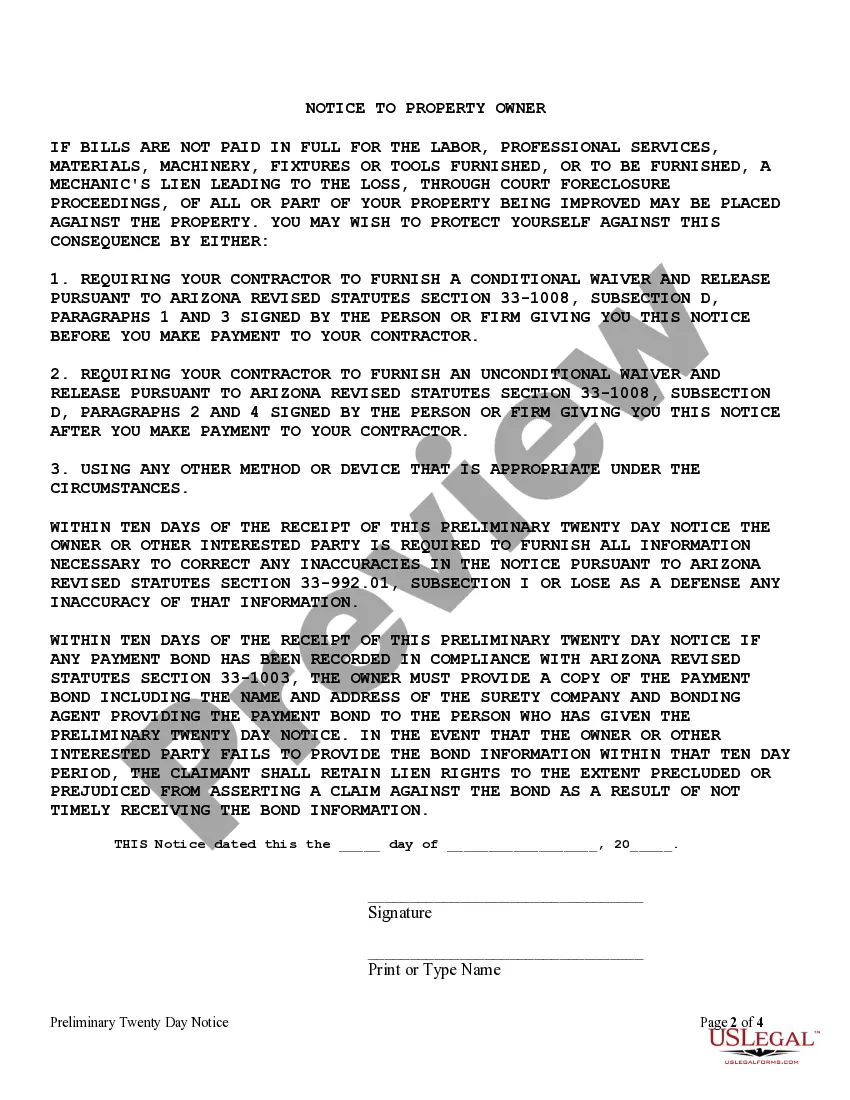
Notice to Property Owner
If bills are not paid in full for the labor, professional services, materials, machinery, fixtures or tools furnished or to be furnished, a mechanic’s lien leading to the loss, through court foreclosure proceedings, of all or part of your property being improved may be placed against the property. You may wish to protect yourself against this consequence by either:
1. Requiring your contractor to furnish a conditional waiver and release pursuant to Arizona Revised Statutes section 33-1008, subsection D, paragraphs 1 and 3 signed by the person or firm giving you this notice before you make payment to your contractor.
2. Requiring your contractor to furnish an unconditional waiver and release pursuant to Arizona Revised Statutes section 33-1008, subsection D, paragraphs 2 and 4 signed by the person or firm giving you this notice after you make payment to your contractor.
3. Using any other method or device which is appropriate under the circumstances.
D. The preliminary notice given by any claimant shall follow substantially the following form:
Arizona Preliminary Twenty Day Lien Notice
In accordance with Arizona Revised Statutes section 33-992.01, this is not a lien. This is not a reflection on the integrity of any contractor or subcontractor.
The name and address of This preliminary lien notice has
the owner or reputed been completed by (name and
owner are: address of claimant):
Date: _________________________
By: ___________________________
Address: ______________________
The name and address You are hereby notified that the
of the original claimant has furnished or will
contractor are: furnish labor, professional
services, materials, machinery, fixtures or tools of the following general description:
The name and address of any lender or reputed lender and assigns are:
In the construction, alteration or repair of the building, structure or improvement located at:
The name and address of the person with whom the claimant has contracted are:
And situated upon that certain lot(s) or parcel(s) of land in __________ County, Arizona,
described as follows:
An estimate of the total price of the labor, professional services, materials, machinery, fixtures
or tools furnished or to be furnished is: $_________________
(The following statement shall be in bold-faced type.)
Notice to Property Owner
If bills are not paid in full for the labor, professional services, materials, machinery, fixtures or tools furnished, or to be furnished, a mechanic’s lien leading to the loss, through court foreclosure proceedings, of all or part of your property being improved may be placed against the property. You may wish to protect yourself against this consequence by either:
1. Requiring your contractor to furnish a conditional waiver and release pursuant to Arizona Revised Statutes section 33-1008, subsection D, paragraphs 1 and 3 signed by the person or firm giving you this notice before you make payment to your contractor.
2. Requiring your contractor to furnish an unconditional waiver and release pursuant to Arizona Revised Statutes section 33-1008, subsection D, paragraphs 2 and 4 signed by the person or firm giving you this notice after you make payment to your contractor.
3. Using any other method or device that is appropriate under the circumstances.
(The following language shall be in type at least as large as the largest type otherwise on the document.)
Within ten days of the receipt of this preliminary twenty day notice the owner or other interested party is required to furnish all information necessary to correct any inaccuracies in the notice pursuant to Arizona Revised Statutes section 33-992.01, subsection I or lose as a defense any inaccuracy of that information.
Within ten days of the receipt of this preliminary twenty day notice if any payment bond has been recorded in compliance with Arizona Revised Statutes section 33-1003, the owner must provide a copy of the payment bond including the name and address of the surety company and bonding agent providing the payment bond to the person who has given the preliminary twenty day notice. In the event that the owner or other interested party fails to provide the bond information within that ten day period, the claimant shall retain lien rights to the extent precluded or prejudiced from asserting a claim against the bond as a result of not timely receiving the bond information.
Dated: ___________________ ____________________________
(Company name)
By: _______________________
(Signature)
_______________________
(Title)
(Acknowledgement of receipt language from Arizona Revised Statutes section 33-992.02 shall be inserted here.)
E. If labor, professional services, materials, machinery, fixtures or tools are furnished to a jobsite by a person who elects not to give a preliminary twenty day notice as provided in subsection B of this section, that person is not precluded from giving a preliminary twenty day notice not later than twenty days after furnishing other labor, professional services, materials, machinery, fixtures or tools to the same jobsite. The person, however, is entitled to claim a lien only for such labor, professional services, materials, machinery, fixtures or tools furnished within twenty days prior to the service of the notice and at any time thereafter.
F. The notice or notices required by this section may be given by mailing the notice by first class mail sent with a certificate of mailing, registered or certified mail, postage prepaid in all cases, addressed to the person to whom notice is to be given at the person’s residence or business address. Service is complete at the time of the deposit of notice in the mail.
G. A person required by this section to give notice to the owner, to an original contractor, to the construction lender, if any, and to the person with whom the claimant has contracted need give only one notice to the owner, to the original contractor, to the construction lender, if any, and to the person with whom the claimant has contracted with respect to all labor, professional services, materials, machinery, fixtures